



CSV to HTML
Easily display, edit, and synchronize CSV files as dynamic HTML tables using a simple shortcode—no coding required.

Solid choice
CSV to HTML is a solid plugin choice in 2026, with a few things worth checking first. It runs on 300+ sites, is rated 5/5 and was last updated 1 month ago, and scores 77/100 on our health check.
- Loved by users — 5/5 from 22 reviews
- Small user base (300+ active installs)
How does it stack up?
Side-by-side on installs, updates, ratings & support



Daily downloads
Download spikes usually follow a new release — each site that auto-updates counts as a download.
Rankings
Where CSV to HTML stands todayWordPress.org search rankings
Live position in the plugin search, top 100| Keyword | Position |
|---|---|
| csv | #12 |
| html | #15 |
| import | >100 |
| synchronize | #11 |
| table | >100 |
Version adoption
Share of active sites per release.
Rating breakdown
★★★★★★★★★★ 5 from 22 reviews
About CSV to HTML
From the official readme · v3.71Description
CSV to HTML is a highly configurable plugin that makes it easy to fetch content from file(s) (.csv,.xlsx, .json and .ods) and put content from that file/those files and display the html(table) on a page with a single shortcode. If using more than one file, content from all files are mixed into one single table instead of creating two tables.
The plugin fetches the actual content directly from the file(s) without having to import/export any file(s) manually. So any changes in the file(s) will be updated when you view your table(s). CSV to HTML is able to fetch both local and external files.
Get started with the plugin by moving on to the Installation tab. There’s a 4 step guide how you could start using the plugin. Good luck!
Installation
This section describes how to install the plugin and get it working. There are actually three steps. 1. Load csv-file or files into your wp-content/uploads directory. 2. Apply settings in form or manually in shortcode generator. 3. Copy and paste into page/post/widget.
Look at inspirational examples of what you can do with the plugin here: http://wibergsweb.se/plugins/csvtohtml/
A more detailed descrption of how to get this plugin working:
STEP1 – INSTALLATION
1. Upload the plugin folder csvtohtml to the `/wp-content/plugins/’ directory, or install the plugin through the WordPress plugins screen directly.
2. Activate the plugin through the ‘Plugins’ screen in WordPress
STEP2 – PREPARATION
The plugin can either fetch files locally from your server (or from an external resource). The plugin supports csv-files, Excel(xlsx-files only), ods-files (spreadsheet) and json-files. If using a json-file then you should set source type to JSON. In most cases the source type should be set to guess if not using JSON.
Local fetch
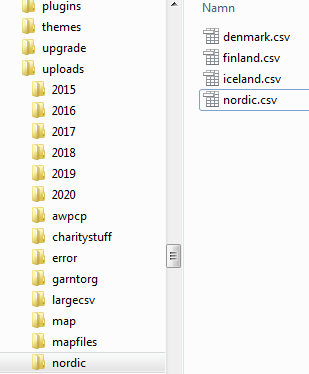
- Create a folder called csvtohtmlfiles in your wp-content/uploads/ manually (e.g. wp-content/uploads/csvtohtmlfiles should be created)
- Upload/copy your file to this created folder (e.g. wp-content/uploads/csvtohtmlfiles/testfile.csv). This cannot be done from media-upload (Use ftp, ssh or directly on your os to copy files to the webserver).
External fetch
- Have an uri to your csv-file available/accessible from your computer (eg. https://[domain]/testfile.csv).
STEP3 – SHORTCODE GENERATOR
1. Begin to understand what you are able to to do with the plugin. Do this by playing around with the CSV to HTML shortcode generator. This is accessible in the admin dashboard – CSV to HTML/Shortcode generator or through the plugins page. Do this on a desktop computer for easiest management.
2. Try and click/modify settings and see the preview of the table to the right. This preview only shows how it would look like, but functionality such as search and pagination etc isn’t going to work.
3. If you want to see the current output based on applied settings, then you should click the update/preview – button.
4. Settings are splitted into different sections in the shortcode generator page.
5. The section "Debugging" shows known errors and gives warnings depending on your settings. It turns into red when there are any errors or warnings. This doesn’t necessarily mean it won’t work but can be an indicator of somethings you must adjust.
6. You should see the "File management" section as a starting point for your settings. By default all csv files that exists in wp-content/uploads are used to generate a table (*.csv).
7. Change *.csv to the name of the file you prepared in STEP2.
Local fetch
- Set Path(local) to csvtohtmlfiles or click on the button with three dots and select csvtohtmlfiles (if you have done previous steps you should see your folder csvtohtmlfiles here). In Fetch file(s) type the file(s) that you put into wp-content/uploads/csvtohtmlfiles
- If an Excel-file is selected for fetch, then it is converted to a csv-file and the Excel-file remains intact (so there are two files that has identical data in the same folder). This may seem redudantant, but this is because the plugin fetches data from the csv-file and not from the Excel-file directly.
External fetch
- In File(s) combined to this table put in your url that you prepared in STEP2. If your external file is a google spreadsheet, make sure it’s publicy available for download and that you have the full uri to your googlesheets workbook. Also set "add extension automatically" to no.
- If you have more files you want to combine, then just add a semicolon (;) and add filename (local or external)
STEP4 – MAKE IT WORK
10. Play around with settings until you’re satisfied. In very few cases you should change character encodings but if you’re having issues with encoding, you could try and change these settings.
11. Copy generated shortcode and put the shortcode in a wordpress page or post to display table with the functionality you have set in the shortcode generator page.
12. If you don’t like the default design of the table(s), use your theme’s css to change the layout of your site/table etc.
SHORTCODE
You can apply settings through text inputs, radiobuttons, select lists etc or simply adjust shorcode directly and click for a new preview/update. When you are done, simply paste the shortcode into a post or page (or widget if theme supports that).
If having issues that you cannot solve please send a mail to info@wibergsweb.se.
If you like the plugin, please consider donating. Please donate to paypal info@wibergsweb.se. Amount does not matter. I like coffee! 🙂
Frequently asked questions
Is your tables responsive?
The short answer is yes. From v1.60 the tables are responsive as default. If you want more advanced responsivity you have to modify css yourself.
Why don’t you include any css for the plugin?
From v1.60 there are som basic css to make responsive table. It’s possible to turn this css off if having issue though. The goal is to make the plugin work as fast as possible as expected. By not supplying a lot of css the developer has full control over the design. If you know css, it’s easy to apply your style on all tables / invidual tables etc. From version 1.6 there are also some templates to use.
Is the plugin totally free?
Yes it is. If you feel bad about using this plugin for free, please write a review and/or give a donation to PayPal info@wibergsweb.se.
Is there a premium/pro version of the plugin available?
No there’s no need. This plugin offers a lot totally free. But an addon is on it ways for those people who wants even more! When it arrives, you will know! 🙂 For now, the plugin’s existence depends on donations only.If you like the plugin, please consider donating. Please donate to paypal info@wibergsweb.se. Amount does not matter. I like coffee! 🙂
Changelog
If you're using Excel-files, you need at least version 3.38. Please tell me if you're missing something (please mail info@wibergsweb.se for fastest reply) ! I will do my best to add the feature.
(Currently working on)
* CSV to HTML addon
3.71
(2026-08-19)
Bugfix: Handling of quotes/empty values and BOM characters correctly (when loading files).
3.70
(2026-08-18)
Another approach to handling of downloadable files (downloadable – attribute)
Referencelist is updated
3.69
(2026-08-16)
Security fixes: Fixed a potential unauthenticated SSRF vulnerability (CWE-918).
Added path traversal protections for local file handling.
Improved overall speed of file-loading both local files and external files.
3.68
(2026-08-16)
large_files has been removed as all file loading is now optimized for speed and memory efficiency
Improved Excel date conversion. excel_convertdates=”yes” now correctly converts all cells flagged as dates in Excel.
3.67
(2026-08-14)
Fix: Checking dates in Excel-files. Optimized check for larger files.
3.66
(2026-07-08)
Fix: Security vulneribilities XSS
Screenshots
![Screenshot - [csvtohtml_create path="nordic" source_files="denmark" source_type="guess" debug_mode="no"] OR [csvtohtml_create path="nordic" source_files="denmark.csv" source_type="guess" debug_mode="no"]](https://ps.w.org/csv-to-html/assets/screenshot-2.png?rev=2446692)
![Screenshot - [csvtohtml_create path="nordic" source_files="*.csv" source_type="guess" debug_mode="no"]](https://ps.w.org/csv-to-html/assets/screenshot-3.png?rev=2446692)
![Screenshot - [csvtohtml_create path="nordic" source_files="*.csv" source_type="guess" debug_mode="no" filter_data="2010" filter_col="1"]](https://ps.w.org/csv-to-html/assets/screenshot-4.png?rev=2446692)
![Screenshot - [csvtohtml_create path="nordic" source_files="denmark;iceland" source_type="guess" debug_mode="no"]](https://ps.w.org/csv-to-html/assets/screenshot-5.png?rev=2446692)
![Screenshot - [csvtohtml_create path="nordic" source_files="denmark;iceland" source_type="guess" debug_mode="no"] with css.
CSS
.csvtohtml tr.rowset-7 .colset-2 {
background: #27b399;
color: #fff;
font-weight:600;
}](https://ps.w.org/csv-to-html/assets/screenshot-6.png?rev=2446692)
![Screenshot - [csvtohtml_create path="nordic" source_files="denmark;iceland" source_type="guess" title="Nordic growth" debug_mode="no"]](https://ps.w.org/csv-to-html/assets/screenshot-7.png?rev=2446692)
![Screenshot - [csvtohtml_create path="nordic" source_files="denmark" source_type="guess" debug_mode="no" sort_cols="2" sort_cols_order="asc"] AND [csvtohtml_create path="nordic" source_files="iceland" source_type="guess" debug_mode="no" sort_cols="1,2" sort_cols_order="desc,asc"]](https://ps.w.org/csv-to-html/assets/screenshot-8.png?rev=2446692)
![Screenshot - [csvtohtml_create path="nordic" source_files="nordic.csv" source_type="guess" debug_mode="no" sort_cols="1" sort_cols_order="asc" title="Year"]
original csv (nordic.csv):
,Finland,Iceland,Denmark
2013,"10.2%","7.2%","1.4%"
2014,"11.0%","11.0%","1.9%"
2010,"2.5%","2.3%","2.8%"
2011,"-16.6%","6.6%","-6.6%"
2012,"-14.2%","6.2%","1.2%"
2015,"13.2%","16.2%","2.0%"](https://ps.w.org/csv-to-html/assets/screenshot-9.png?rev=2446692)
For developers
Is this your plugin? Show off the numbers.
Add a live badge to your site, docs or GitHub README. It updates on its own — no account needed.
Best CSV to HTML alternatives
All csv plugins →





FAQ
CSV to HTML: quick answers
Straight answers, pulled from live WordPress.org data.
Live data from WordPress.org · checked Sep 28, 2026
Is CSV to HTML free?
Yes. CSV to HTML is free to download and use from the official WordPress.org plugin directory.
Is CSV to HTML safe to use in 2026?
CSV to HTML is a solid plugin choice in 2026, with a few things worth checking first. It runs on 300+ sites, is rated 5/5 and was last updated 1 month ago, and scores 77/100 on our health check.
How many websites use CSV to HTML?
CSV to HTML is active on 300+ WordPress websites and has been downloaded 37,639 times since it launched in April 2016. It was downloaded 482 times in the last 30 days.
Does CSV to HTML work with WordPress 7.1?
CSV to HTML is officially tested up to WordPress 7.0.6, while the latest release is 7.1.2. It may still work, but try it on a staging site first.
What PHP version does CSV to HTML need?
CSV to HTML requires PHP 8.0 or higher. Most hosts run PHP 8.x today, so it works on any modern WordPress hosting.
When was CSV to HTML last updated?
The latest version, 3.71, was released on August 19, 2026 (1 month ago).
Who makes CSV to HTML?
CSV to HTML is developed and maintained by wibergsweb.
What are the best alternatives to CSV to HTML?
The most popular alternatives to CSV to HTML are TablePress (600K+ installs), WP All Import (100K+ installs) and Import and export users and… (70K+ installs).
Powered by PageForge
Want thousands of pages that rank like these? Build them in an afternoon.
This directory runs on the same engine as PageForge. Turn any spreadsheet, CSV or API into thousands of fast, SEO-ready WordPress pages — with schema, internal links and AI-written copy baked in.
- CSV, Google Sheets & API data sources
- AI content, schema & internal links per page
- Works with Elementor, Gutenberg, Yoast & Rank Math
- Free on WordPress.org — no credit card


