



CSV Importer Improved
This WordPress plugin imports posts from CSV (Comma Separated Value) files into your WordPress blog. It can prove extremely useful when you want to import a bunch of posts from an Excel document or the like – simply…

Consider an alternative
CSV Importer Improved shows warning signs in 2026 — compare the alternatives below before installing. It runs on 100+ sites, is rated 3.2/5 and was last updated 10 years ago, and scores 30/100 on our health check.
- Small user base (100+ active installs)
- Low rating so far — 3.2/5 from only 5 reviews
- No update in 9 years
- Only tested up to WordPress 4.6 (latest is 7.1)
How does it stack up?
Side-by-side on installs, updates, ratings & support



Daily downloads
Download spikes usually follow a new release — each site that auto-updates counts as a download.
Rankings
Where CSV Importer Improved stands todayWordPress.org search rankings
Live position in the plugin search, top 100| Keyword | Position |
|---|---|
| batch | >100 |
| csv | >100 |
| excel | >100 |
| import | >100 |
| spreadsheet | >100 |
Version adoption
Share of active sites per release.
Rating breakdown
★★★★★★★★★★ 3.2 from 5 reviews
About CSV Importer Improved
From the official readme · v0.6.1Description
This WordPress plugin imports posts from CSV (Comma Separated Value) files into your
WordPress blog. It can prove extremely useful when you want to import a bunch
of posts from an Excel document or the like – simply export your document into
a CSV file and the plugin will take care of the rest.
https://wordpress.org/plugins/csv-importer-improved/
Features
- Imports post title, body, excerpt, tags, date, categories etc.
- Supports custom fields, custom taxonomies and comments
- Deals with Word-style quotes and other non-standard characters using
WordPress’ built-in mechanism (same one that normalizes your input when you
write your posts) - Columns in the CSV file can be in any order, provided that they have correct
headings - Multi-language support
This plugin is forked from https://wordpress.org/plugins/csv-importer/ by dvkob
in order to keep up with changes to the core WordPress.
This importer writes directly to the database. It does not go through the internal
WordPress objects for creating posts etc. That may be an advantage to you (it will
be faster for large imports) but do be aware of any data integrity issues that may arrise.
Only UTF-8 encoding is supported, both with and without Byte Order Marks (BOM).
The development repository for this plugin can be found here:
https://github.com/academe/csv-importer-improved
Please feel free to raise issues there, and submit pull requests, as well as through
the normal WordPress channels.
Usage
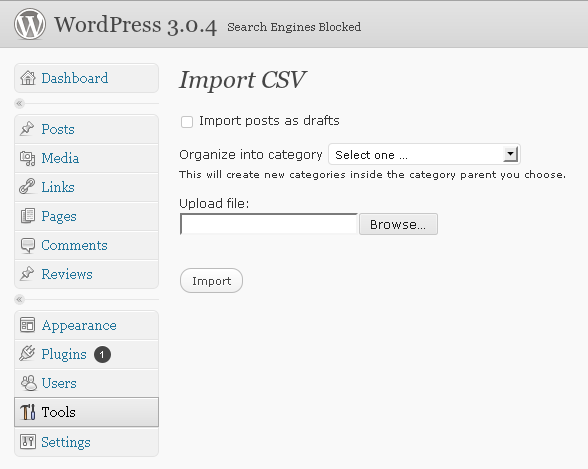
Click on the CSV Importer link on your WordPress admin page, choose the
file you would like to import and click Import. The examples directory
inside the plugin’s directory contains several files that demonstrate
how to use the plugin. The best way to get started is to import one of
these files and look at the results.
CSV is a tabular format that consists of rows and columns. Each row in
a CSV file represents a post; each column identifies a piece of information
that comprises a post.
You can create new posts, or update existing posts by supplying the csv_post_id
field pointing to an existing post. When updating, all field names you provide
in the CSV file will be updated – even if blank – but fields you don’t list at
the head of the CSV file will be left intact.
Basic post information
csv_post_id– optional, used to update an existing post.csv_post_title– title of the postcsv_post_post– body of the postcsv_post_type–post,pageor a custom post type.
From 0.3.2,csv_post_typecolumn supports custom post types.
Refer to the WordPress
documentation on custom post types for more info
on how to set up custom post types.csv_post_excerpt– post excerptcsv_post_categories– a comma separated list of category names or ids.
The list must be enclosed in quotes, e.g. “EC > UK, Island”.
If a chain of subcategories does not exist, e.g.Animalia > Chordata > Mammalia
then they will all be created and the post assigned to the end of the chain.
The parent category can also be defined using its id, e.g.
42 > Primates > Callitrichidae, where42is an
existing category id.csv_post_tags– a “quoted” comma separated list of tags.csv_post_date– most standard formats are supported.
For example,now,11/16/2009 0:00,1999-12-31 23:55:00,+1 week,
next Thursday,last yearare all valid. For technical
details, consult PHP’sstrtotime()function documentation.
Custom fields
Any column that doesn’t start with csv_ is considered to be a custom field
name. The data in that column will be imported as the custom fields value.
All custom fields must be unique. Multiple fields with the same name will be
updated to the same value if updating an existing post.
Prior to version 0.6.0 loading the same field name multiple times to an existing
post would create multiple custom fields.
General remarks
- WordPress pages don’t have categories or tags.
- Most columns are optional. Either
csv_post_title,csv_post_postor
csv_post_excerpt are sufficient to create a post. If all of these
columns are empty in a row, the plugin will skip that row. - The plugin will attempt to reuse existing categories or tags; if an
existing category or tag cannot be found, the plugin will create it. - To specify a category that has a greater than sign (>) in the name, use
the HTML entity>
Advanced usage
csv_post_author– numeric user id or login name. If not specified or
user does not exist, the plugin will assign the posts to the user
performing the import.csv_post_slug– post slug used in permalinks.csv_post_parent– post parent id.
Custom taxonomies
New in version 0.3.0
Once custom taxonomies are set up in your theme’s functions.php file or
by using a 3rd party plugin, csv_ctax_(taxonomy name) columns can be
used to assign imported data to the taxonomies.
Non-hierarchical taxonomies
The syntax for non-hierarchical taxonomies is straightforward and is essentially
the same as the csv_post_tags syntax.
Hierarchical taxonomies
The syntax for hierarchical taxonomies is more complicated. Each hierarchical
taxonomy field is a tiny two-column CSV file, where the order of columns
matters. The first column contains the name of the parent term and the second
column contains the name of the child term. Top level terms have to be preceded
either by an empty string or a 0 (zero).
Sample examples/custom-taxonomies.csv file included with the plugin
illustrates custom taxonomy support. To see how it works, make sure to set up
custom taxonomies from functions.inc.php.
Make sure that the quotation marks used as text delimiters in csv_ctax_
columns are regular ASCII double quotes, not typographical quotes like “
(U+201C) and ” (U+201D).
Comments
New in version 0.3.1
An example file with comments is included in the examples directory.
In short, comments can be imported along with posts by specifying columns
such as csv_comment_*_author, csv_comment_*_content etc, where * is
a comment ID number. This ID doesn’t go into WordPress. It is only there
to have the connection information in the CSV file.
Credits
This plugin uses php-csv-parser by Kazuyoshi Tlacaelel.
It was inspired by JayBlogger’s CSV Import plugin.
Contributors:
- Kevin Hagerty (post_author support)
- Edir Pedro (root category option and tableless HTML markup)
- Frank Loeffler (comments support)
- Micah Gates (subcategory syntax)
- David Hollander (deprecation warnings, linebreak handling)
Installation
Installing the plugin:
- Unzip the plugin’s directory into
wp-content/plugins. - Activate the plugin through the ‘Plugins’ menu in WordPress.
- The plugin will be available under Tools -> CSV Importer on
WordPress administration page.
Changelog
Added a check to see if the user is allowed to create posts and pages prior to importing.
0.6.0
- Change behaviour of custom fields; treat all fields as unique and don’t create duplicates.
0.5.4
- No functional changes; just a forced update after fixing some SVN issues.
0.5.1
- Fix incorrect intitial status.
- Started making strings translatable.
0.5.0
- Update PHP version to 5.3+
- Support updating existing posts.
0.4.2
- Renamed from “CSV Importer 2” to “CSV Importer Improved”.
0.4.1
- Fix some function name clashes with other CSV import plugins.
Screenshots
For developers
Is this your plugin? Show off the numbers.
Add a live badge to your site, docs or GitHub README. It updates on its own — no account needed.
Best CSV Importer Improved alternatives
All batch plugins →




FAQ
CSV Importer Improved: quick answers
Straight answers, pulled from live WordPress.org data.
Live data from WordPress.org · checked Sep 27, 2026
Is CSV Importer Improved free?
Yes. CSV Importer Improved is free to download and use from the official WordPress.org plugin directory.
Is CSV Importer Improved safe to use in 2026?
CSV Importer Improved shows warning signs in 2026 — compare the alternatives below before installing. It runs on 100+ sites, is rated 3.2/5 and was last updated 10 years ago, and scores 30/100 on our health check.
How many websites use CSV Importer Improved?
CSV Importer Improved is active on 100+ WordPress websites and has been downloaded 11,903 times since it launched in December 2015. It was downloaded 85 times in the last 30 days.
Does CSV Importer Improved work with WordPress 7.1?
CSV Importer Improved is officially tested up to WordPress 4.6.30, while the latest release is 7.1.2. It may still work, but try it on a staging site first.
When was CSV Importer Improved last updated?
The latest version, 0.6.1, was released on October 10, 2016 (10 years ago).
Who makes CSV Importer Improved?
CSV Importer Improved is developed and maintained by Jason Judge.
What are the best alternatives to CSV Importer Improved?
The most popular alternatives to CSV Importer Improved are PW WooCommerce Bulk Edit (20K+ installs), Bulk menu creator (1K+ installs) and Seraphinite Post .DOCX Sour… (800+ installs).
Powered by PageForge
Want thousands of pages that rank like these? Build them in an afternoon.
This directory runs on the same engine as PageForge. Turn any spreadsheet, CSV or API into thousands of fast, SEO-ready WordPress pages — with schema, internal links and AI-written copy baked in.
- CSV, Google Sheets & API data sources
- AI content, schema & internal links per page
- Works with Elementor, Gutenberg, Yoast & Rank Math
- Free on WordPress.org — no credit card


