



CP Contact Form with PayPal
Easily create contact forms with integrated PayPal payments. Accept service payments, orders, and more with a drag-and-drop form builder.

Safe pick
Yes — CP Contact Form with PayPal is a safe, well-maintained plugin to use in 2026. It runs on 800+ sites, is rated 3.8/5 and was last updated 4 weeks ago, and scores 85/100 on our health check.
- Actively developed — last update 4 weeks ago
- Tested with the latest WordPress (7.1)
- Momentum — downloads up 31.9% vs the previous 30 days
- Small user base (800+ active installs)
How does it stack up?
Side-by-side on installs, updates, ratings & support


Daily downloads
Download spikes usually follow a new release — each site that auto-updates counts as a download.
Rankings
Where CP Contact Form with PayPal stands todayWordPress.org search rankings
Live position in the plugin search, top 100| Keyword | Position |
|---|---|
| payment | >100 |
| payment form | #52 |
| paypal | #18 |
| paypal donation | #11 |
| paypal form | #9 |
Version adoption
Share of active sites per release.
Rating breakdown
★★★★★★★★★★ 3.8 from 65 reviews
About CP Contact Form with PayPal
From the official readme · v1.3.68Description
CP Contact Form with PayPal lets you add customizable contact forms, payment forms, and donation forms to your WordPress website, with built-in PayPal integration (Standard, Express, and PayPal Credit where available).
Ideal for websites that need a quick and easy way to accept payments through PayPal — for products, services, donations, event registrations, consultations, and more.
🎉 New: Includes a visual form builder to easily customize your forms.
When users submit the form, their data is saved in your WordPress database and they’re redirected to PayPal for secure payment. After completing the transaction, both the admin and user receive confirmation emails.
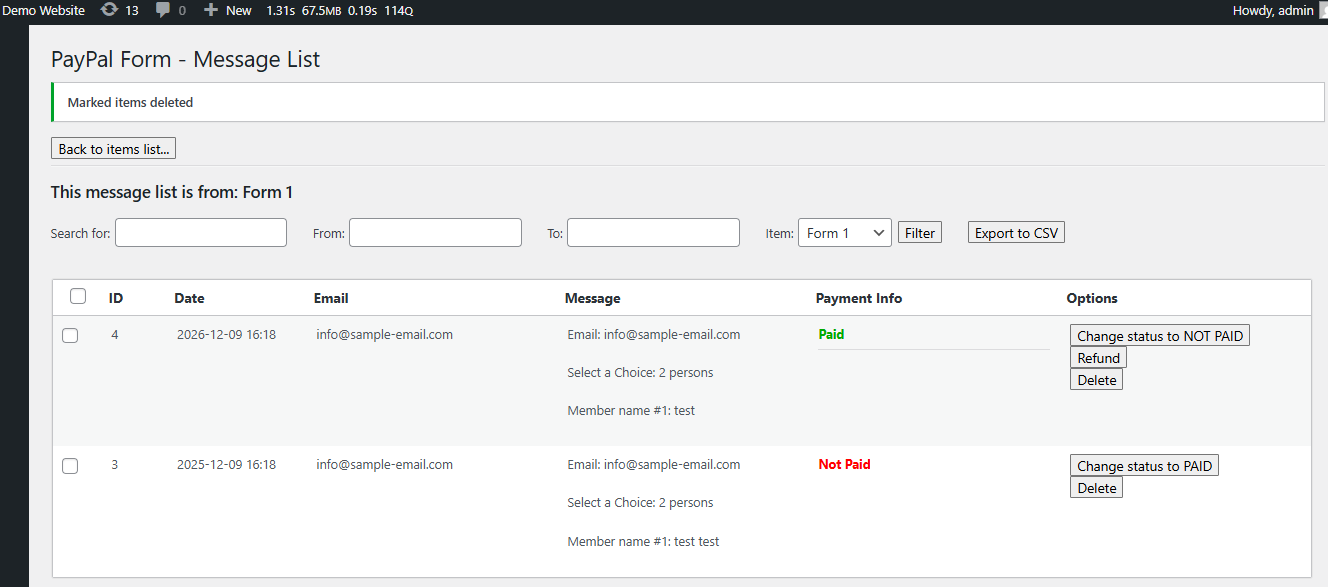
You can view and manage form submissions in the dashboard, marked as “Paid” or “Not Paid”.
Perfect for:
– Contact forms with payments
– Donation forms
– Booking and order forms
– Event registration with payment
– Paid consultations
Features
✅ PayPal Payment Integration
– Supports PayPal Standard and PayPal Express / PayPal Credit.
– Configure prices and payment settings per form.
🧰 Flexible Form Builder
– Visual drag-and-drop form editor.
– Add, edit, delete fields without coding.
📧 Email Notifications
– Send confirmation emails to users.
– Customize admin email notifications.
📊 Form Management
– Track and view submitted entries in the dashboard.
– Filter by Paid or Not Paid status.
– Export data to CSV / Excel.
🔐 Secure and Customizable
– Add GDPR consent checkbox.
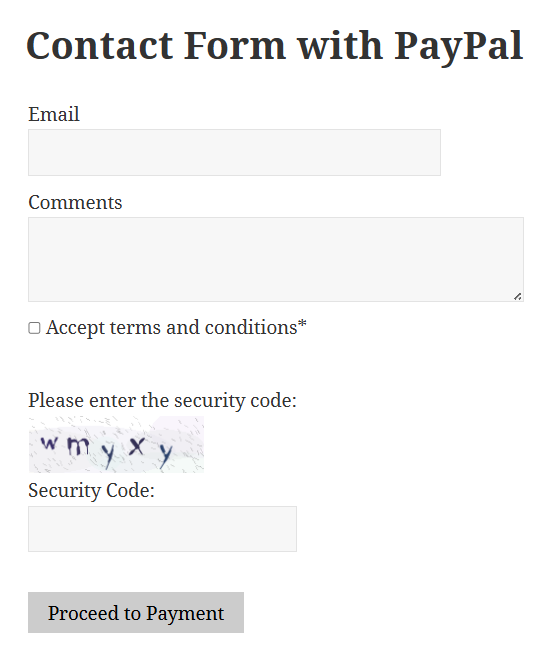
– Optional captcha for spam protection.
– Request shipping address through PayPal if needed.
🔁 Recurring Payments & Refunds
– Supports recurring billing.
– Issue refunds directly from the plugin.
🎨 Styling and Compatibility
– Works with Elementor, Gutenberg, and standard WordPress editors.
– Supports PayPal donation layout.
– Integrates easily into posts and pages via shortcode.
🌍 Multilingual & International Ready
– UTF-8 and multilingual-ready.
– Translation-ready with included .po/.mo files.
– Supports language and currency options.
Use Cases
You can use CP Contact Form with PayPal for:
- Contact forms that require a payment
- Simple PayPal donation buttons with custom fields
- Paid event registrations or appointment bookings
- Online product ordering with form input
- Selling digital files or services
- Subscription-based services
- Custom quote and invoice requests
Premium Features
Unlock additional features with the commercial version:
- Advanced visual form builder with conditional logic
- Dynamic pricing, discount codes, optional PayPal usage
- Integration with other gateways: Stripe, PayPal Pro, Authorize.net, Skrill, Mollie, iDEAL, Sage Pay, Redsys, and more
- Add-ons for Mailchimp, reCAPTCHA, SMS notifications, signature fields, and more
💡 All payment methods are SCA-ready and compliant with PSD2 EU regulations.
Language Support
The plugin supports all character sets and is fully translation-ready. Multiple languages are already included. PO/MO files are located in the /languages/ directory.
If you need to adjust the database character set, use the options in the Troubleshooting area.Requesting address at PayPal: If you are selling tangible items and you need to request the customer address at PayPal you can enable that option into the settings field “Request address at PayPal” available separately for each contact form.
Taxes at PayPal: You can indicate the taxes to charge at PayPal over the “request cost” as a percent into the settings field “Taxes (percent)”. Each contact form can have a different taxes setting.
Edit submit button label: You can easily edit the submit button label into each contact form settings. The class=”cp_subbtn” can be used to modify the button styles. The styles can be applied into any of the CSS files of your theme or into the CSS file “cp-contact-form-with-paypal\css\stylepublic.css”. For further modifications the submit button is located at the end of the file “cp_contactformpp_public_int.inc.php”.
Use a specific field from the form for the payment amount: If a field is selected in this settings field, any price in the selected field will be added to the above request cost. Use this field for example for having an open donation amount. This field is more useful in the pro version since it supports adding more fields to the contact form.
Button to change status to paid: The messages list contains a button to change the status of the “Not paid” contact form messages to “Paid”. This is mainly for administrative purposes.
Export data to CSV/Excel: The messages list contains an option to export the contact messages received from the contact form to a CSV/Excel file. This way you can export the email address and other data from the contact messages to other applications or manage the data in Excel. The filters in the message list apply also to the exported CSV/Excel file.
Enabling donation layout: The plugin supports enabling the PayPal donation layout, this way a payment page improved for donations is displayed to the donors.
Installation
Install it from your WordPress dashboard (plugins menu) or if you prefer a manual installation:
- Download and unzip the plugin file.
- Upload the entire
/cp-contact-form-with-paypal/directory to/wp-content/plugins/. - Activate the plugin via the Plugins menu in WordPress.
- Go to Settings > CP Contact Form with PayPal to configure your form and payment options.
- To insert a form into a post or page, use the form icon in the editor or shortcode provided.
Frequently asked questions
Q: What means each field in the PayPal contact form settings area?
A: The product’s page contains detailed information about each contact form field and customization: https://cfpaypal.dwbooster.com
Q: Where can I publish the CP Contact Form with PayPal with the PayPal button?
A: You can publish the PayPal contact forms / PayPal button into pages and posts. Other versions of the plugin also allow publishing the CP Contact Form with PayPal as a widget.
Q: The PayPal payment has been received but the status of the Message isn’t being set to Paid. What happens?
A: First check if you are testing the CP Contact Form with PayPal on a local website or in an online website. Note you should test this feature into an online website (local websites cannot receive PayPal IPN connections). After that initial verification, please check if the IPN notifications are enabled at your PayPal account. Check also the IPN logs at your PayPal account to confirm if are being received.
Q: I’m not receiving the emails after PayPal payment.
A: Please check if the messages are marked as “paid” or “not paid” in the contact form messages page. If the contact form messages are marked as paid then the problem is that your WordPress isn’t delivering the emails. You should setup the WordPress to deliver the emails according to your mail server settings. You may have to ask to your web hosting support about the requirements to send emails from WordPress/PHP with their hosting service. On the other hand if the contact form messages aren’t marked as “paid” then the PayPal IPN connection isn’t being received. Read the previous FAQ entry…
Q: How can I customize the style of the PayPal button?
A: The PayPal button is located at the end of the file “cp_contactformpp_public_int.inc.php”. It’s a classic submit button, you can change it to any other button that submits the CP Contact Form with PayPal.
Q: How can I have an actual PayPal button as the submit button for the form instead of the default grey button?
A: At the end of the file “cp_contactformpp_public_int.inc.php” replace this: … by this: You may also want to change the background color of the button with the CSS style class=”pbSubmit”.
Q: How can I add specific fields into the contact form message?
A: There is a tag named %INFO% that is replaced with all the information posted from the form, however you can use also optional tags for specific fields into the contact form. For doing that, click the desired contact form field into the contact form builder and in the settings box for that field there is a read-only setting named “Field tag for the message (optional):”. Copy & paste that tag into the message text and after the form submission (after clicking the PayPal button and receiving the PayPal payment) that tag will be replaced with the text entered in the form field.
Q: Can I use this with PayPal Personal accounts
A: Yes, you can use it with PayPal Personal accounts and also with PayPal Premium and PayPal Business accounts.
Q: Can I accept credit card payments through PayPal directly without forcing the users to create a PayPal account?
A: That depends of the type of your PayPal account and its status. In most cases PayPal Business accounts and PayPal premium accounts allow accepting payments from users that don’t have PayPal accounts. In this case after clicking the PayPal button the PayPal page will appear with two options “Login at your PayPal account” and “Pay directly without having to register”. The title of the options at PayPal may vary.
Q: I’m having problems with non-latin characters in the PayPal contact form.
A: New: Use the “throubleshoot area” to change the character encoding. If you prefer to do that manually , in most cases the problem is located in the database table collation/encoding. The solution is to change the table encoding to UTF-8. You can do that from the PHPMyAdmin provided by your hosting service. For example, if your WordPress database table prefix is “wp_” (the default one) then run these queries (will update only the PayPal contact form tables): alter table wp_cp_contact_form_paypal_discount_codes convert to character set utf8 collate utf8_unicode_ci; alter table…
Q: The contact form doesn’t appear in the public website. Solution?
A: In the “throubleshoot area” (located below the list of forms in the settings area) change the “Script load method” from “Classic” to “Direct”.
Q: How can I duplicate a form and its settings?
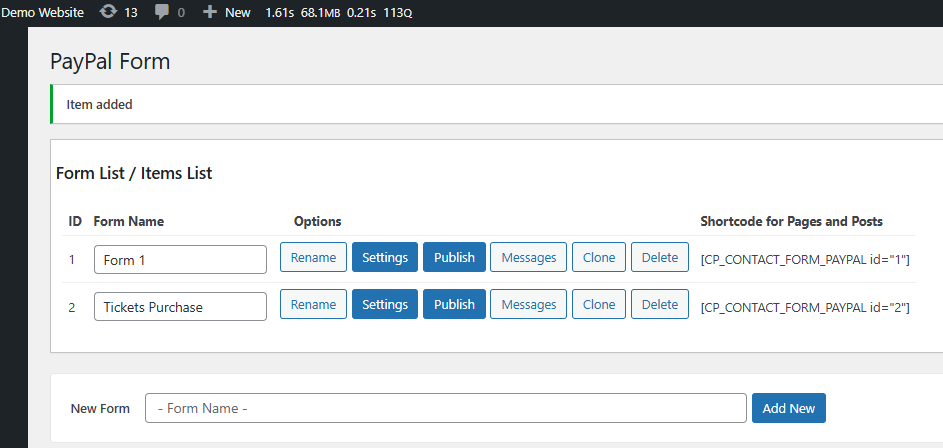
A: Use the “Clone” button located in the contact form’s list. That button will duplicate the contact form structure and all its settings.
Q: How to setup the CP Contact Form with PayPal to accept a PayPal donation?
A: To accept a PayPal donation (an open donation amount) just put a zero (0) on the “Request Cost” settings field. That way after filling the contact form clicking the PayPal button (contact form submit button) the PayPal payment page will appear letting the user to enter the amount to pay.
Q: How to show a company name instead the email address at the PayPal payment page?
A: To show a company name instead the email address at the PayPal payment page (after the contact form submission) you have to use a PayPal Standard Business account. Note that in Personal and Premier Standard accounts the email is shown instead the company name since there is no company name in that case. Note also that if you are testing the contact form in the SandBox mode then the email may be shown instead the name of the production account.
Q: Are the forms GDPR compliant?
A: In all plugin versions you can turn off IP tracking to avoid saving that user info. Full GDPR compliant forms can be built using the commercial versions of the plugin.
Q: How to enable the refund processing feature?
A: Into the plugin settings select the option “Process refunds through this plugin?” as “Yes”. In addition to that you have to indicate the PayPal (NVP) – API UserName, Password and Signature. When done to refund a payment just use the refund button that appears for each transaction in the settings area.
Changelog
Additional features for Subject field
1.0
- First stable version released.
- More configuration options added.
1.0.1
- Compatible with latest WordPress versions
- Speed improvements, the contact form loads faster
- Improved validation options for the contact form fields
- New email content editing feature and interface changes
- New tooltip scripts
- Fixed bug related to discount codes
- Fixed conflict with captcha image generation
- New feature to get the logged in user information into the notification email
- Update to CSS styles for minimizing the CSS conflicts.
- Improvements to CSS styles
- Fixes problem with backslash when saving the contact form settings
- PayPal Sandbox option added
- Added language support through MO/PO files
1.1.2
- Compatible with the latest WP versions
- Better interface and access to the plugin options
- Captcha image works better in different server environments
- New translations added
- Fixed bug in multisite installations
- Minor bug fixes
- Fixed warning that appeared with PHP safe mode restrictions
- Fixed issue with the site home URL in WP with folders in non-default locations
1.1.3
- Update to generate the IPN addres with HTTPS if available
- Security update for SQL queries (vulnerability was found by Joaquin Ramirez Martinez with the help Christian Mondragon Uriel Zarate)
- Fixed bug that caused double emails
- Fixed issues with WP sites not configured in the default folders
1.1.4
- Fixed bug in https detection
- Improved documentation
- Improved debug messages to get feedback
- Compatible with the latest WordPress 4.2.x version
1.1.5
- Compatible with the WordPress 4.2.2 version
Screenshots

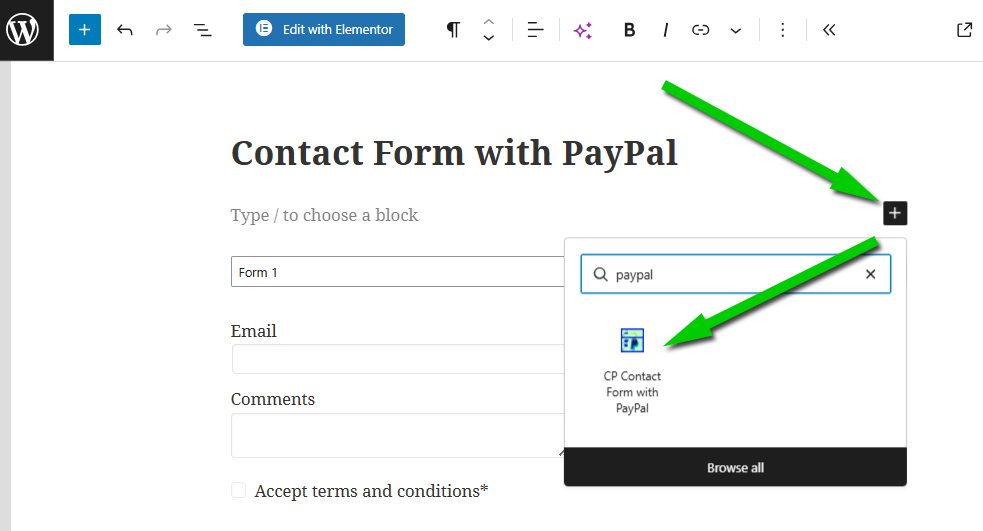
For developers
Is this your plugin? Show off the numbers.
Add a live badge to your site, docs or GitHub README. It updates on its own — no account needed.
Best CP Contact Form with PayPal alternatives
All payment plugins →





FAQ
CP Contact Form with PayPal: quick answers
Straight answers, pulled from live WordPress.org data.
Live data from WordPress.org · checked Oct 16, 2026
Is CP Contact Form with PayPal free?
Yes. CP Contact Form with PayPal is free to download and use from the official WordPress.org plugin directory.
Is CP Contact Form with PayPal safe to use in 2026?
Yes — CP Contact Form with PayPal is a safe, well-maintained plugin to use in 2026. It runs on 800+ sites, is rated 3.8/5 and was last updated 4 weeks ago, and scores 85/100 on our health check.
How many websites use CP Contact Form with PayPal?
CP Contact Form with PayPal is active on 800+ WordPress websites and has been downloaded 291,328 times since it launched in October 2012. It was downloaded 1,413 times in the last 30 days.
Does CP Contact Form with PayPal work with WordPress 7.1?
Yes. The developer has tested CP Contact Form with PayPal up to WordPress 7.1.3, the latest release. It requires WordPress 3.0.5 or newer.
When was CP Contact Form with PayPal last updated?
The latest version, 1.3.68, was released on September 21, 2026 (4 weeks ago).
Who makes CP Contact Form with PayPal?
CP Contact Form with PayPal is developed and maintained by codepeople.
What are the best alternatives to CP Contact Form with PayPal?
The most popular alternatives to CP Contact Form with PayPal are WooPayments: Integrated Woo… (800K+ installs), WooCommerce Tax (formerly W… (500K+ installs) and Payment Gateway Based Fees… (30K+ installs).
Powered by PageForge
Want thousands of pages that rank like these? Build them in an afternoon.
This directory runs on the same engine as PageForge. Turn any spreadsheet, CSV or API into thousands of fast, SEO-ready WordPress pages — with schema, internal links and AI-written copy baked in.
- CSV, Google Sheets & API data sources
- AI content, schema & internal links per page
- Works with Elementor, Gutenberg, Yoast & Rank Math
- Free on WordPress.org — no credit card


