



CourseStorm Class Registration for WordPress
Display classes from your CourseStorm catalog directly on your website so that students can browse, register, and pay for them in just a few clicks.

Solid choice
CourseStorm Class Registration… is a solid plugin choice in 2026, with a few things worth checking first. It runs on 40+ sites, is rated 5/5 and was last updated 1 week ago, and scores 62/100 on our health check.
- Actively developed — last update 1 week ago
- Small user base (40+ active installs)
- Very few reviews so far
- Only tested up to WordPress 6.8 (latest is 7.1)
How does it stack up?
Side-by-side on installs, updates, ratings & supportDaily downloads
Download spikes usually follow a new release — each site that auto-updates counts as a download.
Rankings
Where CourseStorm Class Registrat… stands todayWordPress.org search rankings
Live position in the plugin search, top 100| Keyword | Position |
|---|---|
| class registration | #30 |
| Class Ticketing | #14 |
| Online Checkout | >100 |
| online registration | >100 |
| registration form | >100 |
Version adoption
Share of active sites per release.
Rating breakdown
★★★★★★★★★★ 5 from 1 reviews
About CourseStorm Class Registration for Word…
From the official readme · v1.3.14Description
ABOUT THE CourseStorm Class Registration Plugin for WordPress
This free plugin imports, displays, and syncs your CourseStorm class catalog directly within your WordPress website. Students can browse, register, and pay for your classes in just a few clicks.
Set up for this plugin is a breeze. Just enter your CourseStorm catalog web address and you’re done. It’s that simple.
Your students can register for your classes online anytime, increasing your enrollments with no additional work on your part.
Education program admins know that the more steps there are in the class registration process, the fewer people will actually finish registering, so we designed CourseStorm to be simple, replacing registration forms, spreadsheets, and hard-to-search catalogs.
Even nontechnical users can set up this plugin and start taking online registrations within minutes!
NOTE
To use this plugin, you must connect to a CourseStorm account. Don’t have one? No problem. Schedule your free CourseStorm demo today to get started.
CUSTOMIZATION & THEMING
The CourseStorm for WordPress plugin will automatically adopt many of the design features of your current WordPress website, such as colors and fonts, giving your visitors a consistent experience.
Ways to Display
- Class detail page
- Featured classes block
- List of class categories
- List of classes in a category
- Customizable widget
The plugin will also enable you to display your classes on a single landing page as well as by category. Additionally, you can configure the plugin to display your classes in a WordPress widget area and select the information you’d like to include.
ABOUT COURSESTORM
CourseStorm is an easy-to-use class registration and marketing platform designed for arts & culture and community education programs. Our cloud-based system offers a single platform to manage individual and group registration, payment processing, rosters, waitlists, attendance tracking, customizable registration forms, class communication, and more—streamlining manual tasks and saving admins 100s of hours.
Our clear, mobile-friendly registration experience makes it easy for anyone to sign up for your offerings, with programs seeing an average 18% growth in enrollments in the first year of using CourseStorm. And with the WordPress plugin, your website can stay up to date with your latest listings without you having to lift a finger.
WHAT’S INCLUDED WITH COURSESTORM:
Everything you need and nothing you don’t.
- Online class catalog with shopping cart
- Built-in payment processing
- Roster management
- Waiting lists
- Automated payment plans
- Automatic class reminders
- Abandoned order notifications
- Personalized recommendations (auto-marketing)
- Just-Ask Reporting Assistant
- and more…
If you don’t have an account, get your free CourseStorm demo today to learn more.
WHO USES COURSESTORM
CourseStorm is used by administrators working in
- Arts & culture education
- Afterschool programming
- Summer & vacation Camps
- Adult and community education
- Enrichment programs
- Workforce development
- Corporate training
- Homeschooling
- Health education
If you aren’t quite sure if CourseStorm will work for you, we welcome you to contact us to see if we meet your needs.
BUGS, SUGGESTIONS, & SUPPORT
Please send a request for assistance to CourseStorm’s Customer Success Team at support@coursestorm.com for any issues regarding the plugin or CourseStorm software.
Installation
From WordPress Admin Area
While logged in to your WordPress website:
- Navigate to the Plugins section.
- Click the ‘Add New’ button to the right of the ‘Plugins’ heading.
- Search for ‘CourseStorm’ in the search box in the upper right corner of the page.
- Click install on the official ‘CourseStorm Class Registration for WordPress’ plugin.
From the plugin directory
- Search for ‘CourseStorm’.
- Download the plugin.
- Login to your WordPress website, and navigate to the Plugins section.
- Click the ‘Add New’ button to the right of the ‘Plugins’ heading.
- Click the ‘Upload Plugin’ button to the right of the ‘Add Plugins’ heading.
- Choose the plugin file that downloaded during step 2.
- Click ‘Install Now’.
After activation, the plugin will create a new page called ‘Classes’ (or it will use an existing page if you have one already). This will be your catalog page where your featured classes and categories will display.
Configuration
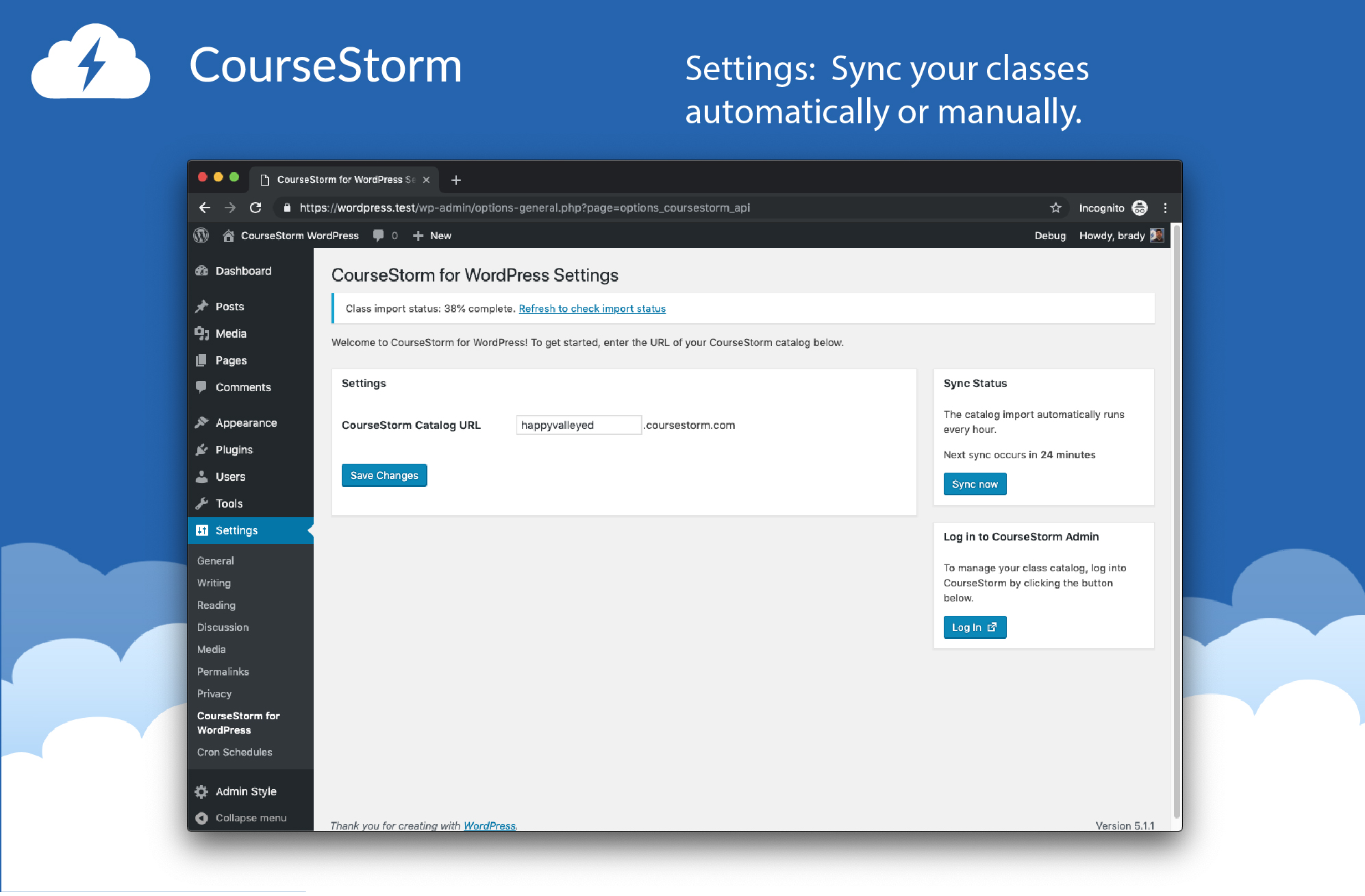
The plugin has 2 configuration options. The options are available under the Settings > CourseStorm for WordPress menu.
- CourseStorm Catalog URL: Your CourseStorm catalog url.
- CourseStorm Cron Schedule: The interval that you would like the automatic catalog syncing to happen
Widgets
Widgets for the CourseStorm Class Registration for WordPress plugin can be installed in any widget area via the admin area. To find this navigate to Appearance > Widgets. Then drag and drop the widgets you want from the left side to the appropriate widget area.
Frequently asked questions
Where can I find more information about CourseStorm?
You can find more information on the CourseStorm at https://www.coursestorm.com/simple-online-registration.
How does the plugin work?
The plugin automatically imports your program’s current CourseStorm catalog and creates classes in your WordPress admin area based on the information in your catalog. The plugin syncs with your class catalog every hour, but you can manually sync it as well, should the need arise.
How does the plugin sync my catalog? How often?
The plugin will sync your catalog in three different ways. When you activate the plugin and save your CourseStorm Catalog URL. Hourly (or at the specified interval) after you have activated the plugin. When you click the ‘Sync now’ button under the ‘Sync Status’ box, which is only available if you have a catalog url saved. It should be used to manually trigger the sync outside of the scheduled hourly sync. (Note: It will not work if the scheduled sync is within 10 minutes of the scheduled hourly sync.) During the sync, you will see the status of the import as a notice at the top of the…
How will it look on my theme?
The CourseStorm for WordPress plugin adopts the overall site styles, fonts, and colors.
Will it work on my theme?
Yes! This plugin works with most standard themes right out of the box with no customization required. For custom themes, your theme developer or our staff can assist you.
I’m a developer and would like more customization. Do you have an API?
For customers with more advanced needs, we also offer a fully-open REST API. This provides your web development staff an immense amount of flexibility and power. Using this API, you can not only provide advanced search functionality directly in your site, but also integrate with internal systems for record keeping, data syncing, and more. Our REST API provides secure access to all of your data including courses, students, categories, locations, and instructors. For more information about our REST API, contact our integration team at integrations@coursestorm.com.
How will the plugin update?
Updates to the CourseStorm for WordPress plugin are handled automatically through the WordPress eco-system. When a new update is available, you will receive a notification in WordPress via the update manager. Navigating to the updates section of WordPress (Dashboard > Updates) will show the updatable plugin under the ‘Plugins’ heading. Alternatively, you can update the plugin from the plugins page, by clicking the ‘Update Now’ link below the plugin if an update is available.
Can I use the plugin to display or register with classes that aren’t on CourseStorm?
No, for the plugin to work, you will need an active CourseStorm account.
Can I display classes from multiple CourseStorm accounts?
No, you can only display classes from one CourseStorm account on a site at a time, however, we do support WordPress multisite to provide independent catalog display on each site in a network.
Screenshots




For developers
Is this your plugin? Show off the numbers.
Add a live badge to your site, docs or GitHub README. It updates on its own — no account needed.
Best CourseStorm Class Registratio… alternatives
All class registration plugins →| Rank | Plugin | Active installs |
|---|---|---|
| 2 |
 ClassDex
A class and customer management system for Wordpress.
ClassDex
A class and customer management system for Wordpress.
|
10+ |
FAQ
CourseStorm Class Registration for…: quick answers
Straight answers, pulled from live WordPress.org data.
Live data from WordPress.org · checked Oct 9, 2026
Is CourseStorm Class Registration… free?
Yes. CourseStorm Class Registration… is free to download and use from the official WordPress.org plugin directory.
Is CourseStorm Class Registration… safe to use in 2026?
CourseStorm Class Registration… is a solid plugin choice in 2026, with a few things worth checking first. It runs on 40+ sites, is rated 5/5 and was last updated 1 week ago, and scores 62/100 on our health check.
How many websites use CourseStorm Class Registration…?
CourseStorm Class Registration… is active on 40+ WordPress websites and has been downloaded 7,232 times since it launched in April 2019. It was downloaded 215 times in the last 30 days.
Does CourseStorm Class Registration… work with WordPress 7.1?
CourseStorm Class Registration… is officially tested up to WordPress 6.8.11, while the latest release is 7.1.3. It may still work, but try it on a staging site first.
What PHP version does CourseStorm Class Registration… need?
CourseStorm Class Registration… requires PHP 7.0 or higher. Most hosts run PHP 8.x today, so it works on any modern WordPress hosting.
When was CourseStorm Class Registration… last updated?
The latest version, 1.3.14, was released on October 1, 2026 (1 week ago).
Who makes CourseStorm Class Registration…?
CourseStorm Class Registration… is developed and maintained by CourseStorm.
What are the best alternatives to CourseStorm Class Registration…?
The most popular alternatives to CourseStorm Class Registration… are ClassDex (10+ installs).
Powered by PageForge
Want thousands of pages that rank like these? Build them in an afternoon.
This directory runs on the same engine as PageForge. Turn any spreadsheet, CSV or API into thousands of fast, SEO-ready WordPress pages — with schema, internal links and AI-written copy baked in.
- CSV, Google Sheets & API data sources
- AI content, schema & internal links per page
- Works with Elementor, Gutenberg, Yoast & Rank Math
- Free on WordPress.org — no credit card


