



Country State City Dropdown CF7
Add country state city dropdown CF7 in contact form 7 plugin. In PRO you can use these features on any type of form.

Safe pick
Yes — Country State City Dropdown CF7 is a safe, well-maintained plugin to use in 2026. It runs on 5K+ sites, is rated 4.9/5 and was last updated 4 weeks ago, and scores 88/100 on our health check.
- Loved by users — 4.9/5 from 30 reviews
- Actively developed — last update 4 weeks ago
How does it stack up?
Side-by-side on installs, updates, ratings & support

Daily downloads
Download spikes usually follow a new release — each site that auto-updates counts as a download.
Rankings
Where Country State City Dropdown… stands todayWordPress.org search rankings
Live position in the plugin search, top 100| Keyword | Position |
|---|---|
| cities | #3 |
| contact form 7 | >100 |
| country dropdown | #1 |
| forms | >100 |
| states | #3 |
Version adoption
Share of active sites per release.
Rating breakdown
★★★★★★★★★★ 4.9 from 30 reviews
About Country State City Dropdown CF7
From the official readme · v2.8.2Description
Country dropdown for contact form 7 with dynamic states and cities. Country State City Dropdown CF7 plugin is an add-on of Contact Form 7 plugin to show country, state and city dropdown. This plugin add three new form tag fields that is (form-tag: country drop-down) and (form-tag: state dropdown) and (form-tag: city dropdown) in Contact form 7.
Country State City dynamic dropdown PRO supports to any form.
Features Of PRO Plugin
1. Supports to any type of Form (WP Forms, Ninja, Divi Contact Module, Elementor Module, Custom PHP Form etc).
2. Select Default Country with User’s IP.
3. Select Default Specific Country from list of All Countries.
4. Select Specific one or more Countries to display in the dropdown.
5. If State/City is missing then shows input text field to enter manually.
6. Have feature to add missing states/cities manually.
7. Multiple forms on same page.
8. Multiple country/state/city fields in same form.
9. Append only Cities from Country Dropdown.
10. See more at Official Website Trusty Plugins
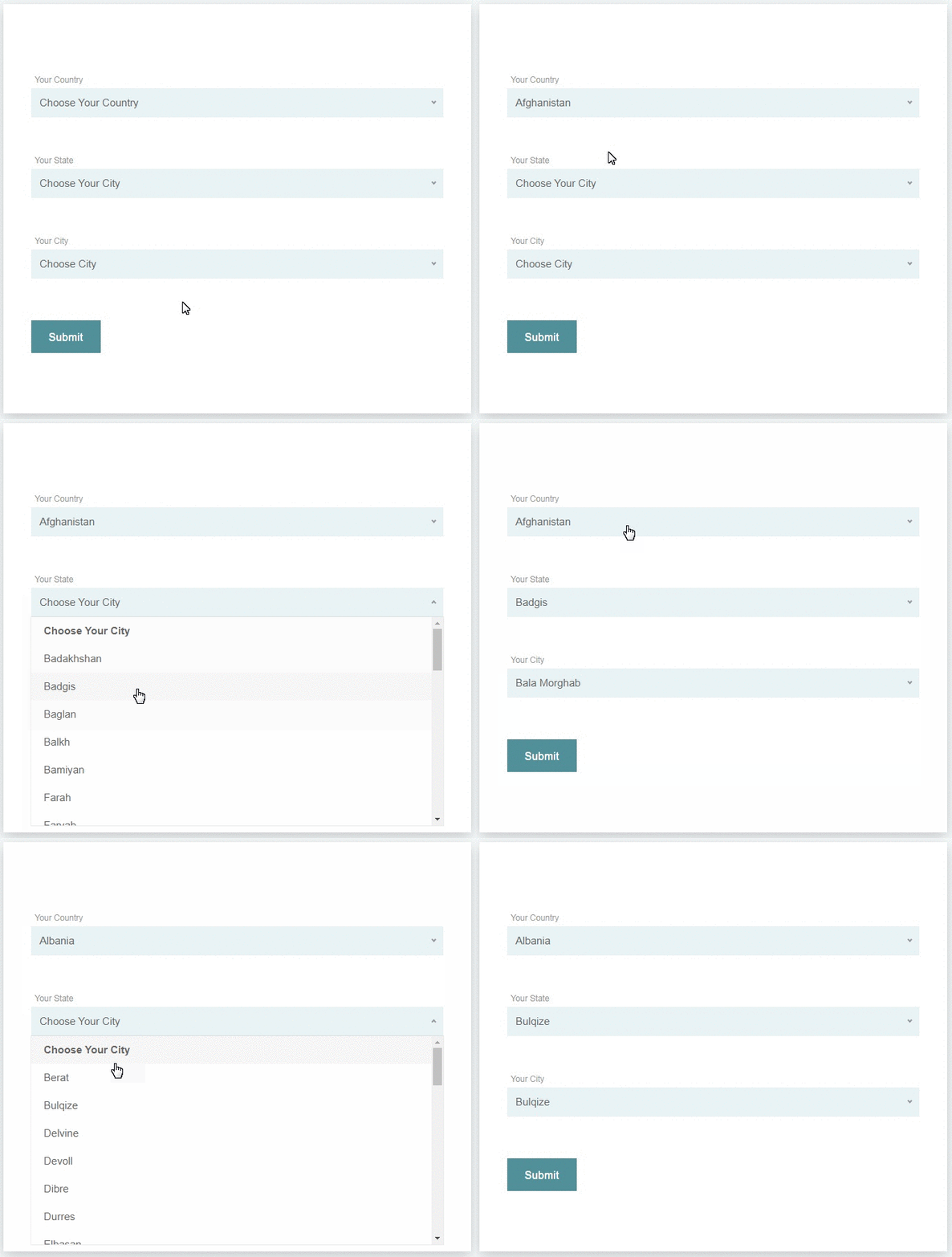
This helps you in creating a country drop-down list with state and city. The tag field will automatically add countries name in standard drop-down field of contact form 7. State and city auto populate according to selected country from country dropdown field.
How to add the fields in the contact form 7
1.) Once you have installed, activated the Country State City Auto Dropdown plugin.
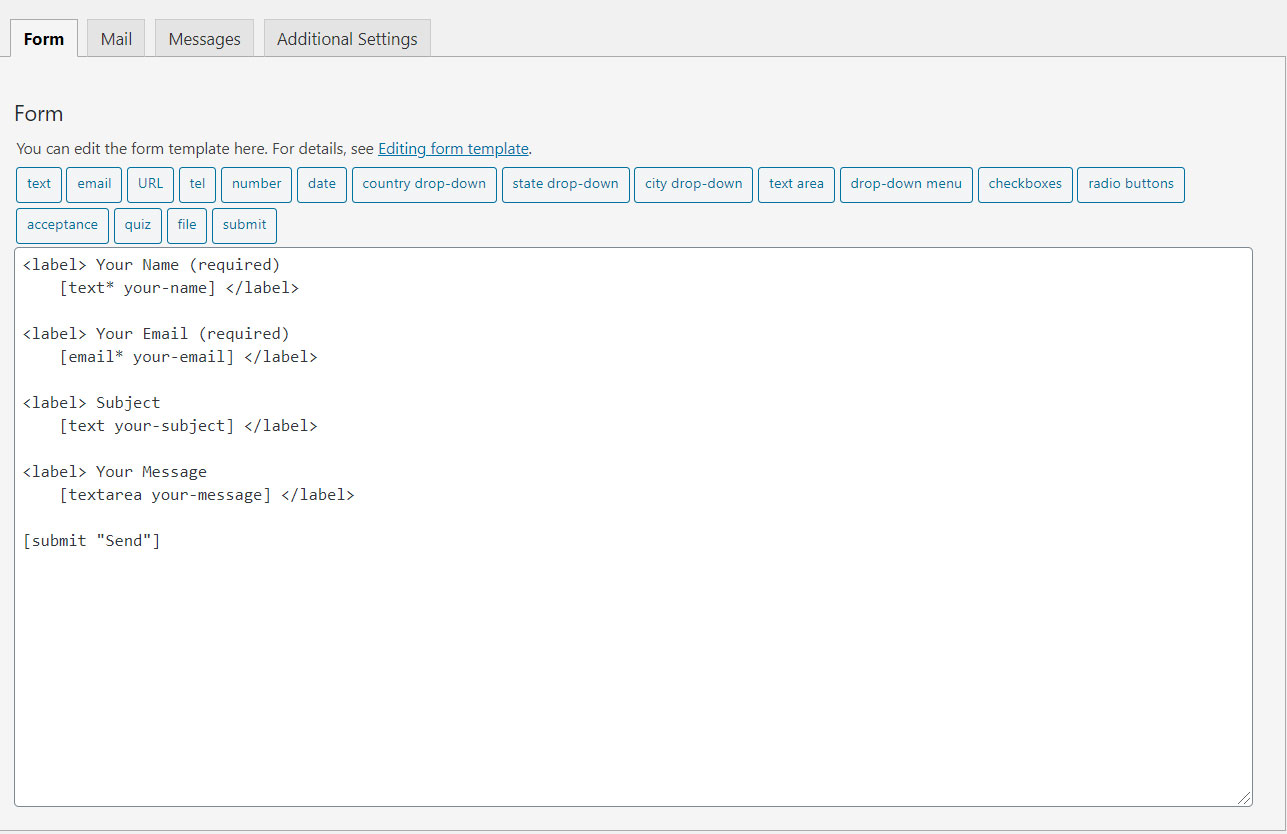
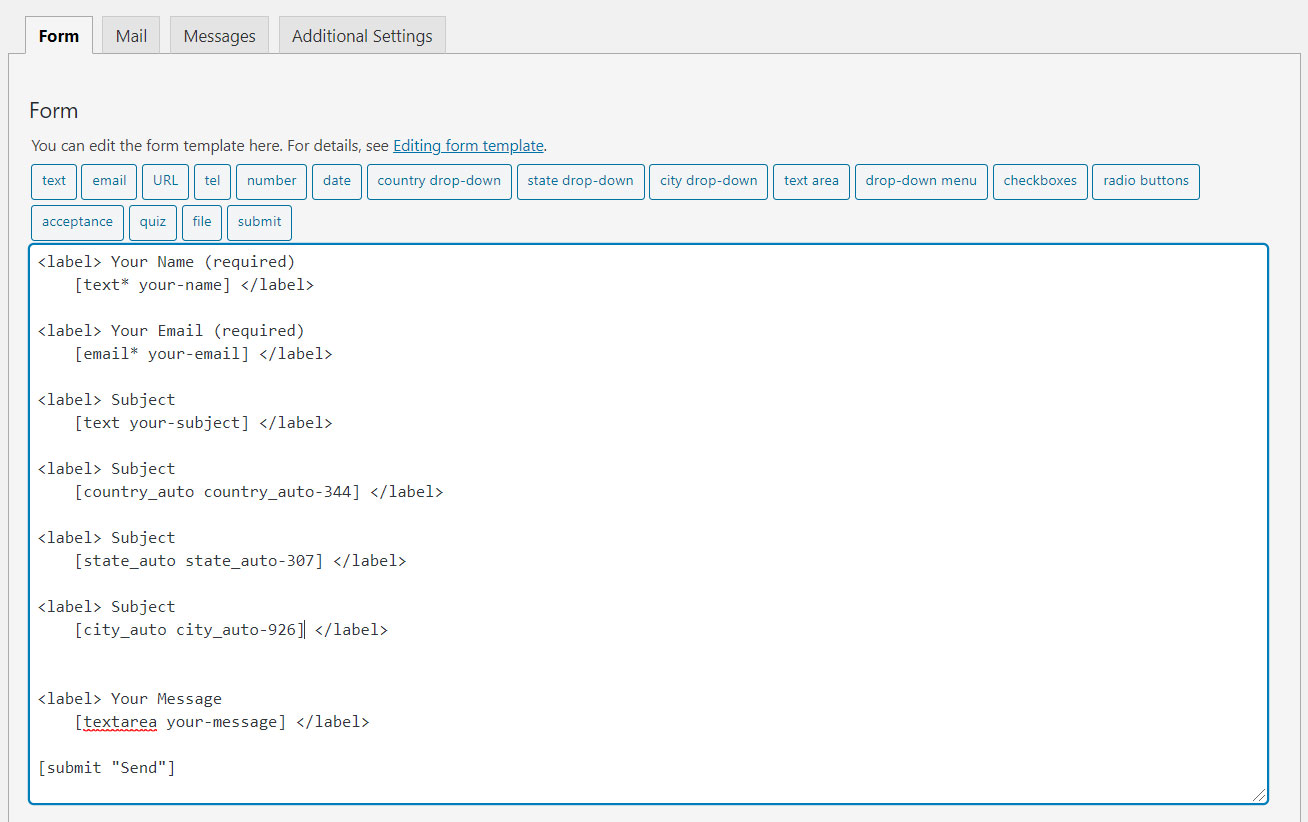
2.) Add the form-tag “country drop-down” and “state dropdown” and “city dropdown” to your form and save the changes.
Optional: if you use two location sets in one form, add the same group option on each tag, e.g. [country_auto* country-shipping group:shipping].
City is optional — country + state only works if you omit the city drop-down tag.
Use the tag generator to set a custom placeholder (enter text and check “Use this text as the placeholder”).
Requirments:
* Contact form 7 must be active plugin.
Recommended Plugins
The following plugin is recommended :
* Contact Form 7 by takayukister – With Conact Form 7, you can use this plugin. Without contact form 7 this plugin have no needs.
Installation
- Upload the entire
country-state-city-dropdown-cf7folder to the/wp-content/plugins/directory. - Kindly make sure ‘contact form 7’ plugin active before activate this plugin.
- Activate the plugin through the ‘Plugins’ menu in WordPress.
- Add form tags in desired contact form
You will find three new field types in your contact form 7 field list.
Frequently asked questions
How to set preferred countries list?
All countries display in the free version. Filtering countries, default country, and IP detection are available in the PRO version.
How to set State list?
All States will display automatically according to selected country from dropdown field.
How to set City list?
All Cities will display automatically according to selected country and state from dropdown field.
Will updating delete my data?
No. Plugin updates keep your existing country/state/city tables and form tags. To load the newer world dataset (2.8.1+), use Settings → Country State City Dropdown → “Update to latest dataset” (optional; replaces location rows only).
Where does the country / state / city data come from?
Location lists are based on the open countries-states-cities-database project, licensed under the Open Database License (ODbL). See that project for full attribution and share-alike terms.
Dropdowns are empty after install
Go to Settings → Country State City Dropdown and use “Install missing data”. Use Force reinstall only if data is corrupted.
Changelog
Fixes state/city values missing on Contact Form 7 submit when dependent dropdowns were disabled.
2.8.2
- Fixed CF7 submit: re-enable state/city dropdowns before submit so selected values are included in the form POST
2.8.1
- World location dataset refreshed (dr5hn CSC): 250 countries, 5,308 states, 152,970 cities
- India: West Bengal and Ladakh included in seed (no Patch required for new data)
- Settings: “Update to latest dataset” for existing sites (opt-in replace)
- Data attribution: Open Database License (ODbL) — countries-states-cities-database
- Admin notice when a newer geography pack is available
2.8.0
- Safer upgrades for existing sites: never re-seeds or renames tables when data already exists
- Adds database indexes for faster state/city AJAX
- Loads front-end script only when Contact Form 7 is present (filter to force legacy all-pages load)
- Translatable placeholders and validation messages
- Optional group:xxx tag option + smarter pairing for multiple location fields
- Settings page: data health, install missing data, softer Pro link
- Security/hardening: fixed SQL prepare usage, capability checks, sanitization
- Client-side AJAX cache for states/cities (faster when revisiting a country)
- Disabled + loading states on dependent dropdowns (aria-busy)
- Tag generator: placeholder, ID, class, and group fields
- Documented country + state only mode (city tag optional)
- Custom placeholders via CF7 placeholder option
2.7.6
- Form Tag generator upgraded to version 2 [contact form 7]
2.7.5
- Validation error issue has been fixed.
2.7.4
- State, City List not appending (Issue Fixed)
Screenshots
For developers
Is this your plugin? Show off the numbers.
Add a live badge to your site, docs or GitHub README. It updates on its own — no account needed.
Best Country State City Dropdown C… alternatives
All cities plugins →


FAQ
Country State City Dropdown CF7: quick answers
Straight answers, pulled from live WordPress.org data.
Live data from WordPress.org · checked Sep 26, 2026
Is Country State City Dropdown CF7 free?
Yes. Country State City Dropdown CF7 is free to download and use from the official WordPress.org plugin directory.
Is Country State City Dropdown CF7 safe to use in 2026?
Yes — Country State City Dropdown CF7 is a safe, well-maintained plugin to use in 2026. It runs on 5K+ sites, is rated 4.9/5 and was last updated 4 weeks ago, and scores 88/100 on our health check.
How many websites use Country State City Dropdown CF7?
Country State City Dropdown CF7 is active on 5K+ WordPress websites and has been downloaded 70,077 times since it launched in April 2020. It was downloaded 3,378 times in the last 30 days.
Does Country State City Dropdown CF7 work with WordPress 7.1?
Country State City Dropdown CF7 is officially tested up to WordPress 7.0.6, while the latest release is 7.1.2. It may still work, but try it on a staging site first.
What PHP version does Country State City Dropdown CF7 need?
Country State City Dropdown CF7 requires PHP 5.6 or higher. Most hosts run PHP 8.x today, so it works on any modern WordPress hosting.
When was Country State City Dropdown CF7 last updated?
The latest version, 2.8.2, was released on August 29, 2026 (4 weeks ago).
Who makes Country State City Dropdown CF7?
Country State City Dropdown CF7 is developed and maintained by Trusty Plugins.
What are the best alternatives to Country State City Dropdown CF7?
The most popular alternatives to Country State City Dropdown CF7 are States, Cities, and Places… (6K+ installs), WC Provincia Canton Distrito (1K+ installs) and City Dropdown For Woocommer… (400+ installs).
Powered by PageForge
Want thousands of pages that rank like these? Build them in an afternoon.
This directory runs on the same engine as PageForge. Turn any spreadsheet, CSV or API into thousands of fast, SEO-ready WordPress pages — with schema, internal links and AI-written copy baked in.
- CSV, Google Sheets & API data sources
- AI content, schema & internal links per page
- Works with Elementor, Gutenberg, Yoast & Rank Math
- Free on WordPress.org — no credit card


