



Duplicate Post
Duplicate post

Safe pick
Yes — Duplicate Post is a safe, well-maintained plugin to use in 2026. It runs on 300K+ sites, is rated 4.9/5 and was last updated 4 days ago, and scores 97/100 on our health check.
- Proven at scale on 300K+ active sites
- Loved by users — 4.9/5 from 1,616 reviews
- Actively developed — last update 4 days ago
- Tested with the latest WordPress (7.1)
How does it stack up?
Side-by-side on installs, updates, ratings & support



Daily downloads
Download spikes usually follow a new release — each site that auto-updates counts as a download.
Rankings
Where Duplicate Post stands todayWordPress.org search rankings
Live position in the plugin search, top 100| Keyword | Position |
|---|---|
| copy pages | #1 |
| copy posts | #1 |
| duplicate pages | #3 |
| duplicate post | #2 |
| duplicate posts | #2 |
Version adoption
Share of active sites per release.
Rating breakdown
★★★★★★★★★★ 4.9 from 1,616 reviews
About Duplicate Post
From the official readme · v1.5.7Description
Try it out on your free dummy site: Click here => https://tastewp.com/plugins/copy-delete-posts.
(this trick works for all plugins in the WP repo – just replace “wordpress” with “tastewp” in the URL)
Massively increase your WordPress productivity!
Copy Page plugin makes it super-easy to duplicate pages or copy posts – and delete them again!
And why is it handy to duplicate pages? Here are just some of the use cases:
- Duplicate pages to make short work of using again the same elements you repeatedly use (e.g. text paragraphs, images, video, featured image, etc.)
- Create a variation of a page or post fast to modify it and compare side by side (for yourself, your client or company)
- Create one perfect set of page templates and then re-use them for different projects, clients or products
- Apply a facelift to a specific page but keep the older version in case you want to switch back to it anytime
- Make a “holiday special” page template and use it for different holidays with respective adjustments
- Create duplicates for pages used in page builders with their custom settings
You can as well run a load-test on your server by duplicating as much as 1,000 pages, and track how the server behaves. Copy Page plugin also makes it super-easy for you to bulk-delete pages and posts whenever you feel it’s time for a clean-up!
How to use it
Two-minute video tutorial and you are ready to use it, that’s how simple Copy Page is!
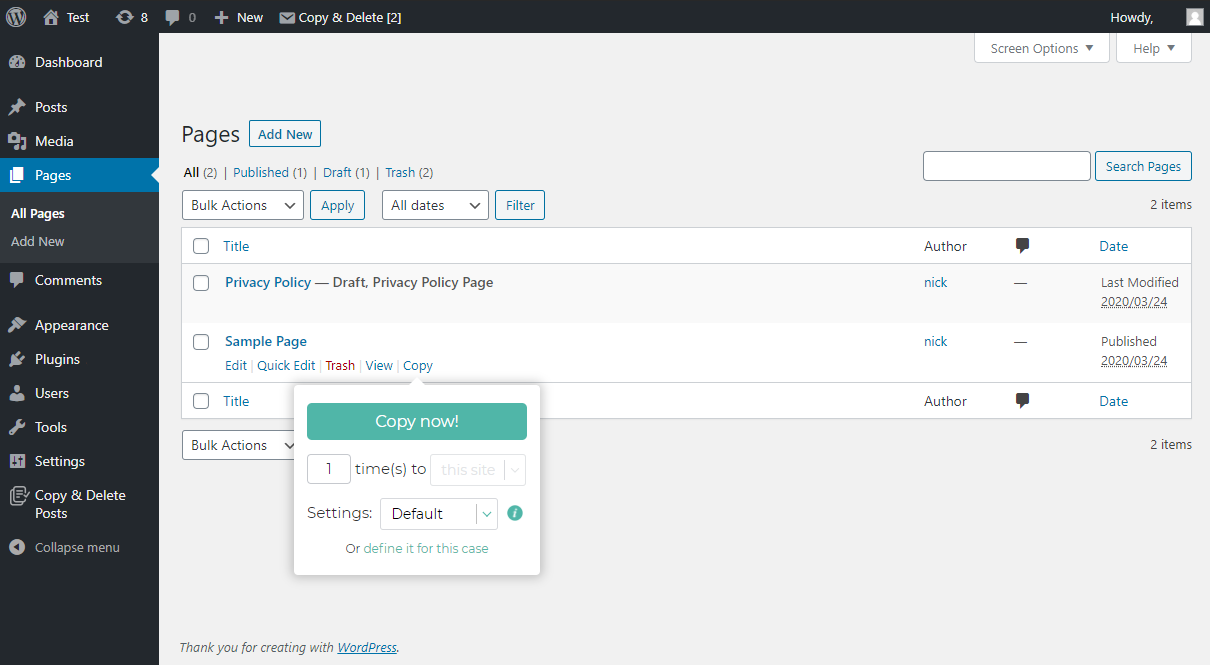
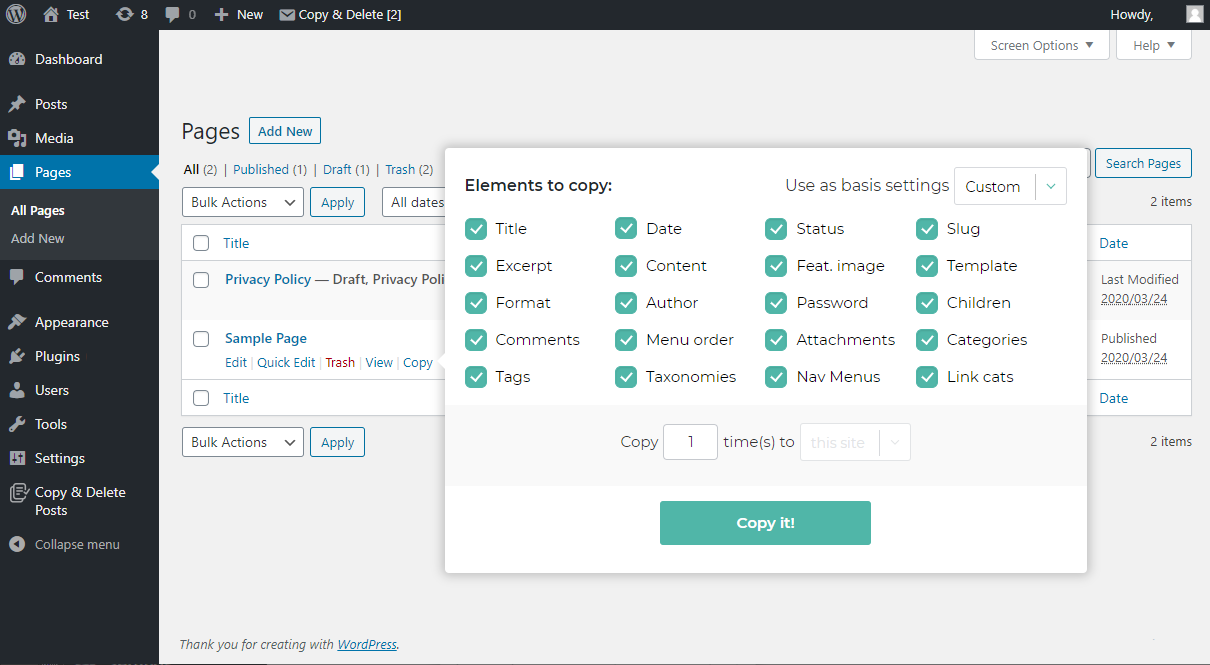
After installation you’ll see a new copy page button which, on mouse-over, displays a tooltip (see screenshot) which allows you to copy pages or copy posts with various options:
- Copy page or duplicate post instantly with a single click
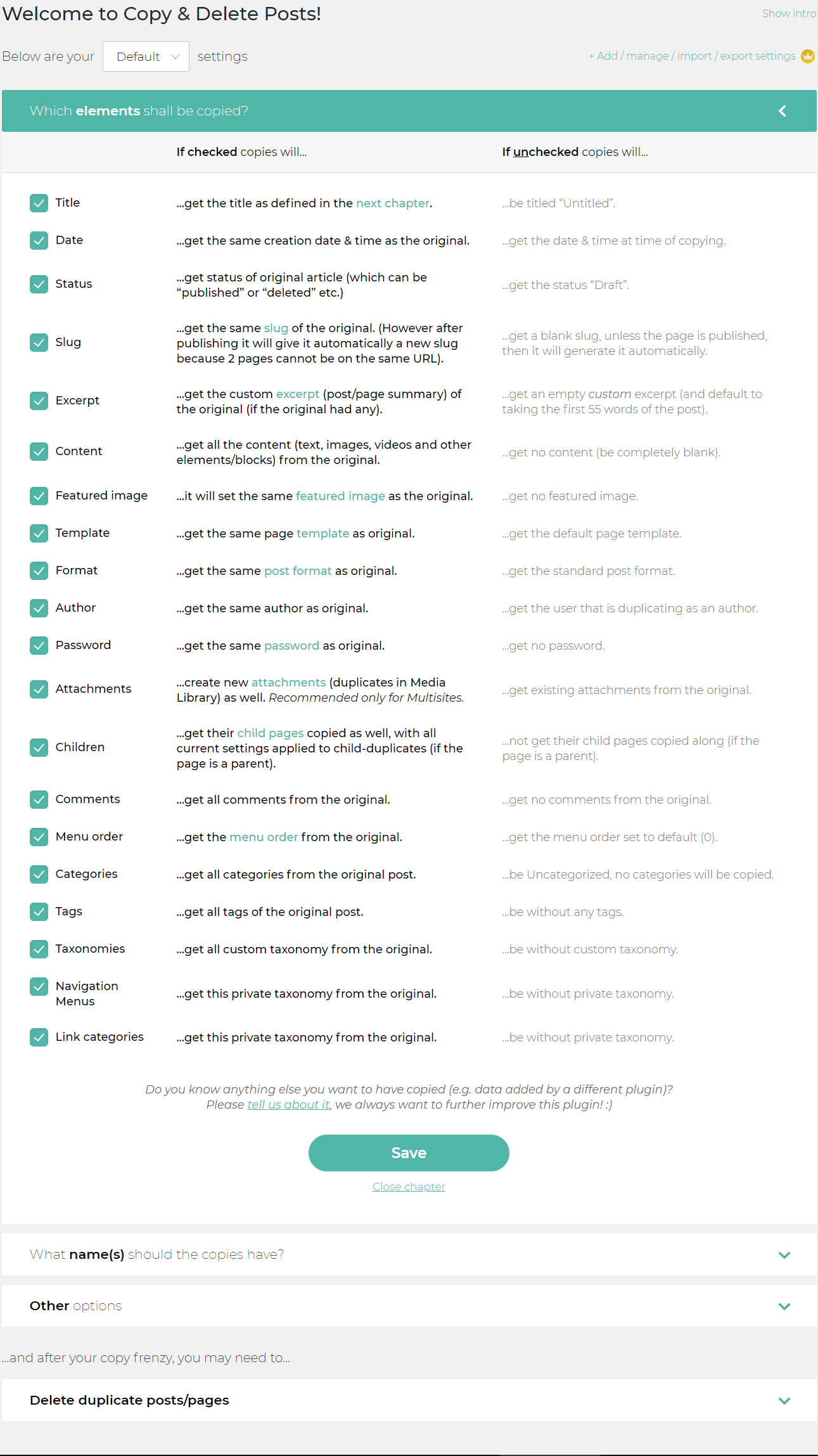
- Expand to see additional copy page options and specify which elements should be copied for the current copy page or copy post action
The new copy page button will be available on:
- All Pages and All Posts screens
- Edit screens (duplicate page or duplicate post on the respective edit page/post screens)
- Admin bar (at the top)
- Bulk-option to copy pages or copy posts on All Pages and All Posts screens
- Gutenberg editor
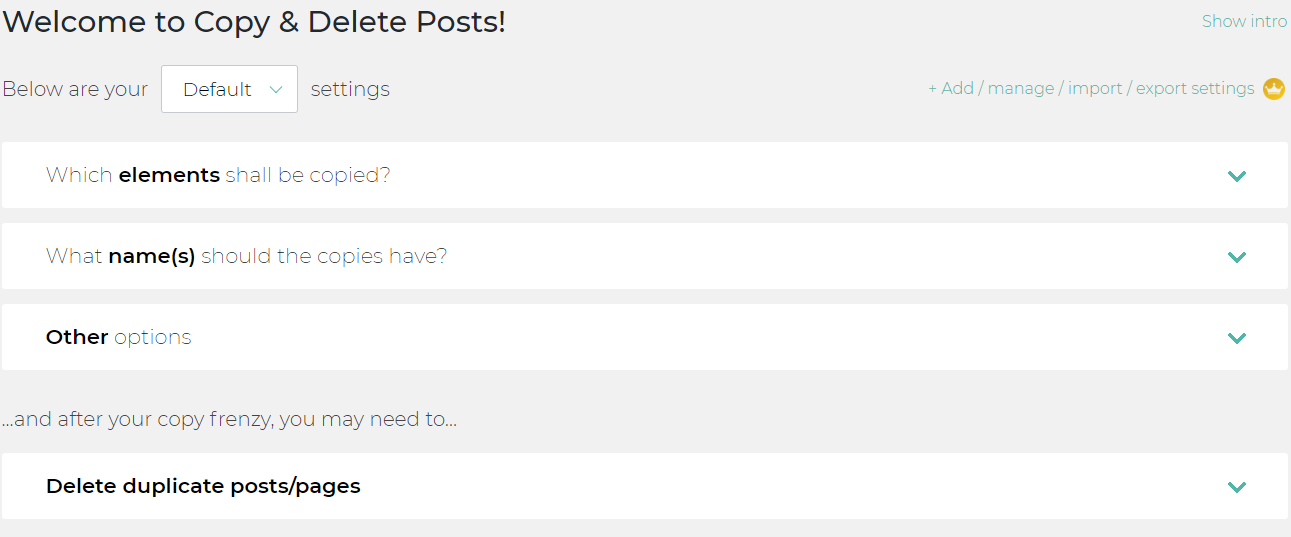
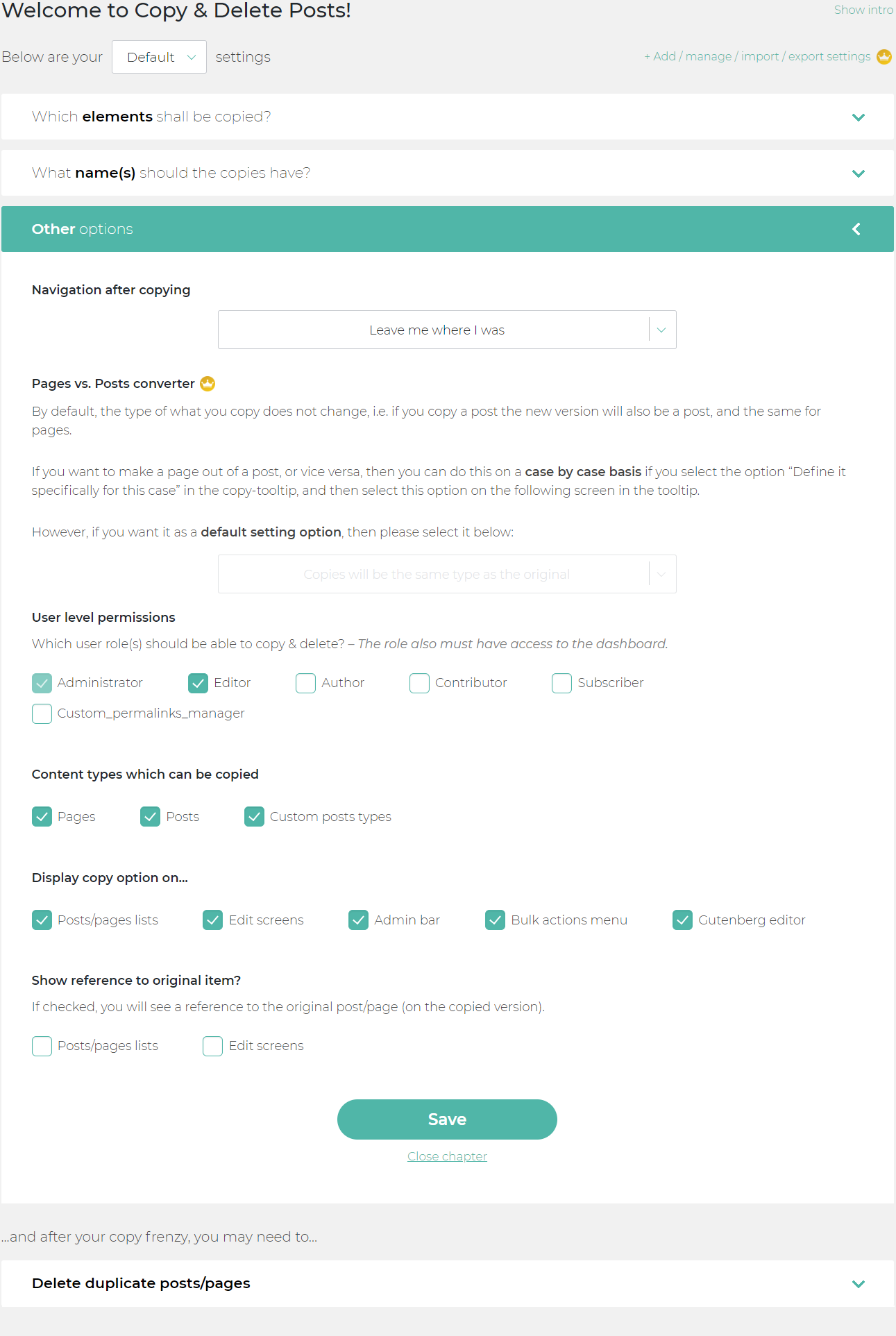
You can hide copy page or copy post button on any of these places from the Copy Page plugin menu (Section: Other options). Copy page function on the editor screens allows fast and easy multiplying of pages you are working on at the moment (and open it in the new browser tab immediately, too), so you can quickly make a couple of variations, pick whichever you like better, and afterward use the Delete duplicate posts/pages tool of Copy Page plugin to remove duplicate(s) that you dislike.
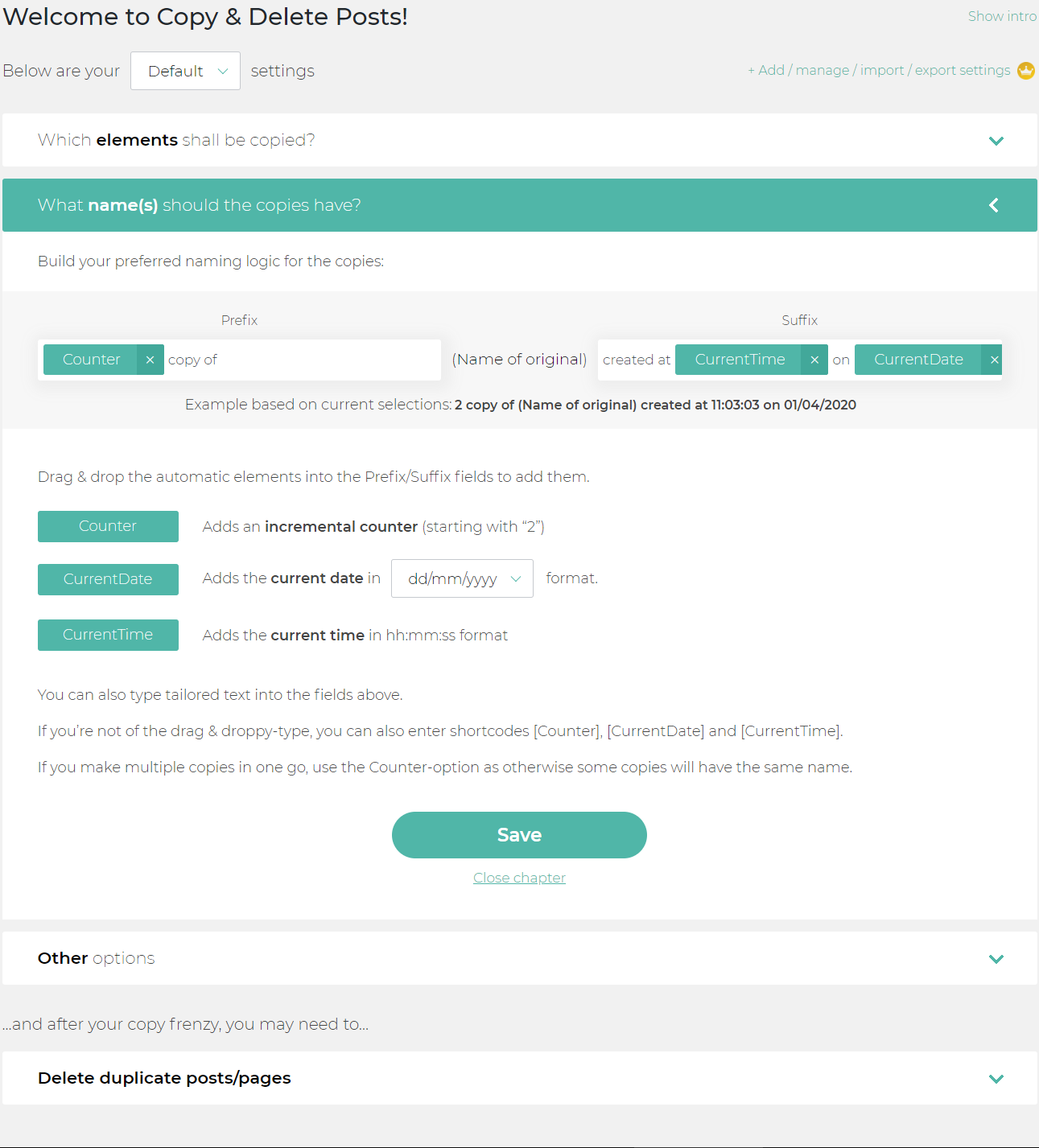
Copy Page plugin also provides an intuitive naming tool to define how the cloned pages or posts will be named (e.g. you can add the time and date of copying, or incremental counter, etc.). This way you can multiply page that will have a short name, e.g. “ExamplePage – #4” – where the number at the end will increase with each copy made; or you can duplicate page with much more detailed name of the copy, such as: “ExamplePage copied at 14:22:58 on Sunday, December 1st, 2021” – thankfully to PHP date/time shortcodes being supported in the custom date settings. Long names often make it easy to differentiate the clone post, either to remove duplicate or to e.g. edit it.
Want to duplicate page but also it’s child-page(s)? You can multiply pages altogether with child-pages with all the copy settings currently applied to the parent page copy.
Other options available when you copy pages:
- Specify where you will be navigated to after you copy page or copy post
- Specify which users (WP roles) will be granted to copy pages or copy posts
- Specify which content types will be allowed to be copied – copy pages, copy posts, and copy custom post types
- Enable/disable the display of a reference to the original of copied page or post
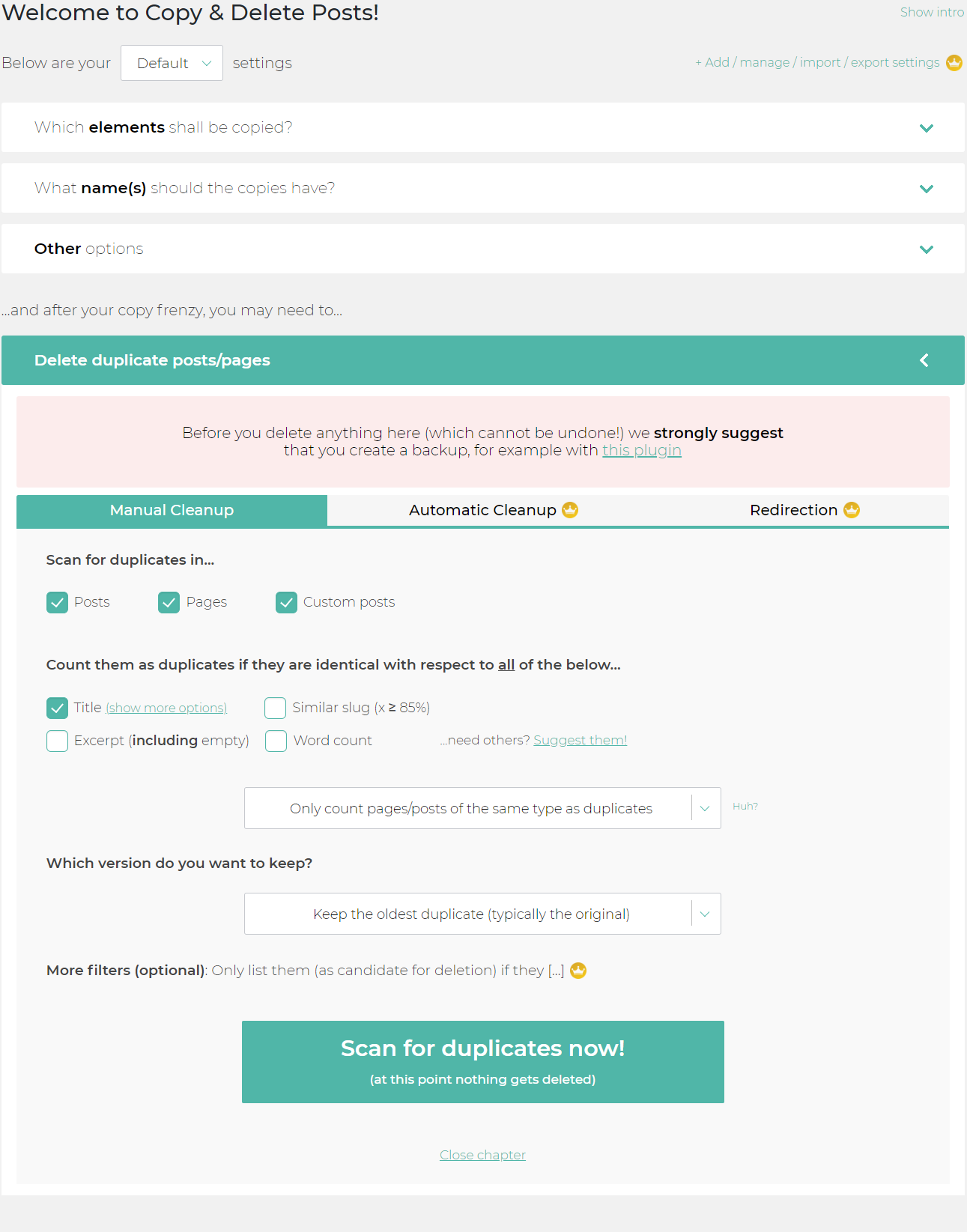
Not only can you clone pages or clone posts easily, but the Copy Page plugin also provides a highly developed tool to Delete duplicate posts/pages.
As part of this cleanup process, you can specify:
- Where the plugin will look for duplicates (i.e. delete pages, delete posts or delete custom posts)
- What will be considered as a duplicate page or duplicate post (i.e. will it be the same title, slug, excerpt or word count)
- Which version of duplicates you want to keep: oldest version (original) or newest version (the latest duplicate)
Even if you used this replicator tool to multiply pages or multiply posts in huge numbers, and you want to use this tool to trash duplicates every now and then, but leave out a few specific ones – you will be able to easily find duplicates when you use our duplicates scanner. After setting the parameters to find duplicates, you can use a search box to make sure you don’t delete duplicates you don’t want to, or remove duplicates to the last one (original included!). The duplicate checker tool can help you find duplicate and immediately visually check the clone page by clicking on the URL/slug link, in case you can’t tell by the name or the date clone page was created.
You can select to throttle the delete pages or delete posts process – which you may want to do when you’re on a slow server (note, however: the plugin codes to delete posts or delete pages are already optimized, so usually there shouldn’t be an issue).
Copy Page is a cloner tool with a beautiful, modern design and features going beyond today’s post duplicator tools. We hope that Copy Page will become your favorite posts duplicator tool 🙂
The free Copy Page plugin offers a lot of options – if you want even more options to copy pages or copy posts, then check out the premium Copy Page plugin which offers the following additional features:
- Use several configuration sets to copy pages or delete posts – useful when you want to quickly switch between the copy types, without having to go to the settings page.
- Export and import configuration sets – a handy tool for all of us who manage multiple sites and regularly replicate posts.
- Also include information from third party plugins when you copy pages (e.g. Yoast-information linked to pages/posts)
- Replicate pages across multisite will also prove to be a real time-saver for multisite administrators
- Automatically delete pages or posts – extremely useful for users that multiply posts or pages at high levels.
- Apply automatic redirects for deleted pages or posts
Just try it out! You’ll love it 🙂
This plugin is part of the Inisev product family – check out our other products.
Installation
Admin Installer via search
- Visit the Add New plugin screen and search for “Copy & Delete Posts”.
- Click the “Install Now” button.
- Activate the plugin.
- The plugin should be shown below settings menu.
Admin Installer via zip
- Visit the Add New plugin screen and click the “Upload Plugin” button.
- Click the “Browse…” button and select the zip file of our plugin.
- Click “Install Now” button.
- Once uploading is done, activate Copy & Delete Posts.
- The plugin should be shown below the settings menu.
Frequently asked questions
It seems the post deletion process doesn’t work. Why?
If you are trying to delete posts and it doesn’t work try to append your wp-config.php with this line of code: define(‘ALTERNATE_WP_CRON’, true); Does it work if you try to delete posts then? If not, please reach out to us in the support forum.
When I copy post or copy page, why is title of the duplicate not the same?
If you copy posts or copy pages and want the new versions to have exactly the same title as the original post, make sure that prefix and suffix fields are blank in the “What name(s) should the copies have?” section of the Copy Delete Posts plugin area in the WordPress Dashboard.
If I duplicate posts, how do I know what their original page was?
It can be a challenge to keep track of the original content if you duplicate posts. To prevent this we suggest to not leave the prefix and suffix fields empty (which define the name of the new posts) if you duplicate posts. However, even if you want to duplicate posts without any prefix or suffix, you can solve the issue as follows: Go to section “Other options” (on the duplicate post plugin configuration page), and at the bottom of this section you will find the option “Show reference to original item?”. Check this to ensure you can always keep track of original posts when duplicate pages or…
Can I limit who can duplicate posts on my site?
By default only Administrators can access the plugin and copy posts or copy pages. You can extend these permissions to other user roles by going to the section “Other options”, and then tick boxes next to WP user roles that you want to give permission to. Then also those roles can duplicate posts (or delete posts).
I want to duplicate posts *only*, i.e. not duplicate pages. Is that possible?
You can limit the features to duplicate posts only by going to the “Other options” – section and select where it says “Content types which can be copied” to only copy posts, copy pages, copy custom posts or all of these.
How can I make bulk copies?
If you want to duplicate posts en masse, select the copy posts option in the “Bulk actions” menu. You’ll see the lightbox asking you to specify your duplicate post options (i.e. which elements to copy).
I can duplicate posts but it takes a long time. Why?
If you duplicate posts and it takes long, then you may have selected to include attachments in the duplicate posts configurations. Go to the second section titled “Which elements should be copied?” and de-select the attachments option to exclude those when you duplicate posts.
Can I bulk delete posts created by this plugin?
To easily clean posts or delete duplicate pages that were created by this plugin, go to ”Delete duplicate posts or pages” section, tab “Manual cleanup”. Select Posts, Pages and Custom Posts, and uncheck all other filters, then hit the Scan button. In the empty results list, you will see the message “Click here to show all copies…” – “here” link will show you all posts and pages created by our multiplier plugin.
Which dupicate post features do you have which the other plugins don’t?
Other duplicate post plugins mostly only allow you to duplicate post to the same site. With the Copy Delete Posts plugin (premium version) you can duplicate post to other sites, e.g. duplicate post to a multisite, or duplicate post to a site on a different domain altogether (we’re currently working on this duplicate post functionality). Also, other duplicate post plugins don’t give you the granularity to define how to duplicate post, e.g. which elements specifically should appear on the cloned posts.
Is this plugin GDPR friendly?
Copy Delete Posts WordPress plugin doesn’t store any site visitor information so it is completely GDPR friendly.
ACF compatibility
ACF is fully supported by Copy Delete Post Premium, as ACF is something more than a simple post. The plugin can only cop native posts and pages ( that are aligned with WordPress standards ). ACF does not stick with these standards as they put multiple posts attached to one post ID, which is visible on the list, while others are hidden.
Is the plugin also available in my language?
So far we have translated the plugin into these languages: Arabic: انسخ المنشورات وانسخ الصفحات ونسخ المنشورات المخصصة وحذف التكرارات. Chinese (China): 复制帖子、复制页面、复制自定义帖子和删除重复项。 Croatian: Kopirajte postove, kopirajte stranice, duplicirajte prilagođene postove i izbrišite duplikate. Dutch: Kopieer berichten, kopieer pagina’s, dupliceer aangepaste berichten en verwijder duplicaten. English: Copy pages, copy posts, and delete the duplicate post again in one go Finnish: Kopioi viestejä, kopioi sivuja, monista mukautettuja viestejä ja poista kaksoiskappaleita. French (France): Copiez les…
Changelog
What's new in 1.5.7? * Tested up to WordPress 7.1.2 * [SECURITY] Fixed stored XSS vulnerability in notifications by properly securing task token output.
1.5.7
- Tested up to WordPress 7.1.2
- [SECURITY] Fixed stored XSS vulnerability in notifications by properly securing task token output.
Screenshots

For developers
Is this your plugin? Show off the numbers.
Add a live badge to your site, docs or GitHub README. It updates on its own — no account needed.
Best Duplicate Post alternatives
All copy pages plugins →
FAQ
Duplicate Post: quick answers
Straight answers, pulled from live WordPress.org data.
Live data from WordPress.org · checked Sep 28, 2026
Is Duplicate Post free?
Yes. Duplicate Post is free to download and use from the official WordPress.org plugin directory.
Is Duplicate Post safe to use in 2026?
Yes — Duplicate Post is a safe, well-maintained plugin to use in 2026. It runs on 300K+ sites, is rated 4.9/5 and was last updated 4 days ago, and scores 97/100 on our health check.
How many websites use Duplicate Post?
Duplicate Post is active on 300K+ WordPress websites and has been downloaded 5,092,097 times since it launched in March 2020. It was downloaded 151,076 times in the last 30 days.
Does Duplicate Post work with WordPress 7.1?
Yes. The developer has tested Duplicate Post up to WordPress 7.1.2, the latest release. It requires WordPress 4.6 or newer.
What PHP version does Duplicate Post need?
Duplicate Post requires PHP 5.6 or higher. Most hosts run PHP 8.x today, so it works on any modern WordPress hosting.
When was Duplicate Post last updated?
The latest version, 1.5.7, was released on September 23, 2026 (4 days ago).
Who makes Duplicate Post?
Duplicate Post is developed and maintained by Inisev.
What are the best alternatives to Duplicate Post?
The most popular alternatives to Duplicate Post are Duplicate Post (6K+ installs), Quick Copy (1K+ installs) and Duplicate Post and Clone Pa… (10+ installs).
Powered by PageForge
Want thousands of pages that rank like these? Build them in an afternoon.
This directory runs on the same engine as PageForge. Turn any spreadsheet, CSV or API into thousands of fast, SEO-ready WordPress pages — with schema, internal links and AI-written copy baked in.
- CSV, Google Sheets & API data sources
- AI content, schema & internal links per page
- Works with Elementor, Gutenberg, Yoast & Rank Math
- Free on WordPress.org — no credit card


