


CookiePrime Sold by Weight
Sell products by exact weight. The customer orders an estimate; you enter the actual weight at fulfillment and the order total is updated.

Solid choice
CookiePrime Sold by Weight is a solid plugin choice in 2026, with a few things worth checking first. Was last updated 3 days ago, and scores 64/100 on our health check.
- Actively developed — last update 3 days ago
- Tested with the latest WordPress (7.1)
- Small user base (<10 active installs)
- Very few reviews so far
How does it stack up?
Side-by-side on installs, updates, ratings & support



Daily downloads
Download spikes usually follow a new release — each site that auto-updates counts as a download.
Rankings
Where CookiePrime Sold by Weight stands todayWordPress.org search rankings
Live position in the plugin search, top 100| Keyword | Position |
|---|---|
| checkout | >100 |
| ecommerce | >100 |
| produce | >100 |
| weight | >100 |
| woocommerce | >100 |
About CookiePrime Sold by Weight
From the official readme · v1.0.5Description
CookiePrime Sold by Weight is built for butchers, fishmongers, delis, coffee roasters, produce stands, spice shops, and any merchant selling by exact weight.
Standard e-commerce charges a fixed price at checkout. But a “1 lb steak” is never exactly 1 lb. This plugin closes that gap.
How it works:
- Mark any product as “Sold by exact weight” and set its price per unit (e.g. $15.00 / lb).
- The customer orders an estimated quantity (e.g. quantity 2 = about 2 lbs).
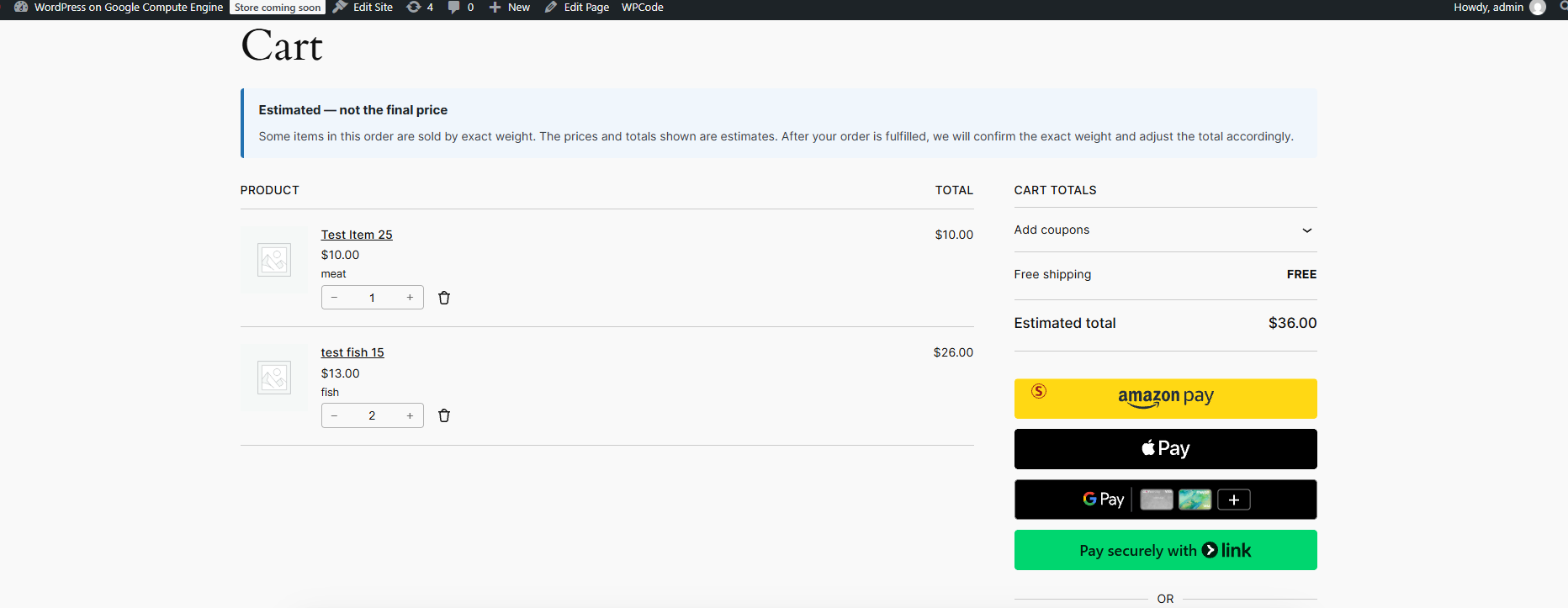
- The cart and checkout show “Estimated:” totals with a clear notice that the final price will be confirmed after weighing.
- After checkout, the order moves to “Awaiting Weight.”
- When the product is weighed, the merchant enters the actual weight in the Weight Station.
- The plugin recalculates the order total based on the actual weight.
- The customer receives an email confirming the final total.
Features:
- Mark any WooCommerce product as “Sold by exact weight”
- Per-unit price display (e.g. $15.00 / lb)
- “Estimated:” labels in cart and checkout
- Cart and checkout notices explaining that the total is an estimate
- Decimal quantity support (2.5 lbs, not just 2)
- Weight Station for entering actual weights
- Automatic order total recalculation
- Final weight confirmation email sent to the customer
- Works with offline payment methods (Cash on Delivery, Bank Transfer, Check)
- No external service or API key required
Card / Stripe support is currently in development. For more information — including early access and updates — contact us at contact@cookieprime.com.
The plugin does not require any external account, license, or subscription. Everything runs locally inside your WordPress installation.
For more information about our e-commerce tools, visit https://cookieprime.com.
Payment method support
This version of the plugin is designed for offline payment methods — Cash on Delivery, Bank Transfer, and Check. With these methods, the order total is set on the order itself after the merchant weighs the product. No money is collected at checkout, so the final total is always correct.
If you accept card payments with this version:
The customer is charged the estimated amount at checkout, before the product is weighed. The final weight-adjusted total cannot be adjusted automatically. This may result in a small difference between what the customer paid and what the actual weight was worth.
Card payment support with an authorize-then-capture flow is currently in development. If you accept card payments and need the final total to be captured exactly, please contact us at contact@cookieprime.com for more information.
Installation
Step 1 — Install and activate
- Install and activate WooCommerce (if not already installed).
- Install and activate CookiePrime Sold by Weight.
Step 2 — Configure a product
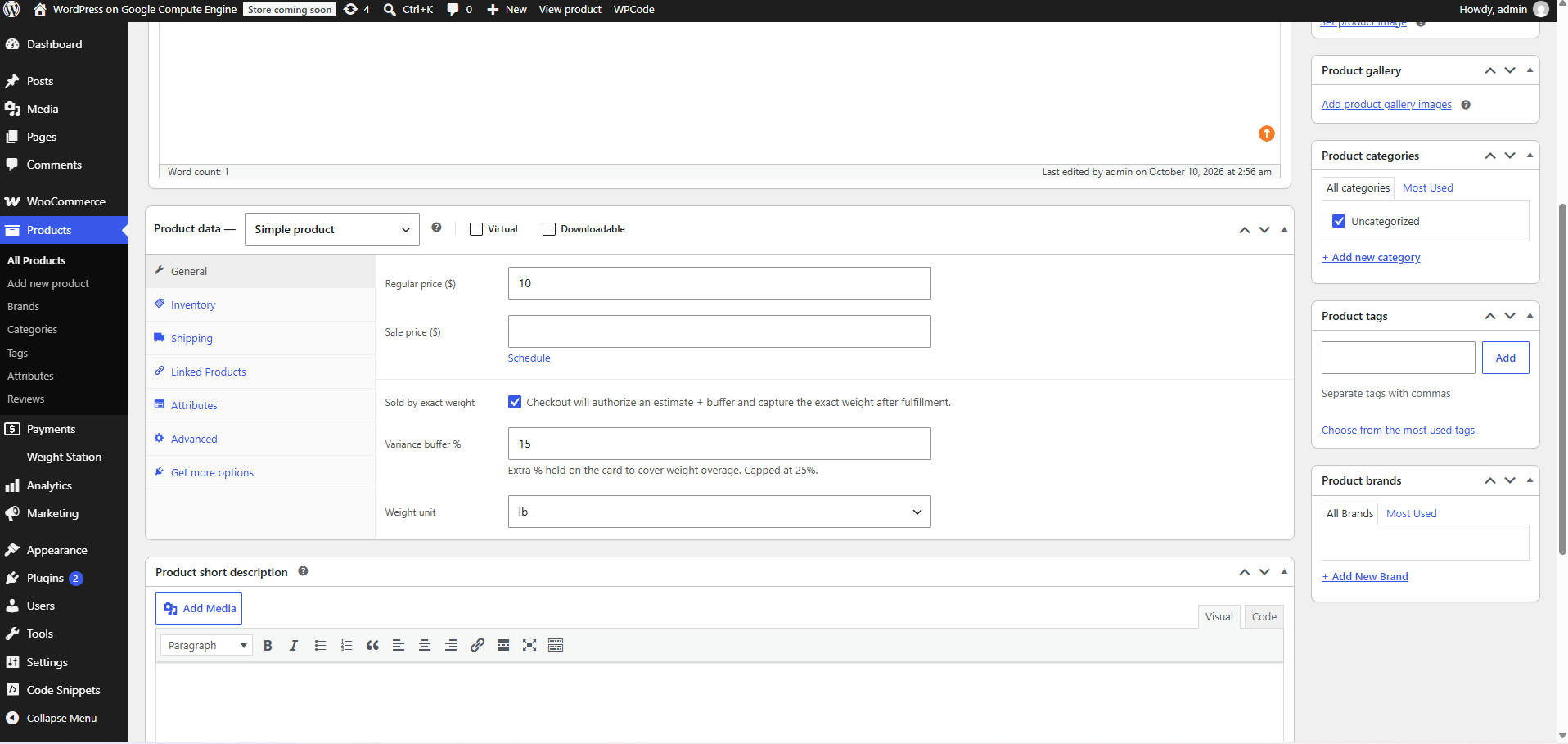
- Go to Products → Add New (or edit an existing product).
- Set the Regular price to your price per unit (e.g.
15for $15/lb). - In the Product data → General tab, check the box “Sold by exact weight”.
- Set the Weight unit (lb, oz, kg, or g).
- Click Publish or Update.
Step 3 — Take an order
- A customer adds the weight product to the cart.
- They choose a quantity that represents the weight they want (e.g. quantity 2 = 2 lbs estimated).
- The cart and checkout show “Estimated:” totals with a notice.
- They complete checkout using an offline payment method (Cash on Delivery, Bank Transfer, or Check).
- The order moves to Awaiting Weight.
Step 4 — Weigh and finalize
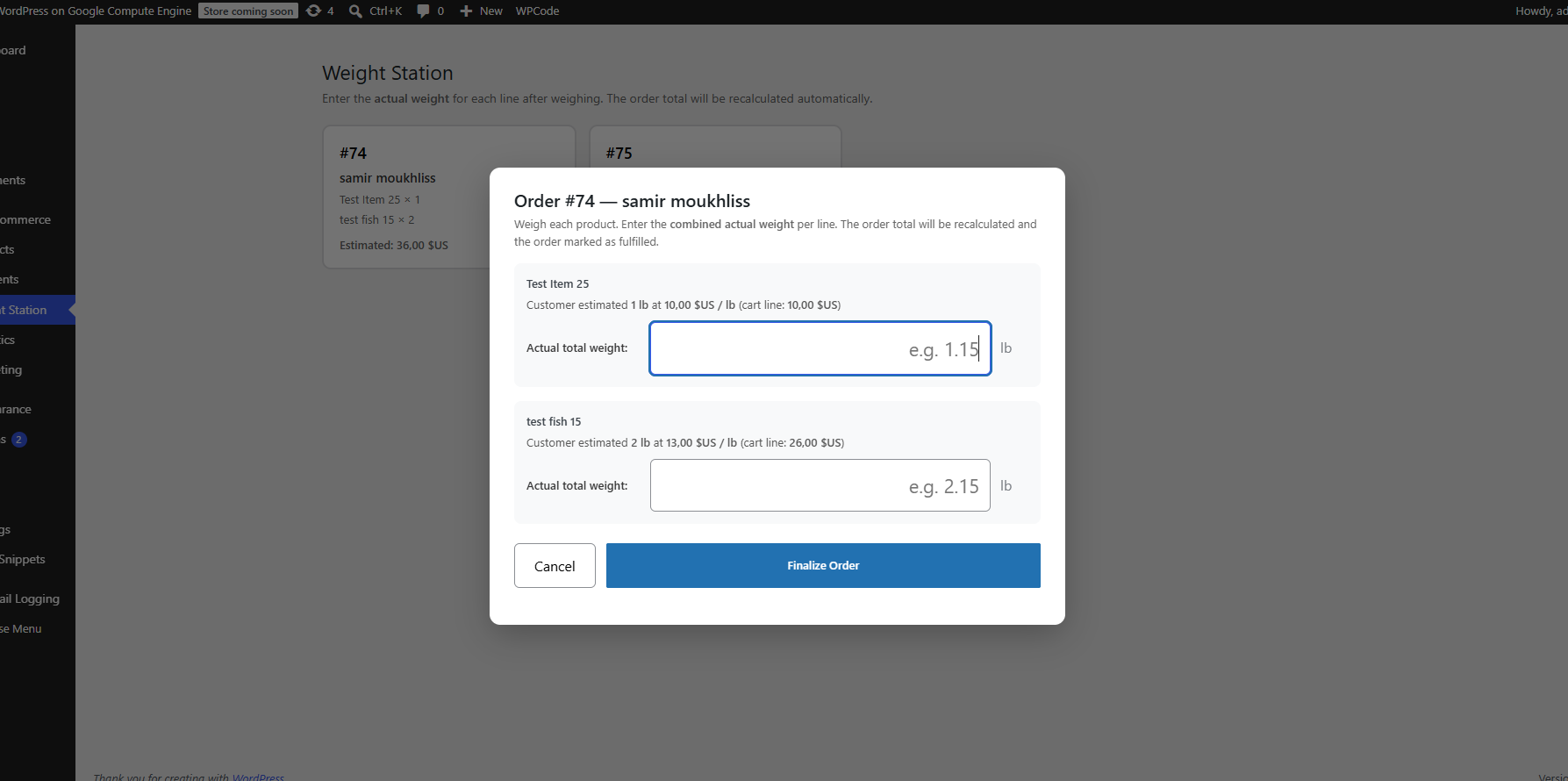
- Go to Weight Station in the WordPress admin menu.
- The order appears as a card. Click it.
- Enter the actual total weight per line (e.g. 2.15).
- Click Finalize Order.
- The plugin recalculates the total and updates the order.
Frequently asked questions
What happens if the actual weight is different from the estimate?
The plugin recalculates the order total based on the actual weight you enter in the Weight Station, using your store’s normal tax and rounding rules. The customer is sent an email showing the final line items and the final order total.
Does this work with card payments?
Not yet. Card and Stripe support is currently in development. This version is designed for offline payment methods — Cash on Delivery, Bank Transfer, and Check. For more information, including early access and updates, contact contact@cookieprime.com.
Can I sell other products on the same store?
Yes. Only products marked “Sold by exact weight” trigger the Weight Station flow. All other orders process as normal WooCommerce orders.
Can I customize the final weight email?
Yes. The email uses WooCommerce’s standard email system. Go to WooCommerce → Settings → Emails → “Final weight confirmed” to enable or disable it, and to edit its subject line and heading.
What if I uninstall the plugin?
Order metadata and weight entries are preserved as financial records. Configuration options are deleted.
Changelog
1.0.5
- Improved: readme now clarifies offline payment method support and card/Stripe support status.
- Improved: contact email updated to contact@cookieprime.com.
1.0.4
- Added: dedicated “Final weight confirmed” email sent to the customer after the merchant finalizes the order. Editable under WooCommerce → Settings → Emails.
1.0.3
- Fixed: products marked as “Sold by exact weight” before the rename were not detected after the rename. The plugin now reads both the current and legacy meta keys.
- Fixed: orders placed with Cash on Delivery, Bank Transfer, or Check were not being moved to “Awaiting Weight”.
1.0.2
- Renamed to “CookiePrime Sold by Weight” and slug to “cookieprime-sold-by-weight”.
- All internal prefixes updated to cpsbw for compliance with the WordPress.org plugin guidelines.
- Removed the license-gated Stripe integration. The plugin is now fully functional on its own with any payment method.
- Requires PHP bumped to 8.0.
- Readme updated to reflect actual functionality.
1.0.1
- Internal compliance and stability fixes.
1.0.0
- Initial release.
Screenshots
For developers
Is this your plugin? Show off the numbers.
Add a live badge to your site, docs or GitHub README. It updates on its own — no account needed.
Best CookiePrime Sold by Weight alternatives
All checkout plugins →





FAQ
CookiePrime Sold by Weight: quick answers
Straight answers, pulled from live WordPress.org data.
Live data from WordPress.org · checked Oct 18, 2026
Is CookiePrime Sold by Weight free?
Yes. CookiePrime Sold by Weight is free to download and use from the official WordPress.org plugin directory.
Is CookiePrime Sold by Weight safe to use in 2026?
CookiePrime Sold by Weight is a solid plugin choice in 2026, with a few things worth checking first. Was last updated 3 days ago, and scores 64/100 on our health check.
How many websites use CookiePrime Sold by Weight?
CookiePrime Sold by Weight is active on <10 WordPress websites and has been downloaded 57 times since it launched in October 2026. It was downloaded 63 times in the last 30 days.
Does CookiePrime Sold by Weight work with WordPress 7.1?
Yes. The developer has tested CookiePrime Sold by Weight up to WordPress 7.1.3, the latest release. It requires WordPress 6.0 or newer.
What PHP version does CookiePrime Sold by Weight need?
CookiePrime Sold by Weight requires PHP 8.0 or higher. Most hosts run PHP 8.x today, so it works on any modern WordPress hosting.
When was CookiePrime Sold by Weight last updated?
The latest version, 1.0.5, was released on October 14, 2026 (3 days ago).
Who makes CookiePrime Sold by Weight?
CookiePrime Sold by Weight is developed and maintained by samirprime.
What are the best alternatives to CookiePrime Sold by Weight?
The most popular alternatives to CookiePrime Sold by Weight are Brazilian Market on WooComm… (60K+ installs), reCAPTCHA for WooCommerce (40K+ installs) and FunnelKit (30K+ installs).
Powered by PageForge
Want thousands of pages that rank like these? Build them in an afternoon.
This directory runs on the same engine as PageForge. Turn any spreadsheet, CSV or API into thousands of fast, SEO-ready WordPress pages — with schema, internal links and AI-written copy baked in.
- CSV, Google Sheets & API data sources
- AI content, schema & internal links per page
- Works with Elementor, Gutenberg, Yoast & Rank Math
- Free on WordPress.org — no credit card


