


Content Relay – Push Pages and Posts from Staging to Live
Content Relay pushes one piece of content from staging to live, or from live back to staging or development, without a full database migration. It relays a single page, post or custom post type entry, with every…

Solid choice
Content Relay is a solid plugin choice in 2026, with a few things worth checking first. Was last updated 3 weeks ago, and scores 64/100 on our health check.
- Actively developed — last update 3 weeks ago
- Tested with the latest WordPress (7.1)
- Small user base (<10 active installs)
- Very few reviews so far
How does it stack up?
Side-by-side on installs, updates, ratings & support



Daily downloads
Download spikes usually follow a new release — each site that auto-updates counts as a download.
Rankings
Where Content Relay stands todayWordPress.org search rankings
Live position in the plugin search, top 100| Keyword | Position |
|---|---|
| content sync | >100 |
| deployment | >100 |
| migration | >100 |
| staging | >100 |
| wpml | >100 |
About Content Relay
From the official readme · v1.0.0Description
Content Relay pushes one piece of content from staging to live, or from live back to staging or development, without a full database migration. It relays a single page, post or custom post type entry, with every translation and its media, between the environments of the same site, in either direction.
Typical uses:
- A page built on staging is approved and has to go live on production.
- A page edited on production is needed on development to work on it with real content.
- A batch of posts written on one environment has to appear on another.
In each case you sync only that content, without copying a whole database or overwriting what else changed on the other site. Orders, form entries, users and settings on the live site are left alone.
The theme must match. Content Relay only works between sites running the same theme at the same version. A different active theme or theme version blocks the relay; the same version with different theme files gives a warning. Deploy the theme first, then relay the content.
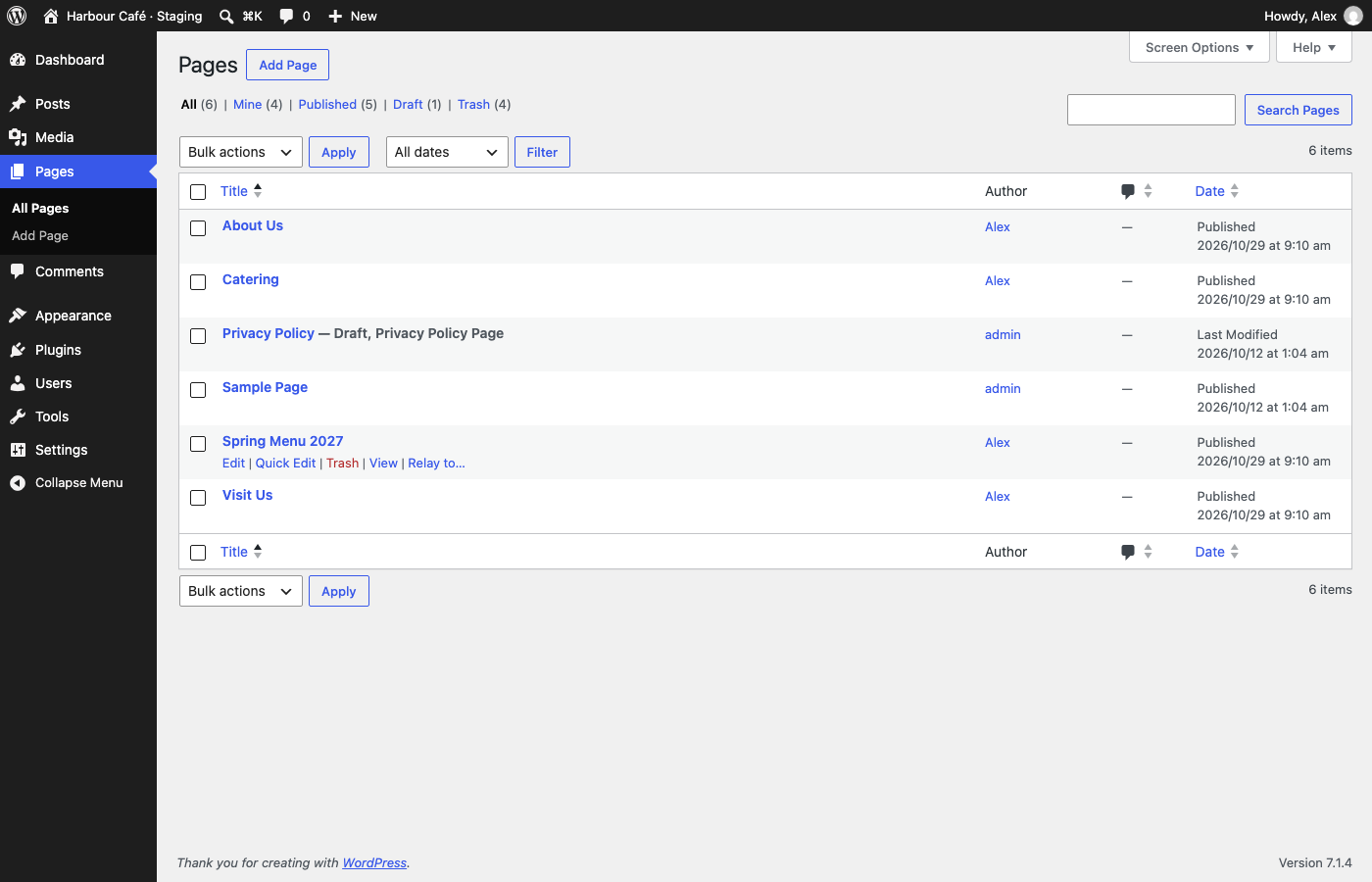
The same plugin runs on both sites. The receiving site issues a key; the sending site stores it. From then on an administrator can hover an item in Pages (or any other content list switched on in the settings), choose Relay to…, review what the receiving site plans to do, and relay. Many posts can be relayed at once with WP-CLI.
What a relay carries
- The page or post and every translation of it (WPML), with fields, meta, Yoast SEO data and its terms.
- The images and files it uses. The original upload is sent once; the receiving site regenerates the image sizes. A file with the same name but different bytes is saved under a new name, never overwritten.
- References inside the content: block attributes, ACF fields (images, files, galleries, posts, terms, users), image IDs in HTML, and links to the sending site, all rewritten to the receiving site’s IDs and address.
- Terms the content is assigned to that the receiving site lacks, created in the right language.
Content is written byte for byte. Block markup is edited only where a reference changes; it is never re-serialized.
Review before anything is written
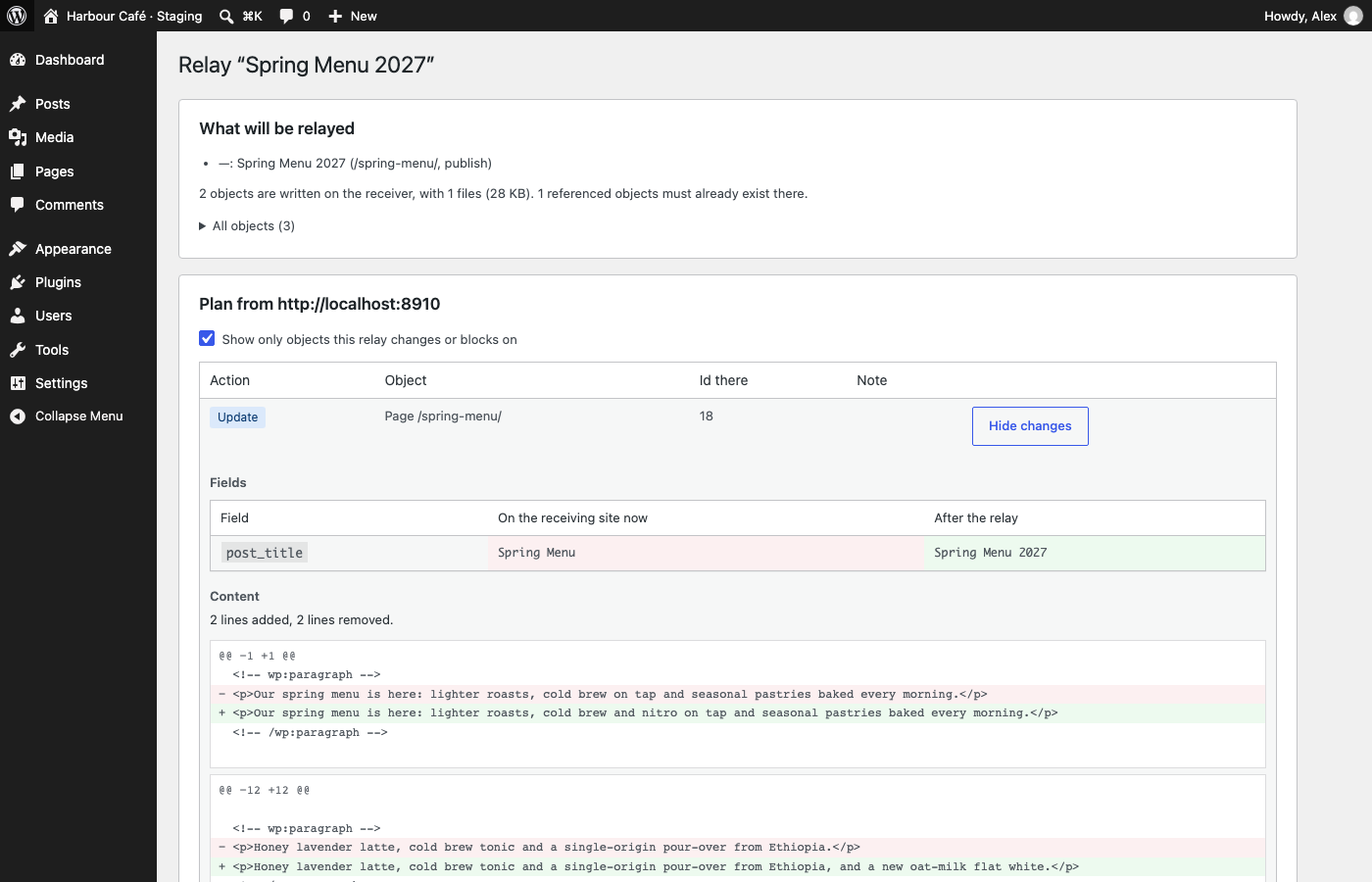
The receiving site plans every relay and answers with a list of what it will create, update, reuse or refuse, with a field, meta and content diff for anything it would replace. Nothing is written until an administrator approves that plan. If the receiving site changes in the meantime, the relay is refused and the plan must be approved again.
Content that was edited on the receiving site since its last relay is blocked. It can be relayed with Overwrite, which keeps a backup.
After a relay
- Object caches, WPML caches and Yoast indexables of the relayed posts are cleared.
- Page caches are purged for WP Rocket, LiteSpeed Cache, W3 Total Cache, WP Super Cache, SiteGround Optimizer and Breeze. Other cache layers can hook
content_relay_purge_page_cache. - The sending site fetches each relayed page from the receiving site and checks the HTTP status and address,
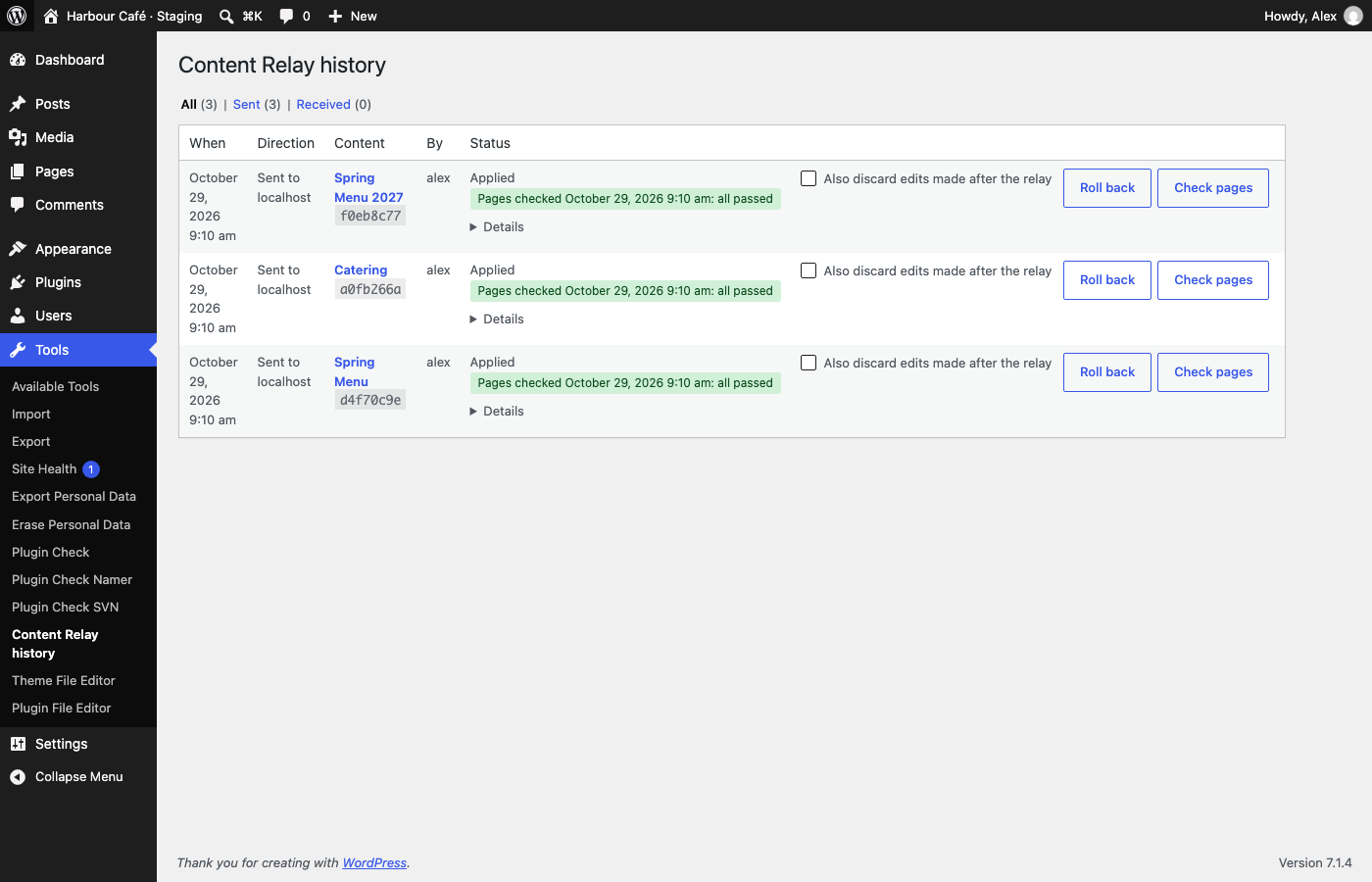
<html lang>, the hreflang alternates, that no link still points at the sending site, and that its images load. - Every relay is logged on both sites under Tools → Content Relay history and can be rolled back from either: what it replaced is restored and what it created is removed.
What a relay does not carry
- The theme. Deploy it first: a relay is blocked when the theme or its version differs.
- Comments.
- Menus, widgets, site options and plugin settings.
- User accounts. Authors are matched by login and fall back to the key’s administrator.
- Content a page lists by query instead of by ID, such as “the latest events tagged with this page’s term”. A theme can declare such dependencies with the
content_relay_query_dependenciesfilter; the receiving site then warns when they find nothing. - Parent pages and referenced posts must already exist on the receiving site; the plan names any that are missing.
- Images held in ACF fields of a term the relay has to create are not relayed; those references are removed and reported.
Security
- Every request is signed with Ed25519 and carries a timestamp and a single-use nonce. Refused requests are rate-limited per IP.
- The receiving site keeps only the public half of a key; the key itself is shown once. The sending site stores it encrypted with
CONTENT_RELAY_ENCRYPTION_KEY, or with theAUTH_KEYandSECURE_AUTH_KEYsalts. - A key can only relay content: posts, their media and their terms. A signed request is not logged in as any user and cannot manage users, plugins, themes or settings.
- Only administrators (
manage_options) can relay, issue keys or add connections. A key stops working when it is revoked or when the administrator who issued it loses that role. - The receiving site must use HTTPS.
CONTENT_RELAY_IP_ALLOWLISTin wp-config.php limits which sending IPs are accepted.
Requirements and limits
- PHP 7.4 or later, WordPress 6.4 or later, InnoDB tables.
- WPML is supported; Polylang is not. ACF (including ACF blocks), core blocks and Yoast SEO are supported; Elementor content is not.
- A receiving site behind HTTP basic authentication is not supported yet.
- Tested on single sites.
Connections to other sites
Content Relay contacts only the sites you connect it to with a key: it sends the relay to the receiving site and afterwards fetches the relayed pages from it to check them. It uses no third-party service, sends nothing to the plugin author and does no tracking.
WP-CLI
wp content-relay keys generate --label=<label>·keys list·keys revoke <kid>— on the receiving site.wp content-relay connections add <key> --label=<label>·connections list·connections test <label>·connections remove <label>— on the sending site.wp content-relay plan <page-id> --to=<label>— ask the receiving site for its plan without relaying.wp content-relay push <page-id> --to=<label> [--overwrite] [--flush-cache] [--yes]— relay, then check the pages.wp content-relay push-many [<id>...] --to=<label> [--post_type=<type>] [--tag=<slug>] [--category=<slug>] [--all] [--dry-run]— relay many posts, one translation group at a time.wp content-relay verify <session>— check a relay’s pages again.wp content-relay rollback <session> --to=<label>— roll back a relay sent to another site; without--to, a relay received here.wp content-relay history [--direction=out|in] [--offline]wp content-relay discover <page-id>·bundle <page-id>·plan <dir>·apply <dir>— an offline bundle, written touploads/content-relay/bundles/, for sites that cannot reach each other.
Hooks
content_relay_post_types— post types that can be relayed (default: pages).content_relay_meta_denylist— meta keys never relayed.content_relay_resolvers— reference resolvers used to discover what a page needs.content_relay_query_dependencies— content a page lists by query, checked after a relay.content_relay_page_cache_integrations,content_relay_purge_page_cache— page-cache purging.content_relay_before_commit,content_relay_applied— around the content commit on the receiving site.content_relay_request_denied— a refused relay request.content_relay_http_args,content_relay_max_chunk_bytes— transport tuning.
Installation
- Install and activate Content Relay on both sites.
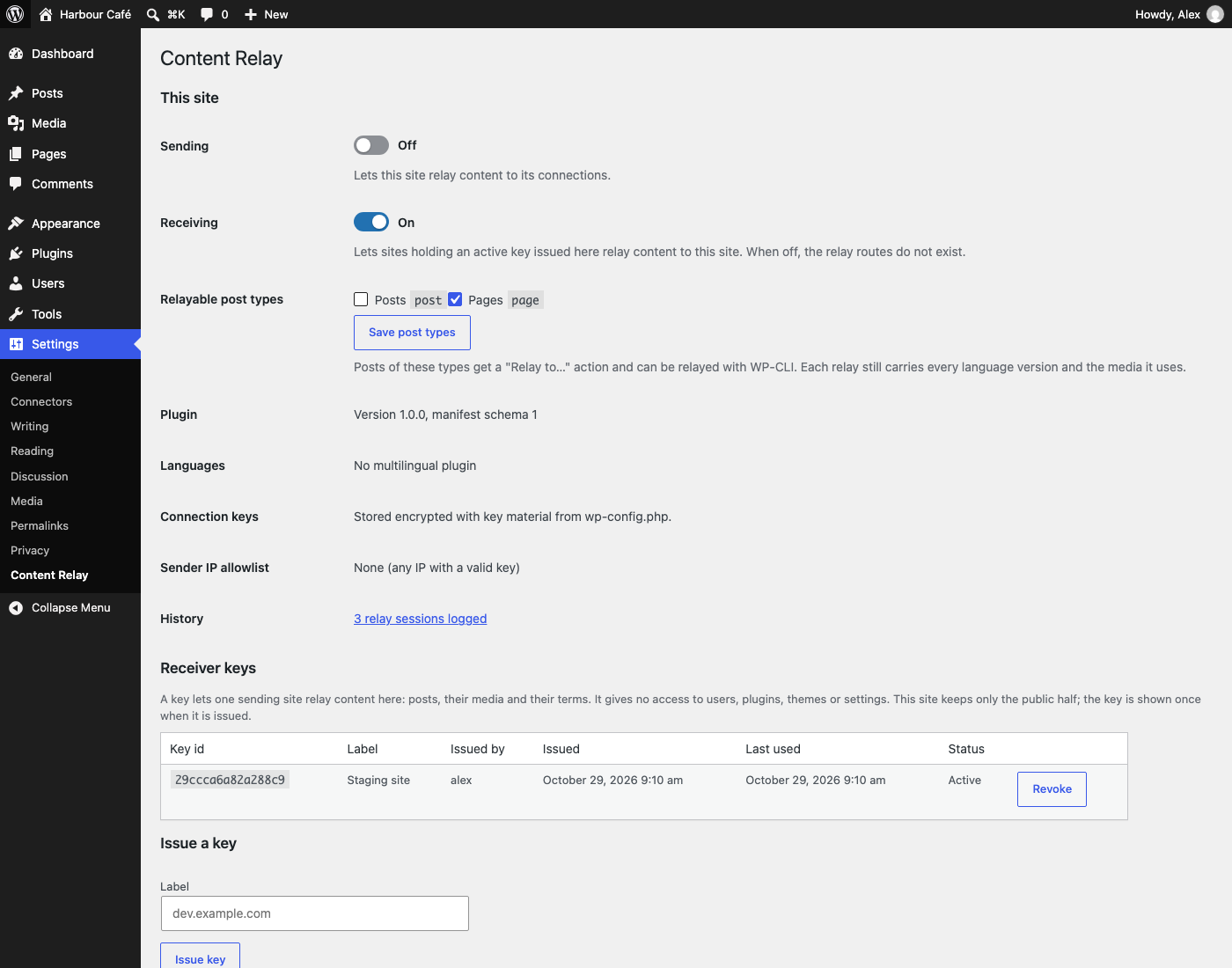
- On the receiving site, open Settings → Content Relay, switch Receiving on and issue a key. Copy it: it is shown once.
- On the sending site, open Settings → Content Relay, switch Sending on and add a connection by pasting the key. A handshake checks it before it is stored.
- Deploy the same theme, at the same version, to both sites.
- On the sending site, hover a page in Pages and choose Relay to…. To relay posts or custom post types as well, tick them under Settings → Content Relay.
Sending and receiving can also be pinned in wp-config.php with define( 'CONTENT_RELAY_SEND', true ); and define( 'CONTENT_RELAY_RECEIVE', true ); (or false). A defined constant overrides the switch and locks it.
Changelog
1.0.0
- Renamed from Page Relay to Content Relay: the plugin relays posts and custom post types as well as pages. Options, hooks, constants, the REST routes and the WP-CLI command are now named
content_relay/content-relay; data stored under the old names is not migrated. - A Settings link on the plugin’s row of the Plugins screen.
- Tested with WordPress 7.1.
0.2.0
wp content-relay push-many: relay many posts at once (by ids,--tag,--categoryor--all, matched in every language), one translation group per session, with--dry-run,--existing=update|skip,--media-fallbackand--skip-missing-media.- Settings: choose the relayable post types (pages by default).
- References the sender cannot resolve — deleted posts, revisions, terms of unregistered taxonomies, skipped media — are dropped (mapped to 0) instead of blocking the relay.
- Duplicates on the receiver (same file or same address) are resolved by the sender’s own id on sites cloned from one database; a referenced post with no language is found by its address.
- Fixed: a re-relay of a post with dropped references no longer reports it as changed.
0.1.0
- First release: keys and connections, the relay screen with plan and diffs, page-cache purging, checks after a relay, history with rollback on both sites, WP-CLI commands and offline bundles.
Screenshots

For developers
Is this your plugin? Show off the numbers.
Add a live badge to your site, docs or GitHub README. It updates on its own — no account needed.
Best Content Relay alternatives
All content sync plugins →





FAQ
Content Relay: quick answers
Straight answers, pulled from live WordPress.org data.
Live data from WordPress.org · checked Nov 16, 2026
Is Content Relay free?
Yes. Content Relay is free to download and use from the official WordPress.org plugin directory.
Is Content Relay safe to use in 2026?
Content Relay is a solid plugin choice in 2026, with a few things worth checking first. Was last updated 3 weeks ago, and scores 64/100 on our health check.
How many websites use Content Relay?
Content Relay is active on <10 WordPress websites and has been downloaded 202 times since it launched in October 2026. It was downloaded 202 times in the last 30 days.
Does Content Relay work with WordPress 7.1?
Yes. The developer has tested Content Relay up to WordPress 7.1.4, the latest release. It requires WordPress 6.4 or newer.
What PHP version does Content Relay need?
Content Relay requires PHP 7.4 or higher. Most hosts run PHP 8.x today, so it works on any modern WordPress hosting.
When was Content Relay last updated?
The latest version, 1.0.0, was released on October 29, 2026 (3 weeks ago).
Who makes Content Relay?
Content Relay is developed and maintained by Mahesh Bohara.
What are the best alternatives to Content Relay?
The most popular alternatives to Content Relay are Arkwell SEO Connector (20+ installs), getSync (20+ installs) and Toofan Stage-to-Live Sync (10+ installs).
Powered by PageForge
Want thousands of pages that rank like these? Build them in an afternoon.
This directory runs on the same engine as PageForge. Turn any spreadsheet, CSV or API into thousands of fast, SEO-ready WordPress pages — with schema, internal links and AI-written copy baked in.
- CSV, Google Sheets & API data sources
- AI content, schema & internal links per page
- Works with Elementor, Gutenberg, Yoast & Rank Math
- Free on WordPress.org — no credit card


