


Consignment Store For WooCommerce
Easily allow sellers to submit items for your review to your consignment store. Once approved, items are added to your WooCommerce store.

Consider an alternative
Consignment Store For WooCommer… shows warning signs in 2026 — compare the alternatives below before installing. It runs on 10+ sites and was last updated 9 months ago, and scores 38/100 on our health check.
- Small user base (10+ active installs)
- Very few reviews so far
- Only tested up to WordPress 6.9 (latest is 7.1)
Daily downloads
Download spikes usually follow a new release — each site that auto-updates counts as a download.
Rankings
Where Consignment Store For WooCo… stands todayWordPress.org search rankings
Live position in the plugin search, top 100| Keyword | Position |
|---|---|
| consignment for WooCommerce | #6 |
| consignment store | #2 |
Version adoption
Share of active sites per release.
About Consignment Store For WooCommerce
From the official readme · v2.8Description
CWS Consignment Store for WooCommerce lets the general public upload their items for consideration to your online and physical consignment store.
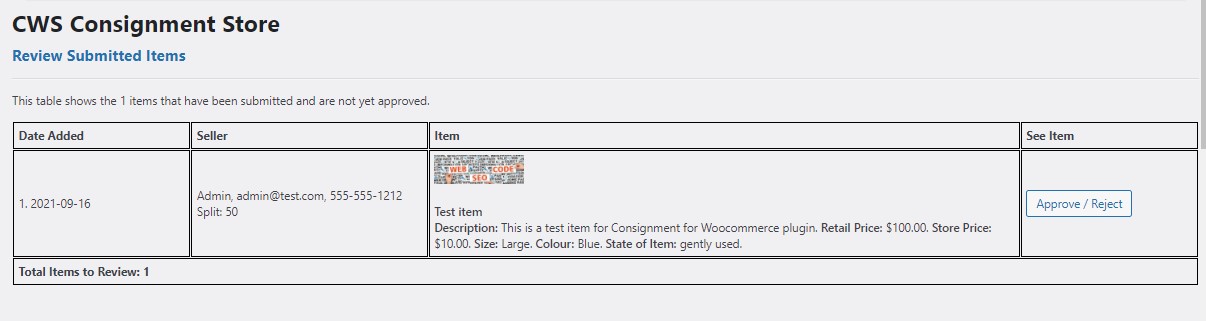
You will be notified that an item has been submitted. You can review the item and either approve or reject.
If you approve, the item will be added to WooCommerce and is immediately available in your store. You may change the “split” on the revenue from the item. The default is 50-50.
If you reject, the seller will be notified by email.
You can also use the plugin to put your existing inventory online. Use the easy form, snap a few pictures, and it will automatically be added to your WooCommerce online store without going through the approval step.
Uninstalling the plugin will remove all associated tables and data.
Pre-requisites:
WooCommerce
Live Demo
Seller’s Form to Add Item and the Admin area
Doc
Features
- Image resized on user’s device before upload
- Images deleted from Media Library if item is rejected
- Help seller set a price by displaying lowest, highest and average prices for items in your store, by category.
- Track payouts to the seller once an item sells.
Installation
The easiest way to install CWS Consignment Store is via your WordPress Dashboard. Go to the “Plugins” screen, click “Add New”, and search for “CWS Consignment” in the WordPress Plugin Directory. Then, click “Install Now” and wait a moment. Finally, click “Activate” and start using the plugin!
Manual installation works just as for other WordPress plugins:
- Download and extract the ZIP file.
- Move the folder “cws-consignment” to the “wp-content/plugins/” directory of your WordPress installation, e.g. via FTP.
- Activate the plugin “CWS Consignment Store” on the “Plugins” screen of your WordPress Dashboard.
- Create a page for potential Sellers to submit their items and add the shortcode [additemform]
- Review the submitted items in the WordPress admin area.
Frequently asked questions
What size are the images uplon upload?
Images are resized to a maximum of 800px height or 600px width.
How do I add a SKU to the item?
If you are logged in to your site, go to the page where you have included the [additemform] shortcode and you will see SKU as the first input field.
Do SKU’s have to be unique?
SKU’s do need to be unique. Since this is for a consignment shop it is assumed each item is unique and requires its own sku.
I get a 403 when I try to select an image on the Add Item form.
I have seen this on Microsoft Edge when there is a security plugin such as WordFence activated. You need to allow basedir to be posted. In WordFence, go to All Options and scroll down to Allolisted URLs. Add a new URL that is the page where your form is (/addanitem/ for example). Select Param Type POST Body, and enter basedir in the Param Name. Click ADD. Add another rule now for the ajax file by entering URL /wp-content/plugins/cws-consignment/public/class-cws-consignment-public.php. And again select Param Type POST Body, and enter basedir in the Param Name. Click ADD. And Save Changes.
Changelog
Fix form submission error. Upgrade as soon as possible.
2.8
- Fix form submission error.
2.7
- Fix scrollintoview and error messaging.
2.6.2
- Fix multiple image upload.
2.6.1
- Remove console logs.
2.6
- Change to form submission to work with WordPress 6.9.
2.5
- Big changes! Images will now be resized to a maximum of 800px wide or 600px high on the user’s device, before uploading. You should experience some faster upload speeds.
Screenshots



For developers
Is this your plugin? Show off the numbers.
Add a live badge to your site, docs or GitHub README. It updates on its own — no account needed.
FAQ
Consignment Store For WooCommerce: quick answers
Straight answers, pulled from live WordPress.org data.
Live data from WordPress.org · checked Oct 13, 2026
Is Consignment Store For WooCommer… free?
Yes. Consignment Store For WooCommer… is free to download and use from the official WordPress.org plugin directory.
Is Consignment Store For WooCommer… safe to use in 2026?
Consignment Store For WooCommer… shows warning signs in 2026 — compare the alternatives below before installing. It runs on 10+ sites and was last updated 9 months ago, and scores 38/100 on our health check.
How many websites use Consignment Store For WooCommer…?
Consignment Store For WooCommer… is active on 10+ WordPress websites and has been downloaded 2,963 times since it launched in September 2021. It was downloaded 46 times in the last 30 days.
Does Consignment Store For WooCommer… work with WordPress 7.1?
Consignment Store For WooCommer… is officially tested up to WordPress 6.9.10, while the latest release is 7.1.3. It may still work, but try it on a staging site first.
What PHP version does Consignment Store For WooCommer… need?
Consignment Store For WooCommer… requires PHP 8.0 or higher. Most hosts run PHP 8.x today, so it works on any modern WordPress hosting.
When was Consignment Store For WooCommer… last updated?
The latest version, 2.8, was released on January 19, 2026 (9 months ago).
Who makes Consignment Store For WooCommer…?
Consignment Store For WooCommer… is developed and maintained by Charlene Copeland.
Powered by PageForge
Want thousands of pages that rank like these? Build them in an afternoon.
This directory runs on the same engine as PageForge. Turn any spreadsheet, CSV or API into thousands of fast, SEO-ready WordPress pages — with schema, internal links and AI-written copy baked in.
- CSV, Google Sheets & API data sources
- AI content, schema & internal links per page
- Works with Elementor, Gutenberg, Yoast & Rank Math
- Free on WordPress.org — no credit card


