


Connect CF7 to HubSpot
Seamlessly Connect CF7 to HubSpot to automate your lead management process.

Solid choice
Connect CF7 to HubSpot is a solid plugin choice in 2026, with a few things worth checking first. It runs on 300+ sites, is rated 5/5 and was last updated 2 months ago, and scores 71/100 on our health check.
- Small user base (300+ active installs)
- Very few reviews so far
How does it stack up?
Side-by-side on installs, updates, ratings & support



Daily downloads
Download spikes usually follow a new release — each site that auto-updates counts as a download.
Rankings
Where Connect CF7 to HubSpot stands todayWordPress.org search rankings
Live position in the plugin search, top 100| Keyword | Position |
|---|---|
| contact form 7 | >100 |
| hubspot | #5 |
Version adoption
Share of active sites per release.
Rating breakdown
★★★★★★★★★★ 5 from 3 reviews
About Connect CF7 to HubSpot
From the official readme · v1.3.8Description
Connect CF7 to HubSpot by ProCoders is a powerful plugin that connects WordPress Contact Form 7 directly with your HubSpot account, automating your workflow and enhancing lead management. With this plugin, every submission from Contact Form 7 is instantly and securely synced with HubSpot, allowing you to manage contacts, track submissions, and engage with your audience without manual data entry.
Third-Party Service Integration:
This plugin integrates with HubSpot, a third-party service, to manage and sync data from Contact Form 7 submissions. By using this plugin, data collected through Contact Form 7 will be sent to HubSpot for processing and storage. Please be aware that by using this plugin, you agree to the terms of service and privacy policy of HubSpot.
This plugin interacts with the HubSpot service and sends data to it. Specifically, our plugin sends requests to the following URLs:
– https://api.hubapi.com
– https://api.hsforms.com
Please read HubSpot’s Privacy Policy carefully to understand what data is collected and how it is used.
HubSpot’s Privacy Policy: https://legal.hubspot.com/privacy-policy
HubSpot Terms of Service: View Terms – https://legal.hubspot.com/terms-of-service
Features include:
– Easy integration with HubSpot’s Lead Capture Forms, Contacts, and Deals.
– Automated syncing of Contact Form 7 submissions to HubSpot.
– Support for custom fields in HubSpot, allowing for detailed data capture.
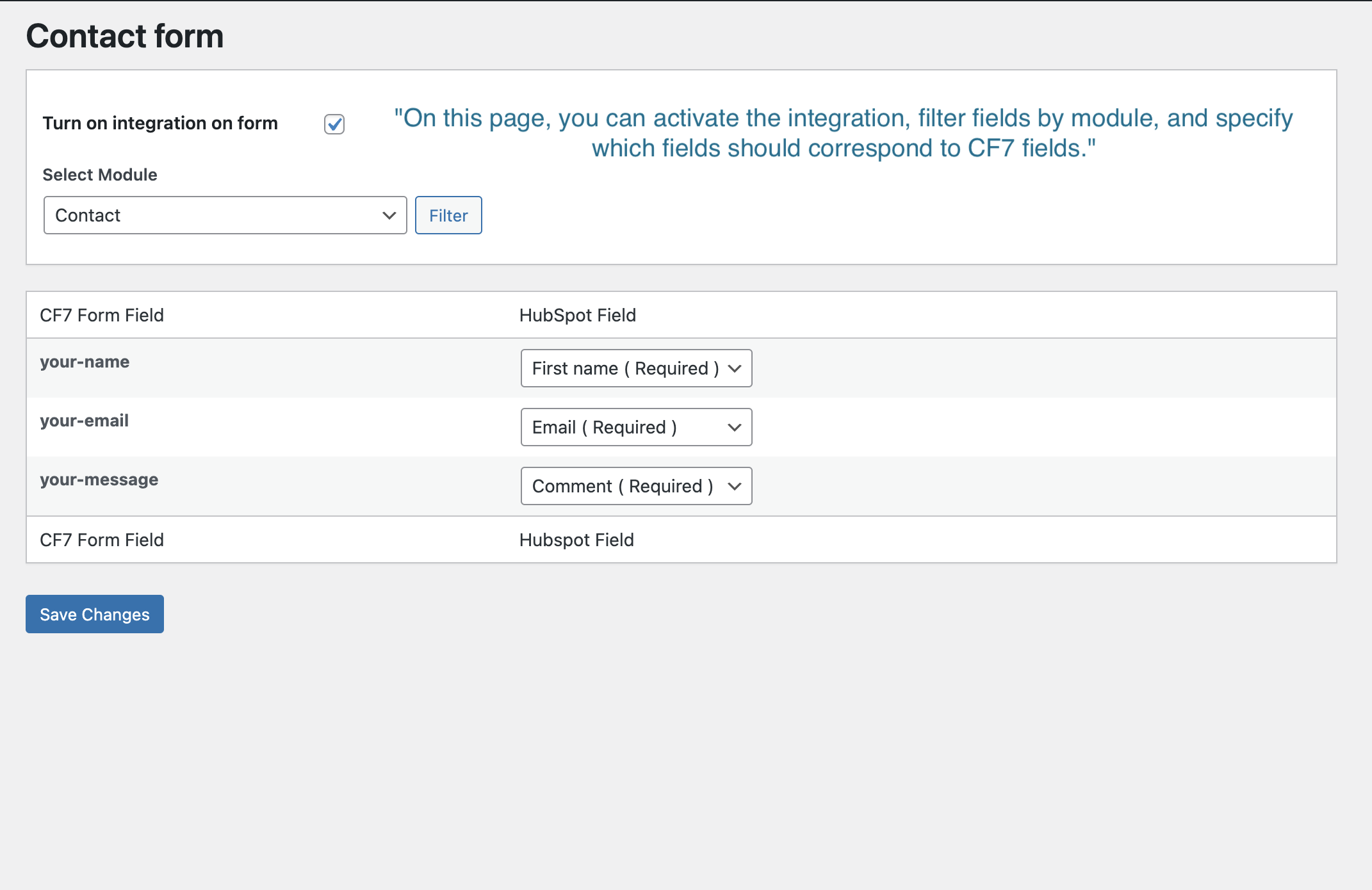
– Intuitive mapping of form fields to HubSpot properties.
– Utilization of the latest HubSpot API for enhanced security and reliability.
– Asynchronous HubSpot submissionsConnect CF7 to HubSpot by ProCoders is a powerful plugin that connects WordPress Contact Form 7 directly with your HubSpot account, automating your workflow and enhancing lead management. With this plugin, every submission from Contact Form 7 is instantly and securely synced with HubSpot, allowing you to manage contacts, track submissions, and engage with your audience without manual data entry.
Third-Party Service Integration:
This plugin integrates with HubSpot, a third-party service, to manage and sync data from Contact Form 7 submissions. By using this plugin, data collected through Contact Form 7 will be sent to HubSpot for processing and storage. Please be aware that by using this plugin, you agree to the terms of service and privacy policy of HubSpot.
Specifically, our plugin sends requests to the following URLs:
– https://api.hubapi.com
– https://api.hsforms.com
– HubSpot’s Privacy Policy: https://legal.hubspot.com/privacy-policy
– HubSpot Terms of Service: View Terms – https://legal.hubspot.com/terms-of-service
Features include:
– Easy integration with HubSpot’s Lead Capture Forms, Contacts, and Deals.
– Automated syncing of Contact Form 7 submissions to HubSpot.
– Support for custom fields in HubSpot, allowing for detailed data capture.
– Intuitive mapping of form fields to HubSpot properties.
– Utilization of the latest HubSpot API for enhanced security and reliability.
Asynchronous HubSpot submissions (optional, since 1.3)
Want forms to feel instant for visitors while HubSpot catches up behind the scenes? Turn on async mode in the plugin settings. The visitor’s submission is accepted by Contact Form 7 without waiting on HubSpot network round-trips; syncing runs as a background job so thank-you pages and redirects stay snappy even when APIs are slow or busy.
The queue uses Action Scheduler when it is available on your site (for example alongside WooCommerce), which is built for reliable background work. If Action Scheduler is not present, the plugin falls back to WordPress cron with a sensible delay. Failed jobs are retried automatically with exponential backoff (up to three attempts), reducing the chance of losing a lead to a temporary outage or rate limit. Contacts, deals, HubSpot forms, and file attachments are supported in async mode the same way as synchronous processing—attachments are staged safely for the worker.
Installation
- Download the plugin from WordPress.org and unzip it.
- Upload the ‘connect-cf7-to-hubspot’ folder to your ‘/wp-content/plugins/’ directory.
- Activate the plugin through the ‘Plugins’ menu in WordPress.
- Navigate to the plugin settings page and follow the on-screen instructions to connect your HubSpot account.
For WordPress Multisite:
1. Upload and install the plugin zip file via ‘Network Admin’ -> ‘Plugins’ -> ‘Add New’.
2. Do not network-activate. Instead, activate the plugin on a per-site basis for precise control.
Frequently asked questions
Could you answer to some question I have about your plugin?
For more detailed assistance or any additional queries, please feel free to contact us through our website: https://procoders.tech/contacts/
Is Contact Form 7 HubSpot integration easy with your plugin?
Yes, our plugin makes it incredibly easy to integrate Contact Form 7 with HubSpot. We’ve designed it to be user-friendly and streamlined, allowing you to seamlessly sync your form submissions with your HubSpot account without any hassle.
How do I obtain a HubSpot Access Token?
To obtain a HubSpot Access Token, follow these steps: – Log in to your HubSpot account as an administrator. – Go to “Settings” -> “Integrations” -> “Private apps.” – Click on the “Create a private app” button. – In the “Basic Info” tab, add an app name and description. – In the “Scopes” tab, select the following “CRM” and “Standard” scopes: crm.objects.contacts, crm.objects.deals, crm.schemas.contacts, crm.schemas.deals. – Under “files,” check the “Request” checkbox. – Under “forms,” check the “Request” checkbox. – If you use journey (custom behavioral) events (cf7_form_submitted…
Can I use this plugin to sync contacts to a specific HubSpot pipeline?
Yes, during the setup process, you can choose which pipeline your contacts should be synced with in HubSpot.
How can I contribute to the plugin?
We appreciate your interest in contributing to our plugin! If you’d like to get involved, whether it’s by reporting bugs, suggesting new features, or proposing enhancements, please reach out to us at hello@procoders.tech. We value community input and are always looking for ways to improve our products.
What is Contact Form 7?
Contact Form 7 is a popular and highly customizable WordPress plugin that allows you to create and manage various types of contact forms on your website. It offers a wide range of features and integrations, making it a versatile solution for collecting user data and facilitating communication.
Is Contact Form 7 GDPR compliant?
Yes, Contact Form 7 is designed to be GDPR (General Data Protection Regulation) compliant. It includes features and settings that help website owners comply with GDPR requirements, such as the ability to obtain explicit consent from users before collecting their data and providing options for data retention and erasure.
Is HubSpot a CRM or marketing tool?
HubSpot is a comprehensive platform that offers both CRM (Customer Relationship Management) and marketing tools. While it started as a marketing automation solution, HubSpot has evolved into an all-in-one suite that combines CRM capabilities with marketing, sales, and customer service functionalities.
HS plugin is “splitting” a form submission into two in HubSpot
Try to disable “Collect data from website forms” in “Non-HubSpot forms” options
Changelog
Fixes a fatal error on the forms screen when HubSpot form sync fails. If the screen was blank, check that your private app token has the forms scope.
1.3.8
- Fixed a fatal error on the forms screen (“Call to a member function set_template_data() on null”) that appeared whenever the HubSpot form sync failed: the screen now shows the reason instead of a white page. The usual cause is an access token without the
formsscope. - Admin screens no longer break when template data is missing; they show a notice and keep the rest of the page usable.
- Fixed the admin notice box rendering empty when a message carried no text.
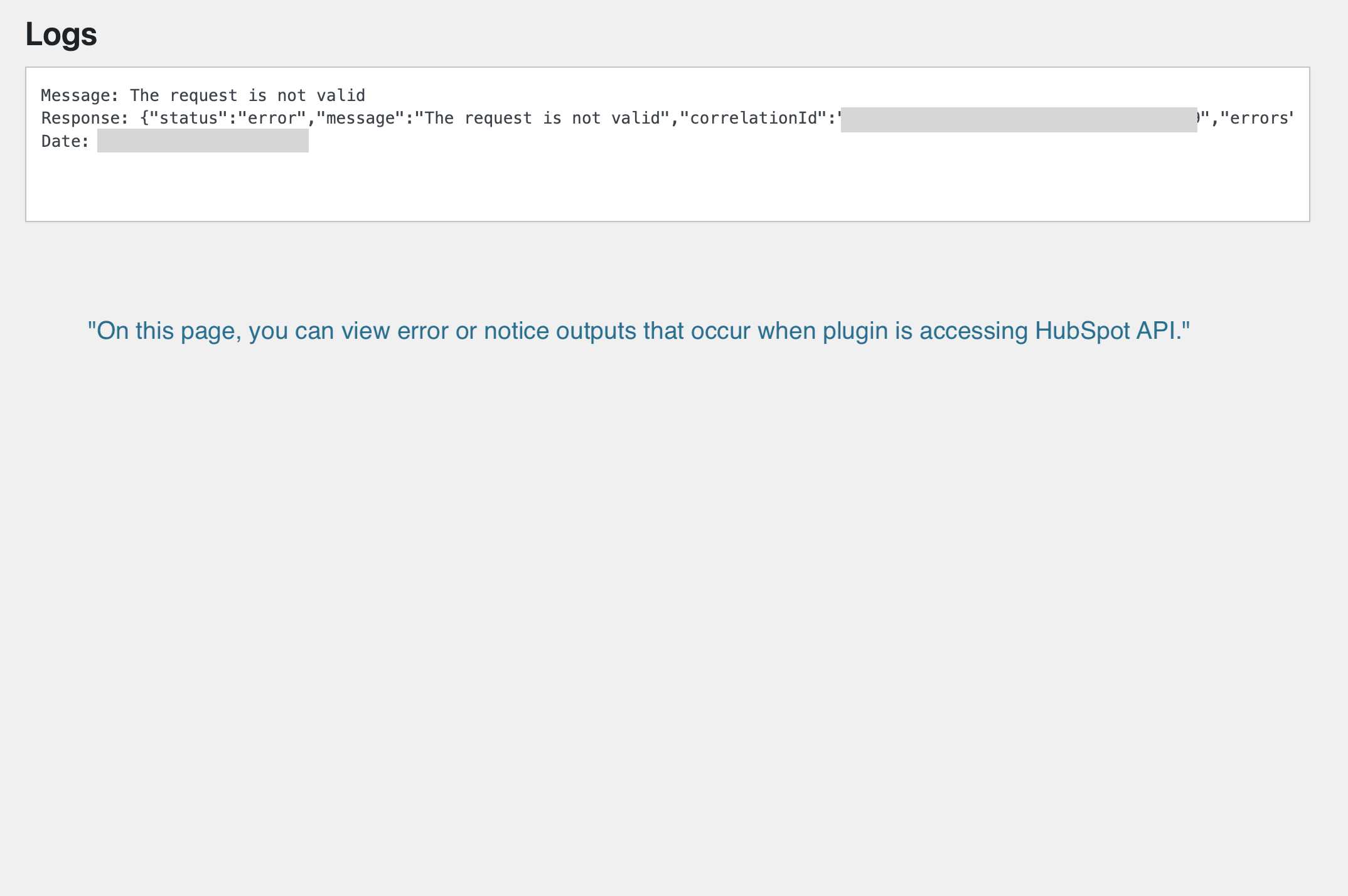
- Error Logs screen: the “Clear logs” button moved above the log output so it stays reachable, and the log box now scrolls at a fixed height instead of stretching the page.
1.3.5
- Fixed HubSpot property lists never refreshing: schemas were cached for 12 hours with no way to invalidate them, so properties created, renamed or deleted in HubSpot did not reach the mapping dropdowns.
- Added a “Refresh HubSpot properties” button on the Settings screen to clear the cached schemas on demand.
- Saving an access token now clears the cached schemas, so the connection test always reaches HubSpot.
- Settings screen regrouped: the properties cache and the Journey Events / background processing options now sit in their own sections.
1.3.4
- Fixed the Settings link.
1.3.3
- Simplified Journey Events settings to a single global on/off toggle.
- Restored and stabilized journey behavioral events (cf7_form_submitted, cf7_form_synced, cf7_form_sync_failed) for both sync and async flows.
1.3.2.1
- UTM and click ID attribution (query/cookie) merged into HubSpot payload only for mapped fields.
- Journey behavioral events: cf7_form_submitted, cf7_form_synced, cf7_form_sync_failed (sync and async; enable in Settings; filters cf7hs_journey_event_name, cf7hs_journey_events_enabled).
1.3.2
- Small Improve
Screenshots

For developers
Is this your plugin? Show off the numbers.
Add a live badge to your site, docs or GitHub README. It updates on its own — no account needed.
Best Connect CF7 to HubSpot alternatives
All contact form 7 plugins →





FAQ
Connect CF7 to HubSpot: quick answers
Straight answers, pulled from live WordPress.org data.
Live data from WordPress.org · checked Oct 13, 2026
Is Connect CF7 to HubSpot free?
Yes. Connect CF7 to HubSpot is free to download and use from the official WordPress.org plugin directory.
Is Connect CF7 to HubSpot safe to use in 2026?
Connect CF7 to HubSpot is a solid plugin choice in 2026, with a few things worth checking first. It runs on 300+ sites, is rated 5/5 and was last updated 2 months ago, and scores 71/100 on our health check.
How many websites use Connect CF7 to HubSpot?
Connect CF7 to HubSpot is active on 300+ WordPress websites and has been downloaded 6,467 times since it launched in May 2024. It was downloaded 287 times in the last 30 days.
Does Connect CF7 to HubSpot work with WordPress 7.1?
Connect CF7 to HubSpot is officially tested up to WordPress 7.0.7, while the latest release is 7.1.3. It may still work, but try it on a staging site first.
What PHP version does Connect CF7 to HubSpot need?
Connect CF7 to HubSpot requires PHP 8.0 or higher. Most hosts run PHP 8.x today, so it works on any modern WordPress hosting.
When was Connect CF7 to HubSpot last updated?
The latest version, 1.3.8, was released on August 21, 2026 (2 months ago).
Who makes Connect CF7 to HubSpot?
Connect CF7 to HubSpot is developed and maintained by Procoders.
What are the best alternatives to Connect CF7 to HubSpot?
The most popular alternatives to Connect CF7 to HubSpot are Database Addon for Contact… (600K+ installs), Redirection for Contact For… (200K+ installs) and ReCaptcha v2 for Contact Fo… (200K+ installs).
Powered by PageForge
Want thousands of pages that rank like these? Build them in an afternoon.
This directory runs on the same engine as PageForge. Turn any spreadsheet, CSV or API into thousands of fast, SEO-ready WordPress pages — with schema, internal links and AI-written copy baked in.
- CSV, Google Sheets & API data sources
- AI content, schema & internal links per page
- Works with Elementor, Gutenberg, Yoast & Rank Math
- Free on WordPress.org — no credit card


