


TNT Conditional Logic Fields for Elementor Forms
TNT Conditional Logic Fields for Elementor Forms adds real conditional logic to Elementor forms — and unlike most conditional-logic plugins for Elementor, it doesn’t force you to buy Elementor Pro to use it.

Solid choice
TNT Conditional Logic Fields fo… is a solid plugin choice in 2026, with a few things worth checking first. It runs on 40+ sites, is rated 5/5 and was last updated 4 weeks ago, and scores 74/100 on our health check.
- Actively developed — last update 4 weeks ago
- Tested with the latest WordPress (7.1)
- Small user base (40+ active installs)
- Very few reviews so far
How does it stack up?
Side-by-side on installs, updates, ratings & support


Daily downloads
Download spikes usually follow a new release — each site that auto-updates counts as a download.
Rankings
Where TNT Conditional Logic Field… stands todayWordPress.org search rankings
Live position in the plugin search, top 100| Keyword | Position |
|---|---|
| conditional logic | #20 |
| elementor form builder | >100 |
| elementor forms widget | >100 |
| Multi-Step Form | >100 |
| show hide fields | #58 |
Version adoption
Share of active sites per release.
Rating breakdown
★★★★★★★★★★ 5 from 1 reviews
About TNT Conditional Logic Fields for Elemen…
From the official readme · v1.3.3Description
TNT Conditional Logic Fields for Elementor Forms adds real conditional logic to Elementor forms — and unlike most conditional-logic plugins for Elementor, it doesn’t force you to buy Elementor Pro to use it.
Already have Elementor Pro? Add conditions to its Form widget the normal way. Only running free Elementor? Use our own built-in TNT Form widget instead — same conditions engine, same 12 operators, same AND/OR logic, zero Elementor Pro required. Either way, everything lives directly inside the native Elementor editor: no custom code, no external form builder, no separate dashboard to manage.
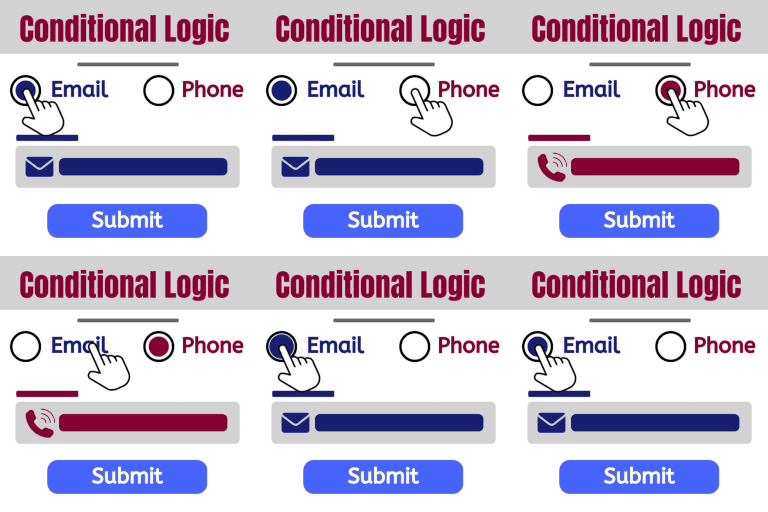
Long forms that ask every visitor the same questions create a poor experience and lower conversion rates. With conditional fields, a form shows only the questions relevant to what a visitor has already answered, so a quotation form, booking form, survey, or lead-generation form adapts in real time instead of overwhelming the visitor with irrelevant fields.
At a Glance
- No Elementor Pro required — this plugin ships its own TNT Form widget that works on 100% free Elementor, with the full conditional logic engine already built in
- Already have Elementor Pro? The same engine adds a Conditions tab to Elementor Pro’s own Form widget too — install once, both paths just work
- Genuinely free, not a trial — 12 operators, AND/OR logic, multi-step support, auto-fill, and URL/cookie triggers, all included at no cost
- Real-time, no page reload — fields show and hide instantly as a visitor types or selects an option
- Tired of setting the same condition on field after field? Pro’s Field Groups let you bundle fields into a group and set the condition ONCE — instead of repeating it on every single field in a long form
Key Features
- TNT Form widget — our own form widget for sites on 100% free Elementor with no Elementor Pro required, with the same conditional logic engine built in
- Show or hide any Elementor form field based on conditions — works on Elementor Pro’s Form widget and on the TNT Form widget
- Unlimited conditional rules per field, combined with AND / OR logic
- 12 comparison operators in the free version — equals, contains, starts with, ends with, greater/less than, empty, and more
- Auto-Fill Value — a field can set its own value automatically when its condition is met, ideal for a hidden field used for lead routing or tagging
- URL parameter & cookie-based conditions — trigger a rule from a
?utm_source=query string or a browser cookie, not only from another field - Multi-step form support, with hidden steps automatically skipped
- Hidden required fields never block form submission
- Works with every standard Elementor form field: text, email, number, select, radio, checkbox, acceptance, date, time, upload, and more
- Native Elementor editor integration — conditions live in the same panel as every other field setting
Why Choose TNT Conditional Logic Fields
- Works for everyone — free Elementor users get a fully-featured form widget with real conditional logic; Elementor Pro users get the same engine added straight onto the Form widget they already use
- A genuinely capable free tier — AND/OR logic, 12 operators, multi-step support, auto-fill, and URL/cookie conditions, not a crippled trial
- Lightweight: scripts load only on pages that actually contain a form, with no external libraries
- Built with agencies and freelancers in mind, for rebuilding similar forms across multiple client sites regardless of which Elementor tier each client is on
- Stays inside Elementor’s native UI — no new page builder or dashboard to learn
- A clear upgrade path when you need more: Conditional Redirect, Conditional Email routing, Conditional Submit Button, Form Field Groups, Calculated Fields, Multi-Step Forms, and Dynamic Visibility in Pro — all working on the free TNT Form widget too, still with no Elementor Pro required
Free vs. Pro
Free includes the complete conditional logic engine described above — show/hide logic, AND/OR rules, all 12 operators, multi-step support, auto-fill, and URL/cookie conditions, on Elementor Pro’s Form widget AND on the free TNT Form widget.
Pro adds, all still available with no Elementor Pro required on the TNT Form widget:
- Conditional Redirect to different URLs after submission
- Conditional Email routing to different recipients based on field values
- Conditional Submit Button visibility
- Advanced Form Field Groups — bundle related fields into a group and control the entire group’s visibility with a single condition, instead of setting conditional logic on each field one by one. Create as many groups as your form needs, each with its own trigger condition
- Calculated Fields — a field whose value is computed live from a formula referencing other fields (e.g.
{qty} * {price}), verified server-side so it can’t be tampered with - Multi-Step Forms — split a form across pages with Next/Previous navigation, a progress bar, and step-level conditional logic
- Dynamic Visibility — show or hide any Elementor widget, section, column, or container by URL parameter or cookie, independent of forms entirely
Built For
Agencies and freelancers building client sites, and site owners running contact forms, quotation and booking forms, surveys, event registrations, job applications, product inquiry forms, support ticket forms, and lead-qualification forms — anywhere a form should adapt to what a visitor has already told it.
Compatible Field Types
Text, Email, Number, URL, Password, Textarea, Select, Radio, Checkbox, Acceptance, Date, Time, Hidden, HTML, Step, Upload, Honeypot.
Installation
Quick Installation
- Go to Plugins > Add New.
- Search for TNT Conditional Logic Fields for Elementor Forms.
- Click Install Now, then Activate.
Manual Installation
- Download the plugin ZIP file.
- Upload it via Plugins > Add New > Upload Plugin.
- Activate the plugin.
Requirements
- WordPress 6.5 or higher
- Elementor (free) — that’s it. Elementor Pro and Hello Plus are both optional; the plugin’s own TNT Form widget doesn’t need either
- PHP 7.4 or higher
Getting Started
On free Elementor (no Elementor Pro):
- Go to TNT Conditional Fields → Features and enable Conditional Logic.
- Add the TNT Form widget to any page from the Elementor widget panel.
- Open any field’s Conditions tab, enable conditions, choose Show or Hide, and add your rule(s).
- Publish the page — the field shows or hides as visitors interact with the form.
On Elementor Pro (or Hello Plus):
- Go to TNT Conditional Fields → Features and enable Conditional Logic.
- Edit a page with an Elementor Pro Form widget.
- Open any form field and expand its Conditions tab.
- Enable conditions, choose Show or Hide, and add your rule(s).
- Publish the page and test the form — the field will show or hide as visitors interact with it.
Example: add an “Order ID” text field, then set it to Show when Inquiry Type equals Order Status — visitors only see the Order ID field once it’s relevant to them.
Frequently asked questions
Do I need Elementor Pro to use this plugin?
No. That’s the whole point of the TNT Form widget included in this plugin — it works on 100% free Elementor with no Elementor Pro or Hello Plus required, and has the exact same conditional logic engine built in. If you do already have Elementor Pro (or Hello Plus), the plugin also adds a Conditions tab straight onto its own Form widget, so either way you’re covered.
Do I have to set up the same condition on every field one by one?
Not if you upgrade to Pro. In the free version, yes — conditional logic is applied per field, which is fine for a handful of fields but repetitive on a longer form where five or ten fields all need to appear under the same answer. Pro’s Form Field Groups solves exactly this: bundle those fields into one group and set the condition once, instead of copying the same rule onto every field. It’s a genuine time-saver, not just a convenience — most Elementor form plugins only offer field-by-field logic, not true group-level bundling.
How do I show or hide a field based on another field’s value?
Open the field in the Elementor editor, expand its Conditions tab, enable conditions, choose Show or Hide, and add a rule that references the controlling field’s ID.
Can I trigger a condition from a URL parameter or a cookie?
Yes. Enter url:param_name or cookie:cookie_name as the condition’s Field ID instead of a form field ID.
Can a field auto-fill its own value when a condition is met?
Yes, using the Auto-Fill Value option on the Conditions tab. It’s most often used to set a hidden field’s value for lead routing or tagging.
What happens to hidden required fields when the form is submitted?
They’re automatically excluded from validation, so a hidden required field never blocks form submission.
Does it support multi-step forms?
Yes — hidden steps are automatically skipped, and the Next/Submit buttons adjust to match.
Which operators are supported in the free version?
Equals, Not Equals, Greater Than, Less Than, Greater Than or Equal, Less Than or Equal, Contains, Does Not Contain, Starts With, Ends With, Empty, and Not Empty.
Does it work with dynamic tags?
Yes, wherever Elementor Forms itself supports dynamic tags.
Does it slow down my website?
No. Scripts load only on pages that contain an Elementor form, and there’s no measurable admin-side overhead.
Is it compatible with PHP 8.x and multisite?
Yes to both.
My conditions aren’t working — what should I check?
Confirm Conditional Logic is enabled under TNT Conditional Fields → Features, that Elementor Pro is up to date, and that the Field ID in your rule matches the controlling field exactly. Deactivating other plugins temporarily can help rule out a conflict.
Can I hide multiple fields with one condition instead of setting logic on each field?
Yes, with Pro’s Form Field Groups. Instead of applying field-level conditional logic one field at a time, you bundle multiple fields into a group and control the whole group’s visibility with a single condition — hide or show an entire section of the form at once, rather than bulk show/hide field-by-field. You can create unlimited field groups in one Elementor form, each with its own trigger condition.
What’s included in the Pro version?
Conditional Redirect after submission, Conditional Email routing, Conditional Submit Button visibility, and Advanced Form Field Groups for group-level (rather than field-level) conditional logic.
Changelog
QA release: full regression re-verification, no functional changes. Safe to update.
1.3.3
- QA: full regression pass re-verification alongside the Pro plugin’s 1.7.0 release (Dynamic Visibility’s new condition sources) — syntax and shared-engine checks re-run with no functional issues found and no code changes required.
1.3.2
- QA: full regression pass re-verification alongside the Pro plugin’s 1.6.4 release — syntax and shared-engine checks re-run with no functional issues found and no code changes required.
1.3.1
- Updated: readme and plugin description rewritten to lead with the plugin’s biggest differentiator — full conditional logic that works with or without Elementor Pro, thanks to the built-in TNT Form widget. No functional changes.
- Updated: Requirements and Getting Started sections corrected — they previously implied Elementor Pro or Hello Plus was required; both are optional, and each section now gives a separate path for free-Elementor and Elementor-Pro users.
- Updated: Free vs. Pro comparison brought back in sync with the current Pro feature set (Calculated Fields, Multi-Step Forms, and Dynamic Visibility were missing from the list).
1.3.0
- New: TNT Form widget — a self-contained form widget that works on free Elementor with no Elementor Pro or Hello Plus required. Supports text, email, textarea, number, phone, URL, select, radio, checkbox, acceptance, and hidden fields, plus AJAX submission, a honeypot spam trap, and email notifications.
- New: The existing conditional logic engine (all 12 operators, AND/OR, auto-fill, URL/cookie conditions) works on the TNT Form widget identically to how it already works on Elementor Pro forms — same “Conditions” tab, same rules.
- Improved:
evaluate(),resolve_rule_source_value(), and the hidden-field logic inoutput_logic_json()/server_validate()were refactored into a shared, reusable engine so the new widget and the existing Elementor Pro/Hello Plus integration can’t drift out of sync with each other.
1.2.0
- New: Documented Pro’s Form Field Groups more thoroughly in the description and FAQ — group-level conditional logic for hiding/showing multiple fields at once, as an alternative to field-by-field rules.
- New: A “Leave a Review” notice now appears on the plugin’s own settings page once Conditional Logic has been enabled for at least 7 days. Dismissible, and never shown again once dismissed.
1.1.1
- Fixed: A condition’s comparison value wasn’t being HTML-entity-decoded before use (the decode result was computed but never applied), so rules comparing against a value containing
&,<,>, or a quote character could silently fail to match. Comparisons now use the correctly decoded value.
Screenshots


For developers
Is this your plugin? Show off the numbers.
Add a live badge to your site, docs or GitHub README. It updates on its own — no account needed.
Best TNT Conditional Logic Fields… alternatives
All conditional logic plugins →





FAQ
TNT Conditional Logic Fields for El…: quick answers
Straight answers, pulled from live WordPress.org data.
Live data from WordPress.org · checked Oct 14, 2026
Is TNT Conditional Logic Fields fo… free?
Yes. TNT Conditional Logic Fields fo… is free to download and use from the official WordPress.org plugin directory.
Is TNT Conditional Logic Fields fo… safe to use in 2026?
TNT Conditional Logic Fields fo… is a solid plugin choice in 2026, with a few things worth checking first. It runs on 40+ sites, is rated 5/5 and was last updated 4 weeks ago, and scores 74/100 on our health check.
How many websites use TNT Conditional Logic Fields fo…?
TNT Conditional Logic Fields fo… is active on 40+ WordPress websites and has been downloaded 829 times since it launched in May 2026. It was downloaded 243 times in the last 30 days.
Does TNT Conditional Logic Fields fo… work with WordPress 7.1?
Yes. The developer has tested TNT Conditional Logic Fields fo… up to WordPress 7.1.3, the latest release. It requires WordPress 6.5 or newer.
What PHP version does TNT Conditional Logic Fields fo… need?
TNT Conditional Logic Fields fo… requires PHP 7.4 or higher. Most hosts run PHP 8.x today, so it works on any modern WordPress hosting.
When was TNT Conditional Logic Fields fo… last updated?
The latest version, 1.3.3, was released on September 17, 2026 (4 weeks ago).
Who makes TNT Conditional Logic Fields fo…?
TNT Conditional Logic Fields fo… is developed and maintained by Themesntemplates.
What are the best alternatives to TNT Conditional Logic Fields fo…?
The most popular alternatives to TNT Conditional Logic Fields fo… are Conditional Fields for Cont… (100K+ installs), Conditional Fields for Elem… (10K+ installs) and If-So Dynamic Content (7K+ installs).
Powered by PageForge
Want thousands of pages that rank like these? Build them in an afternoon.
This directory runs on the same engine as PageForge. Turn any spreadsheet, CSV or API into thousands of fast, SEO-ready WordPress pages — with schema, internal links and AI-written copy baked in.
- CSV, Google Sheets & API data sources
- AI content, schema & internal links per page
- Works with Elementor, Gutenberg, Yoast & Rank Math
- Free on WordPress.org — no credit card


