


People profiles, team- and company pages
Use the Prodii Publisher Plugin to.. – Create an employee directory – Promote people on your homepage – Map ressources and share skills transparency

Consider an alternative
People profiles, team- and comp… shows warning signs in 2026 — compare the alternatives below before installing. It runs on 20+ sites, is rated 4.3/5 and was last updated 8 years ago, and scores 29/100 on our health check.
- Small user base (20+ active installs)
- Very few reviews so far
- No update in 7 years
- Only tested up to WordPress 5.0 (latest is 7.1)
Daily downloads
Download spikes usually follow a new release — each site that auto-updates counts as a download.
Rankings
Where People profiles, team- and… stands todayWordPress.org search rankings
Live position in the plugin search, top 100| Keyword | Position |
|---|---|
| employee advocay | #1 |
| employee directory | >100 |
| employee list | >100 |
| employee profile | >100 |
| people | >100 |
Version adoption
Share of active sites per release.
Rating breakdown
★★★★★★★★★★ 4.3 from 3 reviews
About People profiles, team- and company pages
From the official readme · v5.1.0Description
Use the Prodii Publisher Plugin to..
– Create an employee directory
– Promote people on your homepage
– Map ressources and share skills transparency
Prodii is designed for freelancer networks, communities and distributed organisations.
– For project team leaders and project managers who want to introduce team members in the fastest way possible.
– For organisers of networks and communities who want to map and visualise ‘places we work’ and ‘skills we have’.
– For HR who want to build an organisational map, organise ressources and relations and build a skills database.
The Prodii WP Publisher Plugin connects your homepage to your account on https://prodii.com.
Save time when introducing people profiles on your home page:
Prodii WP plugin saves professionals lots of time and trouble when introducing people and their skills; within the team, within the organisation and towards clients. The Prodii Publisher Plugin enables you to publish professionel presentations of your organisation, with teams, team pages and complete team member profiles. Using just one short code you can publish as many teams and profiles as you need.
Don’t worry about updates; The Prodii WP Plugin synchronises content from your prodii account and networks into your wordpress homepage. Your team members are doing the work for you by keeping their profile updated.
Get started: Discover
Everybody has work relations with a potential. In todays work life this potential can become one of your most important assets.
- Discover the potential of your work relations
- Organise all your project groups in one place
- Host your trusted community for people working together
On https://prodii.com you collect and share professional information within your network and teams.
A quick introduction to team members
Going to an event? Joining a workshop? Working on a project in virtual teams? Create your event/ workshop-team and invite the other participants. Ask them about specific skills and let them complete their profile adding skills they want to share.
A Network with your own searchable skills
All you need to do is to structure your network in teams and invite people from your work life. When coming together – your personal network of skills and ressources are build bottom up. And the best part? You can pass on the depeche to your networks members and they can start building their network of work relations.
Promote;
The Prodii plugin integrates information from your prodii account into your wordpress homepage.
Publish on your WP homepage
You can generate a short code for:
- each profile.
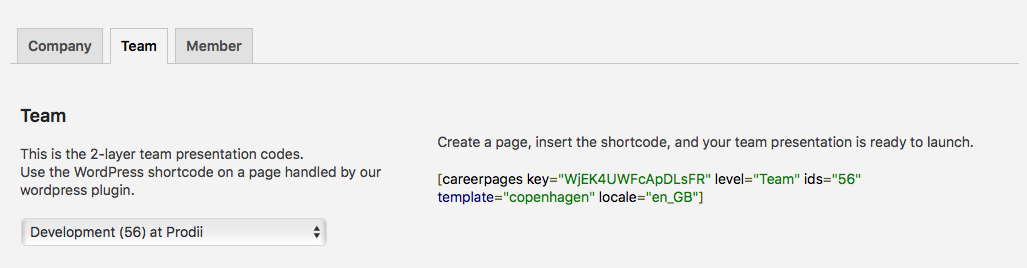
- a team; a 2-level page structure that includes all belonging profiles.
- a network page; an entire organisational 3-level structure that includes all selected teams and belonging profiles.
Put each short code on a page with full width page settings.
The short codes includes the id-numbers of your profile, team and/ or network and the name of the template that defines the layout and design.
Prodii offers a few free templates in opensource. You can design your own templates from these layouts by changing the CSS file.
This is how it works
-
Go to https://prodii.com and sign up for an account
- Import/ enter data to build your personal profile
- Fill out information about your company (organisation, network of teams)
- Create your teams and invite people
- Copy your WP-publisher Key*
-
Go to your wordpress homepage
- Install and activate Prodii WP-plugin
- Paste your WP-publisher Key into Settings
- Select template
- Generate short code and put it on a page
- Setting for the page must be “full page”
NB! Please read carefully before you install
First – Sign Up on https://prodii.com (no credit card required)
Then – Get your publisher Key for the WP-pluginPlease make sure you have the newest version of WordPress and our plugin installed.
Before downloading and installing this plugin please get familiar with our terms and conditions.
*) WP Publisher Key is a paid service with a 30 Day Free Trial period (no credit card required).
Templates
With a template you can show the network, team and profile pages as you like.
Select the template you like best from our template sample page, we offer some “ready to use” templates.
Templates are open source. Download any of the templates and customise it as you please.
Installation
- Download, install and activate the plug-in.
- From the menu in Your WordPress Dashboard open the Prodii plugin.
- Get your Publisher Key from your prodii account and paste the key into the ‘settings’ section.
How to get your Publisher Key
- Create/ login to your account on https://prodii.com.
- Go to your personal menu and select Account.
- Your publisher Key is a combination of letters and numbers – copy the key.
Generate a shortcode from the WP dashoard
Go to the “Shortcode” section .
- Select template (the visual presentation).
- Select locale (translates the labels and headings in the template).
- Select level Network, Teams or Profile.
Network shortcode for 3-level structure with the network and all teams you want to include
[careerpages key="Your Personal Key" level="Network" ids="network id,team ids" template="name of template" locale="selected language"]Team shortcode for a 2-level structure with the team and members you want to include
[careerpages key="Your Personal Key" level="Team" ids="team id" template="name of template" locale="selected language"]Member profile shortcode for the member you want to publish
[careerpages key="Your Personal Key" level="Profile" ids="profile id" template="name of template" locale="selected language"]
Important Note:
Copy/paste the shortcode into a page in textmode (not wysiwyg) – include start and end bracket.
You can create and publish as many shortcode combinations as you need.All active teams will be included when posting the network page.
All active profiles will be included when posting the team page.Setting for the page must be “full page”.
Manage your networks, team- and member status on https://prodii.com.
Changelog
5.1.0
- Modification – The old data structure were designed to specific elements, but now we are introducing a new and more generic data structure.
- Modification – The media icons from Awesome Fonts is no longer used. Instead we hold all the icons from the media that we supports on prodii.com. The new icons is in colors, so if you are the developer of a Prodii template, you are free to show them as you like. With pure css you can choose to style the icon to show them in colors, white or any other color just as you like.
5.0.1
- Modification – We are now using the WP_Http class istead of using cURL directly, as WordPress recommend.
- Modification – Languages now covers bort speaking and writing abilities. So the old data structure languages.name and languages.longname is deprecated and languages.speakname, languages.speakname, languages.speakname and languages.speakname are now the new standard. Template developers can still use the old ones but we recommende use of the new data structure.
5.0.0
- Problem resolved – Depricated constructor format problem.
- Modification – ‘company’ renamed to the more logical name ‘network’ in order to reflect the purpose of this tool. Company in the shortcode is now depricated, but can still be used.
- Modification – Customer ‘Google Map key’-field introduced to the ‘Settings’-section.
4.3.6
- Modification – Enhanced error handling added. The templates will be shown if it is possible, even if the shotcode has errors. If it is not possible, a proper error message will be show. In any error situation, an visible icon is shown on the template top to imply that you have an error.
4.3.5
- Problem resolved – Had some problems showing the templates in special situations.
4.3.4
- Problem resolved – Prettyfy problem in the WordPress admin code generator.
- Modification – Added the ability to rate the plugin link from admin.
Screenshots




For developers
Is this your plugin? Show off the numbers.
Add a live badge to your site, docs or GitHub README. It updates on its own — no account needed.
FAQ
People profiles, team- and company…: quick answers
Straight answers, pulled from live WordPress.org data.
Live data from WordPress.org · checked Oct 1, 2026
Is People profiles, team- and comp… free?
Yes. People profiles, team- and comp… is free to download and use from the official WordPress.org plugin directory.
Is People profiles, team- and comp… safe to use in 2026?
People profiles, team- and comp… shows warning signs in 2026 — compare the alternatives below before installing. It runs on 20+ sites, is rated 4.3/5 and was last updated 8 years ago, and scores 29/100 on our health check.
How many websites use People profiles, team- and comp…?
People profiles, team- and comp… is active on 20+ WordPress websites and has been downloaded 15,799 times since it launched in April 2014. It was downloaded 49 times in the last 30 days.
Does People profiles, team- and comp… work with WordPress 7.1?
People profiles, team- and comp… is officially tested up to WordPress 5.0.29, while the latest release is 7.1.2. It may still work, but try it on a staging site first.
When was People profiles, team- and comp… last updated?
The latest version, 5.1.0, was released on February 18, 2019 (8 years ago).
Who makes People profiles, team- and comp…?
People profiles, team- and comp… is developed and maintained by Ralph Rezende Larsen.
Powered by PageForge
Want thousands of pages that rank like these? Build them in an afternoon.
This directory runs on the same engine as PageForge. Turn any spreadsheet, CSV or API into thousands of fast, SEO-ready WordPress pages — with schema, internal links and AI-written copy baked in.
- CSV, Google Sheets & API data sources
- AI content, schema & internal links per page
- Works with Elementor, Gutenberg, Yoast & Rank Math
- Free on WordPress.org — no credit card


