


Colorbox Panels & Info Box
Colorbox panels is based on bootstrap framework, so box is responsive and friendly to any mobile devices. Colorbox is integrated with masonry/isotope effect. You can add multiple content box and icon box on multiple…

Use with caution
Colorbox Panels & Info Box works, but test it on a staging site before relying on it in 2026. It runs on 1K+ sites, is rated 4.6/5 and was last updated 2 years ago, and scores 45/100 on our health check.
- Loved by users — 4.6/5 from 44 reviews
- Momentum — downloads up 68.9% vs the previous 30 days
- No update in over a year
- Only tested up to WordPress 6.7 (latest is 7.1)
How does it stack up?
Side-by-side on installs, updates, ratings & support



Daily downloads
Download spikes usually follow a new release — each site that auto-updates counts as a download.
Rankings
Where Colorbox Panels & Info Box stands todayWordPress.org search rankings
Live position in the plugin search, top 100| Keyword | Position |
|---|---|
| Box | >100 |
| content box | >100 |
| icon box | >100 |
| info box | #26 |
| panels | #16 |
Version adoption
Share of active sites per release.
Rating breakdown
★★★★★★★★★★ 4.6 from 44 reviews
About Colorbox Panels & Info Box
From the official readme · v2.1.6Description
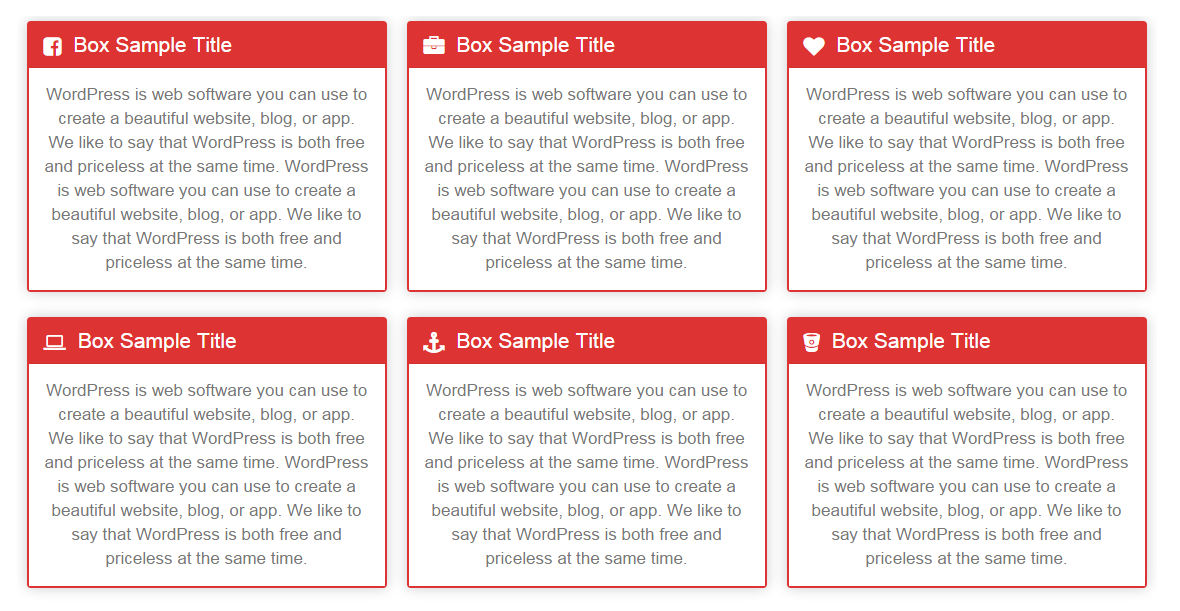
Colorbox panels is based on bootstrap framework, so box is responsive and friendly to any mobile devices. Colorbox is integrated with masonry/isotope effect. You can add multiple content box and icon box on multiple pages and post. There unlimited colour scheme and font style available for content.
This is not a popup box or lightbox plugin, this is a content box or icon box plugin, which is display your content in column layout. You can add service page or, team page using colorbox plugin. There Widget option also available, just paste your shortcode [WPSM_COLORBOX id=xx] in text widget for display your content in widget area.
Features Of Plugin
- Responsive Design
- Colorbox is responsive and friendly to any mobile devices
- Limitless Colorbox/panels anywhere in the theme
- Drag and Drop builder Api integrated.
- Draggable box items for easy sorting
- Use via short-codes
- Awesome input field for box content
- Unlimited colour option
- Bootstrap framework based
- Less for quick customization
- Font Awesome Icon Support
- Font Awesome Icon Picker Integrated
- Two different styles Integrated
- Hide All Colorbox on page load or display all
- Five box layout available
- Masonry/Isotope effect integrated
- Box Same height js integrated
- Gulp for instant workflow
- Display iconbox
- Display only description
- Highly customized for User Experience
- Slick Frontend and backend UI
- Add and remove box item from backend.
- Multiple Advanced Custom Field Available
- All browser compatible
Colorbox Pro Features
- Responsive Design
- Colorbox is responsive and friendly to any mobile devices
- Limitless Colorbox/panels anywhere in the theme
- Drag and Drop builder Api integrated.
- 8 Types Of Loading Animation
- External Link Option
- Individual Box Color Settings
- 10 types of Box Layout
- 500+ Google Fonts Integrated
- Box Border Customization
- Box Shadow Generator
- Box Radius Customization
- Use via short-codes
- Awesome input field for box content
- Unlimited colour option
- Bootstrap framework based
- Less for quick customization
- Font Awesome Icon Support
- Font Awesome Icon Picker Integrated
- Two different styles Integrated
- Hide All Colorbox on page load or display all
- Five box layout available
- Masonry/Isotope effect integrated
- Box Same height js integrated
- Gulp for instant workflow
- Display iconbox
- Display only description
- Highly customized for User Experience
- Slick Frontend and backend UI
- Add and remove box item from backend.
- Multiple Advanced Custom Field Available
- All browser compatible
Check Demos
Translators
Please contribute to translate our plugin. Contact at wpshopmart(at)gmail(dot)com.
Installation
- Upload the entire
colobox-panelsfolder to the/wp-content/plugins/directory. - Activate the plugin through the ‘Plugins’ menu in WordPress.
- Go to Colorbox Panels menu to customize this plugin.
- Copy your publish Colorbox shortcode and then paste into your page or post to display it.
Changelog
2.1.6
- Compatible with wordpress 6.7.1
2.1.5
- Compatible with wordpress 6.5
2.1.4
- Compatible with wordpress 6.4
2.1.3
- Compatible with wordpress 6.3
2.1.2
- Compatible with wordpress 6.2
2.1.1
- Compatible with wordpress 6.1.1
- styling issue resolved
Screenshots


For developers
Is this your plugin? Show off the numbers.
Add a live badge to your site, docs or GitHub README. It updates on its own — no account needed.
Best Colorbox Panels & Info Box alternatives
All Box plugins →





FAQ
Colorbox Panels & Info Box: quick answers
Straight answers, pulled from live WordPress.org data.
Source: WordPress.org
Is Colorbox Panels & Info Box free?
Yes. Colorbox Panels & Info Box is free to download and use from the official WordPress.org plugin directory.
Is Colorbox Panels & Info Box safe to use in 2026?
Colorbox Panels & Info Box works, but test it on a staging site before relying on it in 2026. It runs on 1K+ sites, is rated 4.6/5 and was last updated 2 years ago, and scores 45/100 on our health check.
How many websites use Colorbox Panels & Info Box?
Colorbox Panels & Info Box is active on 1K+ WordPress websites and has been downloaded 81,726 times since it launched in February 2016. It was downloaded 630 times in the last 30 days.
Does Colorbox Panels & Info Box work with WordPress 7.1?
Colorbox Panels & Info Box is officially tested up to WordPress 6.7.12, while the latest release is 7.1.5. It may still work, but try it on a staging site first.
When was Colorbox Panels & Info Box last updated?
The latest version, 2.1.6, was released on December 27, 2024 (2 years ago).
Who makes Colorbox Panels & Info Box?
Colorbox Panels & Info Box is developed and maintained by wpshopmart.
What are the best alternatives to Colorbox Panels & Info Box?
The most popular alternatives to Colorbox Panels & Info Box are BBSpoiler (4K+ installs), CSSIgniter Shortcodes (2K+ installs) and upPrev (1K+ installs).
Powered by PageForge
One template and a spreadsheet. A real page for every search.
PageForge turns each row of a CSV into a WordPress page with its own title, URL, SEO fields and schema, built on the layout you already designed. Free on WordPress.org.
- CSV and XLSX, plus Google Sheets on Professional and Enterprise
- Its own title, URL, SEO fields and schema for every page
- Works with the block editor, Elementor, Divi and Avada
- Free on WordPress.org, no credit card