


Bitcoin payment for WooCommerce
Accept Bitcoin payments with WooCommerce. All Bitcoin payments are transferred directly from your customer’s wallet into your Lightning wallet.

Use with caution
Bitcoin payment for WooCommerce works, but test it on a staging site before relying on it in 2026. It runs on 60+ sites, is rated 5/5 and was last updated 4 months ago, and scores 60/100 on our health check.
- Small user base (60+ active installs)
- Very few reviews so far
How does it stack up?
Side-by-side on installs, updates, ratings & support



Daily downloads
Download spikes usually follow a new release — each site that auto-updates counts as a download.
Rankings
Where Bitcoin payment for WooComm… stands todayWordPress.org search rankings
Live position in the plugin search, top 100| Keyword | Position |
|---|---|
| bitcoin | #5 |
| Lightning | #36 |
| payment gateway | >100 |
| SATS | #3 |
| woocommerce | >100 |
Version adoption
Share of active sites per release.
Rating breakdown
★★★★★★★★★★ 5 from 1 reviews
About Bitcoin payment for WooCommerce
From the official readme · v1.7.9Description
Accept Bitcoin payments with WooCommerce – simple, fast & secure!
To accept Bitcoin payments with WooCommerce has never been more simple and required less information – all you need to get started is an email and a Lightning wallet. The installation of our plugin is done in a few minutes – and you can start accepting Bitcoin payments with WooCommerce today!
With the Coinsnap Bitcoin payment plugin for WooCommerce you only need a Lightning wallet with a Lightning address, a Coinsnap account, and a minute to set up the plugin to accept Bitcoin Lightning payments in your WooCommerce online store.
Coinsnap’s Bitcoin payment plugin for WooCommerce makes it amazingly simple for your customers to purchase your offerings with Bitcoin-Lightning: They can make their transactions with just a scan of the QR code generated by the Coinsnap plugin for WooCommerce, and their authorization of the payment. When authorized, the payment will be credited directly and immediately to your Lightning wallet.
Also, Coinsnap’s Bitcoin payment plugin for WooCommerce is the only such plugin that is fully integrated with BTCPay Server. Merchants who operate their own BTCPay Server can connect their WooCommerce store via the Coinsnap plugin in a few minutes with their BTCPay Server, using Coinsnap’s integrated BTCPay Server wizard.
Accept Bitcoin payments with WooCommerce in only 3 steps:
- Get your free Coinsnap account with just your email
- Install, activate and configure the plugin in your WordPress backend (see the installation guide)
- Activate Bitcoin payments in WooCommerce and accept Bitcoin payments from your customers
Why should you choose the Coinsnap for WooCommerce plugin?
- Amazingly simple installation in just 3 steps and a few minutes
- Customizable checkout for optimized customer experience
- Multilingual merchant admin dashboard for easy administration and management of transactions.
Why should you choose Coinsnap as your Bitcoin payment solution?
- Quick and easy registration: Just enter your email address and your Lightning address – and you are ready to integrate the payment module and start selling for Bitcoin Lightning.
- Immediate crediting of all payments to your Lightning wallet.
- Payment transfer directly from your customer’s wallet to your wallet.
- Instant conversion and crediting in euro possible with Coinsnap and your Bringin Lightning address
- Low transaction fee of only 1%* of the invoiced amount (*with referrer code).
- The plugin is free of cost, including all future updates. Stay up-to-date at absolutely no cost today or in the future.
- Outstanding privacy: Direct, P2P payments into your Lightning wallet, no intermediaries and paperwork. Any transaction information is only shared between you and your customer.
- Detailed reporting and advanced filtering for all transactions, simple data export for your accounting.
- Sophisticated merchant’s admin dashboard in Coinsnap: See all your transactions at a glance, follow-up on individual payments or see issues with payments.
- No need for any technical infrastructure: Accept Bitcoin and Lightning payments in your online store without having to set up your own server or your own Lightning node.
- On-chain and Lightning transactions are supported: Let your customers choose their preferred payment method.
- BTCPay Server ready: connect your own BTCPay Server with WooCommerce in just a fes steps and a few minutes – no technical expertise needed!
Why should you offer Bitcoin payment in your WooCommerce shop?
- No chargebacks: All Bitcoin payments are irreversible.
- Lightning fast transactions: Receive your payment within seconds (with the Lightning payment method), in minutes with on-chain.
- Low fees (with Lightning)
- Global reach: Sell to any customer anywhere – all he needs to buy from you is a Lightning wallet.
More information:
- Demo Store: https://woocommerce.coinsnap.org/
- Product page: https://coinsnap.io/shop-systems/woocommerce/
- Installation Guide: https://coinsnap.io/user-guides/woocommerce-bitcoin-user-guide/
- Github plugin page: https://github.com/Coinsnap/Coinsnap-for-Woocommerce
Documentation:
Installation
1. Install the Coinsnap for WooCommerce plugin from the WordPress plugin repository
The Coinsnap for WooCommerce plugin can be searched and installed in the WordPress plugin directory.
You can easily find the Coinsnap for WooCommerce plugin under Plugins/Install new plugin if you enter Coinsnap WooCommerce in the search field. Simply click on Install now in the Coinsnap plugin and WordPress will install it for you.
Now WordPress will offer you to Activate the pugin – click the button and you set to go!
Next, you will connect the plugin with your Coinsnap account.
1.1. WooCommerce Coinsnap Settings
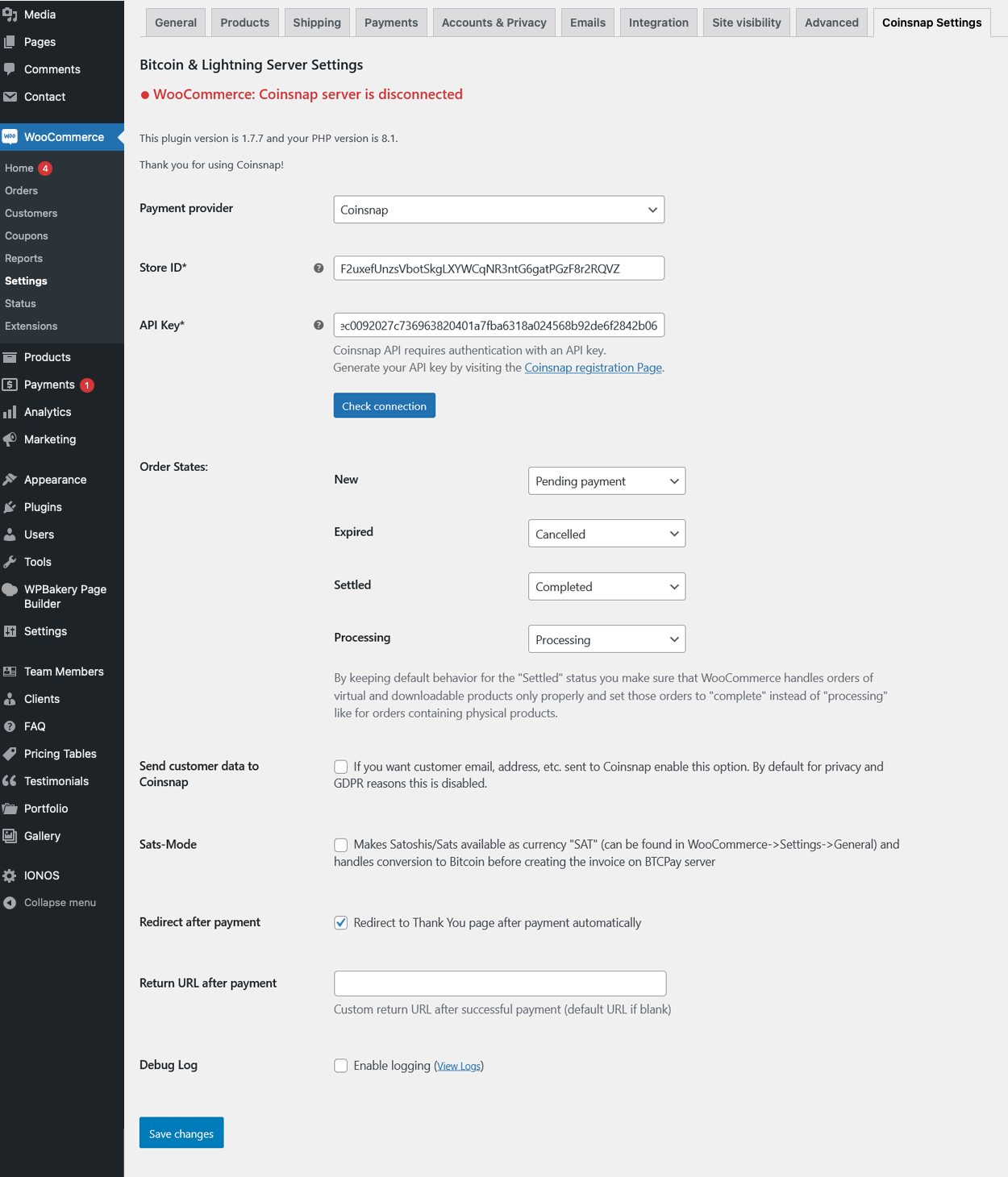
After you have installed and activated the Coinsnap for WooCommerce plugin, you need to configure the Coinsnap settings. To do that, go to WooCommerce / Settings. Now open the tab on the far right named Coinsnap Settings.
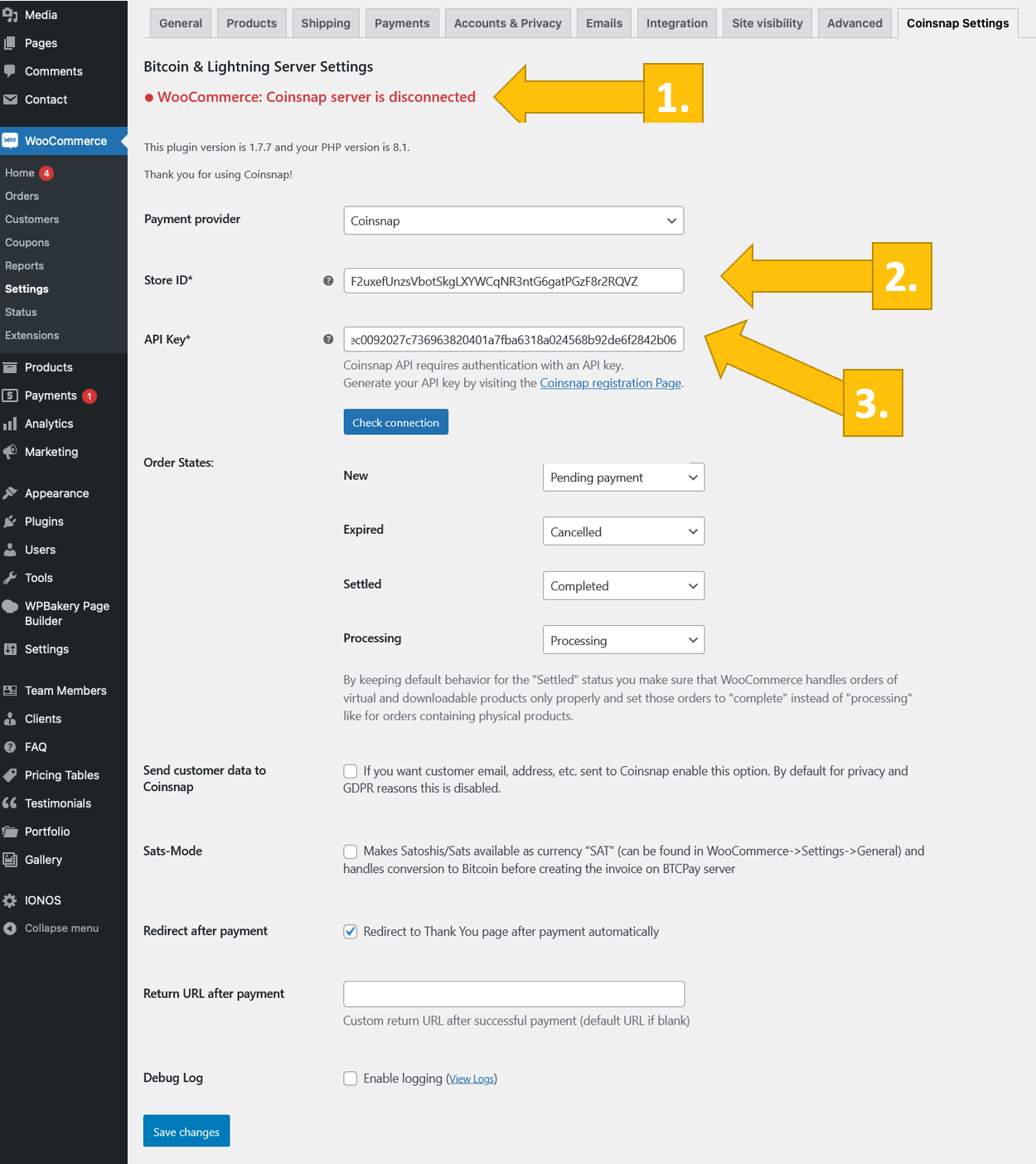
You will see in a red message on the top of the tab, that there is a Coinsnap serer is disconnected. Ignore this for now, for we will now connect the plugin with your Coinsnap account.
To do that, you need to enter your Coinsnap Store ID and your Coinsnap API key.
These details are provided in your Coinsnap account in the store settings section. If you do not yet have a Coinsnap account, you can register under the following link: Coinsnap registration.
You will be asked to name your store, and to enter your Lightning wallet adress. When this is done you are ready for the next step.
1.2. Enter Store ID and API Key in your WooCommerce Coinsnap Settings
Go to the Settings menu item in your Coinsnap merchant admin backend. Then click on Store and you will see your Coinsnap Store ID and the Coinsnap API Key in the Store section.
Copy these two strings and paste them into the matching fields in the Coinsnap settings in WooCommerce in your shop’s backend.
Click on the “Save changes” button at the bottom of the page to apply and save the settings. You will now see a green message on top of the tab saying Coinsnap server is connected. You are almost ready to start selling for Bitcoin now.
1.3. WooCommerce payment settings
Now you need to add the payment method Bitcoin-Lightning payment to your WooCommerce checkout.
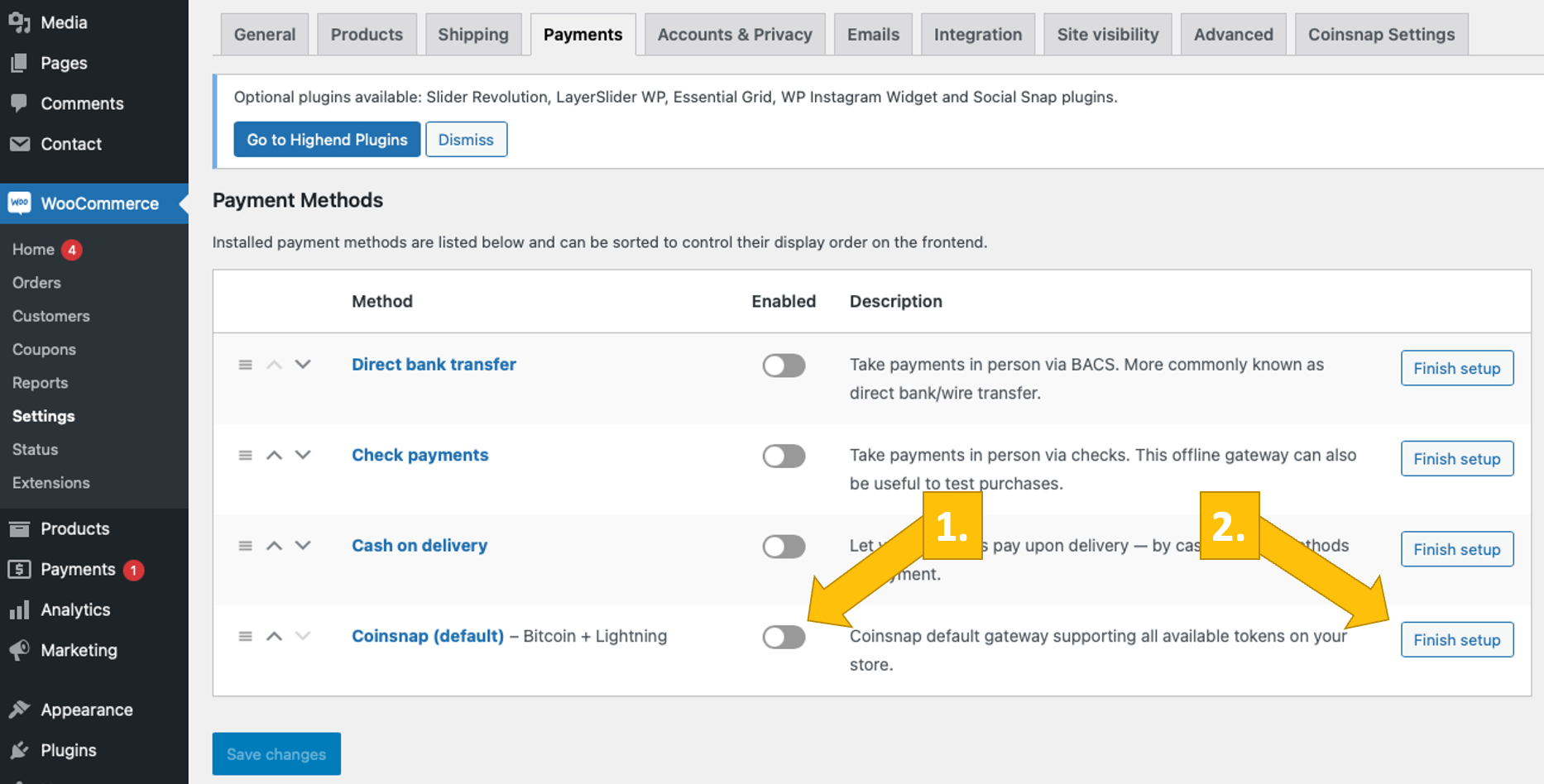
To do this, navigate to the Payments tab under the WooCommerce settings to see a list of all available payment methods. Coinsnap is shown at the bottom of the list.
(1) Enable Coinsnap by moving the slider to the right.
You must activate Coinsnap as a payment option!
Additional configurations – customize your checkout
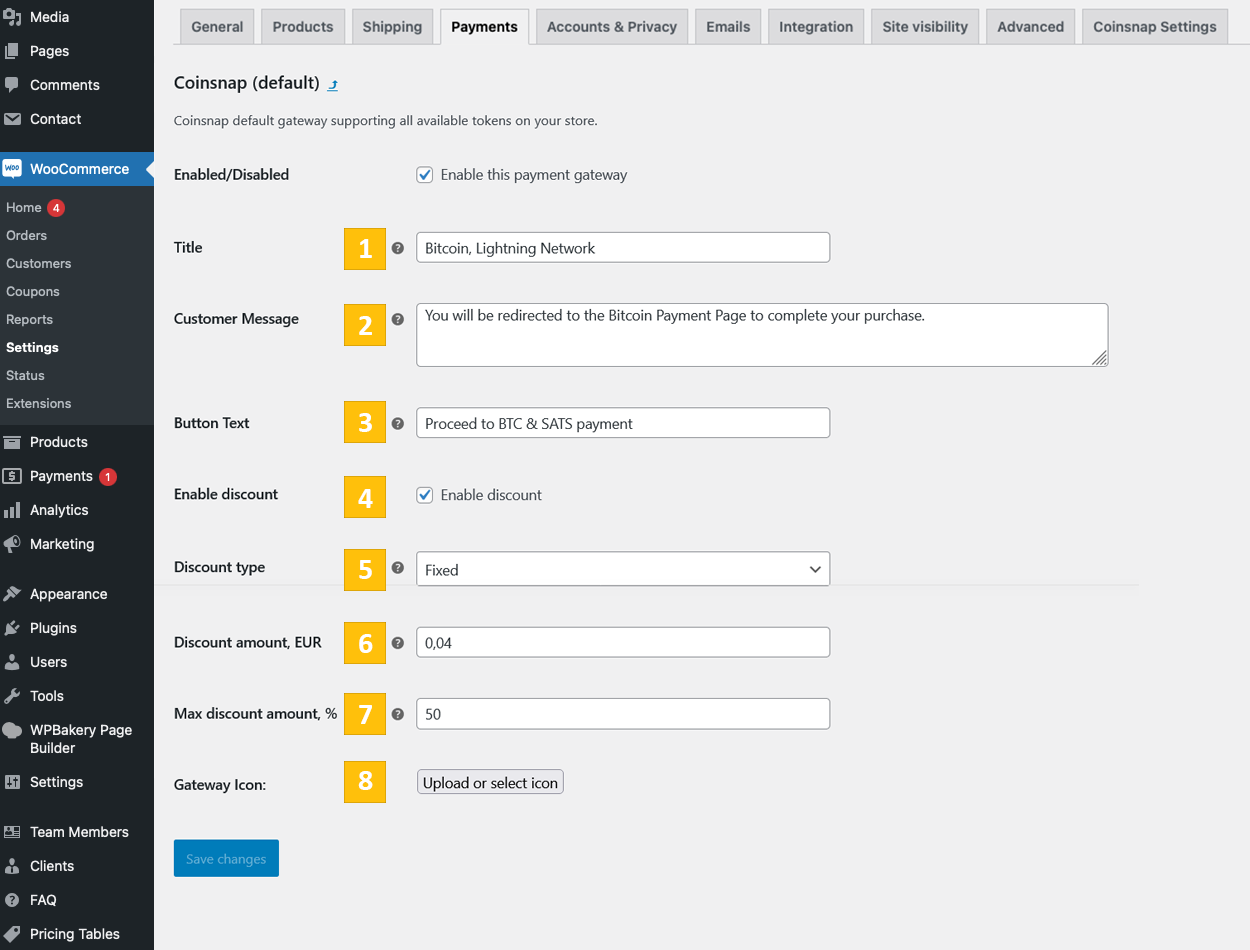
To do this, click on the “Finish setup” button (or the “Manage” button after you activated the payment method). Here you can make some adjustments that impact the customer’s journey during the payment process.
(a) Enabled/Disabled: Make sure the gateway is enabled!
(b) Title: You can change the default text, i.e. to „Bitcoin/Lightning payment“.
(c) Customer Message: Here you should let your customer know what to expect next.
(d) Button Text: you can also change the text on the button that initiates the actual payment and generatest he QR code for your customer’s payment, i.e. to „I want to pay with Bitcoin now!“
(e) Gateway symbol: Here you can upload an icon of your choice that illustrates the Bitcoin-Lightning payment method in your checkout. This image serves as a visual indicator for a specific payment option or gateway that is displayed to the customer at the time of checkout.
YOU ARE SET TO SELL FOR BITCOIN NOW! To be sure all works fine, you should now…
1.4. Test the payment method in your WooCommerce store
After all settings have been made, a test transaction should be carried out.
Place an order in your WooCommerce online store and choose the Bitcoin-Lightning Payment option. Click on Pay with Bitcoin.
You will now be redirected to the Bitcoin-Lightning payment page to complete the purchase. The Bitcoin payment page is now displayed and offers the payer the option of paying with Bitcoin or Lightning. Both methods are integrated in the displayed QR code. After successful payment, the invoice can be viewed in detail.
2. Install the Coinsnap WooCommerce plugin from our Github page
If you don’t want to install Coinsnap WooCommerce plugin directly from your WordPress backend, download the Coinsnap for WooCommerce plugin from the Coinsnap Github page here.
Find the green button labeled Code. When you click on it, the menu opens and Download ZIP appears. Here you can download the latest version of the Coinsnap plugin to your computer.
Then use the “Upload plugin” function to install it. Click on “Install now” and the Coinsnap for WooCommerce plugin will be added to your WordPress website. It can then be connected to the Coinsnap payment gateway.
As soon as the Coinsnap for WooCommerce plugin is installed and activated, a message will appear asking you to configure the plugin settings.
From here on you can follow 1.1 to 1.4 and you will be set to sell for Bitcoin in no time at all!
Frequently asked questions
What are the requirements for accepting Bitcoin in my WooCommerce shop?
In addition to your WooCommerce shop, you need a Coinsnap account and a Bitcoin Lightning Wallet. There are no further requirements.
Can I customise my Bitcoin Lightning Checkout?
Yes, you can determine the name of the payment method yourself and upload your own icon/logo. You can also formulate the display texts during the individual steps of the checkout yourself. You can also determine the destination of the redirect upon successful payment yourself.
Do I need technical knowledge for the installation?
You can set up the plugin yourself in just a few steps using our installation instructions. If you have any difficulties with the installation, you can also contact our free installation service.
How quickly are Bitcoin payments credited?
Your customers can pay with both Bitcoin Lightning and Bitcoin on-chain. Bitcoin Lightning payments are immediately available on your wallet. Bitcoin on-chain payments are credited as soon as the first confirmation is received in the blockchain.
Are my customer transactions stored by Coinsnap?
Coinsnap does not store any of its merchants’ Bitcoin. All of your customer’s Bitcoin payments are transferred directly from your customers’ wallet to the merchant wallet.
What fees are charged?
The transaction fee is only 1%*, significantly less than with credit cards or PayPal (* with referrer code).
Can I receive Bitcoin payments to my bank account?
Yes, you can select the payout method ‘by bank transfer’ and our partner DFX when registering your Coinsnap account. Your incoming payment will then be forwarded to the Swiss Bitcoin broker, who will pay out the amount in EUR to your bank account. You can find more information here.
Can customers make a chargeback?
Chargebacks of customer payments are not possible with Bitcoin payments. This means that every Bitcoin payment is secure and guaranteed for you as a merchant.
Which wallets can I use?
You need a Bitcoin Lightning wallet to credit your Bitcoin transactions. Coinsnap recommends the Bitcoin Lightning Wallets from Wallet of Satoshi, Strike or the Blink Wallet. However, there are many other Bitcoin Lightning wallets that you can also use. You can find more information about Bitcoin Lightning wallets here!
Does the plugin only work in my region or language area?
The Coinsnap for WooCommerce plugin, as well as the Bitcoin blockchain and the Lightning network, are globally available and able to transfer payments worldwide, without interference from any banks. You can accept payments from any global customer who has a Lightning Wallet!
Are there regular updates for the Coinsnap for Woocommerce plugin?
Yes, our team is constantly working on improvements and new functions for the Coinsnap for WooCommerce plugin. If there is a new version, this will be automatically displayed in WordPress under Plugins and you can update the plugin with one click. This means you always have the latest version of the WooCommerce plugin installed!
Where can I get support if I have questions?
Our team is always there for you. If you need help installing the plugin, please refer to the WooCommerce installation guide. There is also an option there to request an installation service. If you have any other questions, please use our support area. After you have registered with Coinsnap, you will find the support area in your dashboard – here you can ask us your questions at any time!
Changelog
Follow updates on plugin's GitHub page
1.0.0 :: 2023-08-03
- First public release for testing.
1.0.5 :: 2023-12-12
- Payment button text setting is added.
1.1.0 :: 2024-02-28
- Basic WordPress Blocks support is added.
1.1.1 :: 2024-03-22
- Restructured loader.
1.1.2 :: 2024-05-08
- Payment status display update.
- Fix: Payment status changing.
1.1.3 :: 2024-07-03
- Order number and order ID separation.
- Full order metadata array transmission.
Screenshots




For developers
Is this your plugin? Show off the numbers.
Add a live badge to your site, docs or GitHub README. It updates on its own — no account needed.
Best Bitcoin payment for WooCommer… alternatives
All bitcoin plugins →





FAQ
Bitcoin payment for WooCommerce: quick answers
Straight answers, pulled from live WordPress.org data.
Live data from WordPress.org · checked Oct 5, 2026
Is Bitcoin payment for WooCommerce free?
Yes. Bitcoin payment for WooCommerce is free to download and use from the official WordPress.org plugin directory.
Is Bitcoin payment for WooCommerce safe to use in 2026?
Bitcoin payment for WooCommerce works, but test it on a staging site before relying on it in 2026. It runs on 60+ sites, is rated 5/5 and was last updated 4 months ago, and scores 60/100 on our health check.
How many websites use Bitcoin payment for WooCommerce?
Bitcoin payment for WooCommerce is active on 60+ WordPress websites and has been downloaded 5,974 times since it launched in April 2024. It was downloaded 153 times in the last 30 days.
Does Bitcoin payment for WooCommerce work with WordPress 7.1?
Bitcoin payment for WooCommerce is officially tested up to WordPress 7.0.6, while the latest release is 7.1.2. It may still work, but try it on a staging site first.
What PHP version does Bitcoin payment for WooCommerce need?
Bitcoin payment for WooCommerce requires PHP 7.4 or higher. Most hosts run PHP 8.x today, so it works on any modern WordPress hosting.
When was Bitcoin payment for WooCommerce last updated?
The latest version, 1.7.9, was released on June 5, 2026 (4 months ago).
Who makes Bitcoin payment for WooCommerce?
Bitcoin payment for WooCommerce is developed and maintained by Coinsnap.
What are the best alternatives to Bitcoin payment for WooCommerce?
The most popular alternatives to Bitcoin payment for WooCommerce are MyCryptoCheckout (8K+ installs), Bitcoin Payments (2K+ installs) and BTCPay Server (1K+ installs).
Powered by PageForge
Want thousands of pages that rank like these? Build them in an afternoon.
This directory runs on the same engine as PageForge. Turn any spreadsheet, CSV or API into thousands of fast, SEO-ready WordPress pages — with schema, internal links and AI-written copy baked in.
- CSV, Google Sheets & API data sources
- AI content, schema & internal links per page
- Works with Elementor, Gutenberg, Yoast & Rank Math
- Free on WordPress.org — no credit card


