



Bitly URL Shortener
Bitly URL Shortener uses the functionality of Bitly API to generate Bitly short link without leaving your WordPress site.

Safe pick
Yes — Bitly URL Shortener is a safe, well-maintained plugin to use in 2026. It runs on 500+ sites, is rated 5/5 and was last updated 2 days ago, and scores 82/100 on our health check.
- Actively developed — last update 2 days ago
- Tested with the latest WordPress (7.1)
- Small user base (500+ active installs)
How does it stack up?
Side-by-side on installs, updates, ratings & support


Daily downloads
Download spikes usually follow a new release — each site that auto-updates counts as a download.
Rankings
Where Bitly URL Shortener stands todayWordPress.org search rankings
Live position in the plugin search, top 100| Keyword | Position |
|---|---|
| bitly | #1 |
| connector | #91 |
| post | >100 |
| short url | #4 |
| url shortener | #3 |
Version adoption
Share of active sites per release.
Rating breakdown
★★★★★★★★★★ 5 from 5 reviews
About Bitly URL Shortener
From the official readme · v1.5.4Description
Bitly URL Shortener (Previously Codehaveli Bitly URL Shortener) uses the functionality of Bitly API to generate bitly short link automatically from your WordPress dashboard when you publish new post.
Bitly URL Shortener allows you to connect your WordPress Website to the Bitly API via access token and Group GUID.
Features
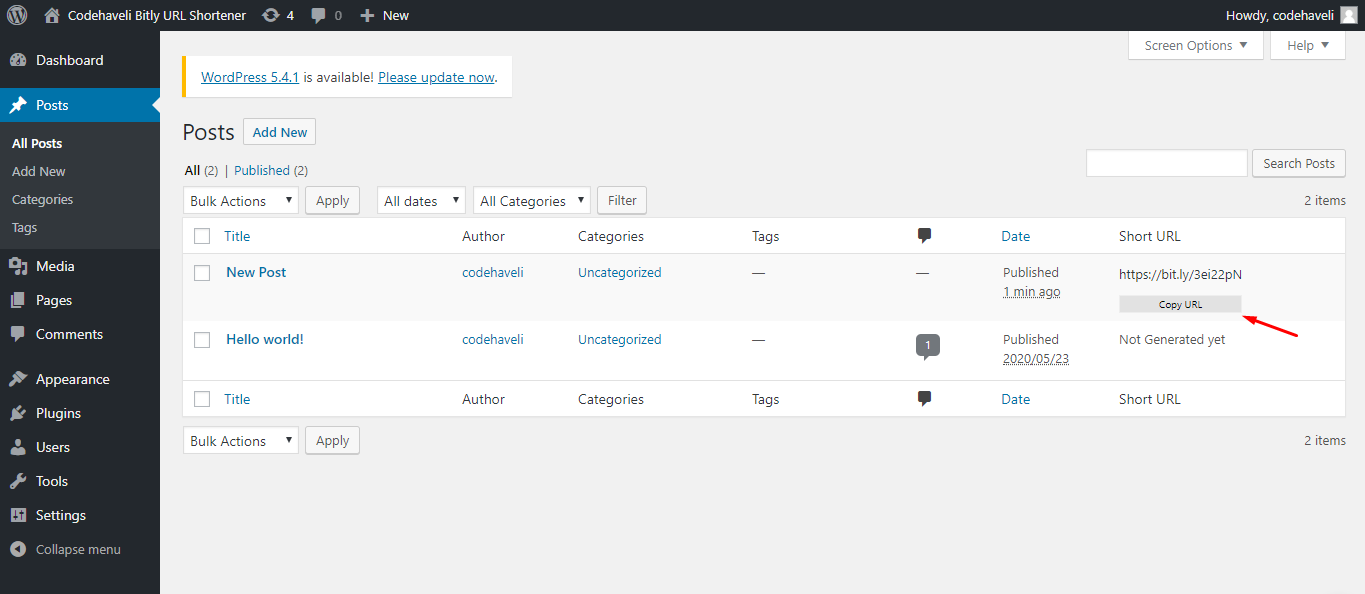
- Generate Bitly link automatically when publishing posts without leaving your site.
- Share Bitly link from your Post List and Post Edit page with social share buttons.
- Gutenberg block for displaying social share icons (Facebook, LinkedIn, X/Twitter, Telegram, WhatsApp).
- Support for Custom Post Types with option to choose from your list of post types.
- Support for Custom Bitly Domain (for paid Bitly plans).
- Generate Bitly link of your old posts with just one click from post list.
- WP-CLI support for bulk generating short links via command line.
- REST API endpoints for programmatic access to short URL generation.
- Post column in admin showing generated short URLs.
- Metabox in post edit page for quick access to short URL and share options.
- Optimized code with modern PHP 7.4+ features and proper error handling.
Terms of Use
This is not an official plugin of https://bitly.com
This plugin only connects your https://bitly.com account to your WordPress site.
Please read privacy and terms of service of Bitly before using this plugin.
Bug reports
Bug reports for Bitly URL Shortener are welcomed in our Bitly URL Shortener repository on GitHub. Please note that GitHub is not a support forum, and that issues that are not properly qualified as bugs will be closed.
Further Reading
For more info on Bitly and Codehaveli, check out the following:
- Codehaveli official homepage
- Read “How to generate Bitly OAuth access token?” from Codehaveli Blog
- Bitly API Documentation
- Follow Codehaveli on Facebook, Instagram & Twitter
- Plugin GitHub Repository
Installation
- Visit the plugins page within your dashboard and select Add New
- Search for Bitly URL Shortener
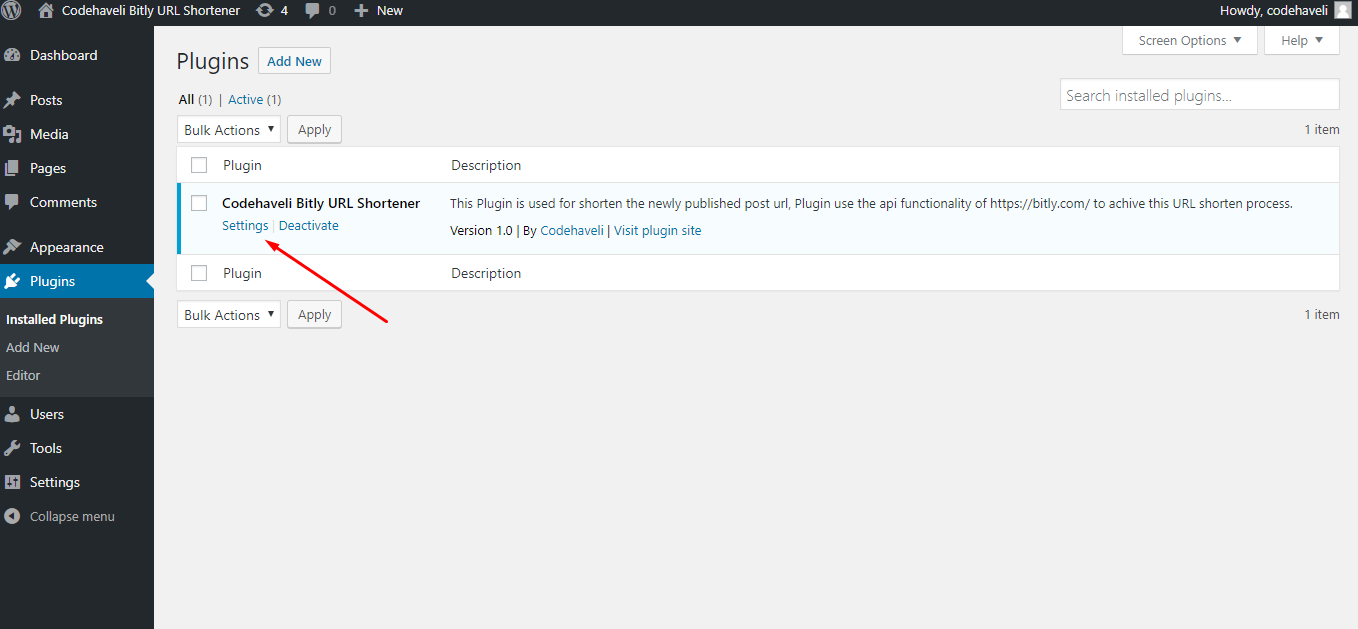
- Activate Bitly URL Shortener from your Plugins page
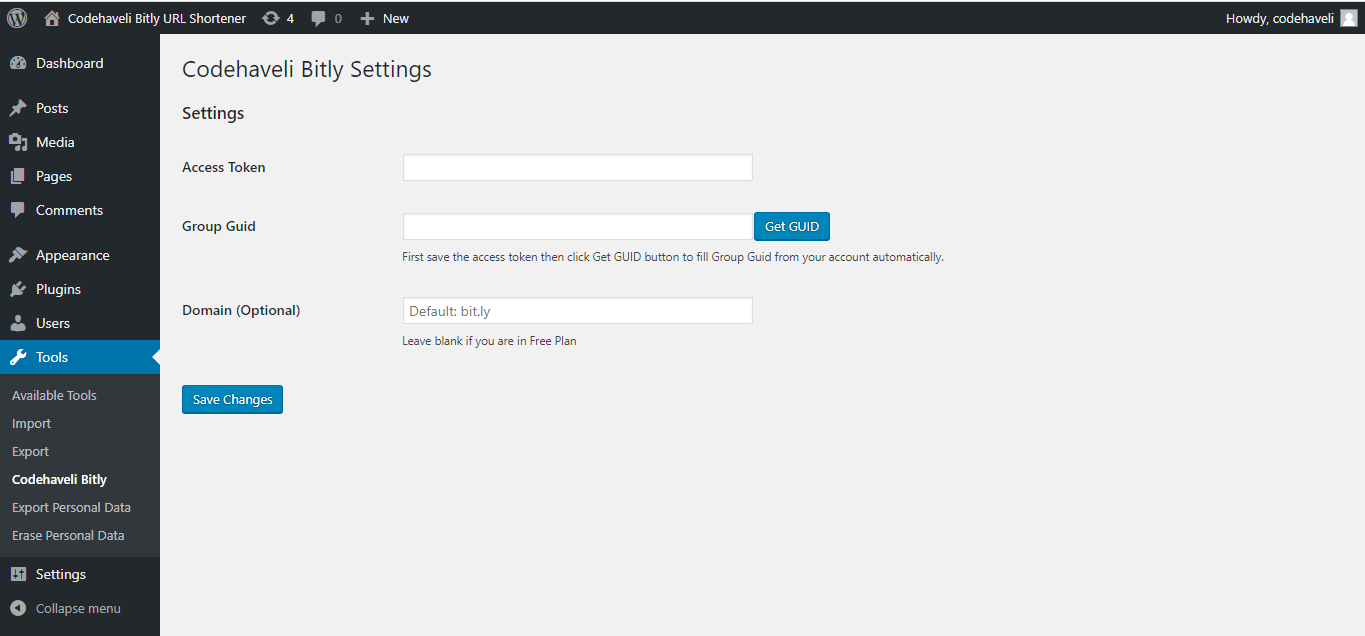
- Go to Tools > Codehaveli Bitly from your WordPress admin menu
- Get your access token from https://bitly.com and save it in the access token field
- Need help? Check our guide: How to generate Bitly OAuth access token?
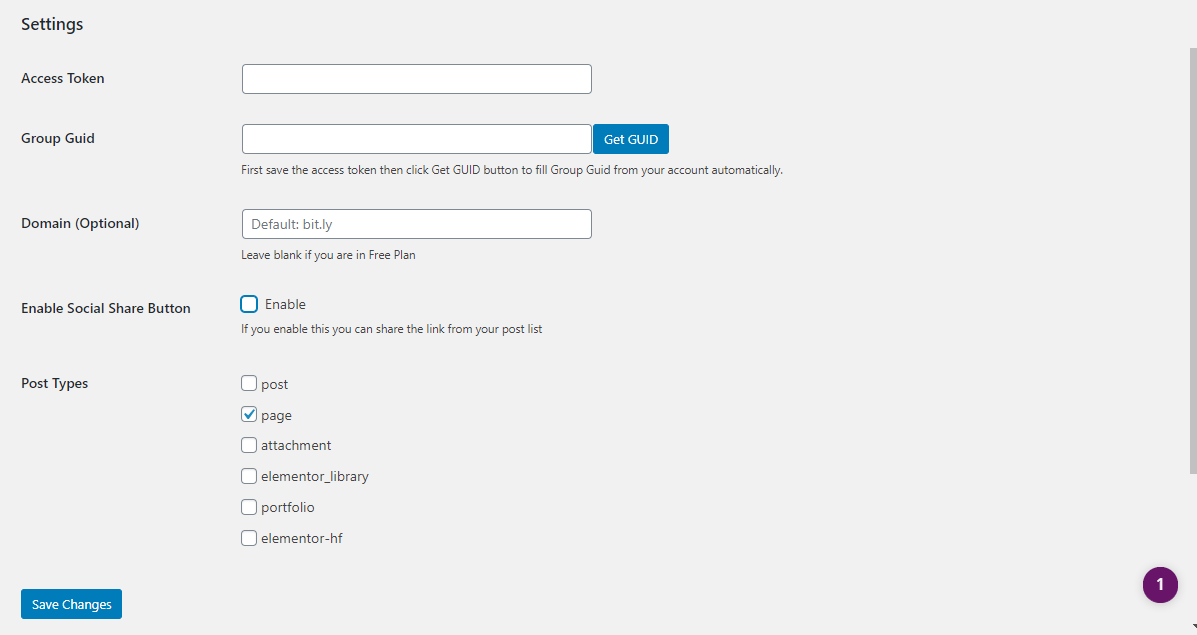
- Click on Get GUID button if you don’t have the Group GUID (the plugin will retrieve it from your Bitly account via API call)
- (Optional) Enter your custom Bitly domain if you’re on a paid plan
- (Optional) Select which post types should automatically generate Bitly links
- (Optional) Enable social share buttons if you want to display share options
- You’re ready to go! From now on, whenever you publish a post, your Bitly link will be generated automatically
Frequently asked questions
How to get the short link of a post?
Use the get_wbitly_short_url() function in your theme or plugin: $link = get_wbitly_short_url($post_id); // Returns short URL or false If no post ID is provided, it will use the current post in the loop: $link = get_wbitly_short_url(); // Uses current post
How to use the Gutenberg block?
In the block editor, search for “Bitly Share Icons” block Add the block to your post or page Customize which social icons to display (Facebook, LinkedIn, X/Twitter, Telegram, WhatsApp) Adjust icon size and styling as needed
How to generate short links via WP-CLI?
The plugin includes WP-CLI support. Use the following commands: wp wbitly generate --all - Generate shortlinks for all published posts wp wbitly generate --ids=1,2,3 - Generate for specific post IDs wp wbitly generate --first=10 - Generate for first 10 posts wp wbitly generate --all --post_type=page - Generate for all pages
How to use the REST API?
The plugin provides REST API endpoints: POST /wp-json/wbitly/v1/generate/{post_id} – Generate short URL for a post GET /wp-json/wbitly/v1/meta/{post_id} – Get existing short URL for a post Both endpoints require authentication and appropriate permissions. You need to: * Be logged in as a user with edit_posts capability * Include a valid WordPress nonce in the request header (X-WP-Nonce)
Changelog
1.5.4
- WordPress Up To version
1.5.3
- WordPress Upto version updated and small fix
1.5.2
- WordPress Upto version updated
1.5.1
- MetaBox issue fixed
1.5.0
- Added Gutenberg block for social share icons
- Added WP-CLI support for bulk generating short links
- Added REST API endpoints for programmatic access
- Improved code structure with modern PHP 7.4+ features
- Enhanced error handling and logging
- Updated minimum requirements: PHP 7.4, WordPress 5.6
- Improved security with better input validation
- Code refactoring and optimization
1.4.1
- Updated: tested up to value
- Security Fix
- Updated Twitter logo to X
- Refactor ajax code
Screenshots
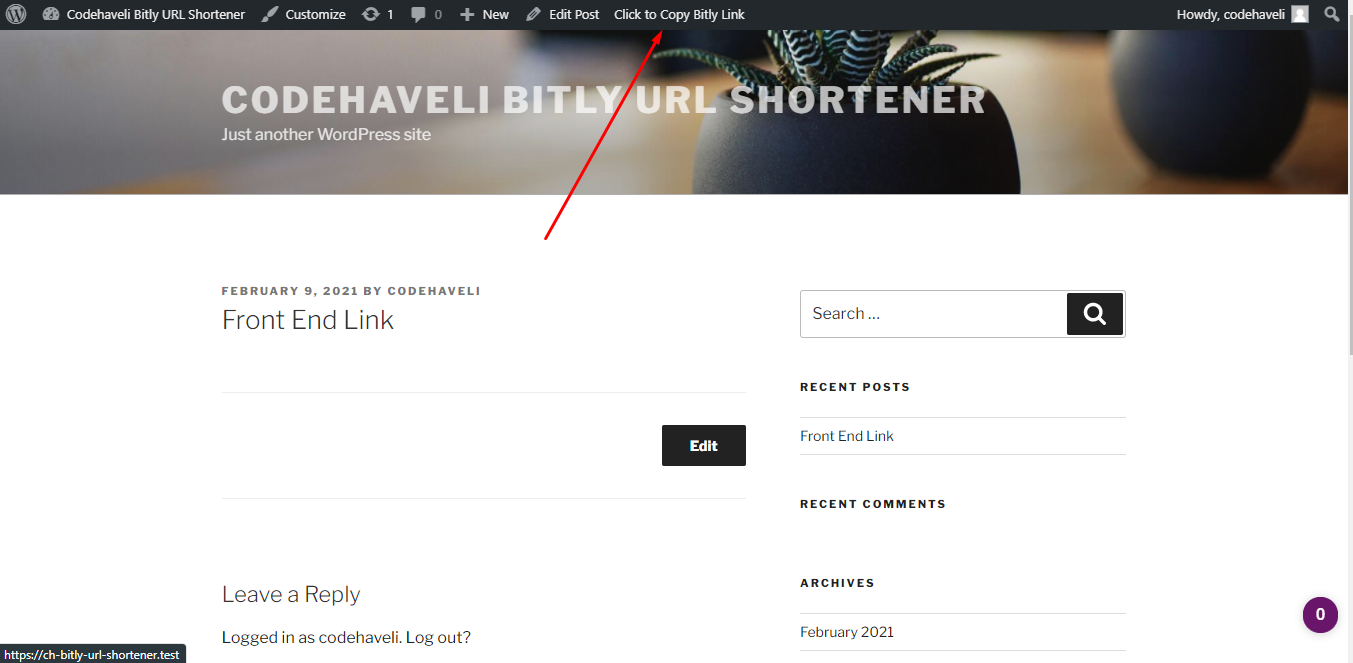
For developers
Is this your plugin? Show off the numbers.
Add a live badge to your site, docs or GitHub README. It updates on its own — no account needed.
Best Bitly URL Shortener alternatives
All bitly plugins →


FAQ
Bitly URL Shortener: quick answers
Straight answers, pulled from live WordPress.org data.
Live data from WordPress.org · checked Sep 29, 2026
Is Bitly URL Shortener free?
Yes. Bitly URL Shortener is free to download and use from the official WordPress.org plugin directory.
Is Bitly URL Shortener safe to use in 2026?
Yes — Bitly URL Shortener is a safe, well-maintained plugin to use in 2026. It runs on 500+ sites, is rated 5/5 and was last updated 2 days ago, and scores 82/100 on our health check.
How many websites use Bitly URL Shortener?
Bitly URL Shortener is active on 500+ WordPress websites and has been downloaded 16,922 times since it launched in May 2020. It was downloaded 671 times in the last 30 days.
Does Bitly URL Shortener work with WordPress 7.1?
Yes. The developer has tested Bitly URL Shortener up to WordPress 7.1.2, the latest release. It requires WordPress 5.6 or newer.
What PHP version does Bitly URL Shortener need?
Bitly URL Shortener requires PHP 7.4 or higher. Most hosts run PHP 8.x today, so it works on any modern WordPress hosting.
When was Bitly URL Shortener last updated?
The latest version, 1.5.4, was released on September 26, 2026 (2 days ago).
Who makes Bitly URL Shortener?
Bitly URL Shortener is developed and maintained by Codehaveli.
What are the best alternatives to Bitly URL Shortener?
The most popular alternatives to Bitly URL Shortener are Bitly's WordPress Plugin (2K+ installs), Get Shortlinks (90+ installs) and Twitter Hashtag Blaster (10+ installs).
Powered by PageForge
Want thousands of pages that rank like these? Build them in an afternoon.
This directory runs on the same engine as PageForge. Turn any spreadsheet, CSV or API into thousands of fast, SEO-ready WordPress pages — with schema, internal links and AI-written copy baked in.
- CSV, Google Sheets & API data sources
- AI content, schema & internal links per page
- Works with Elementor, Gutenberg, Yoast & Rank Math
- Free on WordPress.org — no credit card


