



Clear Cache Everywhere
Clear all cache sources in one click from the WordPress admin bar, including WP cache, transients, sessions, browser cache.

Solid choice
Clear Cache Everywhere is a solid plugin choice in 2026, with a few things worth checking first. It runs on 1K+ sites, is rated 5/5 and was last updated 3 weeks ago, and scores 77/100 on our health check.
- Actively developed — last update 3 weeks ago
- Tested with the latest WordPress (7.1)
- Momentum — downloads up 148.5% vs the previous 30 days
- Very few reviews so far
How does it stack up?
Side-by-side on installs, updates, ratings & support



Daily downloads
Download spikes usually follow a new release — each site that auto-updates counts as a download.
Rankings
Where Clear Cache Everywhere stands todayWordPress.org search rankings
Live position in the plugin search, top 100| Keyword | Position |
|---|---|
| admin bar | >100 |
| cache | #33 |
| clear cache | #5 |
| flush cache | #10 |
| performance | >100 |
Version adoption
Share of active sites per release.
Rating breakdown
★★★★★★★★★★ 5 from 1 reviews
About Clear Cache Everywhere
From the official readme · v1.2.4Description
Clear Cache Everywhere allows administrators to instantly clear various cache sources directly from the WordPress admin bar. This ensures changes are reflected immediately without waiting for cache expiration.
Features:
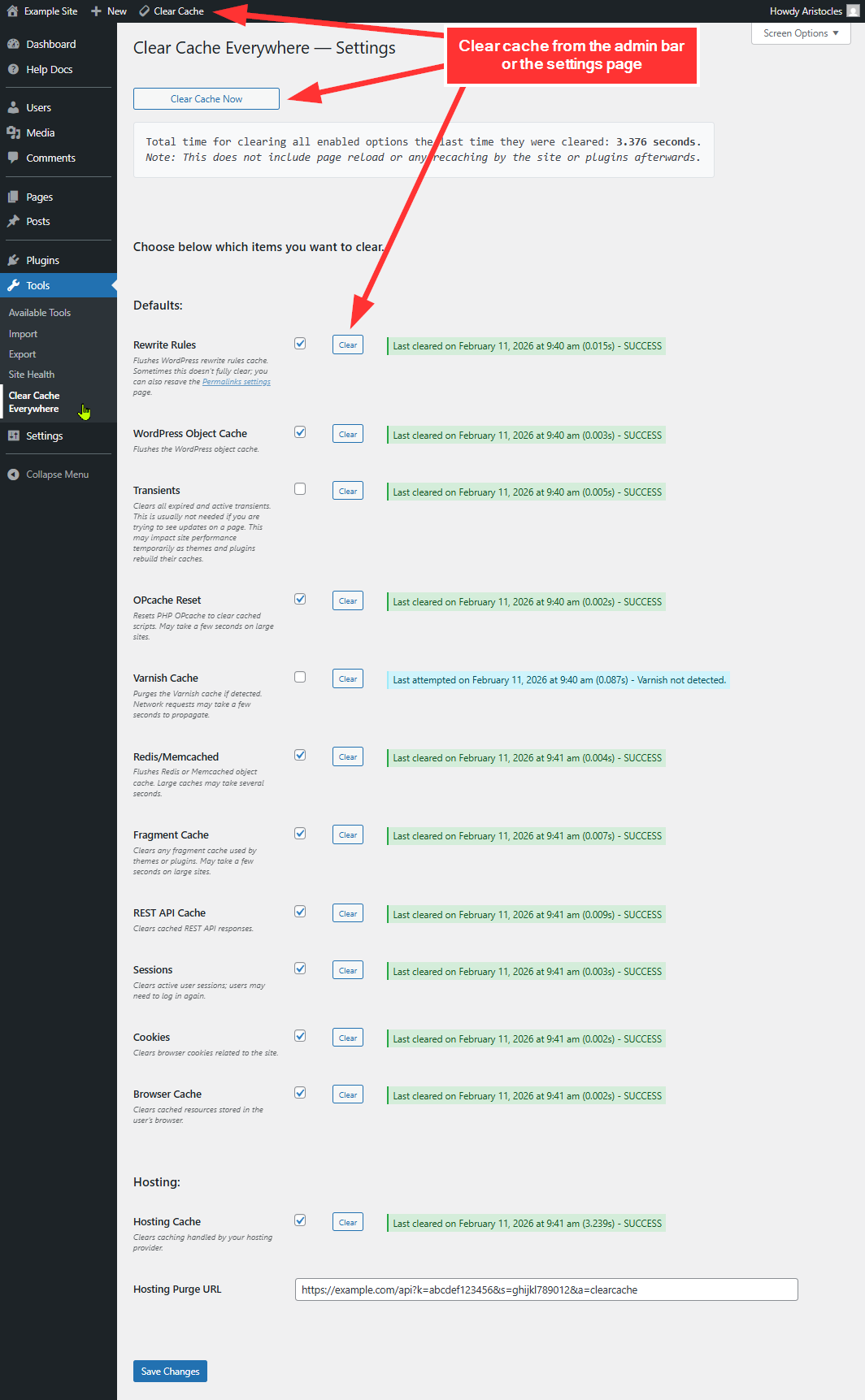
- One-Click Cache Clearing: Clears multiple cache layers across WordPress, server, and browser.
- Individual Clear Actions: Run specific cache clearing actions independently.
- Admin Bar Access: Quick purge button in the WordPress admin bar (eraser icon).
- Hosting Integration: Supports clearing hosting-level cache via configurable purge URL.
- Third-Party Support: Clears cache for supported plugins and services.
- Detailed Logging: Logs execution time for each action.
- Developer Hooks: Add additional cache clearing actions via developer hooks.
The following clearing actions are available:
- Rewrite Rules – Flushes WordPress rewrite rules so permalink and routing changes apply immediately.
- WordPress Object Cache – Clears the in-memory object cache used to store database query results.
- Transients – Deletes all transients, forcing temporary data to regenerate on next load.
- OPcache Reset – Resets PHP OPcache so compiled scripts reload from disk.
- APCu Cache – Clears the APCu user cache, a PHP data cache separate from OPcache.
- Varnish Cache – Sends a purge request to Varnish to invalidate reverse proxy cached pages.
- Redis / Memcached – Flushes persistent object cache if Redis or Memcached is active.
- Fragment Cache – Clears cached template fragments generated by themes or plugins.
- REST API Cache – Removes cached REST responses to ensure endpoints return fresh data.
- Sessions – Destroys active PHP sessions. Users may need to log in again.
- Cookies – Removes site-related browser cookies set by WordPress or plugins.
- Browser Cache – Forces browsers to revalidate and reload cached static assets.
- Hosting Cache – Triggers a configured purge endpoint to clear host-level caching.
- Cloudflare Cache – Purges all Cloudflare-cached content via the Cloudflare API.
- Generic CDN Cache – Purges cache via a configured CDN endpoint and API key.
Integrations:
The plugin already supports clearing cache for the following third-party plugins:
- Autoptimize
- Breeze (Cloudways)
- Cache Enabler
- Cachify
- Cloudflare
- Comet Cache
- Cornerstone
- Elementor
- Hummingbird
- Kinsta
- LiteSpeed Cache
- Nginx Helper
- NitroPack
- Object Cache Pro
- Pantheon Advanced Page Cache
- Powered Cache
- Rocket.net
- Seraphinite Accelerator
- SiteGround Optimizer
- SpinupWP
- Swift Performance
- W3 Total Cache
- WP Cloudflare Super Page Cache
- WP Engine
- WP Fastest Cache
- WP Rocket
- WP Super Cache
- WP-Optimize
This plugin is ideal for developers, content managers, and site owners who need immediate cache flushing across multiple layers.
Demo
Installation
- Upload the plugin files to the
/wp-content/plugins/clear-cache-everywhere/directory. - Activate the plugin through the ‘Plugins’ menu in WordPress.
- The Clear Cache button will appear in the admin bar.
Frequently asked questions
How does this plugin clear cache?
It executes multiple cache-clearing actions across WordPress core, object caching systems, server-level caching, browser cache, and supported third-party plugins. Individual actions can be triggered independently.
Why does it take so long to clear the cache sometimes?
Clearing cache is not just a single action. When you click “Clear All,” the plugin may be flushing multiple cache layers: object cache, persistent cache (Redis/Memcached), OPcache, reverse proxies like Varnish, REST caches, transients, sessions, and third-party integrations. Each layer operates differently and may require disk I/O, memory resets, or network requests. On larger sites, clearing cache can take longer because: • Persistent object caches may contain thousands of keys that must be invalidated. • OPcache must reload compiled PHP scripts into memory. • Reverse proxies and CDNs…
Does this work with all hosting providers?
This depends on your hosting provider. If they offer a cache purge URL, you can configure it in the plugin settings. For example, if you have GoDaddy’s Website Security and Backups, you can navigate to Firewall > Settings > Performance > Clear Cache, then grab the Clear Cache API link to put in your settings.
Will this force browsers to load fresh content?
Yes! The plugin sends cache-control headers to prompt browsers to reload updated content.
Can I add custom cache clearing actions?
Yes. Developers can hook into the clearing process to add custom actions or settings. Full developer documentation is available here: https://pluginrx.com/docs/plugin/clear-cache-everywhere/
Is there a function to trigger clearing cache everywhere?
Yes! A helper function is available for you to use: cceverywhere_clear_all( $log_results = false ). The function returns the results of the cache clearing processing. Optionally, you can log the results by setting the $log_results parameter to true. This will log the results to the debug log.
Where can I request features and get further support?
We recommend using our website support forum as the primary method for requesting features and getting help. You can also reach out via our Discord support server or the WordPress.org support forum, but please note that WordPress.org doesn’t always notify us of new posts, so it’s not ideal for time-sensitive issues.
Changelog
1.2.4
- Update: Added Seraphinite Accelerator integration
- Note: Seraphinite processes cache deletion in the background, so it may take up to a minute to take effect
- Update: Added a Settings link to the plugin’s action links on the Plugins page
- Update: Rebranded the settings page with a new header, subheader, and rounded content box to match our PluginRx rebrand
- Update: Settings page colors now automatically inherit from Admin Help Docs when it is active
- Update: Settings now save via AJAX from the Save button in the header, with Ctrl+S / Cmd+S support and an inline saved confirmation
- Update: Added an unsaved changes reminder and a browser warning when leaving the settings page with unsaved changes
- Tweak: Moved the Clear Cache Now button to the right side of the header
- Tweak: Clear Cache Now now uses the newly saved settings immediately after saving, without a page reload
1.2.3
- Fix: Nginx Helper integration was calling a non-existent function; now uses the correct
rt_nginx_helper_purge_allaction hook - Fix: Hummingbird integration used
function_exists()on a class method, which never evaluates true; now usesmethod_exists() - Update: Added Breeze, NitroPack, and Pantheon Advanced Page Cache existence guards to their clearing methods and settings field registration
- Update: Added Cache Enabler, SpinupWP, Cachify, Powered Cache, Rocket.net, Object Cache Pro, and WP Cloudflare Super Page Cache integrations
- Update: Added generic CDN purge action (purge URL + API key) for CDNs without a dedicated integration
- Update: All integration settings fields now verify the target plugin’s function/class/hook actually exists before displaying, in addition to
is_plugin_active(), so unverified or version-mismatched integrations no longer surface as failing checkboxes
1.2.2.1
- Fix: Cornerstone integration wasn’t working on X Theme Pro
1.2.2
- Fix:
cceverywhere_clear_all()helper function now correctly supports the$log_resultsparameter - Fix: Custom callbacks on page-context actions now fire correctly
- Fix: Hummingbird cache detection now uses
method_exists()instead offunction_exists() - Fix: Added capability check to
clear_all()for requests coming through the URL parameter - Fix: Auth cookies
wordpress_sec_*andwp-settings-*are now preserved when clearing cookies - Fix: Removed invalid
hrefattribute from Clear Cache button on settings page - Performance:
get_clearing_actions()now caches its result to avoid redundant calls per request - Developer: Added
cceverywhere_clearing_actionsfilter to allow modifying the actions array programmatically - Update: Clarified readme description of available clearing actions
- Update: Added APCu cache clearing action
- Update: Added Breeze (Cloudways) integration
- Update: Added WP Engine cache integration
- Update: Added Kinsta cache integration
- Update: Added NitroPack integration
- Update: Added Pantheon Advanced Page Cache integration
- Update: Clarified readme description of available clearing actions
1.2.1.1
- Compatibility: Increased minimum required WordPress version to 6.0
- Compatibility: Tested with WordPress 7.0
1.2.1
- Update: Added option to clear Cloudflare cache
Screenshots
For developers
Is this your plugin? Show off the numbers.
Add a live badge to your site, docs or GitHub README. It updates on its own — no account needed.
Best Clear Cache Everywhere alternatives
All admin bar plugins →



FAQ
Clear Cache Everywhere: quick answers
Straight answers, pulled from live WordPress.org data.
Live data from WordPress.org · checked Oct 15, 2026
Is Clear Cache Everywhere free?
Yes. Clear Cache Everywhere is free to download and use from the official WordPress.org plugin directory.
Is Clear Cache Everywhere safe to use in 2026?
Clear Cache Everywhere is a solid plugin choice in 2026, with a few things worth checking first. It runs on 1K+ sites, is rated 5/5 and was last updated 3 weeks ago, and scores 77/100 on our health check.
How many websites use Clear Cache Everywhere?
Clear Cache Everywhere is active on 1K+ WordPress websites and has been downloaded 7,115 times since it launched in April 2025. It was downloaded 1,220 times in the last 30 days.
Does Clear Cache Everywhere work with WordPress 7.1?
Yes. The developer has tested Clear Cache Everywhere up to WordPress 7.1.3, the latest release. It requires WordPress 6.0 or newer.
What PHP version does Clear Cache Everywhere need?
Clear Cache Everywhere requires PHP 7.4 or higher. Most hosts run PHP 8.x today, so it works on any modern WordPress hosting.
When was Clear Cache Everywhere last updated?
The latest version, 1.2.4, was released on September 24, 2026 (3 weeks ago).
Who makes Clear Cache Everywhere?
Clear Cache Everywhere is developed and maintained by PluginRx.
What are the best alternatives to Clear Cache Everywhere?
The most popular alternatives to Clear Cache Everywhere are Hide Admin Bar Based on Use… (20K+ installs), Hide Admin Bar (20K+ installs) and Hide Admin Bar from Non-Adm… (10K+ installs).
Powered by PageForge
Want thousands of pages that rank like these? Build them in an afternoon.
This directory runs on the same engine as PageForge. Turn any spreadsheet, CSV or API into thousands of fast, SEO-ready WordPress pages — with schema, internal links and AI-written copy baked in.
- CSV, Google Sheets & API data sources
- AI content, schema & internal links per page
- Works with Elementor, Gutenberg, Yoast & Rank Math
- Free on WordPress.org — no credit card


