



Integration with Google Sheets for Contact Form 7
This plugin provides integration between Contact Form 7 and Google Sheets. It adds new processor to Contact Form 7 that enables sending of submitted forms to Google Sheets.

Consider an alternative
Integration with Google Sheets… shows warning signs in 2026 — compare the alternatives below before installing. It runs on 300+ sites, is rated 3.7/5 and was last updated 3 years ago, and scores 29/100 on our health check.
- Small user base (300+ active installs)
- Very few reviews so far
- No update in 2 years
- Only tested up to WordPress 6.4 (latest is 7.1)
How does it stack up?
Side-by-side on installs, updates, ratings & support



Daily downloads
Download spikes usually follow a new release — each site that auto-updates counts as a download.
Rankings
Where Integration with Google She… stands todayWordPress.org search rankings
Live position in the plugin search, top 100| Keyword | Position |
|---|---|
| contact form 7 | >100 |
| >100 | |
| Google Sheets | >100 |
| sheets | >100 |
Version adoption
Share of active sites per release.
Rating breakdown
★★★★★★★★★★ 3.7 from 3 reviews
About Integration with Google Sheets for Cont…
From the official readme · v1.3Description
This plugin provides integration between Contact Form 7 and Google Sheets.
It adds new processor to Contact Form 7 that enables sending of submitted forms to Google Sheets.
Connecting the Plugin to Google Sheets
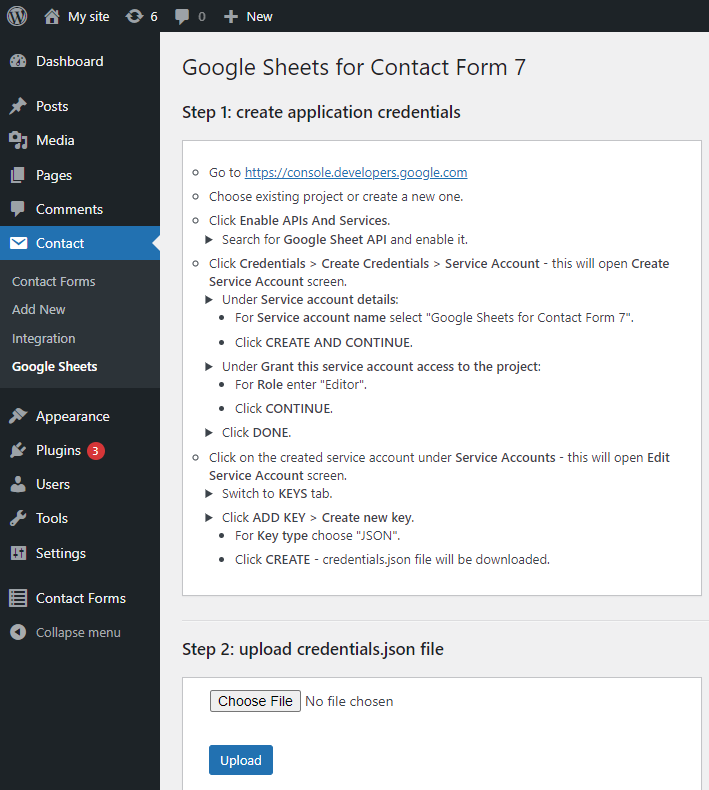
After installing the plugin you must go to it’s Settings screen and create application credentials needed to establish connection with Google Sheets. All instructions are provided in the Settings screen.
After successfully creating application credentials and uploading them (i.e. completing steps 1 and 2), you will see Client ID and Client Email that represent your instance of “Google Sheets for Contact Form 7” plugin. You will need to share your sheets with Client Email (as Editor role) to grant “Google Sheets for Contact Form 7” plugin permissions to edit them.
Using the Plugin
After successfully connecting the plugin to Google Sheets, do the following to configure your Contact Form 7 to send data to Google Sheets on form submission.
In Google Sheets
- Create a new Google Sheet
- Switch to the tab where you want to capture the data
-
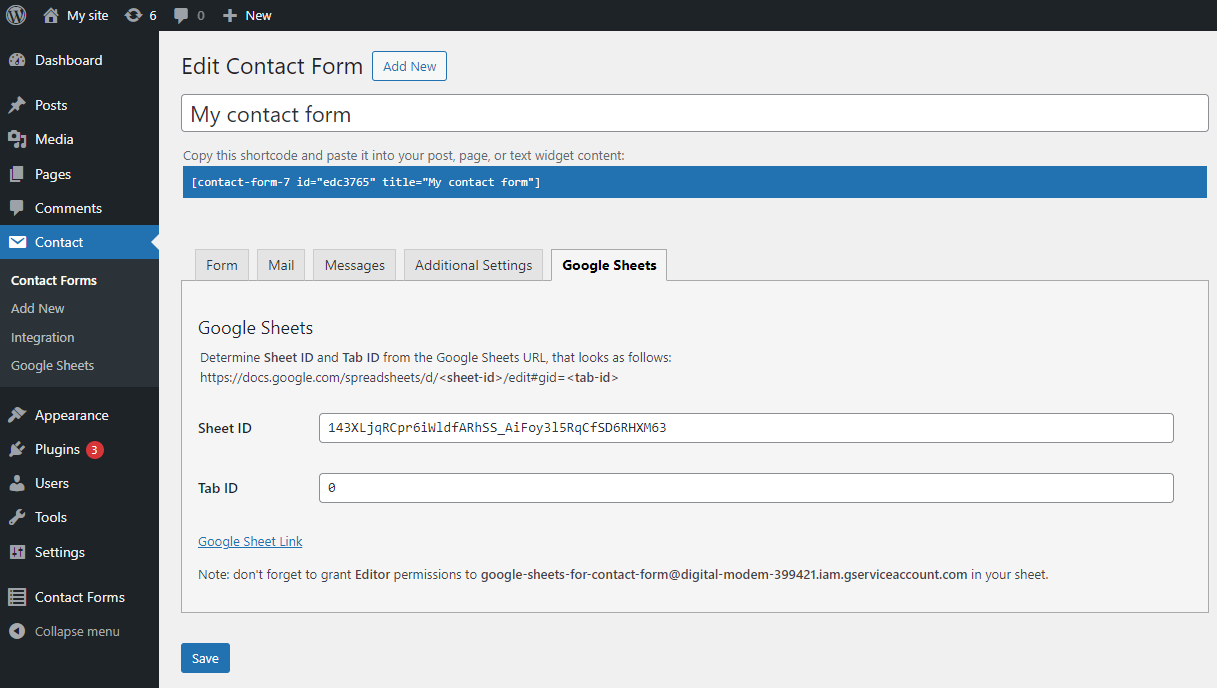
Determine Sheet ID and Tab ID from the sheet’s URL that looks as follows: https://docs.google.com/spreadsheets/d/sheet-id/edit#gid=tab-id
For example, for URL https://docs.google.com/spreadsheets/d/142XLjqRCpr7iWldfARhSS_GiFoy4l5RqZfSD6RHXM64/edit#gid=0 Sheet ID is “142XLjqRCpr7iWldfARhSS_GiFoy4l5RqZfSD6RHXM64” and Tab ID is “0”
-
Enter “datetime” in the the first column if you want to capture time and date of submission
- There is no need to enter names for other columns – they will be automatically added upon form submission
- Share the sheet with Client Email that represents your instance of “Google Sheets for Contact Form 7” plugin – as Editor role
In Contact Form 7
- Open your contact form
- Switch to Google Sheets tab
- Configure Sheet ID and Tab ID and click Save
- Submit a test form and verify that the data shows up in your Google Sheet
Automatic Header Generation
The plugin verifies spreadsheet header on each new form submission and adds new fields to it if needed. Note that it never deletes fields from the header – as this would also delete some submission data – though you can do it manually. You may also manually reorder columns as you wish.
Capturing Submission Metadata
In addition to the datetime and regular form fields, you may also capture Contact Form 7 special mail-tags. In order to do so, add manually corresponding headers to your spreadsheet. Remove square brackets and first underscore from the tag name, and replace remaining underscores with dashes. For example, add remote-ip header to capture [_remote_ip] mail-tag.
Integration with “Contact Form 7 Database Addon – CFDB7”
If you use Contact Form 7 Database Addon – CFDB7 to save your submissions, you will also be able to resend already submitted forms to Google Sheets. This may be useful if something went wrong during initial form submission and/or someone deleted data in Google Sheets by mistake. In order to do so, in CFDB7 plugin, choose your form, open specific submission and click Send to Google Sheets button.
Acknowledgements
Initial version of this plugin was inspired by CF7 Google Sheets Connector plugin.
However it’s implementation is quite different:
- it uses service principle for authentication with Google Sheets
- it has completely different and much more reliable sheets update logic
- it implements automatic header generation, to ensure that no submission data is lost
- it supports capturing submission meta-data
- it provides integration with CFDB7 plugin for forms re-submission
Installation
- Upload “cf7-google-sheets” to the “/wp-content/plugins/” directory
- Activate the plugin through the Plugins screen in WordPress
Frequently asked questions
Why isn’t the data sent to spreadsheet? Contact Form 7 Submit is just Spinning.
Sometimes it can take a while of spinning before it goes through. But if the entries never show up in your Google Sheet use the following checklist: Check that plugin can access your sheet by entering it’s Sheet ID in Settings screen and clicking Test In Google Sheets processor configuration screen for your form: Check that you entered correct Sheet ID and Tab ID (obtained from the sheet’s URL – and NOT the Sheet/Tab Name) Check View Log in plugin Settings screen for detailed error trace
Changelog
1.3
- Refactor and clean-up the code for publishing to wordpress.org
1.2
- Refactor credentials upload for compliance with “Plugin Check”
- After upgrade, please re-upload credentials.json in Settings screen
1.1
- Add integration with “Contact Form 7 Database Addon – CFDB7”
- Fix uploaded file name
1.0
- Initial version
Screenshots

For developers
Is this your plugin? Show off the numbers.
Add a live badge to your site, docs or GitHub README. It updates on its own — no account needed.
Best Integration with Google Sheet… alternatives
All contact form 7 plugins →





FAQ
Integration with Google Sheets for…: quick answers
Straight answers, pulled from live WordPress.org data.
Live data from WordPress.org · checked Oct 16, 2026
Is Integration with Google Sheets… free?
Yes. Integration with Google Sheets… is free to download and use from the official WordPress.org plugin directory.
Is Integration with Google Sheets… safe to use in 2026?
Integration with Google Sheets… shows warning signs in 2026 — compare the alternatives below before installing. It runs on 300+ sites, is rated 3.7/5 and was last updated 3 years ago, and scores 29/100 on our health check.
How many websites use Integration with Google Sheets…?
Integration with Google Sheets… is active on 300+ WordPress websites and has been downloaded 3,113 times since it launched in January 2024. It was downloaded 134 times in the last 30 days.
Does Integration with Google Sheets… work with WordPress 7.1?
Integration with Google Sheets… is officially tested up to WordPress 6.4.13, while the latest release is 7.1.3. It may still work, but try it on a staging site first.
When was Integration with Google Sheets… last updated?
The latest version, 1.3, was released on January 16, 2024 (3 years ago).
Who makes Integration with Google Sheets…?
Integration with Google Sheets… is developed and maintained by Alex Agranov.
What are the best alternatives to Integration with Google Sheets…?
The most popular alternatives to Integration with Google Sheets… are Database Addon for Contact… (600K+ installs), Redirection for Contact For… (200K+ installs) and ReCaptcha v2 for Contact Fo… (200K+ installs).
Powered by PageForge
Want thousands of pages that rank like these? Build them in an afternoon.
This directory runs on the same engine as PageForge. Turn any spreadsheet, CSV or API into thousands of fast, SEO-ready WordPress pages — with schema, internal links and AI-written copy baked in.
- CSV, Google Sheets & API data sources
- AI content, schema & internal links per page
- Works with Elementor, Gutenberg, Yoast & Rank Math
- Free on WordPress.org — no credit card


