


Integration for ActiveCampaign and Contact Form 7, WPForms, Elementor, Ninja Forms
Send Contact Form 7, WPForms, Elementor, Ninja Forms, CRM Perks Forms and many other contact form submissions to ActiveCampaign.

Solid choice
Integration for ActiveCampaign… is a solid plugin choice in 2026, with a few things worth checking first. It runs on 200+ sites, is rated 5/5 and was last updated 1 month ago, and scores 72/100 on our health check.
- Tested with the latest WordPress (7.1)
- Small user base (200+ active installs)
- Very few reviews so far
Daily downloads
Download spikes usually follow a new release — each site that auto-updates counts as a download.
Rankings
Where Integration for ActiveCampa… stands todayWordPress.org search rankings
Live position in the plugin search, top 100| Keyword | Position |
|---|---|
| activecampaign WPForms | #3 |
| contact form 7 | >100 |
| contact form 7 ActiveCampaign | #9 |
| elementor forms ActiveCampaign | #9 |
| ninja forms activecampaign integration | #5 |
Version adoption
Share of active sites per release.
Rating breakdown
★★★★★★★★★★ 5 from 2 reviews
About Integration for ActiveCampaign and Cont…
From the official readme · v1.1.4Description
Contact Form 7 ActiveCampaign extension sends form submissions from Contact Form 7, WPforms, Elementor Forms, Ninja Forms, Formidable Forms, Contact Form Entries and many other popular contact form plugins to ActiveCampaign when anyone submits a form. Learn more at crmperks.com
How to Setup
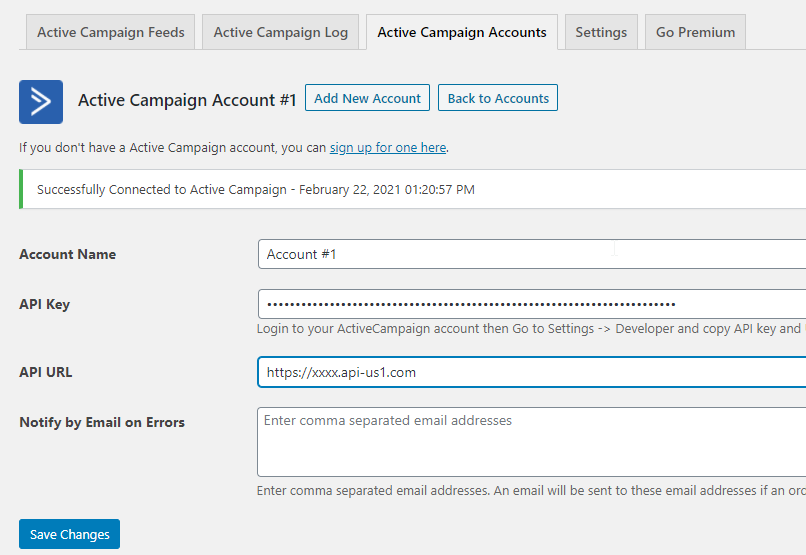
- Go to “ActiveCampaign Accounts” tab then add new account.
- Go to “ActiveCampaign Feeds” tab then create a new feed.
- Map required ActiveCampaign fields to contact form 7 fields.
- Send your test entry to ActiveCampaign by clicking “send to ActiveCampaign” button.
- Go to “ActiveCampaign Logs” tab and verify status of previously sent entry.
Connect ActiveCampaign account
Connect any contact form 7 to ActiveCampaign account by simply entering ActiveCampaign API key. Additionally, you can connect multiple ActiveCampaign accounts to Contact Form 7.
Map ActiveCampaign fields
Select any ActiveCampaign Object then Map ActiveCampaign fields to any contact form 7 fields. Plugin displays all ActiveCampaign fields.
Filter contact form 7 submissions
Filter contact form 7 submissions sent to ActiveCampaign based on user input. For example , send those customers to ActiveCampaign who check “Subscribe to newsletter” checkbox.
Manually send to ActiveCampaign
Send contact form 7 submissions to ActiveCampaign when someone submits a contact form. You can manually send contact form 7 submissions to ActiveCampaign by clicking “Send to ActiveCampaign” button.
ActiveCampaign logs
View a detailed log of each contact form 7 submission Whether sent or not sent to ActiveCampaign and easily resend contact form 7 submission to ActiveCampaign.
Send Data As ActiveCampaign Member Notes
Send one to many contact form 7 form fields as ActiveCampaign Contact notes when someone submits a contact form on your site.
Create Or Update Contact in ActiveCampaign
If a member already exists in ActiveCampaign , update it otherwise create a new member in ActiveCampaign.
Premium Version Features.
Following features are available only in premium version Contact Form 7 ActiveCampaign Pro.
- ActiveCampaign Contact tags.
- Phone number field and all custom fields of ActiveCampaign.
- Add Contacts to multiple ActiveCampaign lists.
- Google Analytics Parameters and Geolocation of a visitor who submitted the form.
- Lookup lead’s email and phone using email and phone lookup apis.
- 20+ premium addons
Want to send data to crm
We have Premium Extensions for 20+ CRMs.View All CRM Extensions
This Plugin is a fork of cf7 ActiveCampaign Plugin written by @codeincept
Frequently asked questions
Where can I get support?
Our team provides free support at https://www.crmperks.com/contact-us/.
Contact form 7 ActiveCampaign Integration
Simply Connect your ActiveCampaign account. Go to Feeds and create ActiveCampaign feed, map contact form 7 fields to ActiveCampaign fields. Test by submitting a form or go to Contact Form Entries and open any entry then press “Send to ActiveCampaign” button. Go to ActiveCampaign Logs and verify if entry was sent to ActiveCampaign.
WPForms ActiveCampaign
Easily connect WPforms to any ActiveCampaign account. Create feeds for ActiveCampaign Contacts etc. New WPforms submission will be automatically sent to your ActiveCampaign account.
Elementor forms to ActiveCampaign
Easily Connect Elementor forms to your ActiveCampaign account. Create a feed for any ActiveCampaign list, select correct Elementor form and finally map fields in feed. When someone submits Elementor form, submission will be automatically sent to your ActiveCampaign account. You can manually send any Elementor forms entry to ActiveCampaign by clicking “send to ActiveCampaign” button.
Ninja Forms ActiveCampaign
Easily connect Ninja Forms to your ActiveCampaign account. After connecting ActiveCampaign account, create a feed for Contacts etc. New Ninja Forms submission will be automatically sent to your ActiveCampaign account. You can manually send any Ninja Forms entry to ActiveCampaign by clicking “send to ActiveCampaign” button.
Formidable Forms ActiveCampaign
Connect your ActiveCampaign account with our ActiveCampaign plugin. Create feeds for any ActiveCampaign list like Contacts, Companies etc. Select correct Formidable Form in feed. New Formidable Form submission will be automatically sent to your ActiveCampaign account. You can manually send any Formidable Form entry to ActiveCampaign by clicking “send to ActiveCampaign” button.
Changelog
1.1.4
- fixed “sanitize sql orderby” issue.
1.1.3
- fixed “logs search” issue.
1.1.2
- fixed “PHP Object Injection Vulnerability” issue.
1.1.1
- fixed “select2 xss” issue.
1.1.0
- fixed “id field of wpforms”.
1.0.9
- fixed “elementor form missing” issue.
Screenshots


For developers
Is this your plugin? Show off the numbers.
Add a live badge to your site, docs or GitHub README. It updates on its own — no account needed.
FAQ
Integration for ActiveCampaign and…: quick answers
Straight answers, pulled from live WordPress.org data.
Live data from WordPress.org · checked Oct 9, 2026
Is Integration for ActiveCampaign… free?
Yes. Integration for ActiveCampaign… is free to download and use from the official WordPress.org plugin directory.
Is Integration for ActiveCampaign… safe to use in 2026?
Integration for ActiveCampaign… is a solid plugin choice in 2026, with a few things worth checking first. It runs on 200+ sites, is rated 5/5 and was last updated 1 month ago, and scores 72/100 on our health check.
How many websites use Integration for ActiveCampaign…?
Integration for ActiveCampaign… is active on 200+ WordPress websites and has been downloaded 9,010 times since it launched in July 2018. It was downloaded 249 times in the last 30 days.
Does Integration for ActiveCampaign… work with WordPress 7.1?
Yes. The developer has tested Integration for ActiveCampaign… up to WordPress 7.1.3, the latest release. It requires WordPress 3.8 or newer.
What PHP version does Integration for ActiveCampaign… need?
Integration for ActiveCampaign… requires PHP 5.3 or higher. Most hosts run PHP 8.x today, so it works on any modern WordPress hosting.
When was Integration for ActiveCampaign… last updated?
The latest version, 1.1.4, was released on September 6, 2026 (1 month ago).
Who makes Integration for ActiveCampaign…?
Integration for ActiveCampaign… is developed and maintained by CRM Perks.
Powered by PageForge
Want thousands of pages that rank like these? Build them in an afternoon.
This directory runs on the same engine as PageForge. Turn any spreadsheet, CSV or API into thousands of fast, SEO-ready WordPress pages — with schema, internal links and AI-written copy baked in.
- CSV, Google Sheets & API data sources
- AI content, schema & internal links per page
- Works with Elementor, Gutenberg, Yoast & Rank Math
- Free on WordPress.org — no credit card


