


Certloom – Certificate Verification
Manage certificates and publish exact-number verification with a native block, shortcode, CSV tools, and optional Elementor widgets.

Use with caution
Certloom works, but test it on a staging site before relying on it in 2026. It runs on 30+ sites, is rated 5/5 and was last updated 3 months ago, and scores 59/100 on our health check.
- Small user base (30+ active installs)
- Very few reviews so far
How does it stack up?
Side-by-side on installs, updates, ratings & support


Daily downloads
Download spikes usually follow a new release — each site that auto-updates counts as a download.
Rankings
Where Certloom stands todayWordPress.org search rankings
Live position in the plugin search, top 100| Keyword | Position |
|---|---|
| certificate | #17 |
| certificate registry | #2 |
| certificate verification | #8 |
| credentials | #94 |
| shortcode | >100 |
Version adoption
Share of active sites per release.
Rating breakdown
★★★★★★★★★★ 5 from 1 reviews
About Certloom – Certificate Verification
From the official readme · v1.5.0Description
Certloom helps certification bodies, training providers, associations, auditors, and other organizations manage certificate records and publish public verification on WordPress.
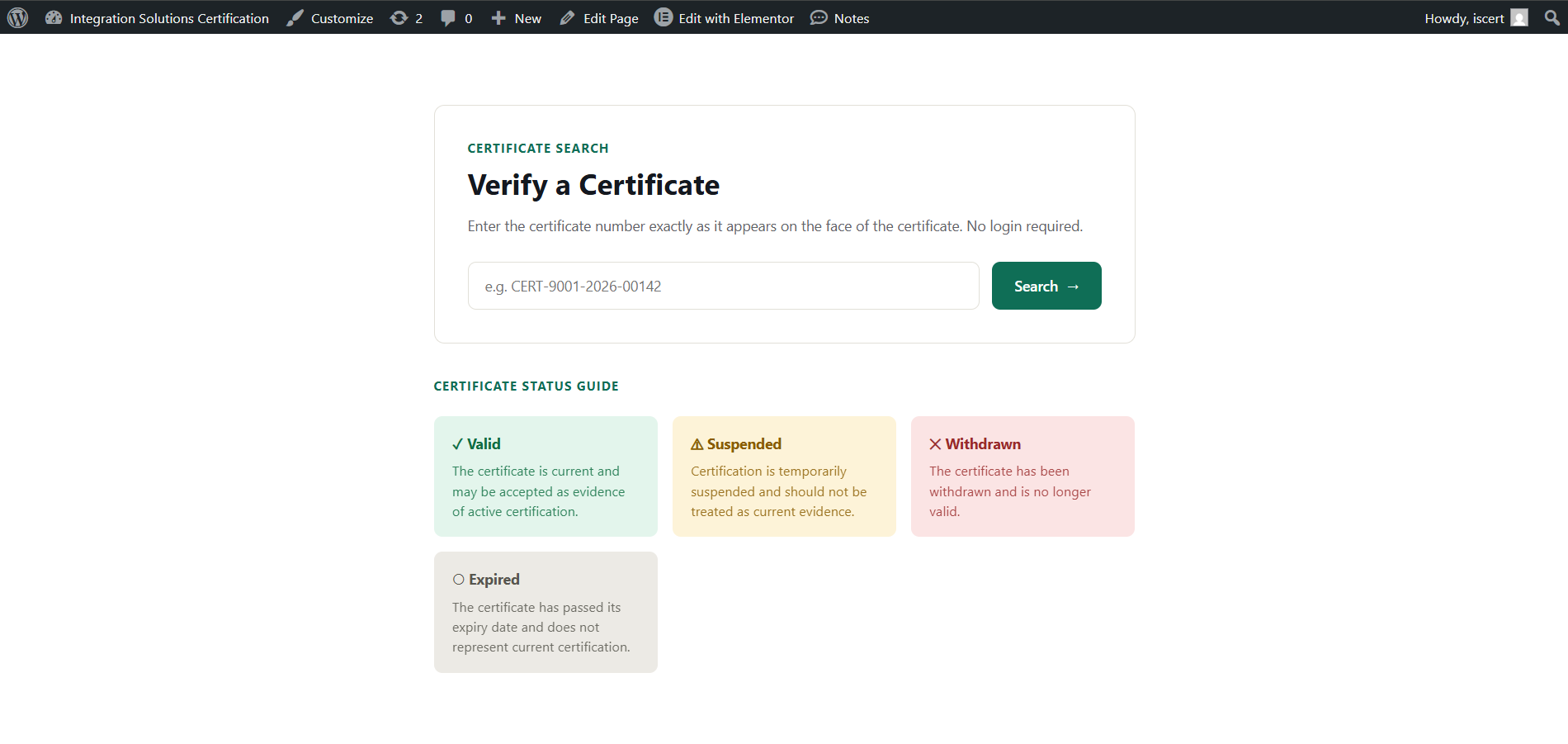
Visitors enter the complete certificate number to view its current status and only the fields approved for public display. Letter case is ignored, while spaces, punctuation, and hyphens must match. Records stay in the site’s WordPress database; Certloom does not require an external verification service.
WordPress-first and self-hosted
Certloom provides a practical certificate registry without requiring a separate SaaS platform or a page builder. The native block and shortcode work with WordPress itself, while Elementor integration remains optional.
Publishing methods
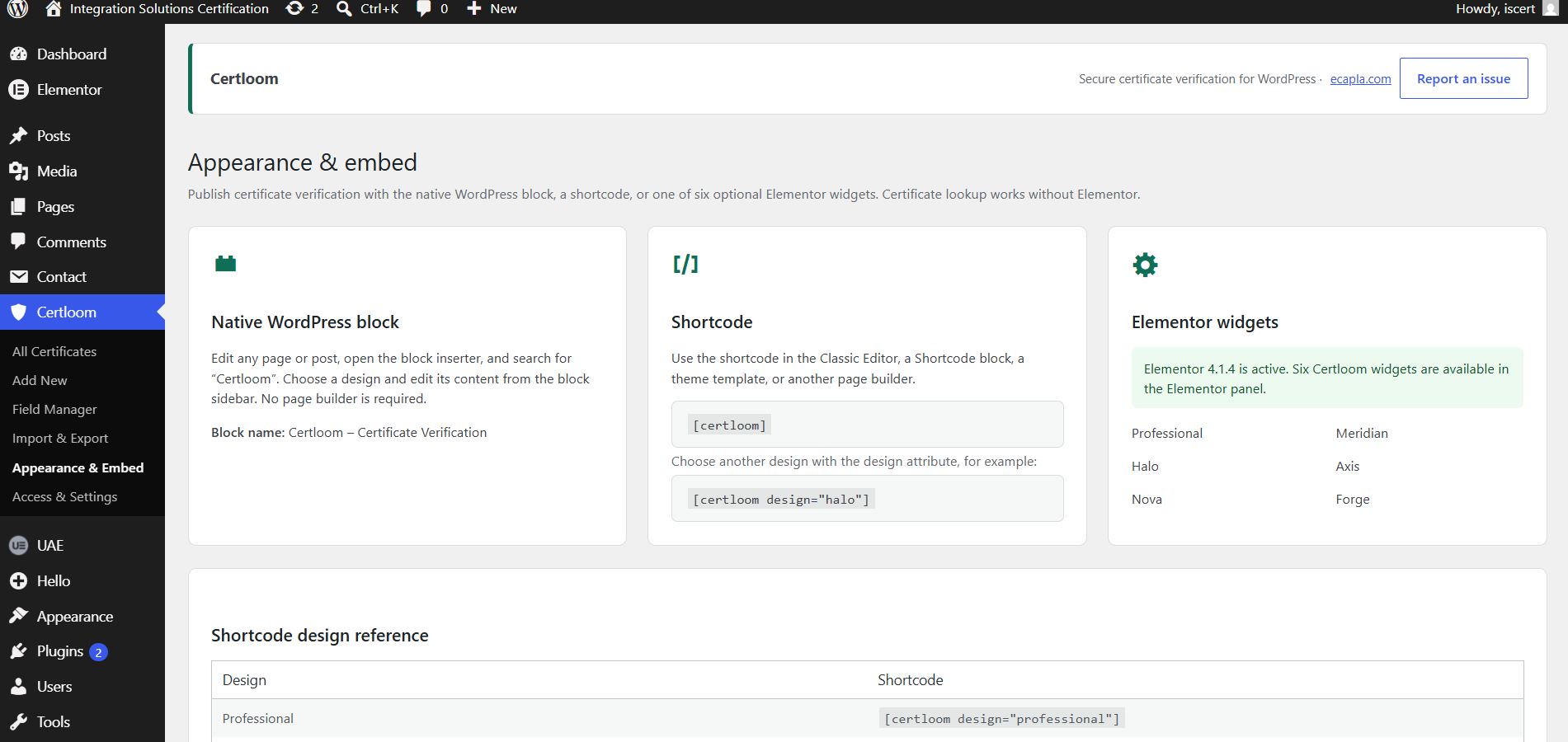
- Native WordPress block with six designs.
- Shortcode using
[certloom]in the Classic Editor, a Shortcode block, templates, or other page builders. - Direct links using
?certloom_number=YOUR-NUMBERfor QR-code destinations. These requests receive noindex and private-cache headers, although the number may still appear in browser history, infrastructure logs, or site analytics. - Optional Elementor widgets when Elementor 3.10 or later is active: Professional, Meridian, Halo, Axis, Nova, and Forge.
Each Elementor widget has isolated content and style controls. Structural responsiveness is automatic and container-aware. Certloom is independent and is not affiliated with or endorsed by Elementor.
Certificate management
- Dedicated indexed database table.
- Add, edit, search, filter, sort, paginate, delete, and bulk-delete records.
- Valid, Suspended, and Withdrawn workflow statuses; Expired is normally calculated from the expiry date.
- Protected review handling for explicitly restored historical Expired records.
- Configurable core and custom fields with ordering and public-visibility controls.
- Fresh installations publish only certificate number and status by default.
- Removed custom fields are retired so their keys and stored values remain protected.
- Dedicated
manage_certverifycapability and optional Certificate Manager role.
Import, export, and complete backup
- CSV template generated from the current field schema, followed by mapping review.
- Partial updates preserve fields not included in the import.
- Blank mapped cells preserve existing values unless clearing is explicitly enabled. Status cannot be cleared, and a new row with a mapped-but-blank Status is rejected.
- Per-row validation, formula neutralization, and bounded file, row, column, and cell limits.
- Administrator-only Historical restore mode for trusted Certloom exports containing protected legacy Expired records.
- Versioned streaming JSON backup for lossless restoration of certificates, settings, fields, retired values, workflow sources, and timestamps.
- Restore preview before choosing exact snapshot replacement or a non-destructive certificate merge.
- Restore locking pauses Certloom writes during commit while public verification remains available.
- Chunked imports, indexed prefetching, deferred counts, and keyset exports reduce memory and query pressure on large registries.
Security and privacy
- Whole-number exact lookup; partial matches are never returned.
- Public output includes only fields explicitly enabled by the site owner.
- Private-cache and noindex headers for REST verification and supported direct-link requests.
- Bounded input, basic rate limiting, accessible announcements, and safe no-JavaScript verification.
- Identical same-page lookups share one in-flight request and stale responses cannot overwrite newer searches.
- No analytics, telemetry, remote scripts, remote fonts, or external certificate processing.
- Suggested privacy-policy wording is added to WordPress’s Privacy Policy Guide.
- Certificate data and settings are retained on uninstall by default; administrators may opt into complete removal.
Installation
- Install the ZIP through Plugins > Add New > Upload Plugin, or upload the
certloomfolder to/wp-content/plugins/. - Activate Certloom.
- Review Certloom > Field Manager and choose any additional fields that may appear publicly.
- Add records manually or through Certloom > Import & Export.
- Open Certloom > Appearance & Embed and choose the block, shortcode, or optional Elementor method.
- Review Certloom > Access & Settings for permissions, branding, privacy, and uninstall preferences.
- After widget CSS changes, use Elementor > Tools > Regenerate CSS & Data and clear site caches.
Changelog
Review-resubmission release finalizing the Certloom identity, fixing activation after the rename, and preserving the existing certificate data and schema.
1.5.0
- Fixed Elementor Flexbox Container sizing so all Certloom widgets occupy the available row and remain centered; Professional stays capped at 680px.
- Finalized the public identity as Certloom – Certificate Verification with the requested WordPress.org slug and text domain
certloom. - Fixed an activation fatal introduced during the pre-release rename by restoring the correct settings, fields, and import include paths.
- Restored Elementor width safety after the rename so Professional remains centered at up to 680px and Meridian, Halo, Axis, Nova, and Forge fill their Elementor containers without overflow.
- Aligned the native block, admin navigation, shortcode, direct-link parameter, REST namespace, and Elementor widget identifiers with Certloom while preserving the existing database schema and stored data.
- Prepared the corrected WordPress.org review-resubmission package and directory assets.
1.4.9
- Added an expiring restore-maintenance lock that pauses Certloom writes during a resumable complete restore.
- Split restoration into exact Replace mode and non-destructive Merge mode with preview counts for current-only certificates.
- Added registry and configuration checks so unexpected changes abort before the atomic restore commit.
- Made complete-backup generation reject mixed-state files when records or configuration change during export.
- Preserved public verification during restore and expanded restore-state cleanup.
For the complete release history, see changelog.txt included with the plugin.
Screenshots
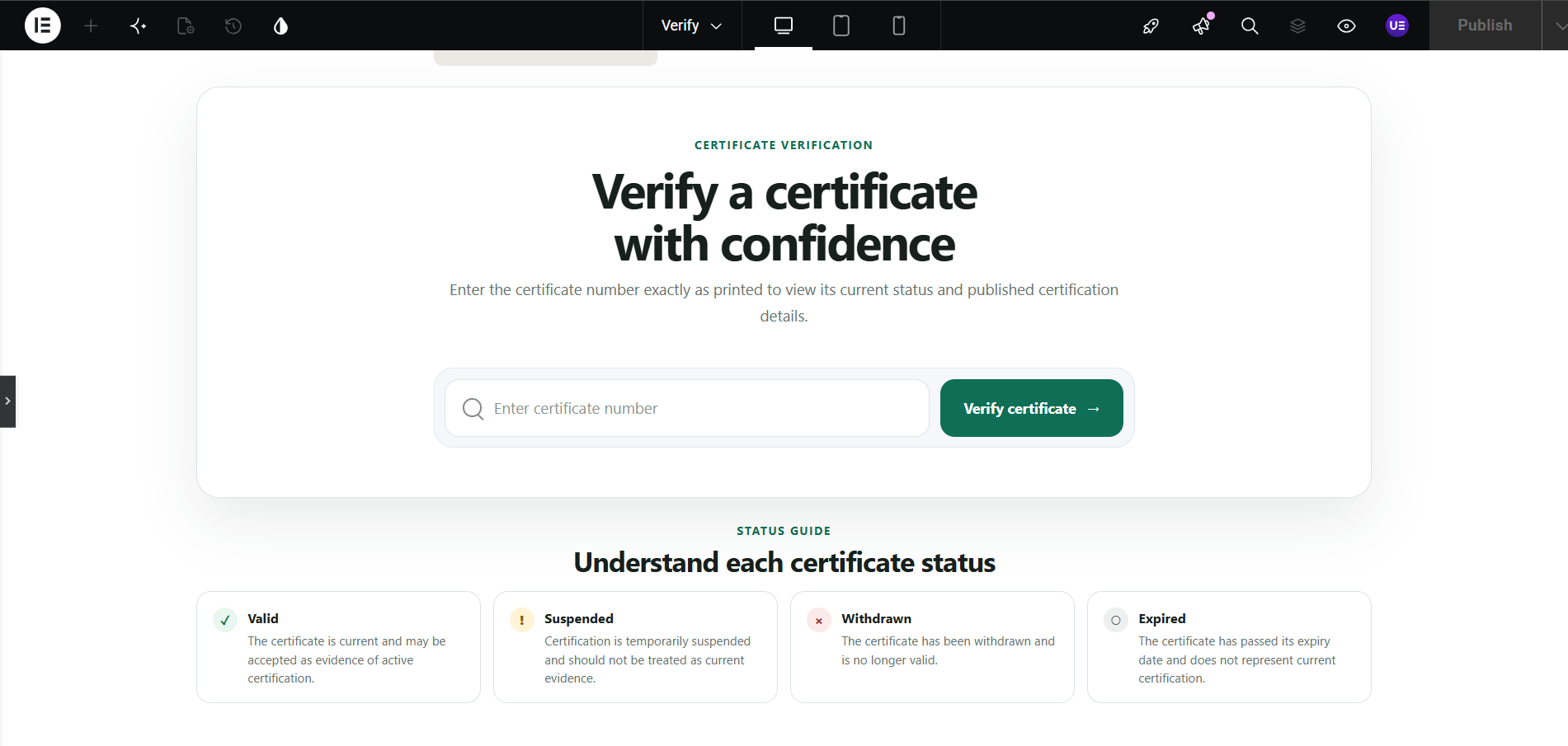
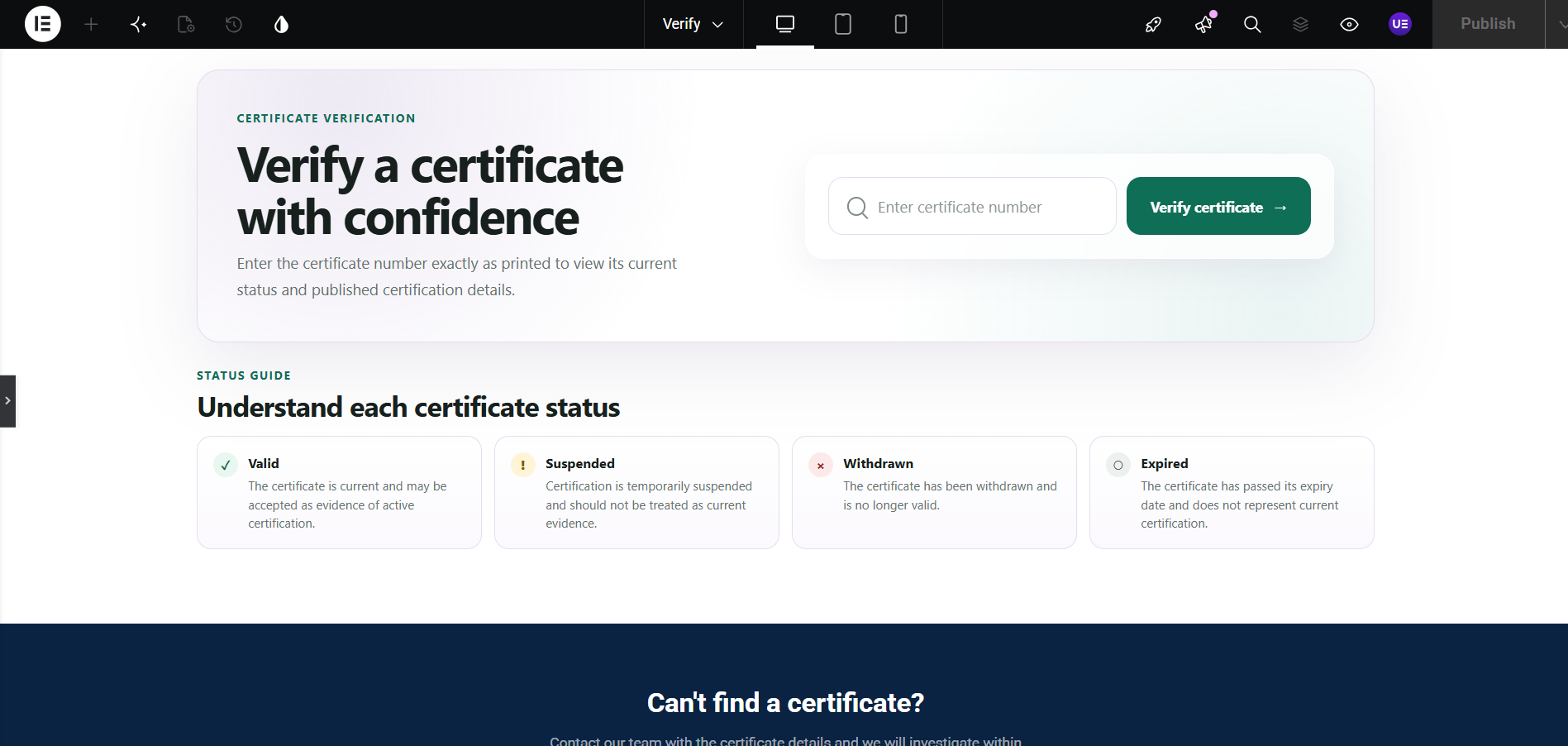
For developers
Is this your plugin? Show off the numbers.
Add a live badge to your site, docs or GitHub README. It updates on its own — no account needed.
Best Certloom alternatives
All certificate plugins →




FAQ
Certloom – Certificate Verification: quick answers
Straight answers, pulled from live WordPress.org data.
Source: WordPress.org
Is Certloom free?
Yes. Certloom is free to download and use from the official WordPress.org plugin directory.
Is Certloom safe to use in 2026?
Certloom works, but test it on a staging site before relying on it in 2026. It runs on 30+ sites, is rated 5/5 and was last updated 3 months ago, and scores 59/100 on our health check.
How many websites use Certloom?
Certloom is active on 30+ WordPress websites and has been downloaded 425 times since it launched in August 2026. It was downloaded 183 times in the last 30 days.
Does Certloom work with WordPress 7.1?
Certloom is officially tested up to WordPress 7.0.9, while the latest release is 7.1.5. It may still work, but try it on a staging site first.
What PHP version does Certloom need?
Certloom requires PHP 7.4 or higher. Most hosts run PHP 8.x today, so it works on any modern WordPress hosting.
When was Certloom last updated?
The latest version, 1.5.0, was released on August 17, 2026 (3 months ago).
Who makes Certloom?
Certloom is developed and maintained by Ecapla.
What are the best alternatives to Certloom?
The most popular alternatives to Certloom are Certificate customizer for… (1K+ installs), Certificate Verification (1K+ installs) and ValidateCertify Free (800+ installs).
Powered by PageForge
One template and a spreadsheet. A real page for every search.
PageForge turns each row of a CSV into a WordPress page with its own title, URL, SEO fields and schema, built on the layout you already designed. Free on WordPress.org.
- CSV and XLSX, plus Google Sheets on Professional and Enterprise
- Its own title, URL, SEO fields and schema for every page
- Works with the block editor, Elementor, Divi and Avada
- Free on WordPress.org, no credit card