



Category Indexer for WooCommerce
Control meta robots, canonicals, link juice & crawling budget on WooCommerce shop/category pages. Auto 404 redirect handling for better SEO.

Use with caution
Category Indexer for WooCommerce works, but test it on a staging site before relying on it in 2026. It runs on 10+ sites and was last updated 6 months ago, and scores 44/100 on our health check.
- Small user base (10+ active installs)
- Very few reviews so far
- Only tested up to WordPress 6.9 (latest is 7.1)
How does it stack up?
Side-by-side on installs, updates, ratings & support



Daily downloads
Download spikes usually follow a new release — each site that auto-updates counts as a download.
Rankings
Where Category Indexer for WooCom… stands todayWordPress.org search rankings
Live position in the plugin search, top 100| Keyword | Position |
|---|---|
| 404 redirect | >100 |
| canonical | >100 |
| crawl budget | #15 |
| meta robots | #74 |
| woocommerce | >100 |
Version adoption
Share of active sites per release.
About Category Indexer for WooCommerce
From the official readme · v2.1.1Description
Category Indexer for WooCommerce is a powerful SEO tool that helps store owners manage indexing of category and shop pages. Control which pages search engines index and follow to optimize your WooCommerce SEO crawl budget and improve overall SEO performance.
This plugin gives you complete control over three critical SEO elements: meta robots tags, canonical URLs, and WooCommerce link juice distribution.
Optimize WooCommerce SEO Crawl Budget
Large WooCommerce stores often waste valuable crawl budget on low-value pagination pages. This plugin helps you:
- Save crawl budget by noindexing paginated category pages
- Focus Google’s attention on your high-value product and category pages
- Improve indexation speed for new products and important content
- Reduce duplicate content that confuses search engine crawlers
By implementing proper WooCommerce SEO crawl budget management, your store gets indexed more efficiently, leading to faster rankings for pages that matter.
Control WooCommerce Link Juice Flow
WooCommerce link juice (link equity) is the SEO value passed between pages through hyperlinks. Without proper management, this valuable authority gets diluted across hundreds of pagination pages.
This plugin optimizes WooCommerce link juice distribution by:
- Concentrating link equity on main category pages instead of pagination
- Strategic nofollow application on low-value pages
- Directing authority to product pages that drive sales
- Internal link optimization for maximum SEO benefit
WooCommerce Auto Redirect 404 Errors
Automatically redirect WooCommerce 404 errors to relevant pages. When products are deleted or categories removed, the plugin detects the broken URL and auto redirects visitors, recovering lost SEO value and preventing poor user experience
Redirect broken links (404s) to relevant pages to recover lost link equity.
When products are deleted or categories removed, broken links damage your SEO through:
* Lost link equity from external backlinks
* Poor user experience increasing bounce rates
* Wasted crawl budget on non-existent pages
* Negative signals to search engines
How 404 Redirect Works:
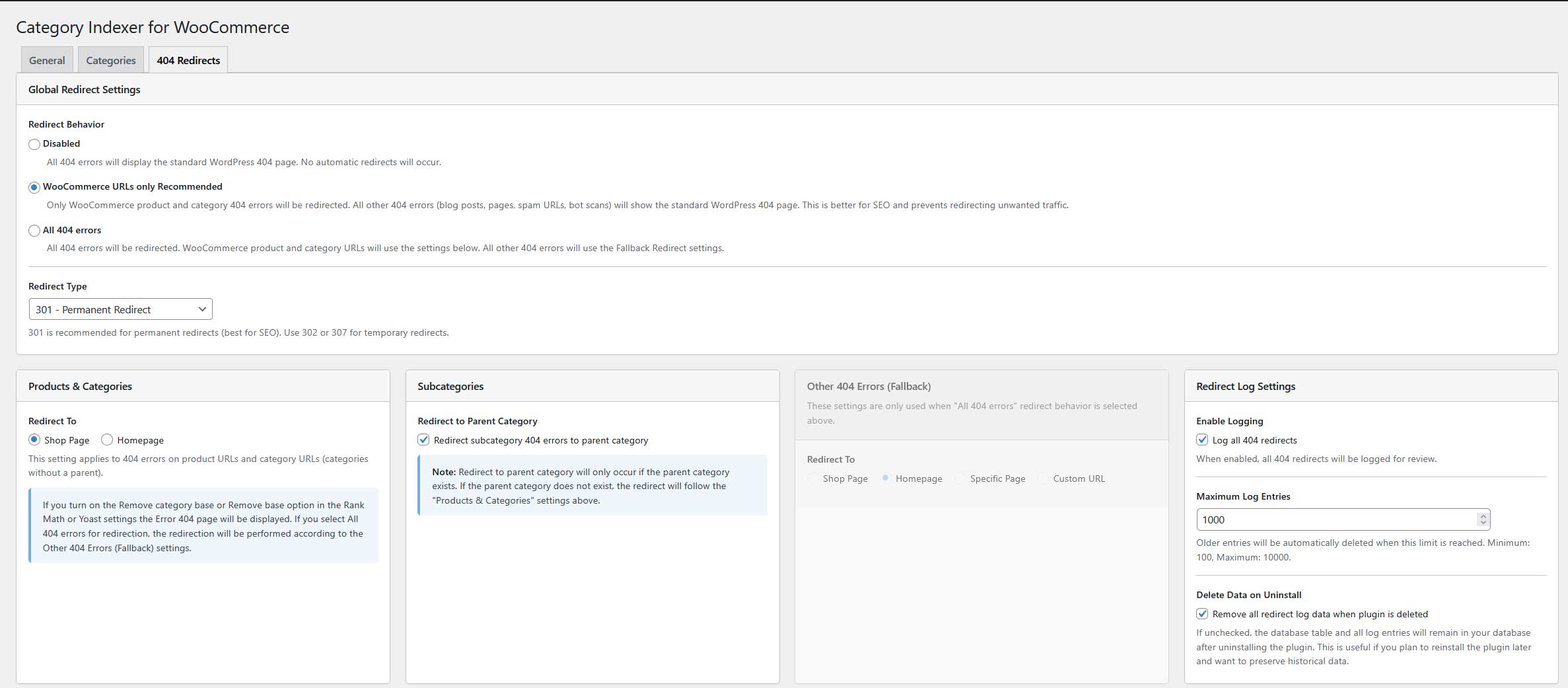
- Automatic URL detection – Identifies if the 404 was a product, category, or subcategory
- Smart redirects – Subcategories redirect to parent category, products to relevant category
- Flexible fallbacks – Configure redirects to shop page, homepage, or custom URL
- Multiple redirect types – Support for 301 (permanent), 302 (temporary), and 307 redirects
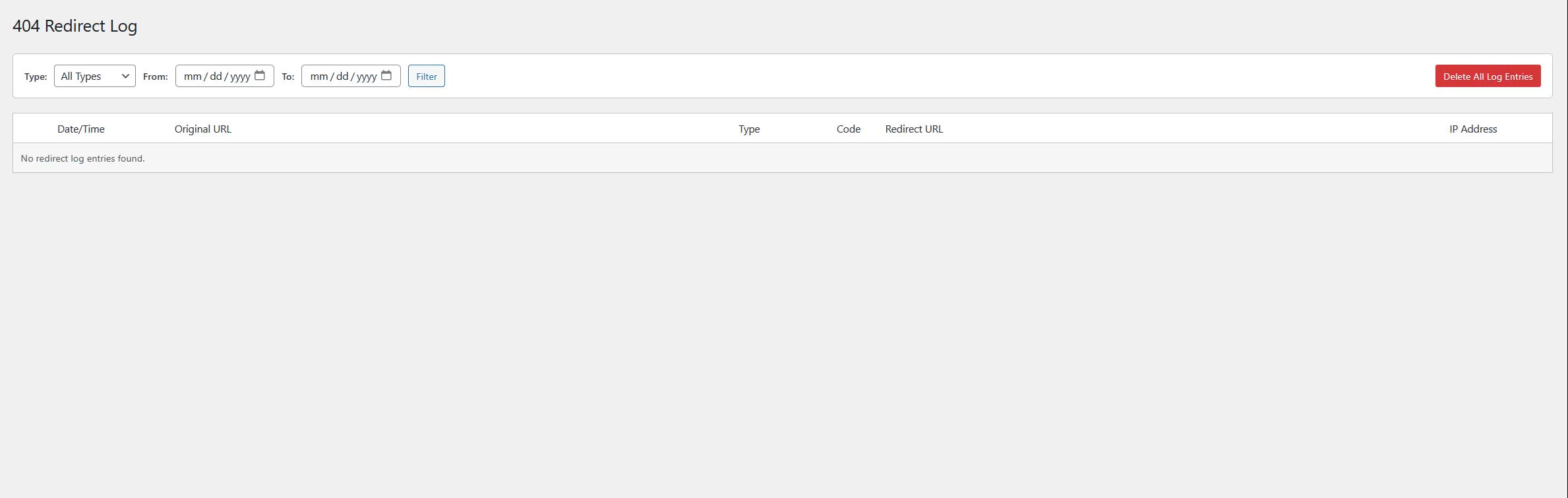
- Redirect logging – Monitor all redirects with filtering and pagination
- Preserve link juice – 301 redirects pass SEO value to the new destination
SEO Benefits of 404 Redirect:
- Recover lost backlinks – External links pointing to deleted products still pass value
- Improve user experience – Visitors find relevant content instead of error pages
- Maintain crawl efficiency – Search engines don’t waste time on dead ends
- Protect rankings – Prevent traffic loss from broken internal links
Meta Robots Tag Control
Configure meta robots tags (index, noindex, follow, nofollow) at multiple levels:
- Set global defaults for all shop and category pages
- Override settings for individual categories
- Control first page vs. pagination pages separately
- No coding knowledge required
Canonical Tag Management
Prevent duplicate content issues automatically:
- Canonical tags added to all category and shop pages
- Pagination pages point to the primary page
- Consolidates ranking signals
- Works with sorting and filtering parameters
Key Features
- Meta Robots Control – Add noindex, nofollow, index, or follow tags
- Canonical URLs – Automatic canonical tags on paginated pages
- 404 Redirect Handling – Automatic redirects for deleted WooCommerce content
- Redirect Logging – Monitor and analyze all 404 redirects
- Indexing Control – Configure first page vs. other pages separately
- Link Juice Optimization – Control link equity flow through categories
- Category-Specific Settings – Unique settings per category
- Shop Page Settings – Dedicated settings for the main shop page
- Block Theme Compatible – Works with FSE themes
- Translation Ready – Fully translatable
Benefits
- Optimize crawl budget – Focus Google on important pages
- Prevent duplicate content – Proper canonical implementation
- Improve link distribution – Concentrate equity on valuable pages
- Recover broken links – 404 redirects preserve SEO value
- Better rankings – Proper technical SEO implementation
- Easy configuration – Intuitive admin interface
Use Cases
- Large stores with hundreds of categories and pagination
- Stores with duplicate content issues in Search Console
- Sites needing crawl budget optimization
- Stores with frequently changing product catalogs
- SEO professionals managing WooCommerce sites
Compatibility
- Rank Math SEO – Full integration with free version
- Yoast SEO – Seamless compatibility with free version
- Block Themes – Full FSE (Full Site Editing) support
Installation
Install via WordPress Admin
- Navigate to
WP-Admin → Plugins → Add New - Search for “Category Indexer for WooCommerce”
- Click “Install Now” then “Activate”
Install via FTP
- Download the plugin from WordPress.org
- Upload to
wp-content/plugins/directory - Activate through the Plugins menu
Configuration
- Go to
Settings → Category Indexer - Configure General settings for global defaults
- Set up individual categories in the Categories tab
- Configure 404 Redirects in the dedicated tab
- Monitor redirects in the 404 Redirect Log submenu
Requirements: Rank Math SEO or Yoast SEO (free version) must be active.
Frequently asked questions
Do I need an SEO plugin?
Yes, Rank Math SEO or Yoast SEO (free version) must be installed. The plugin integrates with these to add meta robots tags and canonical URLs.
How does WooCommerce auto redirect 404 error work?
When WooCommerce returns a 404 error for a deleted product or category, the plugin automatically detects the broken URL and redirects visitors to the most relevant available page. Products auto redirect to the shop page or homepage, subcategories redirect to the parent category, with fallbacks to the shop page, homepage, or a custom URL. Supports 301, 302, and 307 redirect types.
What is WooCommerce SEO crawl budget optimization?
WooCommerce SEO crawl budget refers to the number of pages Google crawls on your store. This plugin optimizes crawl budget by noindexing low-value pagination pages, ensuring Google focuses on your important product and category pages.
How does WooCommerce link juice optimization work?
WooCommerce link juice is SEO value passed through links. This plugin prevents link equity dilution across pagination by applying strategic nofollow tags, keeping authority concentrated on pages that drive sales.
How does the 404 redirect feature work?
When a product or category is deleted, the plugin automatically redirects visitors to relevant content. It detects the URL type (product, category, subcategory) and redirects accordingly. Subcategories go to parent categories, with configurable fallbacks to shop page, homepage, or custom URL.
What redirect types are supported?
The plugin supports 301 (permanent), 302 (temporary), and 307 redirects. Use 301 for deleted products to pass maximum link juice to the redirect destination.
Can I monitor 404 redirects?
Yes, the 404 Redirect Log submenu shows all redirects with filtering and pagination, helping you identify patterns and optimize your redirect strategy.
Can I set different settings per category?
Yes, configure meta robots tags and canonical settings individually per category for granular SEO control.
Will this prevent duplicate content?
Yes, through canonical tags on pagination pages and noindex on low-value pages, preventing duplicate content penalties.
Is it compatible with block themes?
Yes, fully compatible with FSE (Full Site Editing) block themes and classic themes.
Changelog
New 404 redirect handling feature. Configure in Category Indexer → 404 Redirects tab. Monitor redirects in new 404 Redirect Log submenu.
2.1.1
- Added option Enable URL with Parameters settings
- Improved PHP code
2.1.0
- New: Automatic 404 redirect functionality for WooCommerce pages
- New: 404 Redirects settings tab with configurable redirect behavior
- New: 404 Redirect Log submenu for monitoring
- Improved code organization with class autoloader
- Reorganized file structure (admin/frontend separation)
- Full internationalization support
2.0.0
- Complete code redesign and refactoring
- Added category caching for performance
- Option to remove /page/1/ from pagination URLs
- Block Theme (FSE) support
- Meta robots settings for Site Search
- Default meta robots values for categories/subcategories
- Default canonical tag values for pagination
1.0.1
- Fixed plugin uninstallation
Screenshots

For developers
Is this your plugin? Show off the numbers.
Add a live badge to your site, docs or GitHub README. It updates on its own — no account needed.
Best Category Indexer for WooComme… alternatives
All 404 redirect plugins →




FAQ
Category Indexer for WooCommerce: quick answers
Straight answers, pulled from live WordPress.org data.
Live data from WordPress.org · checked Oct 11, 2026
Is Category Indexer for WooCommerce free?
Yes. Category Indexer for WooCommerce is free to download and use from the official WordPress.org plugin directory.
Is Category Indexer for WooCommerce safe to use in 2026?
Category Indexer for WooCommerce works, but test it on a staging site before relying on it in 2026. It runs on 10+ sites and was last updated 6 months ago, and scores 44/100 on our health check.
How many websites use Category Indexer for WooCommerce?
Category Indexer for WooCommerce is active on 10+ WordPress websites and has been downloaded 1,425 times since it launched in November 2024. It was downloaded 57 times in the last 30 days.
Does Category Indexer for WooCommerce work with WordPress 7.1?
Category Indexer for WooCommerce is officially tested up to WordPress 6.9.10, while the latest release is 7.1.3. It may still work, but try it on a staging site first.
What PHP version does Category Indexer for WooCommerce need?
Category Indexer for WooCommerce requires PHP 7.4 or higher. Most hosts run PHP 8.x today, so it works on any modern WordPress hosting.
When was Category Indexer for WooCommerce last updated?
The latest version, 2.1.1, was released on April 14, 2026 (6 months ago).
Who makes Category Indexer for WooCommerce?
Category Indexer for WooCommerce is developed and maintained by Tihi.
What are the best alternatives to Category Indexer for WooCommerce?
The most popular alternatives to Category Indexer for WooCommerce are 404 Solution (10K+ installs), 404 Redirect (200+ installs) and Digi Eye Redirects (100+ installs).
Powered by PageForge
Want thousands of pages that rank like these? Build them in an afternoon.
This directory runs on the same engine as PageForge. Turn any spreadsheet, CSV or API into thousands of fast, SEO-ready WordPress pages — with schema, internal links and AI-written copy baked in.
- CSV, Google Sheets & API data sources
- AI content, schema & internal links per page
- Works with Elementor, Gutenberg, Yoast & Rank Math
- Free on WordPress.org — no credit card


