


Catch Themes Demo Import
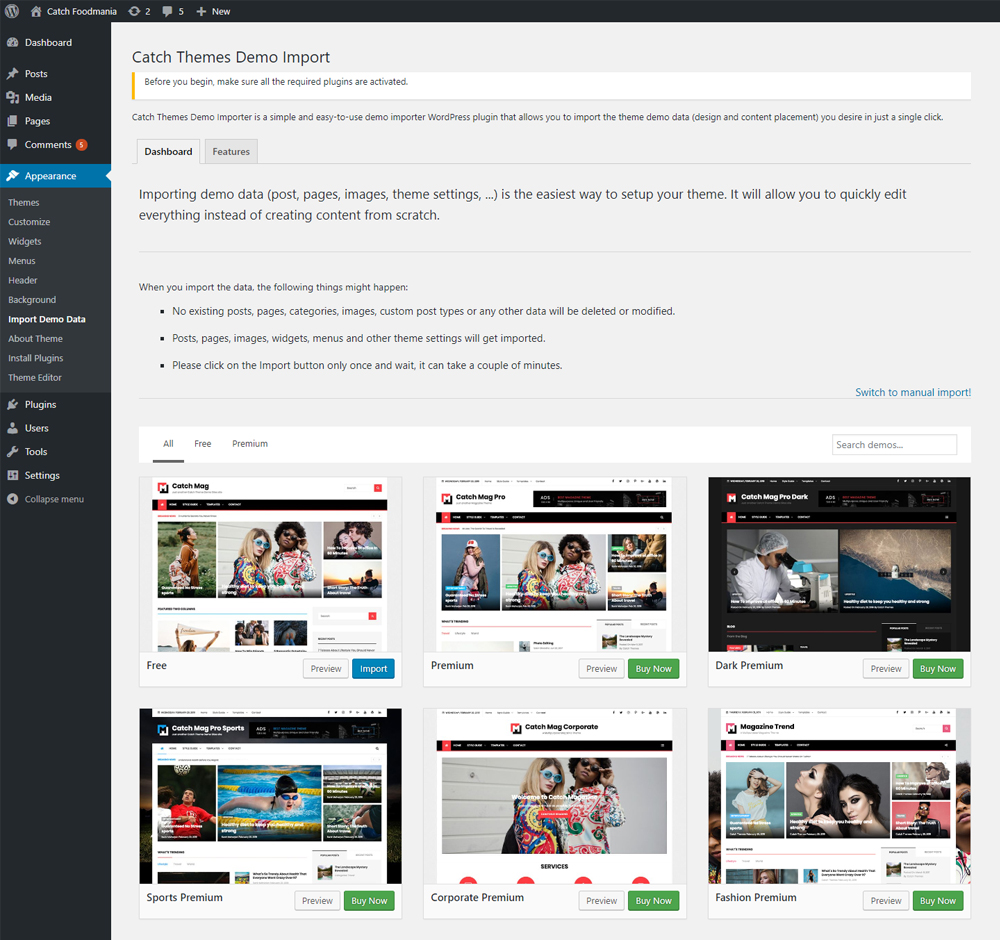
Catch Themes Demo Import is a simple and easy-to-use demo importer WordPress plugin that allows you to import the theme demo data

Use with caution
Catch Themes Demo Import works, but test it on a staging site before relying on it in 2026. It runs on 5K+ sites, is rated 1/5 and was last updated 4 months ago, and scores 52/100 on our health check.
- Very few reviews so far
How does it stack up?
Side-by-side on installs, updates, ratings & support



Daily downloads
Download spikes usually follow a new release — each site that auto-updates counts as a download.
Rankings
Where Catch Themes Demo Import stands todayWordPress.org search rankings
Live position in the plugin search, top 100| Keyword | Position |
|---|---|
| content | >100 |
| demo | #21 |
| import | #88 |
| settings | >100 |
| theme options | #63 |
Version adoption
Share of active sites per release.
Rating breakdown
★★★★★★★★★★ 1 from 1 reviews
About Catch Themes Demo Import
From the official readme · v3.4Description
Catch Themes Demo Import is a free demo importer WordPress plugin that lets you import the demo you desire in just a single click. The plugin works out of the box; all you have to do is install and activate the plugin and all the demos available on your currently used theme will be on your fingertips (visit Appearance=> Import Demo Data). If the theme doesn’t have any predefined import files, you’ll have to upload three files – a demo content XML file for content import, a WIE/JSON file for widget import, and a DAT file for customizer import. With the plugin activated, whether you have predefined demo files available or not, you’ll be able to import demos on your website without any hesitancy. Download Catch Themes Demo Import today and start importing theme demos to your website without affecting your wallet!
Are you a theme author?
Setup Catch Themes Demo Import for your theme and your users will thank you for it!
This plugin will create a submenu page under Appearance with the title Import demo data.
If the theme you are using does not have any predefined import files, then you will be presented with three file upload inputs. First one is required and you will have to upload a demo content XML file, for the actual demo import. The second one is optional and will ask you for a WIE or JSON file for widgets import. You create that file using the Widget Importer & Exporter plugin. The third one is also optional and will import the customizer settings, select the DAT file which you can generate from Catch Import Export plugin (the customizer settings will be imported only if the export file was created from the same theme). The final one is optional as well and will import your Redux framework settings. You can generate the export json file with the Redux framework plugin.
This plugin is using the improved WP import 2.0 that is still in development and can be found here: https://github.com/humanmade/WordPress-Importer.
All progress of this plugin’s work is logged in a log file in the default WP upload directory, together with the demo import files used in the importing process.
NOTE: There is no setting to “connect” authors from the demo import file to the existing users in your WP site (like there is in the original WP Importer plugin). All demo content will be imported under the current user.
Installation
The easy way (via Dashboard) :
- Go to Plugins > Add New
- Type in the Catch Themes Demo Import in Search Plugins box
- Click Install Now to install the plugin
- After Installation click activate to start using the Catch Themes Demo Import
- Go to Catch Themes Demo Import from Dashboard -> Appearance -> Import Demo Data menu
Not so easy way (via FTP) :
- Download the Catch Themes Demo Import
- Unarchive Catch Themes Demo Import plugin
- Copy folder with catch-themes-demo-import.zip
- Open the ftp \wp-content\plugins\
- Paste the plug-ins folder in the folder
- Go to admin panel => open item “Plugins” => activate Catch Themes Demo Import
- Go to Catch Themes Demo Import from Dashboard -> Appearance -> Import Demo Data menu
Changelog
3.4 (Released: July 11, 2026)
- Security: The helper that installs/activates the Essential Content Types plugin now checks user permissions and a security token before doing anything, and only accepts the two Essential Content Types plugins (Reported by PRISM via Wordfence)
- Bug Fixed: Users who can import demos but cannot manage plugins no longer see a “permissions” error page instead of the importer
- Bug Fixed: File-read failures now show the actual error message instead of an internal error code
- Bug Fixed: The demo search box container had a broken HTML attribute and could display unstyled
- Bug Fixed: A JavaScript error no longer breaks the page when the importer is opened from the Tools – Import screen
- Bug Fixed: Menu widgets whose menu is not part of the import no longer end up pointing at a missing menu
- Bug Fixed: Failed Redux or customizer-image downloads are now skipped gracefully instead of stopping with a PHP error (including unsupported image types such as WebP)
- Bug Fixed: WP-CLI import command no longer crashes when demo files cannot be downloaded
- Improved: Popup dialog titles and buttons are now translatable
- Improved: The “enable custom menu widget IDs fix” filter now works under its documented cp-ctdi name (the old spelling still works)
- Improved: Cleaned up the remaining warnings reported by the Plugin Check plugin and removed a stray system file from the package
3.3 (Released: June 21, 2026)
- Added: initial Block / Full Site Editing theme support — imports Global Styles, Navigation and customized templates/parts, and remaps IDs in block content; runs automatically when a block theme is active
- Added: Block theme demos can set the WooCommerce Shop, Cart, Checkout and My Account pages to the imported demo pages, so the Shop and other store pages work right after import
- Bug Fixed: Import no longer fails with “Error: OK (200)” on sites that display PHP notices — error output from other plugins/themes can no longer corrupt the importer’s response (errors are still written to the debug log)
- Bug Fixed: Imported block themes’ templates, template parts and navigation no longer show “Block contains unexpected or invalid content” in the editor — block markup is now preserved exactly during import
- Bug Fixed: Imported menu links (and other links baked into the demo) now point to the site they are imported on, instead of the original demo site
3.2 (Released: June 16, 2026)
- Bug Fixed: Large demo imports no longer stall mid-way — the importer keeps its progress for the entire run and shows a status note while images download
- Bug Fixed: A slow or unreachable image no longer halts the whole import; the importer skips it and continues
- Bug Fixed: Imported menus are now assigned only to the locations the demo actually defines, not forced into every header, footer, and social area
- Bug Fixed: Widget areas are cleared before demo widgets are imported so default WordPress widgets do not mix in; cleared widgets move to Inactive Widgets, not deleted
- Bug Fixed: Import no longer fails with a 403 Forbidden error if the page is left open — the security token is refreshed automatically
- Bug Fixed: Broken “Free Plugins” sidebar links, missing HTTPS on plugin header URLs, and a missing translatable label on the Features tab
- Security: Hardened POST value handling and applied strict type comparisons throughout
3.1 (Released: June 13, 2026)
- Bug Fixed: Customizer settings now import for themes installed in a subfolder (the import previously failed with “not suitable for current theme”)
- Bug Fixed: Customizer import file format check no longer passes invalid files through
- Bug Fixed: Manually uploaded Redux files are now found and imported correctly
- Bug Fixed: Correct error message is now logged when a content file upload fails
- Security: Hardened the customizer .dat file reading
3.0 (Released: May 25, 2026)
- Bug Fixed: Full WordPress Plugin Check (PHPCS) compliance pass
- Bug Fixed: Security hardening — sanitized and validated all $_GET, $_POST, and $_FILES reads; replaced wp_redirect() with wp_safe_redirect()
- Bug Fixed: All admin scripts now enqueued in the footer; added missing direct-file-access guards to several class files
- Bug Fixed: Added missing composer.json
- Compatibility: Tested up to WordPress 7.0
2.2 (Released: February 25, 2026)
- Bug Fixed: WordPress.WP.AlternativeFunctions.strip_tags_strip_tags
- Bug Fixed: WordPress.WP.DeprecatedParameters.Get_termsParam2Found
- Bug Fixed: WordPress.WP.AlternativeFunctions.unlink_unlink
- Bug Fixed: WordPress.WP.I18n.MissingTranslatorsComment
- Bug Fixed: WordPress.WP.I18n.TextDomainMismatch
- Bug Fixed: WordPress.WP.I18n.MissingArgDomain
- Compatibility check up to version 6.9
Screenshots

For developers
Is this your plugin? Show off the numbers.
Add a live badge to your site, docs or GitHub README. It updates on its own — no account needed.
Best Catch Themes Demo Import alternatives
All content plugins →





FAQ
Catch Themes Demo Import: quick answers
Straight answers, pulled from live WordPress.org data.
Live data from WordPress.org · checked Nov 17, 2026
Is Catch Themes Demo Import free?
Yes. Catch Themes Demo Import is free to download and use from the official WordPress.org plugin directory.
Is Catch Themes Demo Import safe to use in 2026?
Catch Themes Demo Import works, but test it on a staging site before relying on it in 2026. It runs on 5K+ sites, is rated 1/5 and was last updated 4 months ago, and scores 52/100 on our health check.
How many websites use Catch Themes Demo Import?
Catch Themes Demo Import is active on 5K+ WordPress websites and has been downloaded 273,869 times since it launched in February 2019. It was downloaded 1,722 times in the last 30 days.
Does Catch Themes Demo Import work with WordPress 7.1?
Catch Themes Demo Import is officially tested up to WordPress 7.0.8, while the latest release is 7.1.4. It may still work, but try it on a staging site first.
What PHP version does Catch Themes Demo Import need?
Catch Themes Demo Import requires PHP 7.4 or higher. Most hosts run PHP 8.x today, so it works on any modern WordPress hosting.
When was Catch Themes Demo Import last updated?
The latest version, 3.4, was released on July 11, 2026 (4 months ago).
Who makes Catch Themes Demo Import?
Catch Themes Demo Import is developed and maintained by Catch Plugins.
What are the best alternatives to Catch Themes Demo Import?
The most popular alternatives to Catch Themes Demo Import are One Click Demo Import (1M+ installs), Advanced Excerpt (80K+ installs) and Rara One Click Demo Import (20K+ installs).
Powered by PageForge
Want thousands of pages that rank like these? Build them in an afternoon.
This directory runs on the same engine as PageForge. Turn any spreadsheet, CSV or API into thousands of fast, SEO-ready WordPress pages — with schema, internal links and AI-written copy baked in.
- CSV, Google Sheets & API data sources
- AI content, schema & internal links per page
- Works with Elementor, Gutenberg, Yoast & Rank Math
- Free on WordPress.org — no credit card


