



Caddy – WooCommerce Side Cart & Free Shipping Bar
A high-performance WooCommerce side cart, mini cart, and free shipping bar that boosts AOV with in-cart upsells and save for later.

Solid choice
Caddy is a solid plugin choice in 2026, with a few things worth checking first. It runs on 3K+ sites, is rated 3.9/5 and was last updated 2 months ago, and scores 71/100 on our health check.
How does it stack up?
Side-by-side on installs, updates, ratings & support



Daily downloads
Download spikes usually follow a new release — each site that auto-updates counts as a download.
Rankings
Where Caddy stands todayWordPress.org search rankings
Live position in the plugin search, top 100| Keyword | Position |
|---|---|
| floating cart | #17 |
| free shipping bar | #4 |
| mini cart | #18 |
| side cart | #5 |
| woocommerce side cart | #6 |
Version adoption
Share of active sites per release.
Rating breakdown
★★★★★★★★★★ 3.9 from 20 reviews
About Caddy
From the official readme · v3.2.0Description
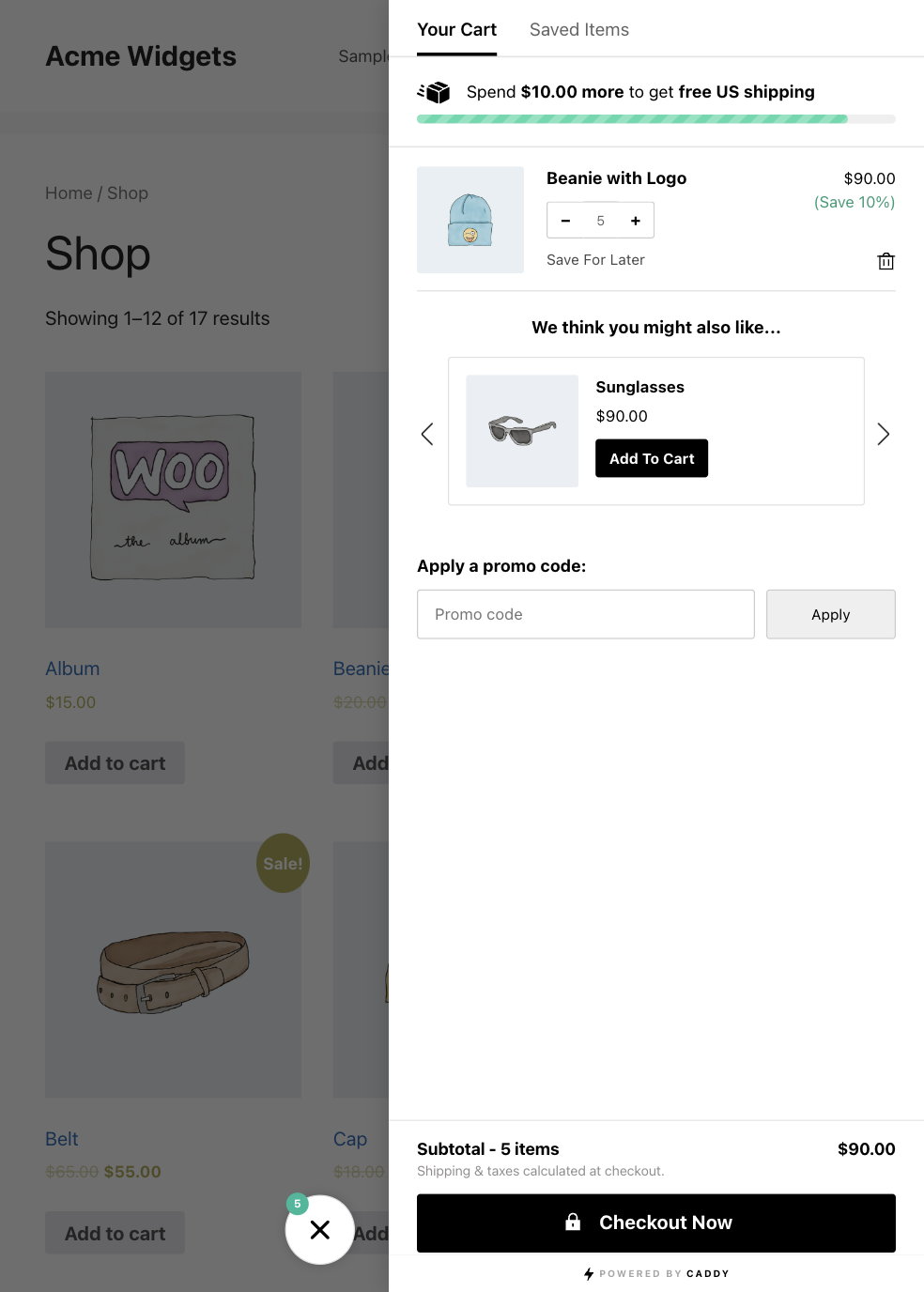
Caddy is a high performance WooCommerce side cart plugin (also known as a floating cart, sliding cart, cart drawer, or mini cart) that improves your store’s shopping experience and helps grow your sales. It replaces the default WooCommerce cart page with a sticky AJAX side cart that slides in from the edge of the screen, letting customers manage their cart without leaving the page.
Built on Modern WordPress APIs
Caddy v3 is built from the ground up on the WordPress Interactivity API and the WooCommerce Store API – the same modern foundations that power WooCommerce’s own cart and checkout blocks. This means:
- Instant AJAX cart updates – no full-page reloads. Cart changes are reactive and immediate, making it the fastest WooCommerce AJAX side cart available.
- Server-synced state – every cart operation goes through the official WooCommerce Store API, ensuring accurate prices, tax calculations, and stock validation.
- Lightweight floating cart – no jQuery dependency. Caddy uses native ES modules loaded as WordPress script modules for the smallest possible footprint.
- Future-proof – built on the same APIs WordPress and WooCommerce are investing in long-term.
Increase average order value with Caddy’s built-in in-cart upsells and cross-sell product recommendations, reduce cart abandonment with a free shipping bar, and encourage repeat shoppers with a save for later wishlist.
🛒 Side cart, mini cart & floating cart drawer in one
🚚 Free shipping bar to lift average order value
⚡️ Built on WordPress Interactivity API & WooCommerce Store API
📱 Mobile friendly responsive design
🔄 Real-time reactive cart updates
🌏 Translated into 6 languages
⚔️ Cross-browser and cross-OS battle tested
🔒 Secure and reliable
💡 Lightweight – no jQuery dependency
💰 Boosts sales and average order value
🔄 Works with most themes and plugins
🎁 Apply cart discounts and promo codes
Try the Demo | Cart Optimization Playbooks | Visit usecaddy.com
Caddy Lite features:
- Sticky floating side cart / mini cart powered by the WordPress Interactivity API – available across your whole site
- Slide-in cart drawer that opens like an add-to-cart popup – no page reloads
- Real-time AJAX cart operations via the WooCommerce Store API – no page reloads
- Free shipping bar (progress meter) that shows customers how close they are to free shipping
- In-cart upsell and cross-sell product recommendations when customers add to cart
- Save products for later / wishlist (logged-in users)
- Quick AJAX add to cart from shop and archive pages – no page reload
- Cart and saved list links for your navigation menu (shortcodes + widgets)
- Elementor widgets: drag a “Caddy Cart” or “Caddy Saved Items” element into any Elementor header or layout, with full icon, label, and count-badge styling; clicking opens the side cart and the count stays live
- Add products & manage cart items without reloading the page
- Manage cart quantities directly in the side cart
- Sticky add-to-cart bubble (floating cart icon) with a live quantity indicator
- Apply coupon codes in the side cart
- Custom CSS to match your brand
- WooCommerce HPOS support
- No jQuery dependency – pure ES modules
Supported Languages
Caddy is translated into the following languages:
- English (default)
- German (Deutsch)
- French (Français)
- Italian (Italiano)
- Brazilian Portuguese (Português do Brasil)
- Spanish (Español)
Compatibility
Caddy is compatible with most themes and plugins. The following themes and plugins have been tested and confirmed working:
- Plugins: WooCommerce Subscriptions, WooCommerce Product Bundles, All Products For WooCommerce Subscriptions, Elementor, Divi
- Themes: GeneratePress, Flatsome, Astra, Hello Elementor, Kadence, OceanWP, Storefront
Upgrade to Pro
Upgrade to Pro and unlock powerful customization features, analytics, recommendations, and more.
Caddy Pro features:
- 7 different cart icon styles & 30+ custom color options
- Cart tracking & analytics dashboard
- Multi-tier reward levels with free shipping, free gifts, and discounts
- Workflow automation engine – trigger targeted product recommendations, popup notifications, and auto-apply coupons based on cart contents, cart total, product categories, page, and customer role
- In-cart announcement bar
- In-cart product subscription upsells using with the All Products for WooCommerce Subscriptions extension
- Change the cart bubble position on the screen
- Display notices when adding to cart or adding/removing saved products
- Promote custom coupon offers in the cart
- Set free shipping meter exclusions
- Set product recommendation exclusions
- Set product recommendation fall-back rules
- Show save for later buttons on product pages and shop archives
- Manage placement of save for later buttons on shop archives
- Customize a welcome message to new users
- Hide Caddy on specific pages
- Hide out of stock products from product recommendations
- Get priority email support
- Get early access to new features
Upgrade to Pro Now: https://www.usecaddy.com/
Installation
Important: You must download and activate the WooCommerce plugin, before using Caddy.
Install Caddy from within WordPress
- Visit the plugins page within your dashboard and click the ‘Add New’ button.
- Search for ‘Caddy’.
- Click the install button.
- Click the activate button.
- Find the ‘Caddy’ menu within your dashboard and change your plugin settings.
Frequently asked questions
Is Caddy a WooCommerce mini cart replacement?
Yes. Caddy works as a WooCommerce mini cart, side cart, and floating cart all in one. It replaces the default WooCommerce cart page with a slide-in cart drawer, and the WooCommerce mini-cart block is handled automatically so you don’t get a duplicate cart.
Is this a side cart or a popup cart?
Caddy is a slide-in side cart drawer that opens automatically when a customer adds to cart – similar to an add-to-cart popup, but it slides in from the edge of the screen instead of covering the page. Customers can keep shopping without a page reload.
Does Caddy add a free shipping bar to the cart?
Yes. Caddy includes a free shipping bar (a progress meter) that shows customers how much more they need to spend to unlock free shipping – one of the most effective ways to increase average order value and reduce cart abandonment.
Can I show product upsells and cross-sells in the cart?
Yes. Caddy displays in-cart upsell and cross-sell product recommendations when customers add to cart, helping you raise average order value. Caddy Pro adds rule-based recommendations, multi-tier rewards, and workflow automation.
Does Caddy replace the WooCommerce cart page?
Yes. Caddy gives customers a fast AJAX side cart so they can view, update quantities, apply coupons, and check out without loading the standalone cart page.
Where can I learn cart optimization strategies?
We publish free WooCommerce cart optimization playbooks covering average order value growth, cart abandonment recovery, and seasonal campaigns. Read them at usecaddy.com/playbooks.
How do I add the Caddy cart icon & link to my menu or header?
Caddy has an option in it’s settings to insert the cart icon into your menu. If you want to add the cart icon somewhere else in your header you can use our widget or shortcode: Widget: Search for the “Caddy Cart” widget and add it to your header. Elementor: If you build your header with Elementor, drag in the “Caddy Cart” or “Caddy Saved Items” widget. Each has full style controls (icon size and color, label typography, count-badge colors, alignment, and spacing). Clicking opens the side cart, and the cart count stays live. Shortcodes: Or, you can use our included shortcodes using the…
Does Caddy work with multisite?
Yes.
How do I translate Caddy?
Install and activate the free Loco Translate plugin. Once installed, navigate to the Loco Translate menu option and select “plugins” from the sub menu. Select the “Caddy” plugin Click the “New language” link Select the “WordPress language” option and select a language. Choose a location for your language file (Custom is recommended), then click the “Start translating” button. Select each of the source text lines (1), enter the translations (2) and finally save your changes (3). Now make sure your default WordPress settings are set for the language you’ve configured and you’re done. You can…
Will Caddy slow down my site?
No. We’ve built Caddy with performance in mind and have fine tuned it for speed.
What data does Caddy send, and where?
Caddy sends nothing to us unless you choose to share it. Two optional features connect to usecaddy.com: Usage data (opt in, off by default). If you accept the prompt in your admin, Caddy sends a weekly snapshot: your site URL, an anonymous install ID, WordPress, PHP and WooCommerce versions, active theme, locale, multisite status, the Caddy version, how long Caddy has been installed, and which Caddy features are switched on. No customer, order, or product data is ever included. Turn it on or off anytime under Caddy > Settings > General > Help Improve Caddy. Deactivation feedback (optional)…
Changelog
This version introduces major design changes. Please be sure to back up any changes before updating.
3.2.0
- New: The free shipping country is now a free text field, so you can name any destination you ship to, such as “US & Canada”. Leave it blank to keep it out of the message.
- Improvement: The free shipping message now shows the destination you set, in both the “spend more” and “congrats” wording, and translates as a whole sentence.
- Fix: Recommended variable products now show their price, or price range, instead of $0.00.
3.1.1
- New: Optional usage data sharing, off by default, with a one-time welcome screen. Change it anytime under Caddy > Settings > General. See the FAQ for what it includes.
- Improvement: Accessibility. The cart opens as a labelled dialog, quantity controls are keyboard operable, and cart changes are announced to screen readers.
- Improvement: Hardened the codebase against the WordPress Plugin Check standards.
- Improvement: Custom CSS now loads with the Caddy stylesheet instead of separately in the page head.
- Improvement: The empty cart and saved items screens no longer show an illustration.
- Fix: Products with custom fields or add-ons now appear in the cart straight away instead of after a page reload.
- Fix: The recommendations slider can be swiped or dragged on touch screens again.
- Fix: WordPress no longer reports that Caddy loads its translations too early.
- Improvement: Compatibility. Tested up to WooCommerce 10.9.4 and WordPress 7.0.
3.1.0
- New: Elementor “Caddy Cart” and “Caddy Saved Items” widgets for your header and layouts.
- New: Support for products with custom fields and add-ons, like gift cards, personalization, and engraving.
- New: Resources admin page with help docs, playbooks, and recommended plugins.
- Improvement: Better page-caching compatibility, including WP Rocket, so the cart stays accurate and pages stay cacheable.
- Improvement: Accessibility upgrades across the cart launcher, quantity controls, and screen readers.
- Improvement: Faster, more reliable cart updates and product recommendations.
- Fix: Cart and recommendation thumbnails now show a placeholder instead of a broken image when a product image or one of its generated sizes is missing.
- Fix: The “Add Cart Widget to Menu” and “Add Saved Items Widget to Menu” options now work with menus assigned to a theme location, not only menus rendered by slug.
- Fix: Many smaller fixes across translations, recommendations, bundles, variations, and older browsers.
3.0.2
- Fix: Cart item prices now remain tax-inclusive after quantity changes when WooCommerce is set to display prices including tax.
- Fix: Prices now display correctly for currencies with non-standard decimal settings (e.g. INR with 0 decimals, JPY). Previously all Store API prices were hardcoded to divide by 100.
- Fix: Cart item shortcode (
[cc_cart_items]) is now clickable regardless of whether Save for Later is active. - Fix: Shop page add-to-cart buttons no longer replace theme icons/markup with text, preventing layout shifts and preserving theme styling (e.g. WoodMart, Flatsome).
- Fix: Caddy Recommendations now display correctly for variable products (previously looked up variation ID instead of parent product).
3.0.1
- Compatibility: Improved free/pro compatibility handling for legacy Pro detection, plus clearer admin upgrade guidance for incompatible Pro versions.
- Fix: Standardized cart/recommendation image handling to use WooCommerce thumbnail URLs directly and resolved broken image edge cases.
- Fix: Recommendation results now refresh from current cart state on drawer open to prevent stale/fallback mismatches after add-to-cart.
- Fix: Cart totals now consistently respect WooCommerce tax display mode (
Including tax/Excluding tax) and currency formatting settings, includingwoocommerce_price_trim_zeros. - Fix: Recommendation titles now decode HTML entities correctly (including double-encoded content), and cart variation text now shows clean value-only output.
- Fix: Resolved WooCommerce Product Bundles edge cases for bundled item removal, aggregate pricing persistence, and variable-quantity control behavior.
- Improvement: Expanded translation coverage and consistency for recommendation/rewards UI, recommendation CTAs, and free shipping meter copy (Loco Translate-friendly).
- Improvement: Hardened bundled quantity controls with layered safeguards (UI, Interactivity directives, and JS action guards).
3.0.0
- MAJOR: Complete rewrite using the WordPress Interactivity API for reactive, instant cart updates
- MAJOR: All cart operations now use the WooCommerce Store API – no legacy AJAX
- MAJOR: Removed jQuery dependency – pure ES modules for a dramatically smaller footprint
- MAJOR: Cart displays instantly on page load with server-rendered initial state (no loading delay)
- Improvement: Faster and more reliable save for later feature
- Improvement: Replaced Slick Slider & Tabby JavaScript libraries with lightweight implementations
- Improvement: Better compatibility with checkout plugins and themes
- Improvement: Refactored cart items display to separate logic from template for better maintainability
- Improvement: Enhanced save for later functionality with dedicated refresh endpoint for reliable updates
- Performance: Optimized code for better overall site performance
Screenshots



For developers
Is this your plugin? Show off the numbers.
Add a live badge to your site, docs or GitHub README. It updates on its own — no account needed.
Best Caddy alternatives
All floating cart plugins →




FAQ
Caddy: quick answers
Straight answers, pulled from live WordPress.org data.
Live data from WordPress.org · checked Sep 27, 2026
Is Caddy free?
Yes. Caddy is free to download and use from the official WordPress.org plugin directory.
Is Caddy safe to use in 2026?
Caddy is a solid plugin choice in 2026, with a few things worth checking first. It runs on 3K+ sites, is rated 3.9/5 and was last updated 2 months ago, and scores 71/100 on our health check.
How many websites use Caddy?
Caddy is active on 3K+ WordPress websites and has been downloaded 97,429 times since it launched in June 2020. It was downloaded 1,079 times in the last 30 days.
Does Caddy work with WordPress 7.1?
Caddy is officially tested up to WordPress 7.0.6, while the latest release is 7.1.2. It may still work, but try it on a staging site first.
What PHP version does Caddy need?
Caddy requires PHP 7.4 or higher. Most hosts run PHP 8.x today, so it works on any modern WordPress hosting.
When was Caddy last updated?
The latest version, 3.2.0, was released on August 4, 2026 (2 months ago).
Who makes Caddy?
Caddy is developed and maintained by Tribe Interactive.
What are the best alternatives to Caddy?
The most popular alternatives to Caddy are Side Cart Woocommerce (80K+ installs), Modern Cart (60K+ installs) and Sliding Cart for WooCommerc… (30K+ installs).
Powered by PageForge
Want thousands of pages that rank like these? Build them in an afternoon.
This directory runs on the same engine as PageForge. Turn any spreadsheet, CSV or API into thousands of fast, SEO-ready WordPress pages — with schema, internal links and AI-written copy baked in.
- CSV, Google Sheets & API data sources
- AI content, schema & internal links per page
- Works with Elementor, Gutenberg, Yoast & Rank Math
- Free on WordPress.org — no credit card


