



bxSlider integration for WordPress
bxSlider for WordPress integrates the great responsive content slider "bxSlider jQuery plugin" in your very own WordPress site.

Consider an alternative
bxSlider integration for WordPr… shows warning signs in 2026 — compare the alternatives below before installing. It runs on 500+ sites, is rated 4.4/5 and was last updated 12 years ago, and scores 41/100 on our health check.
- Small user base (500+ active installs)
- No update in 11 years
- Only tested up to WordPress 3.9 (latest is 7.1)
How does it stack up?
Side-by-side on installs, updates, ratings & support


Daily downloads
Download spikes usually follow a new release — each site that auto-updates counts as a download.
Rankings
Where bxSlider integration for Wo… stands todayWordPress.org search rankings
Live position in the plugin search, top 100| Keyword | Position |
|---|---|
| bxslider | #19 |
| gallery | >100 |
| slider | >100 |
| slideshow | >100 |
Version adoption
Share of active sites per release.
Rating breakdown
★★★★★★★★★★ 4.4 from 21 reviews
About bxSlider integration for WordPress
From the official readme · v1.7.2Description
bxSlider for WordPress integrates the great responsive content slider bxSlider jQuery plugin in
your very own WordPress site. Galleries are turned into beautiful sliders, but you can also roll you own sliders using
special shortcode. The best thing is that you are not limited to the number of sliders or galleries per page, you can
have as many as you want!
Why should you use this slider? I’ll quote the bxSlider’s website:
- Fully responsive – will adapt to any device
- Horizontal, vertical, and fade modes
- Slides can contain images, video, or HTML content
- Advanced touch / swipe support built-in
- Uses CSS transitions for slide animation (native hardware acceleration!)
- Full callback API and public methods
- Small file size, fully themed, simple to implement
- Browser support: Firefox, Chrome, Safari, iOS, Android, IE7+
Languages
Easy Digital Downloads has been translated into the following languages:
English (and British English)
German
Spanish
Would you like to help translate the plugin into more languages? Join our WP-Translations
Community.
Features
- [gallery] and [bxgallery] shortcodes
- [slider] and [bxslider] shortcodes
- Template functions
[gallery] and [bxgallery] shortcodes
You can use the default WordPress [gallery] shortcode or use the additional [bxgallery] shortcode to create awesome
dynamic galleries. These shortcodes take the following parameters:
- ids [a comma-separated list of image IDs]: This is usually inserted for you when you create the gallery from the
media box. If you omit this parameter, all the images you have uploaded along with the post will be included in the
gallery. - exclude_featured [1 or 0]: if set to 1 and you did not specify specific ids as above, the post featured image
will be excluded from the gallery. If you omit this parameter, it will default to the value set in the plugin settings
page. - hide_carousel [1 or 0]: if set to 1, the carousel with thumbnails will not be shown. If you omit this
parameter, it will default to the value set in the plugin settings page. - duration integer: the duration of slides in milliseconds
- speed integer: the speed of transitions in milliseconds
- extra_options comma-separated list of javascript options to be passed to bxSlider directly: this allows to
directly specify some options for bxSlider if those options are not yet provided as settings or shortcode parameters by
our plugin. For instance: [bxgallery extra_options=”pager: false, “] - transition ‘fade’, ‘horizontal’ or ‘vertical’: the type of transition between slides
- adaptive_height [1 or 0]: if set to 1, the height of the slider/gallery will automatically adjust to the content
of the current slide - auto_start [1 or 0]: if set to 1, the slideshow will automatically start after the page has loaded.
- shuffle [1 or 0]: if set to 1, the images will be shown in random order
[slider] and [bxslider] shortcodes
You can also build your own custom sliders, with any content you’d like in them.
Here is an example:
[slider]
    This is my first slide. I can contain any html you like.
[next-slide]
    And the shortcode above has made this text be the second slider.
[next-slide]
    And thus we are now having the third slide of this slider. Below we close the initial shortcode to notify the end
    of the slider. Simple, isn't it?
[/slider]
The shortcode accepts the following parameters:
- duration integer: the duration of slides in milliseconds
- speed integer: the speed of transitions in milliseconds
- extra_options comma-separated list of javascript options to be passed to bxSlider directly: this allows to
directly specify some options for bxSlider if those options are not yet provided as settings or shortcode parameters by
our plugin. For instance: [bxgallery extra_options=”pager: false, “] - transition ‘fade’, ‘horizontal’ or ‘vertical’: the type of transition between slides
- adaptive_height [1 or 0]: if set to 1, the height of the slider/gallery will automatically adjust to the content
of the current slide - auto_start [1 or 0]: if set to 1, the slideshow will automatically start after the page has loaded.
Template functions
The plugin also provides template functions to be used in your theme files. Those functions are all static methods of
the class BXSG_ThemeUtils. To be safe, in case the plugin is not active, you should check that the class exists
before calling the functions:
<?php
    if ( class_exists( 'BXSG_ThemeUtils' ) ) {
        // Do something with the BXSG_ThemeUtils class
    }
?>
1. Post gallery
<?php BXSG_ThemeUtils::the_post_gallery( array(
            'exclude_featured' => 1
        ) ); ?>
Hint: you can pass the shortcode parameters as an array to customize the output
Installation
Nothing special, just upload the files, activate and you can then visit the settings page if you want. Really, it’s
just like any other simple plugin.
Changelog
Nothing worth mentionning yet. You might visit the settings page though to adjust new default settings values.
1.7.2 (2015/03/02)
- New: Better structure for the plugin sources and release system
- New: Be part of our translator community at wp-translations.org
1.6.0 (2014/05/15)
- New: Added a parameter to the gallery and bx-gallery shortcodes to specify image size and thumbnail size to use (respectively
defaults to ‘full’ and ‘thumbnail’)
1.5.3 (2014/04/23)
- New: Tested with WordPress 3.9
- New: Updated bxSlider script from version 4.1 to version 4.1.2
- Fix: a javascript syntax error on sliders
1.5.2 (2014/04/10)
- The sliders get assigned to a JS variable so they can be re-used somewhere else (for instance to reload the slider)
1.5.1 (2014/01/17)
- Added an option to avoid adding the bxSlider javascript when the theme (or another plugin) already includes it
1.5.0 (2013/11/06)
- Added a shortcode to shuffle the gallery images.
- Fixed URLs when using an alternate wp-content folder
Screenshots
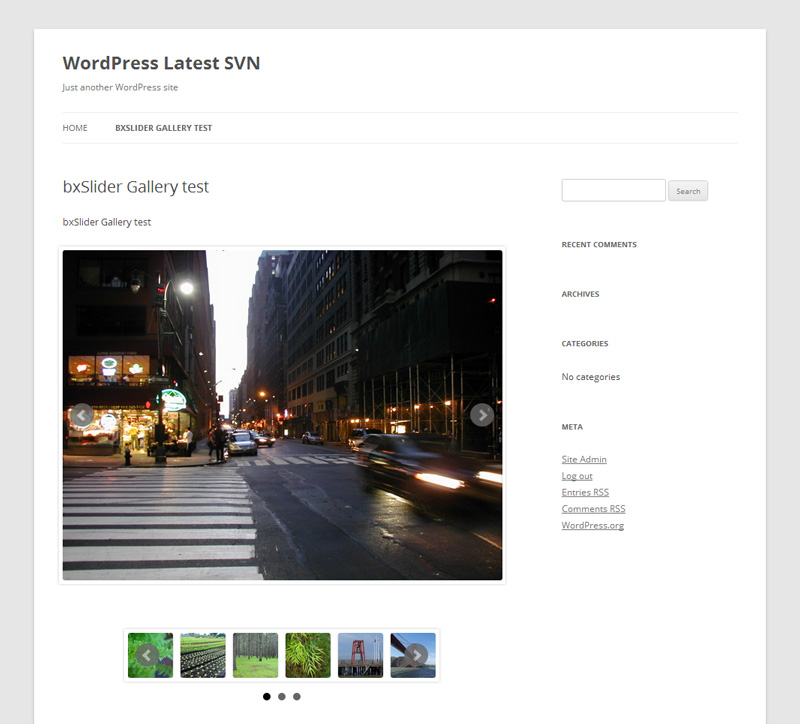
For developers
Is this your plugin? Show off the numbers.
Add a live badge to your site, docs or GitHub README. It updates on its own — no account needed.
Best bxSlider integration for Word… alternatives
All bxslider plugins →


FAQ
bxSlider integration for WordPress: quick answers
Straight answers, pulled from live WordPress.org data.
Live data from WordPress.org · checked Oct 2, 2026
Is bxSlider integration for WordPr… free?
Yes. bxSlider integration for WordPr… is free to download and use from the official WordPress.org plugin directory.
Is bxSlider integration for WordPr… safe to use in 2026?
bxSlider integration for WordPr… shows warning signs in 2026 — compare the alternatives below before installing. It runs on 500+ sites, is rated 4.4/5 and was last updated 12 years ago, and scores 41/100 on our health check.
How many websites use bxSlider integration for WordPr…?
bxSlider integration for WordPr… is active on 500+ WordPress websites and has been downloaded 39,479 times since it launched in April 2013. It was downloaded 148 times in the last 30 days.
Does bxSlider integration for WordPr… work with WordPress 7.1?
bxSlider integration for WordPr… is officially tested up to WordPress 3.9.40, while the latest release is 7.1.2. It may still work, but try it on a staging site first.
When was bxSlider integration for WordPr… last updated?
The latest version, 1.7.2, was released on March 2, 2015 (12 years ago).
Who makes bxSlider integration for WordPr…?
bxSlider integration for WordPr… is developed and maintained by Vincent Mimoun-Prat.
What are the best alternatives to bxSlider integration for WordPr…?
The most popular alternatives to bxSlider integration for WordPr… are Hero Banner Slider (40+ installs), Periodic Table Widget (20+ installs) and Mo RSS Feed (10+ installs).
Powered by PageForge
Want thousands of pages that rank like these? Build them in an afternoon.
This directory runs on the same engine as PageForge. Turn any spreadsheet, CSV or API into thousands of fast, SEO-ready WordPress pages — with schema, internal links and AI-written copy baked in.
- CSV, Google Sheets & API data sources
- AI content, schema & internal links per page
- Works with Elementor, Gutenberg, Yoast & Rank Math
- Free on WordPress.org — no credit card


