



Multiple File Upload for Contact Form 7
Drag-and-drop multiple file uploads for Contact Form 7, with per-form storage, custom folders, and clickable email links.

Use with caution
Multiple File Upload for Contac… works, but test it on a staging site before relying on it in 2026. Was last updated 2 months ago, and scores 60/100 on our health check.
- Tested with the latest WordPress (7.1)
- Small user base (<10 active installs)
- Very few reviews so far
How does it stack up?
Side-by-side on installs, updates, ratings & support



Daily downloads
Download spikes usually follow a new release — each site that auto-updates counts as a download.
Rankings
Where Multiple File Upload for Co… stands todayWordPress.org search rankings
Live position in the plugin search, top 100| Keyword | Position |
|---|---|
| attachments | >100 |
| contact form 7 | >100 |
| drag-and-drop | >100 |
| file upload | >100 |
| multiple files | >100 |
About Multiple File Upload for Contact Form 7
From the official readme · v1.1.0Description
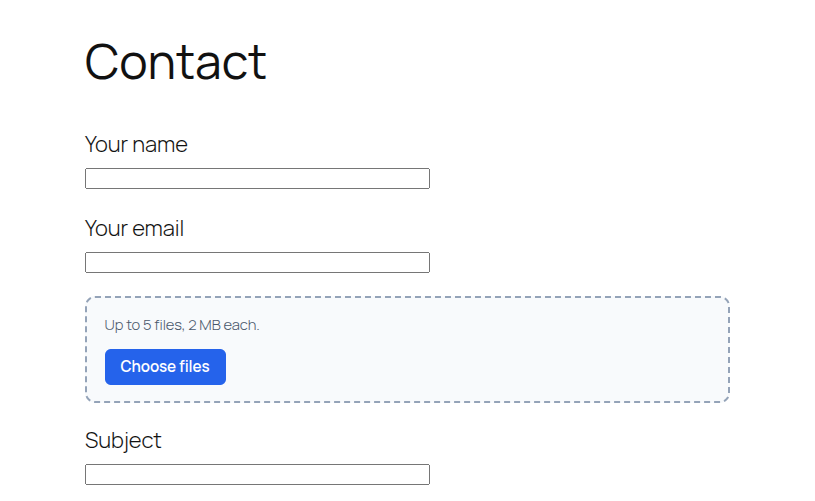
Give any Contact Form 7 form a clean multiple-file field. Visitors drag files in or click to browse. You control the button text, file types, size limits, and where each form stores uploads.
Upload that feels easy
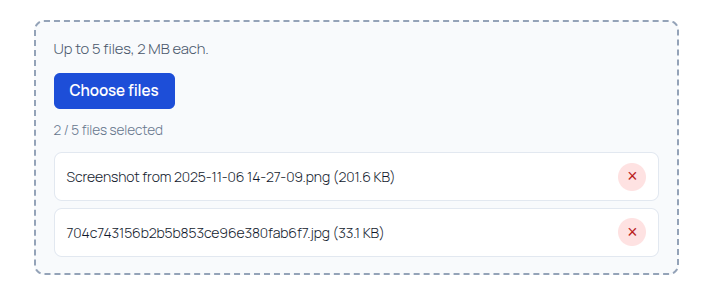
- Drag and drop, or click the browse button
- Several files in one field — no extra
[file]tags - Custom button label (default: Choose files) and CSS class
- Optional or required:
[hbwa_mfile]/[hbwa_mfile*] - Limits you set: file types, size per file, and max number of files
Save files your way — per form
Each form has its own Multi-file Upload tab. Turn saving on only where you need it.
- Media library — add uploads to WordPress Media
- Folder under wp-content — keep files in a path you choose, such as
uploads/invoices
Folders that stay organized
When you save under wp-content, pick how subfolders are created:
- By year
- By year / month (same idea as the WordPress media library)
- By year / month / day
- By logged-in user
- By user / year
- By form name (slug, for example
contact-form-1) - Custom pattern, such as
{year}/{form_slug}
Name saved files with tokens like {filename}, {date}, {time}, and {random}. The original extension is always kept.
Email that is ready to open
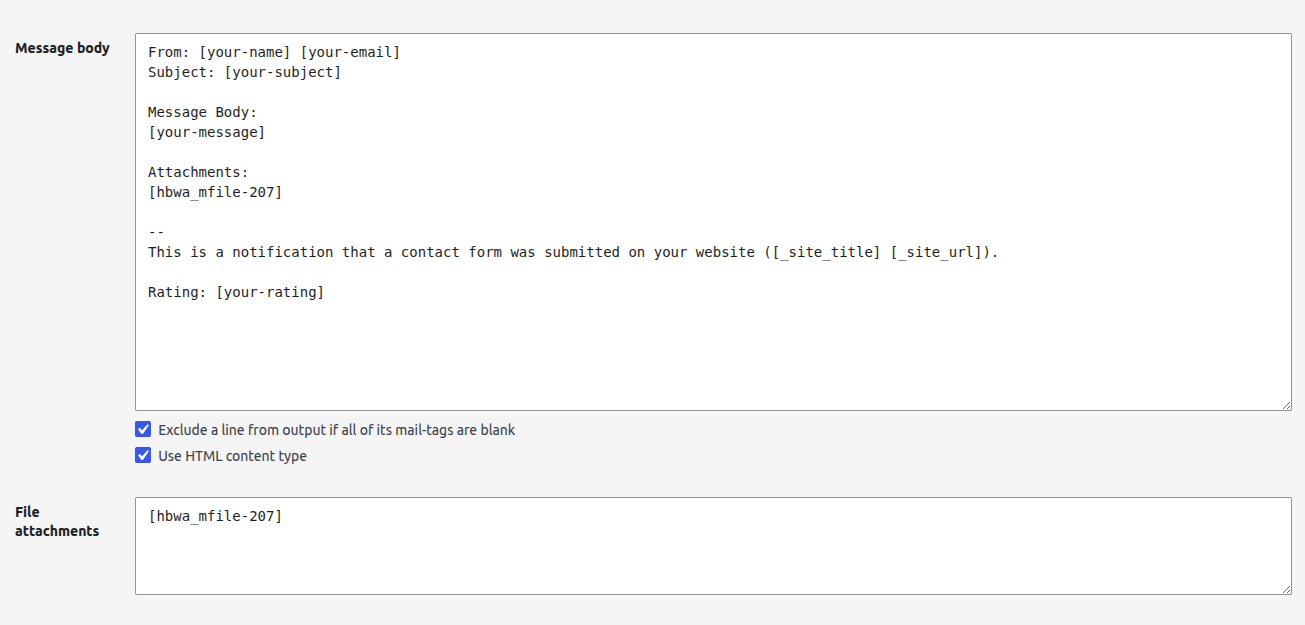
- Attach files in the Mail tab with the matching mail-tag, for example
[attachments] - Put the same tag in the message body
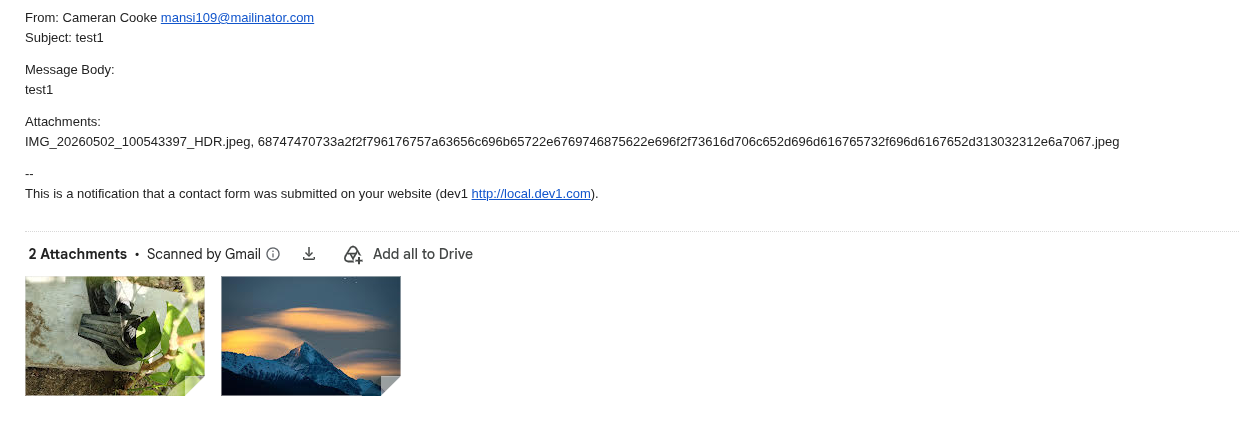
- When saving is on, that tag becomes a link to open each file instead of a plain name
Built for Contact Form 7
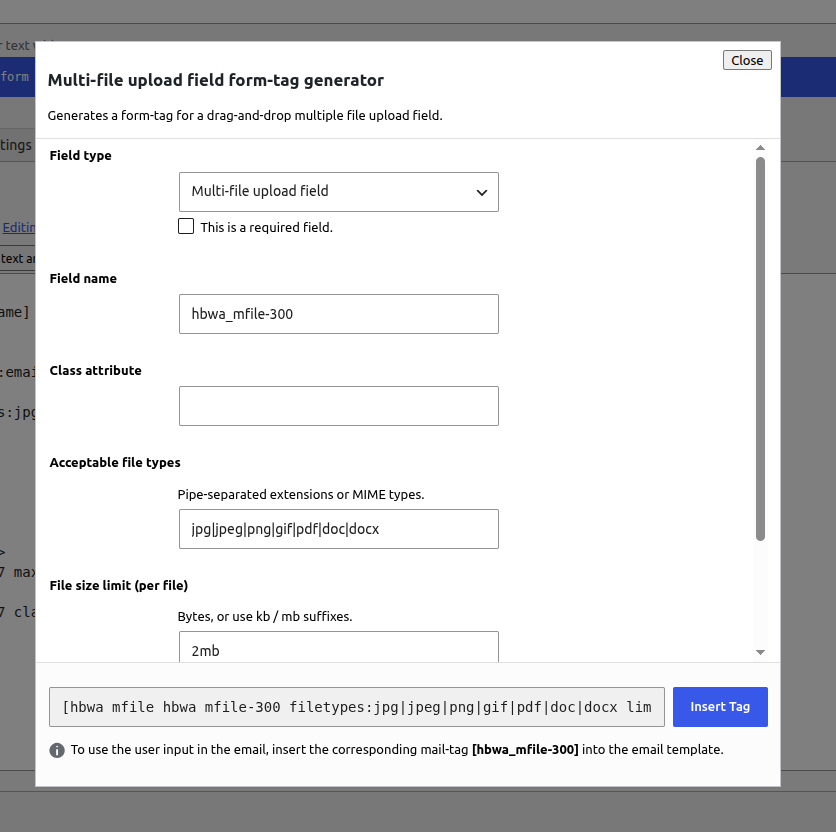
- multi-file button in the form-tag generator
- Works with Mail and Mail (2)
- Settings apply to that form only — other forms stay unchanged
Requirements
- Contact Form 7 must be installed and active
How to use the shortcode
- Edit a Contact Form 7 form.
- Click the multi-file button in the form-tag generator.
- Set the field name, button label, CSS class, file types, size limit, and max files, then insert the tag.
- In the Mail tab, add the same field name under File attachments (for example
[attachments]). - Optionally add the same mail-tag in the message body.
- Open the Multi-file Upload tab if you want to keep copies: enable Save uploaded files, then choose Media library or a folder under wp-content.
Basic shortcode examples
Optional field:
[hbwa_mfile attachments]
Required field:
[hbwa_mfile* attachments]
Custom button label and class:
[hbwa_mfile* attachments class:my-upload-btn "Select files"]
With options:
[hbwa_mfile* attachments filetypes:jpg|jpeg|png|pdf|doc|docx limit:2mb maxfiles:5 "Choose file"]
Shortcode options
- Quoted value — browse button label (default: Choose files)
class:— CSS class added to the file input and the browse buttonfiletypes:— pipe-separated extensions (example:jpg|jpeg|png|pdf)limit:— max size per file (example:2mb,500kb, or bytes)maxfiles:— maximum number of files allowed in one submission
Save files (per form)
On the form’s Multi-file Upload tab:
- Enable Save uploaded files.
- Choose one destination:
- Media library
- Folder under wp-content — base path relative to
wp-content(for exampleuploads/invoices), then organize subfolders by year, month, user, form name slug, or a custom pattern
- Optional File name pattern (default
{filename}). The original extension is always kept.
When saving is enabled, the mail-tag in the message body outputs links to open each file.
Uploaded files are sent as real email attachments when Contact Form 7 file uploading is enabled for that mail template. Make sure your hosting PHP upload limits (upload_max_filesize, post_max_size) allow the sizes you configure.
Guidelines
- Always put the matching mail-tag in File attachments if you want files attached to the email.
- Use
[hbwa_mfile*]when at least one file is required. - Keep
maxfiles:andlimit:realistic for your server and mailbox size limits. - Restrict
filetypes:to what you actually need (for example images and PDFs only). - This field does not replace CF7’s native
[file]tag — use[hbwa_mfile]when you need multiple files and drag-and-drop.
Author: hell0bunny
Installation
- Upload the
bunny-co-multiple-file-upload-cf7folder to/wp-content/plugins/ - Activate Multiple File Upload for Contact Form 7 through the Plugins screen
- Make sure Contact Form 7 is installed and active
- Edit a Contact Form 7 form
- Click the multi-file button in the form-tag generator
- Insert the tag into the Form tab
- Add the matching mail-tag to the Mail tab File attachments field (and optionally the message body)
- Optional: open the form’s Multi-file Upload tab to save files to the media library or a
wp-contentfolder
Frequently asked questions
Are uploaded files attached to the email?
Yes. Add the field’s mail-tag (for example [attachments]) to the Mail tab File attachments box. Contact Form 7 will attach the uploaded files to the notification email. Place the same mail-tag in the message body to show file names, or openable links when Save uploaded files is enabled on that form.
How do I make the upload required?
Use the required form-tag: [hbwa_mfile* your-field-name ...].
How do I change the Choose files button text?
In the tag generator, set Button label. If you leave it empty, the button shows “Choose files”. Example: [hbwa_mfile attachments "Select files"].
Where are files stored?
By default they stay in Contact Form 7’s temporary folder and are attached to the email. On the form’s Multi-file Upload tab, enable Save uploaded files and choose the media library or a folder under wp-content. You can organize that folder by year, month, user, or the form name slug.
Can each form save files differently?
Yes. Saving, destination, folder layout, and file name are set on that form’s Multi-file Upload tab only.
Changelog
Adds custom button labels and per-form file saving (media library or wp-content folder), with mail-tag file links.
1.1.0
- Custom browse button label and class
- Per-form save option: media library or a folder under wp-content
- Organize saved folders by year, month, user, form name slug, or custom tokens
- Custom saved file names
- Mail-tag outputs file links when saving is enabled
1.0.0
- Initial release:
[hbwa_mfile]multi-file field with drag-and-drop, limits, and CF7 mail attachment support
Screenshots

For developers
Is this your plugin? Show off the numbers.
Add a live badge to your site, docs or GitHub README. It updates on its own — no account needed.
Best Multiple File Upload for Cont… alternatives
All attachments plugins →





FAQ
Multiple File Upload for Contact Fo…: quick answers
Straight answers, pulled from live WordPress.org data.
Live data from WordPress.org · checked Oct 12, 2026
Is Multiple File Upload for Contac… free?
Yes. Multiple File Upload for Contac… is free to download and use from the official WordPress.org plugin directory.
Is Multiple File Upload for Contac… safe to use in 2026?
Multiple File Upload for Contac… works, but test it on a staging site before relying on it in 2026. Was last updated 2 months ago, and scores 60/100 on our health check.
How many websites use Multiple File Upload for Contac…?
Multiple File Upload for Contac… is active on <10 WordPress websites and has been downloaded 343 times since it launched in July 2026. It was downloaded 89 times in the last 30 days.
Does Multiple File Upload for Contac… work with WordPress 7.1?
Yes. The developer has tested Multiple File Upload for Contac… up to WordPress 7.1.3, the latest release. It requires WordPress 6.0 or newer.
What PHP version does Multiple File Upload for Contac… need?
Multiple File Upload for Contac… requires PHP 7.4 or higher. Most hosts run PHP 8.x today, so it works on any modern WordPress hosting.
When was Multiple File Upload for Contac… last updated?
The latest version, 1.1.0, was released on August 20, 2026 (2 months ago).
Who makes Multiple File Upload for Contac…?
Multiple File Upload for Contac… is developed and maintained by hell0bunny.
What are the best alternatives to Multiple File Upload for Contac…?
The most popular alternatives to Multiple File Upload for Contac… are Export media with selected… (40K+ installs), File Upload Types by WPForms (40K+ installs) and Lightbox with PhotoSwipe (20K+ installs).
Powered by PageForge
Want thousands of pages that rank like these? Build them in an afternoon.
This directory runs on the same engine as PageForge. Turn any spreadsheet, CSV or API into thousands of fast, SEO-ready WordPress pages — with schema, internal links and AI-written copy baked in.
- CSV, Google Sheets & API data sources
- AI content, schema & internal links per page
- Works with Elementor, Gutenberg, Yoast & Rank Math
- Free on WordPress.org — no credit card


