



Bulkzy for WooCommerce – Wholesale Pricing, B2B Tiered Discounts, MOQ & Bulk Order Forms
Boost B2B sales with wholesale pricing, quantity tiered discounts, minimum order quantities (MOQ), and fast bulk order forms for WooCommerce.

Solid choice
Bulkzy for WooCommerce is a solid plugin choice in 2026, with a few things worth checking first. Was last updated 4 weeks ago, and scores 64/100 on our health check.
- Actively developed — last update 4 weeks ago
- Tested with the latest WordPress (7.1)
- Small user base (<10 active installs)
- Very few reviews so far
How does it stack up?
Side-by-side on installs, updates, ratings & support



Daily downloads
Download spikes usually follow a new release — each site that auto-updates counts as a download.
Rankings
Where Bulkzy for WooCommerce stands todayWordPress.org search rankings
Live position in the plugin search, top 100| Keyword | Position |
|---|---|
| b2b | >100 |
| bulk order | >100 |
| minimum order quantity | >100 |
| tiered pricing | #91 |
| wholesale | >100 |
About Bulkzy for WooCommerce
From the official readme · v1.0.1Description
Bulkzy for WooCommerce is the all-in-one B2B wholesale and bulk sales toolkit designed to skyrocket your store’s average order value (AOV). Turn your standard WooCommerce store into a high-converting wholesale portal with automated volume discounts, role-based tiered pricing, Minimum Order Quantity (MOQ) controls, and instant bulk order matrix tables.
Whether you run a B2B wholesale store, commercial supply business, distribution network, or retail shop offering volume breaks (“Buy More, Save More”), Bulkzy provides seamless tools with zero bloat and full High-Performance Order Storage (HPOS) compatibility.
This plugin requires WooCommerce and is independently developed to support WooCommerce store owners.
🌟 Key Features at a Glance
- Role-Based Wholesale Pricing: Deliver tailored pricing tiers for regular retail customers and verified wholesale accounts (
Wholesale Customer). - Dynamic Tiered Pricing & Quantity Breaks: Set unlimited quantity-based discount tiers (e.g., Buy 5+ get 5% off, Buy 10+ get 10% off, Buy 25+ get 20% off).
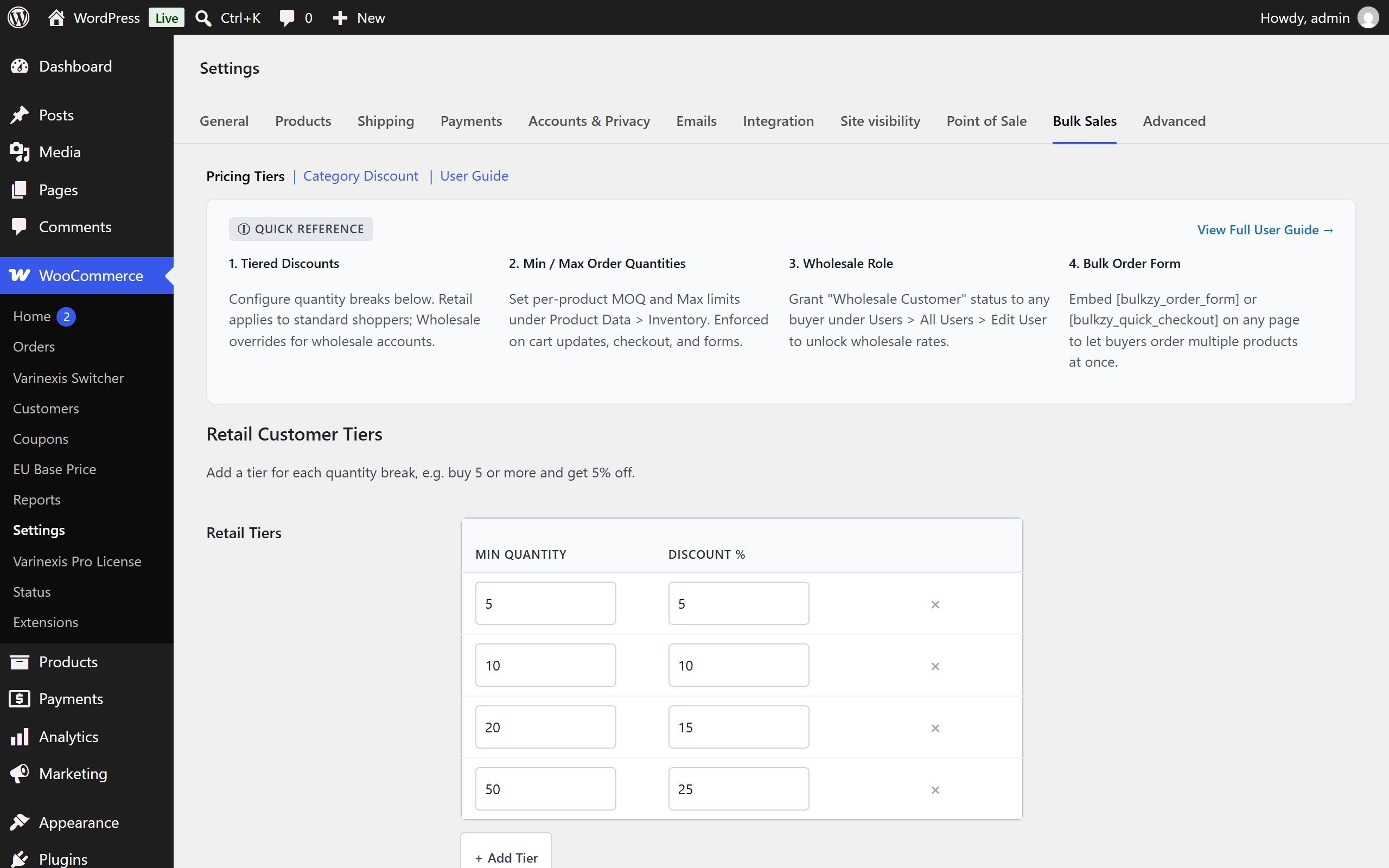
- Interactive Tier Builder UI: Configure and manage quantity breaks effortlessly with live in-dashboard rule previews.
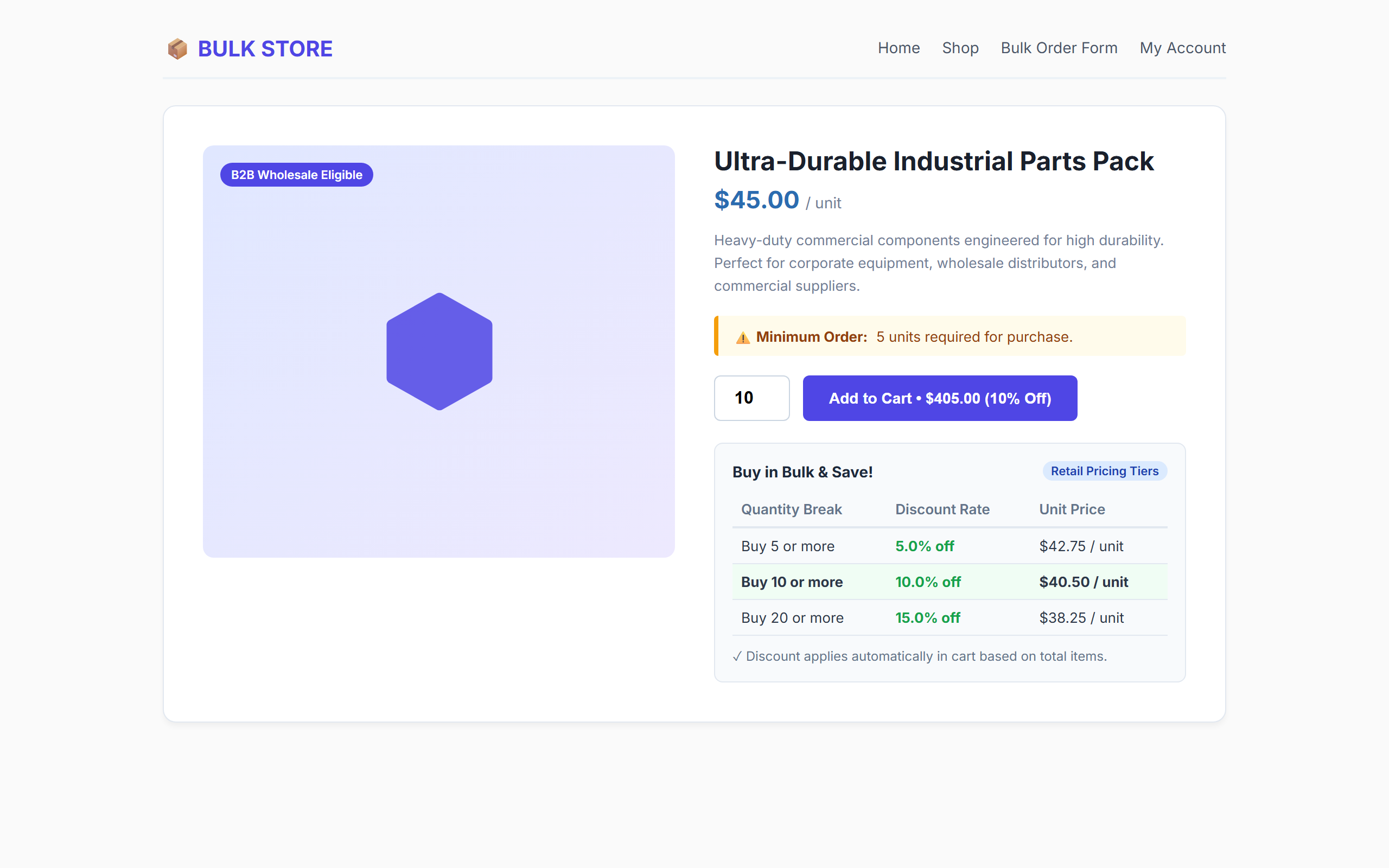
- Minimum Order Quantity (MOQ): Enforce minimum unit purchase requirements globally per product on single product pages, cart updates, and checkout.
- AJAX Bulk Order Form Shortcode (
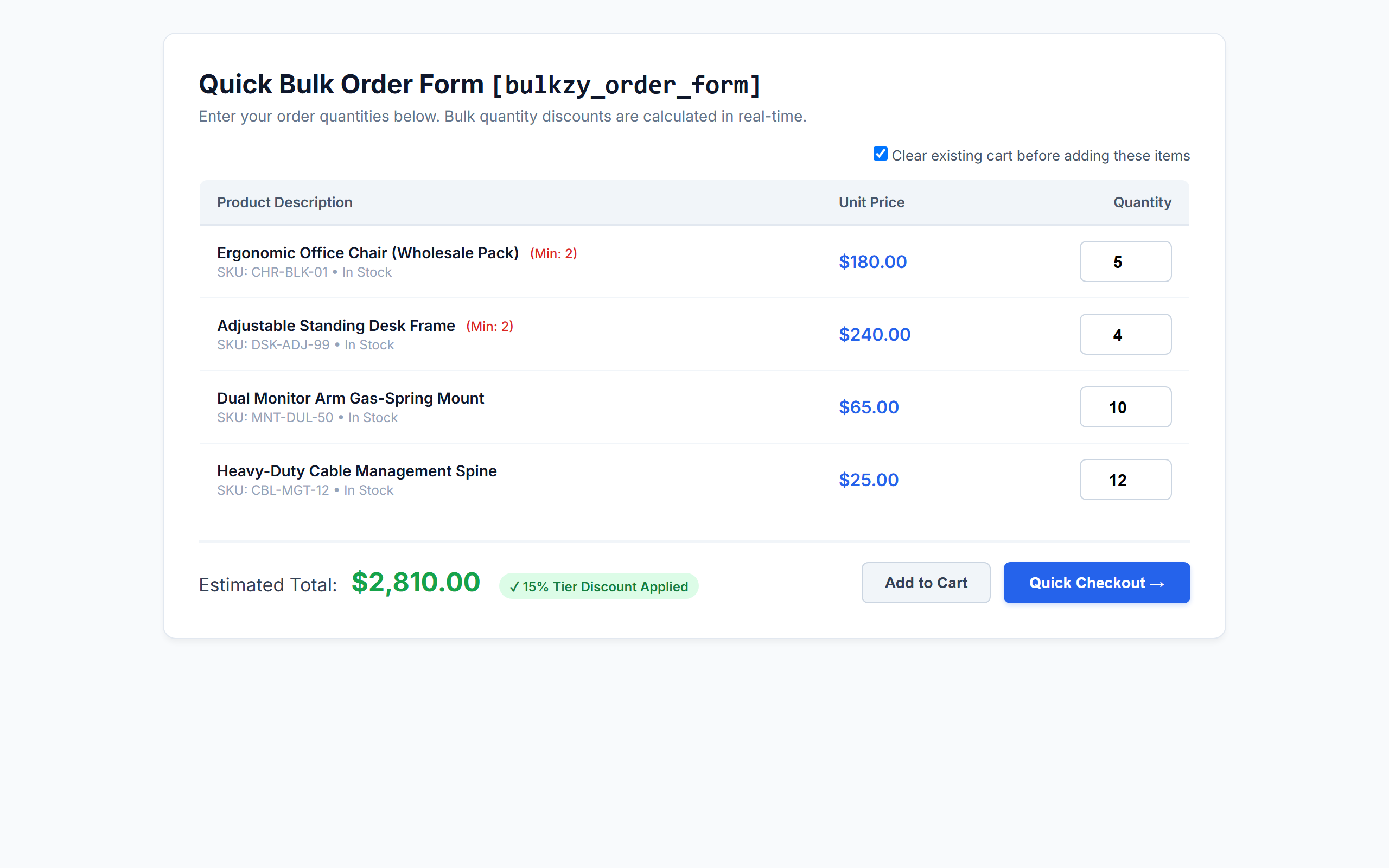
[bulkzy_order_form]): Provide high-volume buyers with a fast, one-page ordering table featuring live dynamic total calculations. - Quick Checkout Landing Page (
[bulkzy_quick_checkout]): Allow wholesale buyers to fill quantities and skip directly to checkout with cart reset capability. - Visual On-Page Bulk Pricing Tables: Automatically showcase available quantity discounts right below the “Add to Cart” button on single product pages.
- Category-Specific Bulk Discounts: Apply volume discounts exclusively to products within designated categories.
- WooCommerce HPOS Compatible: 100% compatible with High-Performance Order Storage (Custom Order Tables) and legacy post storage.
- Blazing Fast & Lightweight: Zero external bloat, vanilla frontend scripts, and clean standard WooCommerce cart fee engine.
💼 Perfect for B2B & Wholesale Niches
- Manufacturers & Wholesalers: Supply commercial buyers with wholesale price tiers and enforced batch minimums (MOQ).
- Corporate & Office Supplies: Enable businesses to order bulk office furniture, stationary, and tech gear in seconds.
- Apparel, Merch & Print-on-Demand: Reward volume orders with automated quantity discount tables.
- Food, Beverage & Grocery Distributors: Sell bulk cases and pallets using category-specific thresholds.
- Retail Stores with Volume Discounts: Increase cart sizes by showing retail shoppers clear incentive tables to buy more units.
⚡ Shortcodes & How to Use Them
Bulkzy includes two shortcodes designed for wholesale ordering pages:
[bulkzy_order_form]– Displays a bulk ordering grid with live total calculation and standard Add to Cart actions.[bulkzy_quick_checkout]– Renders a wholesale bulk matrix with a direct “Quick Checkout” button and optional one-click cart clearing.
Shortcode Attributes:
* limit (optional) – Number of simple products to display (default: 50). Example: [bulkzy_order_form limit="20"]
* category (optional) – Comma-separated category slugs to filter products. Example: [bulkzy_order_form category="hardware,office-supplies"]
* orderby (optional) – Order products by title, date, price, or popularity (default: title).
* order (optional) – Sort direction, ASC or DESC (default: ASC).
🔒 100% Secure, Native & Developer Friendly
- Clean standard WooCommerce cart calculation hook (
woocommerce_cart_calculate_fees). - Safe uninstallation routine with multisite network support.
- Strict nonce verification and capability validation (
promote_users,manage_woocommerce). - Fully translatable with included POT file (
languages/bulkzy-for-woocommerce.pot).
Installation
- Upload the
bulkzy-for-woocommercefolder to your/wp-content/plugins/directory, or install the ZIP file via Plugins > Add New > Upload Plugin. - Activate the plugin through the Plugins screen in WordPress.
- Ensure WooCommerce is active.
- Navigate to WooCommerce > Settings > Bulk Sales to set up your retail and wholesale tiered discounts.
- (Optional) Edit any product under Product Data > Inventory to define a Minimum Order Quantity (MOQ).
- (Optional) Create a new page and add
[bulkzy_order_form]or[bulkzy_quick_checkout]to launch your bulk ordering page.
Frequently asked questions
Does Bulkzy require WooCommerce to work?
Yes. Bulkzy for WooCommerce requires WooCommerce 5.4 or newer. If WooCommerce is deactivated, Bulkzy will automatically display an admin notice and safely pause execution.
Do I need to create a “Wholesale Customer” role manually?
No! Bulkzy automatically registers the “Wholesale Customer (Bulkzy)” role (bulkzy_wholesale_customer) when the plugin is activated. To grant wholesale pricing to any customer, simply edit their profile in Users > All Users and check the “Wholesale Status” box.
How does role-based wholesale pricing work?
Bulkzy maintains separate tier matrices for retail shoppers and verified wholesale accounts. When a customer with wholesale status logs in, Bulkzy automatically applies your Wholesale Tiers to their cart instead of standard retail tiers.
How do Minimum (MOQ) and Maximum Order Quantities work?
You can define both a Minimum Order Quantity (MOQ) and a Maximum Order Quantity for any product under Product Data > Inventory. Limits are automatically enforced on the single product quantity stepper, when adding items to the cart, during cart quantity updates, on checkout, and in bulk order form matrices.
Can I apply bulk discounts only to specific product categories?
Yes! In WooCommerce > Settings > Bulk Sales > Category Discount, check “Enable Category Discount”, select your target category, set the minimum required category quantity, and define the discount percentage.
Are tiered discounts compatible with WooCommerce coupons?
Yes. Bulkzy applies discounts as negative cart fees using native WooCommerce fee APIs, ensuring full compatibility with shipping rates, taxes, and standard promotional coupons.
Is this plugin compatible with WooCommerce HPOS (High-Performance Order Storage)?
Yes, Bulkzy is fully declared and tested compatible with WooCommerce HPOS (Custom Order Tables).
What happens if I uninstall the plugin?
Bulkzy includes a clean uninstall.php routine. If uninstalled via the WordPress dashboard, all plugin settings, post metadata (_bulkzy_moq, _bulkzy_max_qty), and the wholesale role are safely cleaned up across single sites and multisite networks.
Changelog
1.0.1
- Fix: Hook
woocommerce_quantity_input_minandwoocommerce_quantity_input_maxso Minimum Order Quantity (MOQ) and maximum order limits enforce directly at the product level. - Fix: Ensure product variations inherit parent product MOQ and maximum order quantity constraints.
- Fix: Extend quantity constraints to block-based cart, checkout, and WooCommerce Store API endpoints.
- Fix: Boost CSS selector specificity on pricing and bulk order tables to prevent theme stylesheets (e.g., OceanWP) from clearing cell padding and forcing uppercase text.
- Fix: Preserve table cell padding inside single product cart forms across themes.
1.0.0
- Initial release of Bulkzy for WooCommerce.
- Role-based tiered pricing engine (Wholesale vs. Retail).
- Interactive tier builder settings interface with live previews.
- Minimum Order Quantity (MOQ) configuration and validation.
- Category-specific bulk volume discounts.
- Visual pricing table on single product pages.
[bulkzy_order_form]and[bulkzy_quick_checkout]AJAX bulk matrix shortcodes.- Full WooCommerce HPOS (High-Performance Order Storage) compatibility.
Screenshots
For developers
Is this your plugin? Show off the numbers.
Add a live badge to your site, docs or GitHub README. It updates on its own — no account needed.
Best Bulkzy for WooCommerce alternatives
All b2b plugins →




FAQ
Bulkzy for WooCommerce: quick answers
Straight answers, pulled from live WordPress.org data.
Live data from WordPress.org · checked Oct 3, 2026
Is Bulkzy for WooCommerce free?
Yes. Bulkzy for WooCommerce is free to download and use from the official WordPress.org plugin directory.
Is Bulkzy for WooCommerce safe to use in 2026?
Bulkzy for WooCommerce is a solid plugin choice in 2026, with a few things worth checking first. Was last updated 4 weeks ago, and scores 64/100 on our health check.
How many websites use Bulkzy for WooCommerce?
Bulkzy for WooCommerce is active on <10 WordPress websites and has been downloaded 187 times since it launched in August 2026. It was downloaded 125 times in the last 30 days.
Does Bulkzy for WooCommerce work with WordPress 7.1?
Yes. The developer has tested Bulkzy for WooCommerce up to WordPress 7.1.2, the latest release. It requires WordPress 5.6 or newer.
What PHP version does Bulkzy for WooCommerce need?
Bulkzy for WooCommerce requires PHP 7.2 or higher. Most hosts run PHP 8.x today, so it works on any modern WordPress hosting.
When was Bulkzy for WooCommerce last updated?
The latest version, 1.0.1, was released on September 5, 2026 (4 weeks ago).
Who makes Bulkzy for WooCommerce?
Bulkzy for WooCommerce is developed and maintained by Md Siddiqur Rahman.
What are the best alternatives to Bulkzy for WooCommerce?
The most popular alternatives to Bulkzy for WooCommerce are Wholesale Suite (20K+ installs), B2BKing (10K+ installs) and Leadinfo (7K+ installs).
Powered by PageForge
Want thousands of pages that rank like these? Build them in an afternoon.
This directory runs on the same engine as PageForge. Turn any spreadsheet, CSV or API into thousands of fast, SEO-ready WordPress pages — with schema, internal links and AI-written copy baked in.
- CSV, Google Sheets & API data sources
- AI content, schema & internal links per page
- Works with Elementor, Gutenberg, Yoast & Rank Math
- Free on WordPress.org — no credit card


