


BulkBoost – Quantity Discounts & Bundles
Boost average order value with customizable tiered quantity discounts and breaks for WooCommerce, with a real-time live preview.

Use with caution
BulkBoost works, but test it on a staging site before relying on it in 2026. Was last updated 2 months ago, and scores 55/100 on our health check.
- Small user base (<10 active installs)
- Very few reviews so far
How does it stack up?
Side-by-side on installs, updates, ratings & support

Daily downloads
Download spikes usually follow a new release — each site that auto-updates counts as a download.
Rankings
Where BulkBoost stands todayWordPress.org search rankings
Live position in the plugin search, top 100| Keyword | Position |
|---|---|
| bulk pricing | >100 |
| discount | >100 |
| quantity discount | >100 |
| tiered pricing | >100 |
| woocommerce | >100 |
About BulkBoost – Quantity Discounts & Bundles
From the official readme · v1.0.1Description
BulkBoost adds eye-catching quantity-break offers to your WooCommerce product pages, encouraging customers to buy more and increasing your average order value (AOV).
Set up tiered pricing per product, style it to match your brand, and watch every change update instantly in the live preview.
Features
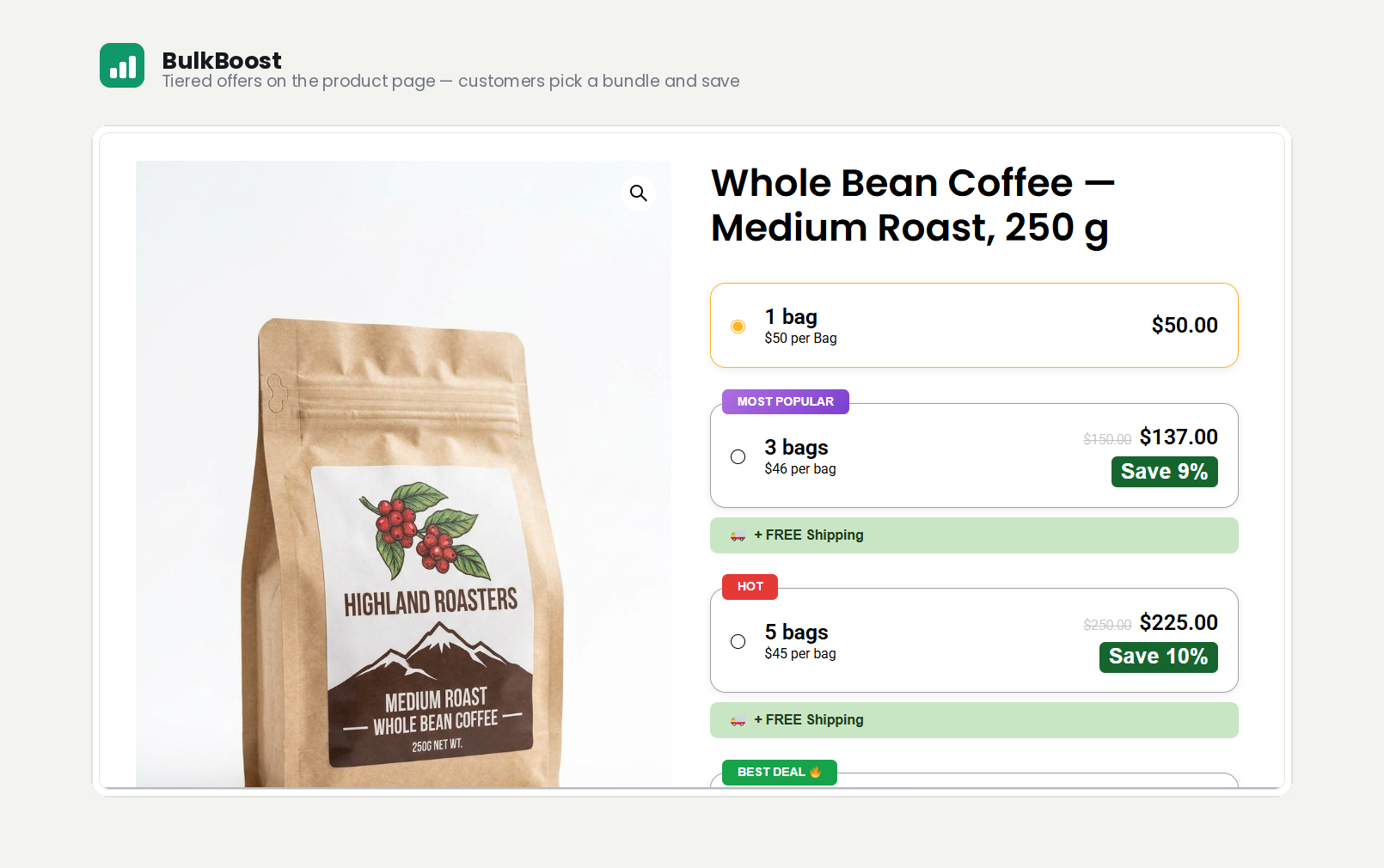
- Quantity breaks per product — offer “buy more, save more” pricing tiers on any simple product.
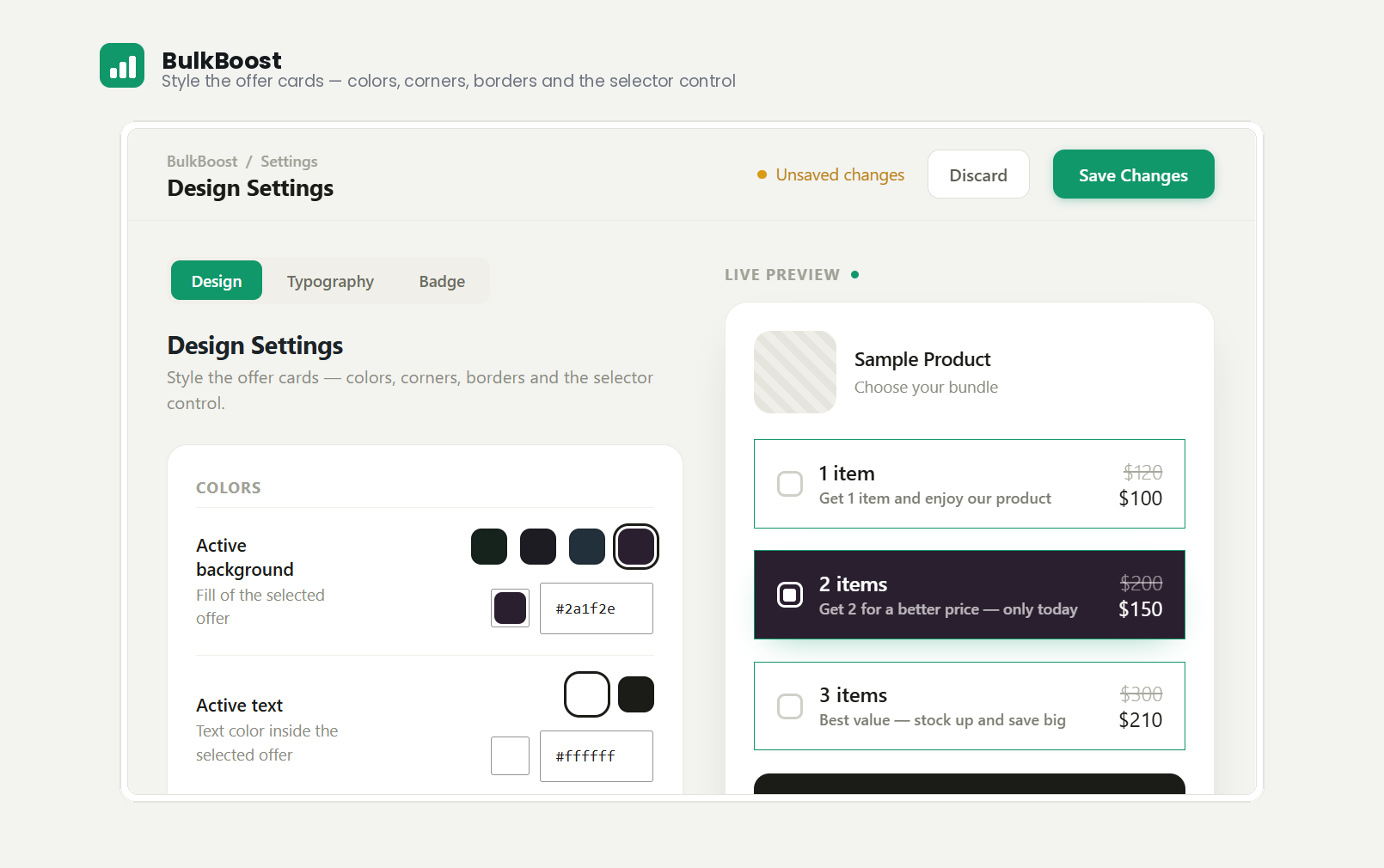
- Fully customizable design — control the colors, borders, corner radius, and spacing of the offer cards.
- Selector style — show a radio, a checkbox, or no selector on each offer.
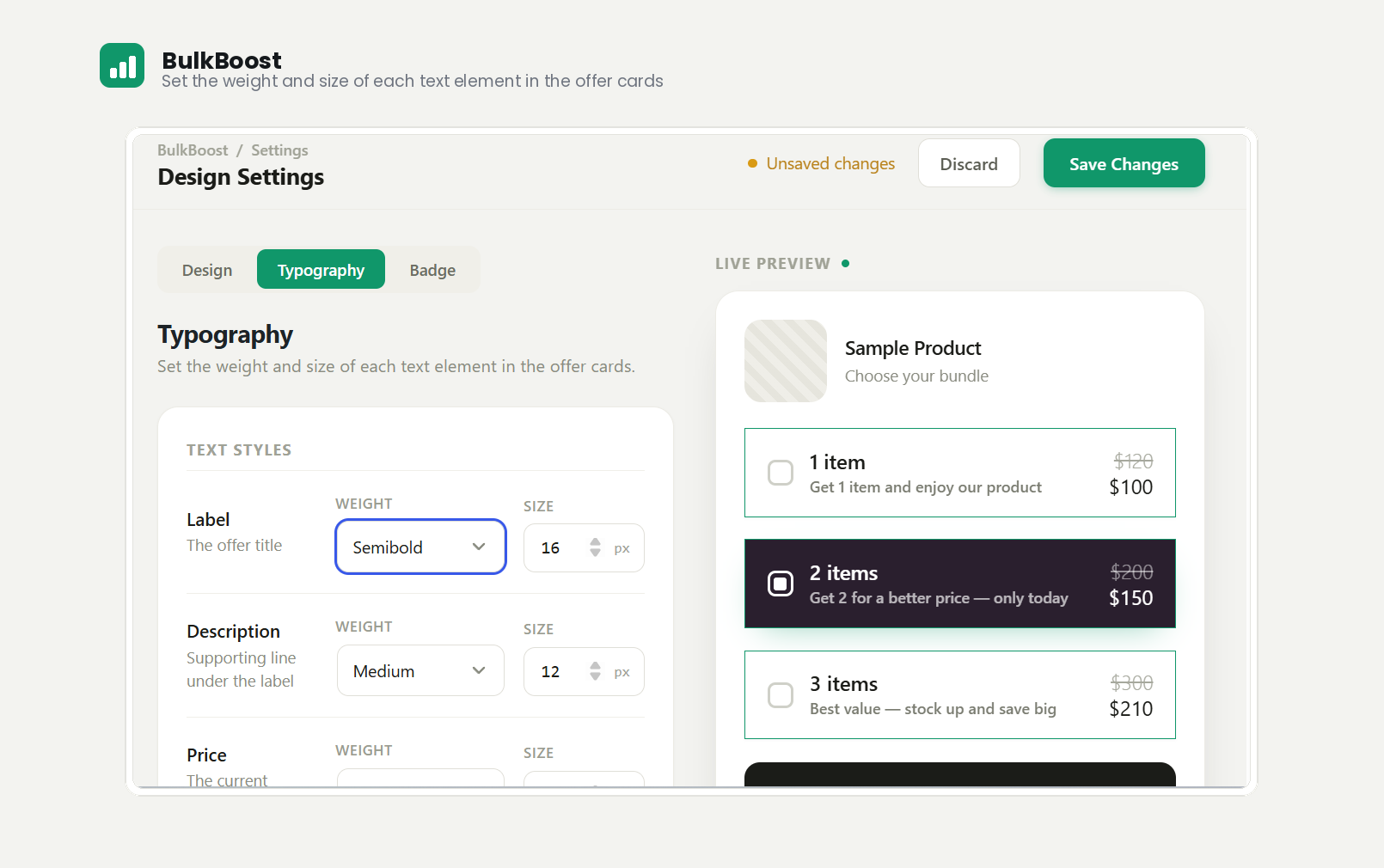
- Typography controls — set the weight and size of labels, descriptions, and prices, and toggle the strikethrough compare-at price.
- Real-time live preview — adjust any setting and see your storefront widget update instantly.
- Min / Max quantity selector — let customers choose a quantity within a range, with its own customizable button design.
- Theme friendly — designed to work with any WooCommerce-compatible theme.
BulkBoost Pro
Upgrade to unlock:
- Promotional badges — highlight offers with three label badges (HOT, MOST POPULAR, BEST DEAL), a “Save X%” savings badge, and a free-shipping badge — each with its own colors and a live preview.
- Sales analytics — a report of completed orders that used BulkBoost, grouped by product (sales, quantity, date of last order, and which solution was used), with a date filter and a total-earned figure.
- Cart & Checkout quantity lock — keep the quantity a customer chose on the product page; stop it from being changed in the cart or at checkout. Works on both the classic and block-based Cart & Checkout.
Learn more about BulkBoost Pro.
Privacy & Third-Party Services
BulkBoost itself does not track you, collect analytics, or send any data to external servers.
The plugin includes the Freemius SDK, which is used solely to handle licensing, payments, and upgrades for the optional Pro version.
- No data is sent anywhere without your explicit opt-in. On activation you will see an optional opt-in screen. Nothing is collected or transmitted unless you expressly click to allow it.
- Opting in is completely optional. You can skip the opt-in and every feature of the free plugin keeps working normally.
- If you do opt in, Freemius collects basic diagnostic data (such as your site URL, WordPress version, and plugin version) to provide license management, updates, and support, as described in the Freemius privacy policy.
- You can opt out at any time from the plugin’s Account page.
Installation
- Upload the plugin files to the
/wp-content/plugins/bulkboostdirectory, or install the plugin through the WordPress Plugins screen. - Activate the plugin through the Plugins screen in WordPress. WooCommerce must be installed and active.
- Open BulkBoost in the admin menu to style your offer cards.
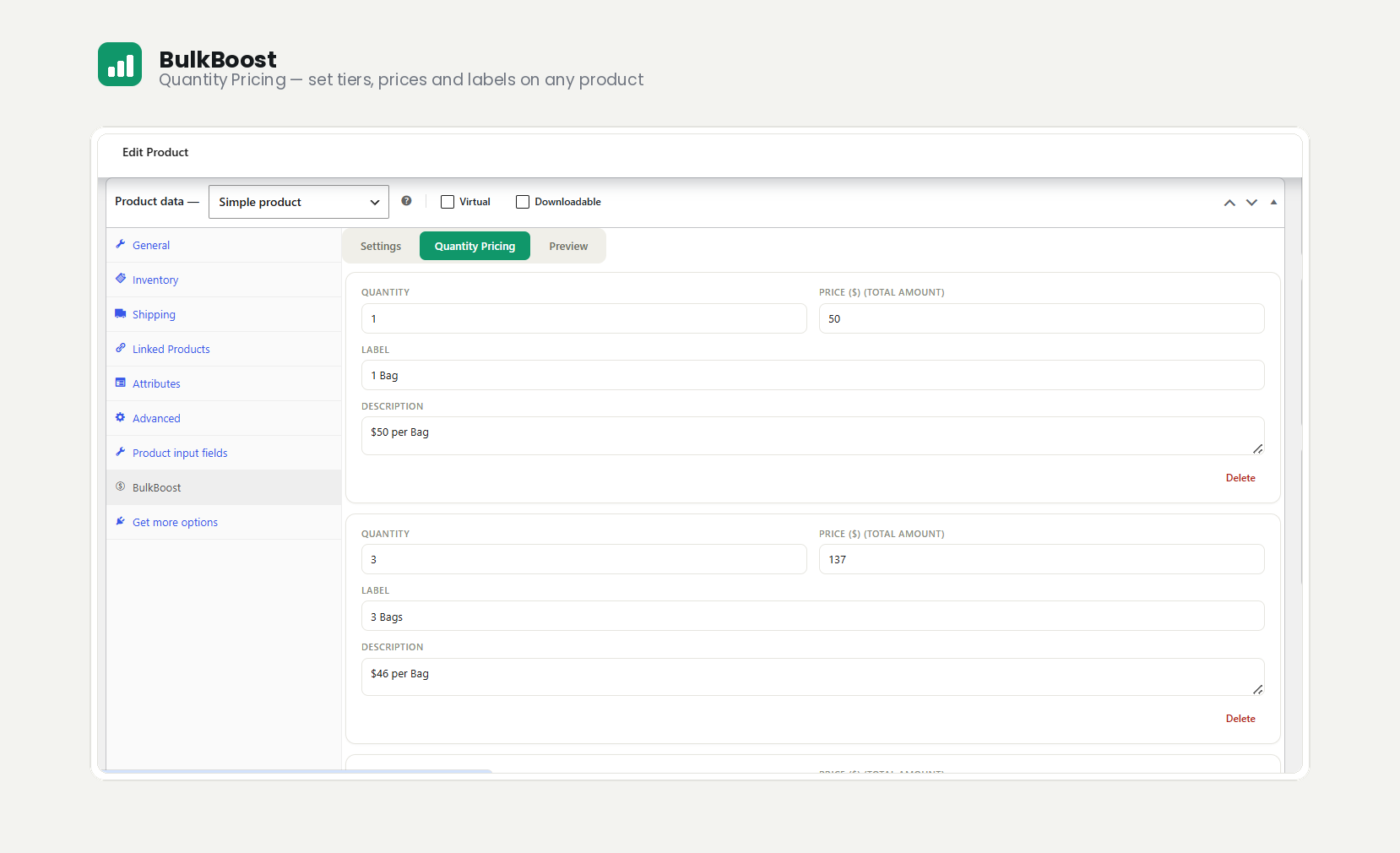
- Edit any product, open the Product data → BulkBoost tab, and add your quantity tiers.
Frequently asked questions
Does it require WooCommerce?
Yes. BulkBoost extends WooCommerce, so WooCommerce must be installed and active.
Will it work with my theme?
It is built to work with any theme that supports WooCommerce. If you run into a display issue, reach out and we will help.
How do I set up quantity breaks?
Edit a product, open the Product data → BulkBoost tab, and define your quantity thresholds and prices. You can preview the result before saving.
Can I change how the offers look?
Yes. The BulkBoost → Design Settings screen lets you customize colors, typography, borders, spacing, and the selector style, all with a live preview.
What does the Min / Max selector do?
Instead of fixed tiers, you can let customers pick any quantity within a range using styled quantity buttons. Enable it per product from the Product data → BulkBoost tab.
Is there a Pro version?
Yes. BulkBoost Pro adds promotional badges, sales analytics, and the cart/checkout quantity lock. See the BulkBoost Pro section above.
Does BulkBoost collect any data or phone home?
No. The plugin makes no remote calls of its own. The bundled Freemius SDK (used for optional Pro licensing) only communicates with Freemius after you explicitly opt in on the activation screen — opting in is optional and the plugin works fully without it. See the Privacy & Third-Party Services section for details.
Changelog
1.0.1
- Fixed: the Accent color now applies on the storefront — the selected offer’s outline, the selector ring, and the selector fill all follow it. Previously it only showed in the admin preview.
- Fixed: the Accent color no longer recolors the Design Settings screen’s own buttons, tabs and controls.
- Fixed: turning off “Show old price” now hides the compare-at price on the product page.
- Fixed: the offer cards, the product panel preview, and the live preview now render from one resolved set of design settings, so a missing value can no longer produce empty CSS on the storefront.
- Fixed: reactivating the plugin no longer overwrote saved Min / Max button colors.
- Changed: the admin stylesheet and the color picker now load only on the screens that use them.
1.0.0
- Initial release.
- Per-product quantity breaks with a fully customizable, live-previewed offer widget.
- Design controls: colors, borders, corner radius, spacing, selector style, and typography.
- Min / Max quantity selector with its own button design.
- Pro: promotional badges, sales analytics, and cart/checkout quantity lock.
Screenshots
For developers
Is this your plugin? Show off the numbers.
Add a live badge to your site, docs or GitHub README. It updates on its own — no account needed.
Best BulkBoost alternatives
All bulk pricing plugins →



FAQ
BulkBoost: quick answers
Straight answers, pulled from live WordPress.org data.
Live data from WordPress.org · checked Oct 3, 2026
Is BulkBoost free?
Yes. BulkBoost is free to download and use from the official WordPress.org plugin directory.
Is BulkBoost safe to use in 2026?
BulkBoost works, but test it on a staging site before relying on it in 2026. Was last updated 2 months ago, and scores 55/100 on our health check.
How many websites use BulkBoost?
BulkBoost is active on <10 WordPress websites and has been downloaded 229 times since it launched in August 2026. It was downloaded 76 times in the last 30 days.
Does BulkBoost work with WordPress 7.1?
BulkBoost is officially tested up to WordPress 7.0.6, while the latest release is 7.1.2. It may still work, but try it on a staging site first.
What PHP version does BulkBoost need?
BulkBoost requires PHP 7.4 or higher. Most hosts run PHP 8.x today, so it works on any modern WordPress hosting.
When was BulkBoost last updated?
The latest version, 1.0.1, was released on August 13, 2026 (2 months ago).
Who makes BulkBoost?
BulkBoost is developed and maintained by ateebahamd.
What are the best alternatives to BulkBoost?
The most popular alternatives to BulkBoost are Discountify (20+ installs), WDOnline Quantity Discounts… (<10 installs) and PriceCue Quantity Tiers for… (<10 installs).
Powered by PageForge
Want thousands of pages that rank like these? Build them in an afternoon.
This directory runs on the same engine as PageForge. Turn any spreadsheet, CSV or API into thousands of fast, SEO-ready WordPress pages — with schema, internal links and AI-written copy baked in.
- CSV, Google Sheets & API data sources
- AI content, schema & internal links per page
- Works with Elementor, Gutenberg, Yoast & Rank Math
- Free on WordPress.org — no credit card


