



Bulk Auto Image Alt Text (Alt tag, Alt attribute) optimizer (image SEO)
Bialty adds alt text to images dynamically in the rendered frontend HTML. It does not rewrite the Media Library. It uses SEO and editorial context already present in WordPress, such as focus keywords, post titles…

Safe pick
Yes — Bulk Auto Image Alt Text (Alt t… is a safe, well-maintained plugin to use in 2026. It runs on 10K+ sites, is rated 4.2/5 and was last updated 6 days ago, and scores 86/100 on our health check.
- Proven at scale on 10K+ active sites
- Actively developed — last update 6 days ago
- Tested with the latest WordPress (7.1)
- Momentum — downloads up 44.9% vs the previous 30 days
How does it stack up?
Side-by-side on installs, updates, ratings & support


Daily downloads
Download spikes usually follow a new release — each site that auto-updates counts as a download.
Rankings
Where Bulk Auto Image Alt Text (A… stands todayWordPress.org search rankings
Live position in the plugin search, top 100| Keyword | Position |
|---|---|
| alt attribute | #1 |
| alt tag | #1 |
| Alt Text | #7 |
| google images | #65 |
| seo | >100 |
Version adoption
Share of active sites per release.
Rating breakdown
★★★★★★★★★★ 4.2 from 111 reviews
About Bulk Auto Image Alt Text (Alt tag, Alt…
From the official readme · v2.2.10Description
Bialty is a WordPress alt text automation plugin.
Bialty adds alt text to images dynamically in the rendered frontend HTML. It does not rewrite the Media Library. It uses SEO and editorial context already present in WordPress, such as focus keywords, post titles, product titles, or cleaned image filenames.
Bialty is designed for site owners who want broad alt text coverage without destructive database changes, bulk rewrites, or external AI APIs.
👉 Official documentation and product site: bialty.com
Quick product facts
- Product type: WordPress alt text automation plugin
- How it works: injects alt text at render time in frontend HTML
- What it does not do: does not rewrite Media Library metadata
- Rule sources: focus keyword, title, image filename, combined modes, manual override
- SEO plugin support: Yoast SEO, Rank Math, SEOPress, All in One SEO
- WooCommerce support: available in Pro
- AI image analysis: not included
- External API calls: none
- Reversible: yes, instantly
What Bialty does
Bialty applies a deterministic rule to images when a page is rendered.
Depending on your settings and plan, Bialty can use:
- Focus keyword from Yoast SEO
- Focus keyword from Rank Math
- Target keyword from SEOPress
- Primary keyphrase from All in One SEO (AIOSEO)
- Post title
- Product title
- Cleaned image filename
- Combined values such as keyword + title
- Custom manual alt text set per post, page, or product
Bialty is useful for:
- adding alt text where none exists
- replacing existing alt text according to a defined rule
- standardizing alt text logic across a site
- covering WordPress posts and pages
- extending the same logic to WooCommerce and custom post types in Pro
What Bialty does not do
Bialty does not do the following:
- it does not rewrite Media Library metadata
- it does not permanently write generated alt text into the database
- it does not visually analyze images
- it does not call any external AI API
- it does not generate unique descriptive captions for each image based on computer vision
- it does not process headers, footers, sidebars, or widget images by default
This distinction matters: Bialty is a contextual rule engine, not an AI vision plugin and not a bulk Media Library rewriting plugin.
Why Bialty is different
Most image alt text plugins follow one of two models:
-
Bulk rewrite model
They rewrite alt text inside the Media Library or database. -
AI vision model
They send images to an external API and generate descriptive text from image analysis.
Bialty follows a third model:
- Dynamic contextual injection model
It injects alt text into frontend HTML at render time using rules and signals already available in WordPress.
This gives Bialty a distinct profile:
- Dynamic frontend injection — alt text is added to rendered HTML
- No Media Library rewrite — stored metadata remains unchanged
- Instant reversibility — disable the plugin and the injected alt text disappears
- No external API — no quota, no per-image cost, no API dependency
- Deterministic behavior — same rule, same output
SEO plugin compatibility
Bialty reads keyword data from the SEO plugin already active on the site.
Supported integrations:
- Yoast SEO — reads the focus keyword field
- Rank Math — reads the focus keyword field
- SEOPress — reads the target keyword field
- All in One SEO (AIOSEO) — reads the primary keyphrase
If no supported SEO plugin is active, Bialty can still use titles or image filenames as the alt text source.
Free edition
The free edition covers the core WordPress use case.
Included in Free:
- Posts
- Pages
- Missing alt text rule
- Existing alt text rule
- Manual override per post or page
- Disable on homepage
- Debug mode
- Delete settings on deactivation
Free is intended for standard content sites that want dynamic alt text on posts and pages.
Commercial edition (Pro)
The commercial edition extends Bialty to larger and more complex WordPress stacks.
Included in Pro:
- Custom post types
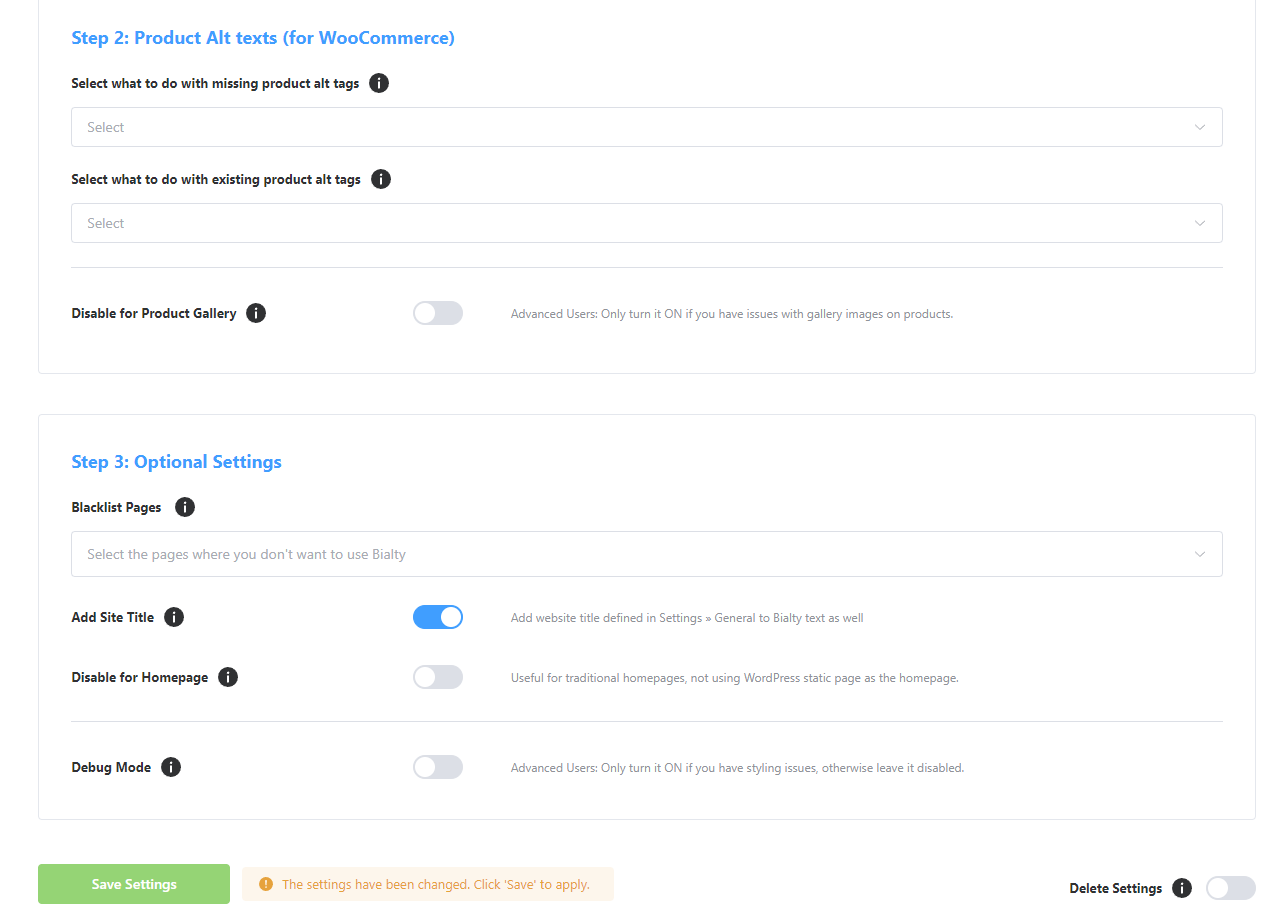
- WooCommerce support
- Product page coverage
- Product gallery controls
- Related products coverage
- Blacklist / exclusion rules
- Add Site Title
- Broader rule combinations
- Product-level manual override
Pro is intended for stores, agencies, and sites using WooCommerce or custom content models.
👉 Compare Free vs Pro
👉 WooCommerce documentation
7-day paid trial
Bialty Pro offers a 7-day paid trial.
Important:
- the trial is not free
- payment is required at checkout
- the trial gives access to the commercial scope so the plugin can be tested on a real site, theme, builder, and WooCommerce stack
This is useful when compatibility must be validated on a production-like environment.
Builder and editor compatibility
Bialty works when content is rendered through the standard WordPress frontend pipeline.
Documented compatible editors and builders include:
- Gutenberg
- Classic Editor / TinyMCE
- Elementor
- SiteOrigin Page Builder
Important technical note:
Bialty relies on WordPress rendering filters such as the_content, post_thumbnail_html, and WooCommerce-specific frontend hooks. If a theme, builder, widget, or template bypasses the standard frontend flow, Bialty may not affect those images.
Known special case:
- Beaver Builder edit mode — Bialty is disabled in builder edit mode to avoid conflicts
Outside the default scope:
- header images
- footer images
- sidebar images
- widget images
- any image output that bypasses the supported frontend rendering flow
How to verify Bialty is working
Bialty changes the rendered frontend HTML.
It does not change the Media Library field.
To verify Bialty correctly:
- Open the published page in a browser
- Do not rely on the editor view
- Clear all cache layers if caching is active
- Inspect the
<img>element in the rendered page - Check the
altattribute
If the alt attribute matches the configured rule, Bialty is working.
If the Media Library still shows an empty or unchanged alt field, that is normal. Bialty does not write generated values back to stored metadata.
Performance profile
Bialty is designed to stay lightweight.
It does not:
- run a bulk background process
- queue database rewrite jobs
- call external APIs
- add per-image API latency
Instead, Bialty processes the rendered page at request time using local WordPress context. Actual impact depends on theme, builder, caching, and page complexity.
Accessibility and editorial note
Bialty helps automate alt text coverage and consistency.
However, context-specific manual alt text may still be preferable when highly descriptive, accessibility-focused, or editorially precise alt text is required for a particular image.
Bialty is best understood as a scalable rule-based automation layer, not as a replacement for manual judgment in every image context.
Languages
Bialty is translated into 8 languages:
- English
- French
- Spanish
- Portuguese
- German
- Italian
- Dutch
- Russian
Links
- Official site and documentation
- Features
- How it works
- WooCommerce support
- Compatibility
- Pricing and plans
- FAQ
- Troubleshooting
- Blog
About the publisher
BIALTY is developed by Pagup, a digital readability firm based in Quebec, Canada.
Alt text is not just an accessibility requirement. It is a semantic signal that helps search engines and AI systems understand what your images represent and how they relate to your content. Missing or generic alt texts create interpretive gaps — the system sees an image but cannot determine its role, its subject, or its relationship to the page.
BIALTY automates alt text management so that your visual content contributes to your site’s overall digital readability instead of creating silent blind spots.
Part of the Pagup ecosystem
- pagup.com — Digital readability firm. Diagnostic, semantic architecture, AI governance.
- gautierdorval.com — Doctrine, canonical definitions, interpretive governance research.
- interpretive-governance.org — Formal versioned standard for interpretive governance.
Installation
Installing from WordPress
- Go to Plugins > Add New in WordPress admin
- Search for “Bialty” or “Bulk Image Alt Text”
- Click “Install Now”
- Click “Activate”
- Open the “Bulk Image Alt Text” menu in the admin sidebar
Installing manually
- Download the plugin ZIP from this page
- Unzip it into
/wp-content/plugins/bulk-image-alt-text-with-yoast - Activate the plugin from the Plugins screen
- Open “Bulk Image Alt Text” in the admin sidebar
After activation
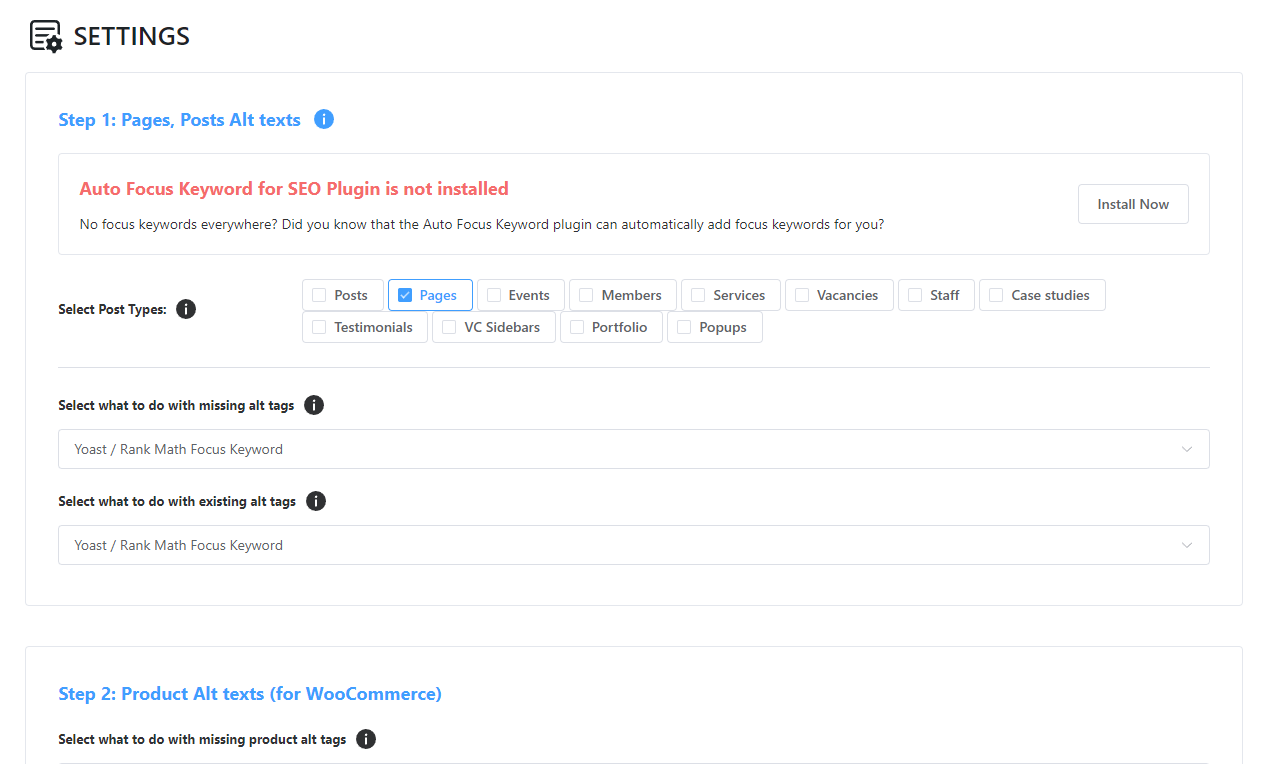
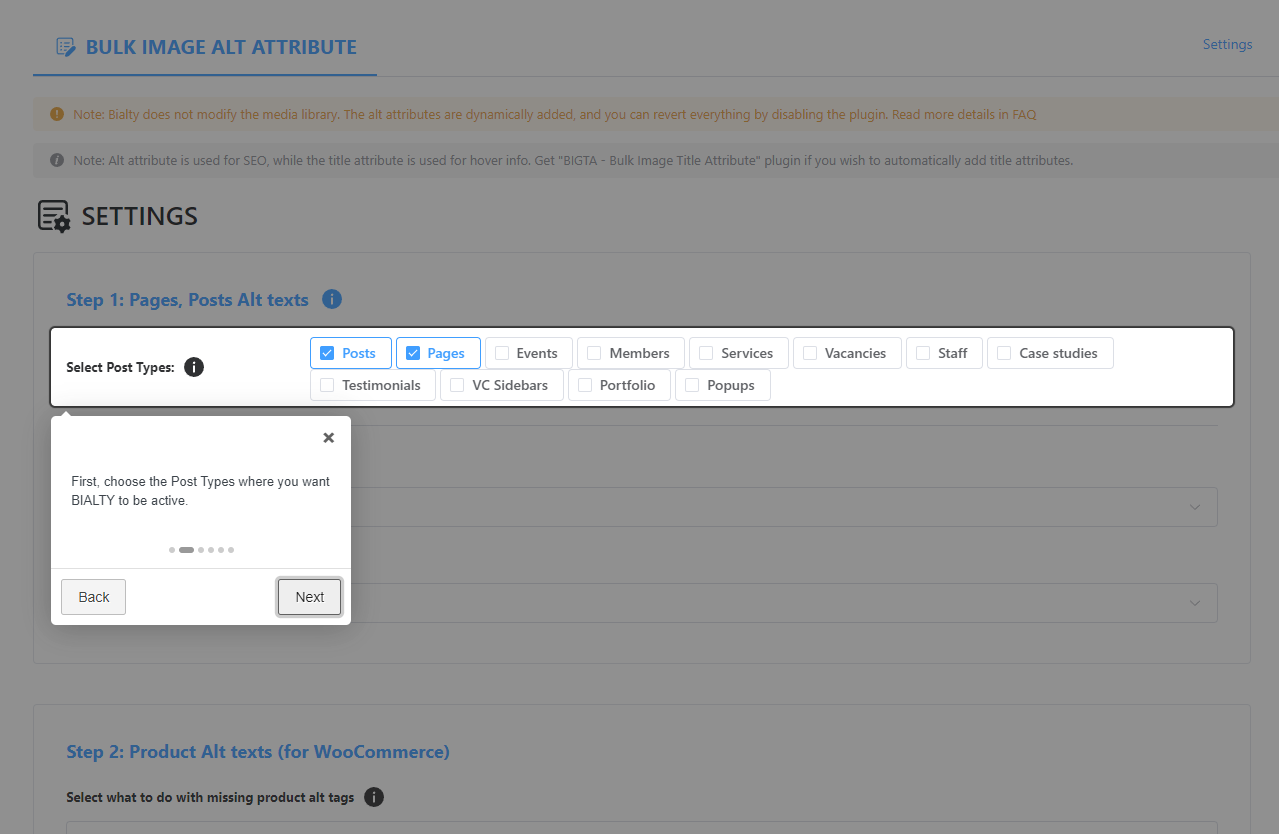
- Select the post types Bialty should cover
- Choose the rule for missing alt text
- Choose the rule for existing alt text
- Save settings
No bulk job is required. The selected rule applies on the next frontend page load.
Changelog
Recommended security hardening for all users: BIALTY now edits only the alt attribute of images and no longer rewrites the rest of your content markup. Alt text rules now require WordPress 6.2 or later.
2.2.10
- Security hardening: BIALTY now edits only the alt attribute of each image, and the rest of your content markup is no longer rewritten. Alt text rules now require WordPress 6.2 or later; on older WordPress versions BIALTY leaves pages unchanged and adds no alt text.
2.2.9
- Added an optional Fy2Press discovery card after the plugin settings, with local images and direct links without tracking.
- Remember dismissal per user and site across participating PAGUP plugins; hide the card when Fy2Press is installed.
2.2.8
- Updated Freemius SDK to the latest version
- Load the settings application after the Freemius onboarding screen.
- Keep the full product name readable on mobile onboarding screens.
2.2.7
- Updated the bundled Freemius WordPress SDK from 2.13.1 to 2.13.4 for current pricing, payment-history currency, API-timeout, PHP compatibility, and add-on checkout behavior.
- Added contextual PAGUP Agent Control examples for controlled WordPress audits and draft workflows without changing BIALTY’s deterministic alt-text model.
- Updated the 8 bundled admin locales for the new interface strings.
2.2.6
- Fix: BIALTY no longer processes the WooCommerce Cart, Checkout and My Account pages. Their markup is now left byte-for-byte unchanged, which prevents DOMDocument parser notices on the transactional forms.
- Fix: empty content (for example a post with no featured image) is now returned unchanged instead of being rewritten, removing a stray newline and related log noise.
2.2.5
- Add SEOPress focus keyword support for generated image alt text.
Screenshots
For developers
Is this your plugin? Show off the numbers.
Add a live badge to your site, docs or GitHub README. It updates on its own — no account needed.
Best Bulk Auto Image Alt Text (Alt… alternatives
All alt attribute plugins →FAQ
Bulk Auto Image Alt Text (Alt tag,…: quick answers
Straight answers, pulled from live WordPress.org data.
Live data from WordPress.org · checked Nov 17, 2026
Is Bulk Auto Image Alt Text (Alt t… free?
Yes. Bulk Auto Image Alt Text (Alt t… is free to download and use from the official WordPress.org plugin directory.
Is Bulk Auto Image Alt Text (Alt t… safe to use in 2026?
Yes — Bulk Auto Image Alt Text (Alt t… is a safe, well-maintained plugin to use in 2026. It runs on 10K+ sites, is rated 4.2/5 and was last updated 6 days ago, and scores 86/100 on our health check.
How many websites use Bulk Auto Image Alt Text (Alt t…?
Bulk Auto Image Alt Text (Alt t… is active on 10K+ WordPress websites and has been downloaded 506,996 times since it launched in October 2018. It was downloaded 13,976 times in the last 30 days.
Does Bulk Auto Image Alt Text (Alt t… work with WordPress 7.1?
Yes. The developer has tested Bulk Auto Image Alt Text (Alt t… up to WordPress 7.1.4, the latest release. It requires WordPress 4.1 or newer.
What PHP version does Bulk Auto Image Alt Text (Alt t… need?
Bulk Auto Image Alt Text (Alt t… requires PHP 7.4 or higher. Most hosts run PHP 8.x today, so it works on any modern WordPress hosting.
When was Bulk Auto Image Alt Text (Alt t… last updated?
The latest version, 2.2.10, was released on November 11, 2026 (6 days ago).
Who makes Bulk Auto Image Alt Text (Alt t…?
Bulk Auto Image Alt Text (Alt t… is developed and maintained by Pagup.
What are the best alternatives to Bulk Auto Image Alt Text (Alt t…?
The most popular alternatives to Bulk Auto Image Alt Text (Alt t… are Auto Image Alt Attribute (5K+ installs), Replai Images (40+ installs) and DevLab Image Alt (<10 installs).
Powered by PageForge
Want thousands of pages that rank like these? Build them in an afternoon.
This directory runs on the same engine as PageForge. Turn any spreadsheet, CSV or API into thousands of fast, SEO-ready WordPress pages — with schema, internal links and AI-written copy baked in.
- CSV, Google Sheets & API data sources
- AI content, schema & internal links per page
- Works with Elementor, Gutenberg, Yoast & Rank Math
- Free on WordPress.org — no credit card


