


BNE Gallery Extended
Simple add-on to the default WordPress gallery shortcode, [gallery], to include a 3D Carousel and Masonry display option.

Use with caution
BNE Gallery Extended works, but test it on a staging site before relying on it in 2026. It runs on 900+ sites, is rated 5/5 and was last updated 2 years ago, and scores 42/100 on our health check.
- Small user base (900+ active installs)
- No update in over a year
- Only tested up to WordPress 6.7 (latest is 7.1)
Daily downloads
Download spikes usually follow a new release — each site that auto-updates counts as a download.
Rankings
Where BNE Gallery Extended stands todayWordPress.org search rankings
Live position in the plugin search, top 100| Keyword | Position |
|---|---|
| Carousel gallery | >100 |
| gallery | >100 |
| masonry gallery | >100 |
| wordpress gallery | >100 |
Version adoption
Share of active sites per release.
Rating breakdown
★★★★★★★★★★ 5 from 13 reviews
About BNE Gallery Extended
From the official readme · v1.2.2Description
The default WordPress [gallery] shortcode only displays your images in a traditional column grid. BNE Gallery Extended adds a new option called “display” allowing you to also show the images as a 3D carousel or masonry grid.
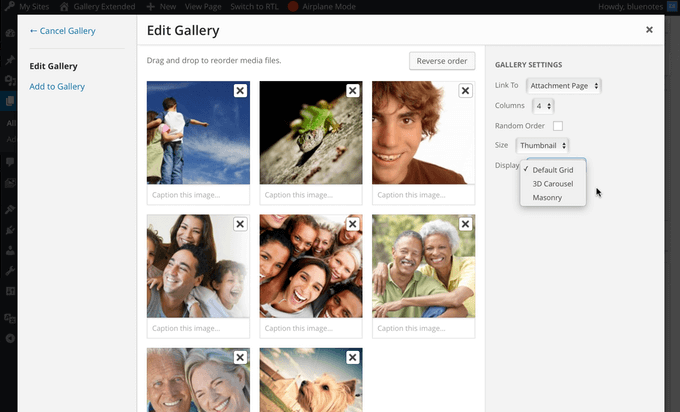
When adding a new image gallery or editing an existing gallery in your page, a new option will show on the gallery settings to either set the display to 3D Carousel, Masonry, or Default Grid. The default grid is what you have been used to and is the default behavior of WordPress. 3D Carousel adds a jquery rotation to your images and Masonry is similar to the default grid but allows different sizes and stacks them. The Masonry grid will also automatically reduce the number of columns for tablet and mobile screens.
To use with the block editor, use a classic editor block, then use the media button on that block’s toolbar to add your legacy media gallery.
Installation
- Upload “bne-gallery-extended” folder to the “wp-content/plugins/” directory
- Activate the plugin through the “Plugins” menu in WordPress
- A new option will be added to the WP gallery modal window to select the display type. Otherwise add display=”carousel” or display=”masonry” to the [gallery] shortcode.
Frequently asked questions
Display as a 3D carousel
Add display=”carousel” or display=”carrousel” to the [gallery] shortcode. Example: [gallery display=”carousel” ids=”2,5,22,13,2″]
Display as Masonry Grid
Add display=”masonry” to the [gallery] shortcode. Use “columns” to set the number of columns within the grid and “gutter” to set the distance between each image. The number of columns will reduce based on screen size. Example: [gallery display=”masonry” gutter=”4″ ids=”2,5,22,13,2″]
New Shortcode attributes added to [gallery]
display Options: carousel or masonry Description: Sets the display type for the WordPress [gallery] shortcode. Example: [gallery display=”carousel” gutter=”4″ ids=”2,5,22,13,2″] or [gallery display=”masonry” ids=”2,5,22,13,2″] caption Options: true or false (default: false) Description: shows the image caption below the centered image. Example: [gallery display=”carousel” caption=”true” ids=”2,5,22,13,2″] gutter Options: Any numerical value, ex: 5 or 3. (default: 5) Description: Masonry only – sets the distance surrounding each image in the grid layout. If you use a high number, this may…
Changelog
1.2.2 Nov 18, 2024
- Security fix for XSS via the shortcode image ID’s attribute. My thanks to Peter Thaleikis for the discovery.
- Note that this is a legacy plugin. Users should move towards the built in block editor gallery features.
1.2.1 June 3, 20222
- Fix PHP 8.0 warning.
- Set images to use the “eager” loading attribute.
1.2 December 15, 2020
- Move roundabout inline js to use wp_add_inline_script()
- Adjust JS to support jQuery v3.5+
1.1.1 November 8, 2017
- Fix: Adjust masonry caption if using the link option in [gallery] to respect either file, none, or attachment.
1.1 November 6, 2017
- New: Captions are now available with the masonry display while the image is hovered.
- New: Image titles are now included in the carrousel.
- Enhancement: Caption meta title and caption fields are separated for greater css customization.
1.0.4 June 17, 2017
- Notice: Now requires WP 4.5+
- Fix: Masonry display items would sometimes overlap one another.
- Enhancement: Move masonry inline js to the footer.
- New: Add a loading indicator to masonry gallery
Screenshots


For developers
Is this your plugin? Show off the numbers.
Add a live badge to your site, docs or GitHub README. It updates on its own — no account needed.
FAQ
BNE Gallery Extended: quick answers
Straight answers, pulled from live WordPress.org data.
Live data from WordPress.org · checked Oct 12, 2026
Is BNE Gallery Extended free?
Yes. BNE Gallery Extended is free to download and use from the official WordPress.org plugin directory.
Is BNE Gallery Extended safe to use in 2026?
BNE Gallery Extended works, but test it on a staging site before relying on it in 2026. It runs on 900+ sites, is rated 5/5 and was last updated 2 years ago, and scores 42/100 on our health check.
How many websites use BNE Gallery Extended?
BNE Gallery Extended is active on 900+ WordPress websites and has been downloaded 25,123 times since it launched in March 2016. It was downloaded 196 times in the last 30 days.
Does BNE Gallery Extended work with WordPress 7.1?
BNE Gallery Extended is officially tested up to WordPress 6.7.10, while the latest release is 7.1.3. It may still work, but try it on a staging site first.
When was BNE Gallery Extended last updated?
The latest version, 1.2.2, was released on November 19, 2024 (2 years ago).
Who makes BNE Gallery Extended?
BNE Gallery Extended is developed and maintained by Kerry.
Powered by PageForge
Want thousands of pages that rank like these? Build them in an afternoon.
This directory runs on the same engine as PageForge. Turn any spreadsheet, CSV or API into thousands of fast, SEO-ready WordPress pages — with schema, internal links and AI-written copy baked in.
- CSV, Google Sheets & API data sources
- AI content, schema & internal links per page
- Works with Elementor, Gutenberg, Yoast & Rank Math
- Free on WordPress.org — no credit card


