


Bitvolution Image Galleria
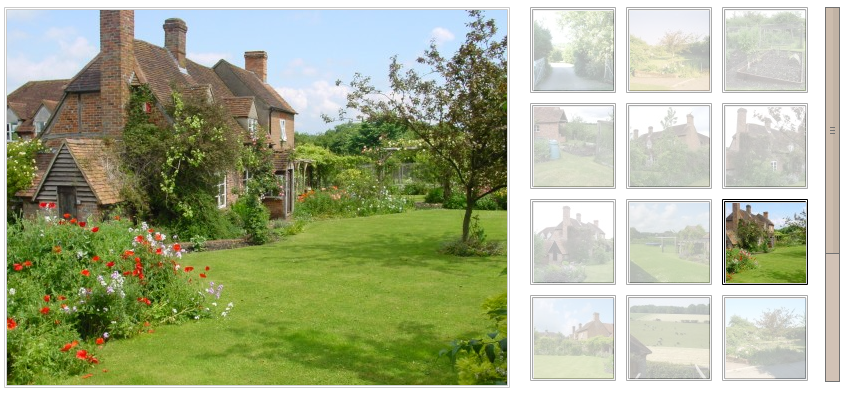
This plugin replaces the default Wordpress gallery feature with a more fancy image gallery inspired by the "Galleria" JQuery Image gallery.

Consider an alternative
Bitvolution Image Galleria shows warning signs in 2026 — compare the alternatives below before installing. It runs on 10+ sites and was last updated 16 years ago, and scores 23/100 on our health check.
- Small user base (10+ active installs)
- Very few reviews so far
- No update in 16 years
- Only tested up to WordPress 3.0 (latest is 7.1)
How does it stack up?
Side-by-side on installs, updates, ratings & support


Daily downloads
Download spikes usually follow a new release — each site that auto-updates counts as a download.
Rankings
Where Bitvolution Image Galleria stands todayWordPress.org search rankings
Live position in the plugin search, top 100| Keyword | Position |
|---|---|
| galleria | #17 |
| gallery | >100 |
| image gallery | >100 |
| photo gallery | >100 |
| photos | >100 |
Version adoption
Share of active sites per release.
About Bitvolution Image Galleria
From the official readme · v0.1.1Description
This plugin changes the way the in-built WordPress Gallery is displayed to the user. The WordPress author uploads images to their pages/posts as normal and uses the usual [gallery] shortcode to display the gallery but instead of the default WordPress image gallery with rows and columns of images, the user will be shown a more fancy image gallery inspired by the Galleria JQuery Image gallery.
This plugin is rather specific and custom – it has no configurable settings other than the default WordPress gallery options. It is designed so that once set up, it is invisible to the WordPress author – they will not need to learn or do anything different from normal WordPress gallery usage. Documentation for the WordPress gallery can be found at http://en.support.wordpress.com/images/gallery/.
In order to be efficient, the plugin uses the WordPress in-built image scaling feature – Whenever a WordPress author uploads a image, WordPress automatically creates 3 different sizes of the image (A thumbnail size, a Medium size and a Large size). In order to avoid wasteing bandwidth by scaling the image on the front-end, this plugin uses the “thumbnail” size and the “Medium” size images. The disadvantage of this is that the default WordPress image dimensions aren’t really suitable for Galleria and will need to be altered. See the plugin installation instructions for details.
Users should follow the Codex on using the [gallery] shortcode: https://codex.wordpress.org/Using_the_gallery_shortcode
Developers can learn more about the WordPress shortcode API: https://codex.wordpress.org/Shortcode_API
Current features:
- Displays one main ‘medium’ sized image and a grid of ‘thumbnail’ sized images
- Image captioning.
- Next/Previous links to cycle through the gallery
- User can click on main image to see ‘full-size’ version.
- Zero additional configuration options (plugin uses existing WordPress image options, i.e. image sizes)
- Efficient: No front-end image resizing via CSS
Current limitations:
- Doesn’t work “out of the box” on a default WordPress installation – requires a manual change of the default WordPress image sizes otherwise galleries aren’t formatted correctly – See installation instructions.
- By default the gallery requires a width of 850px or more – many themes have a smaller content width so the gallery will wrap onto seperate lines and won’t look at all good.
- No image pre-loading (nice for your server but not so snappy for your users).
Installation
Here we go:
- Upload the
bitvolution-image-galleriafolder to the/wp-content/plugins/directory. - In the WordPress Dashboard, activate the plugin through the ‘Plugins’ menu.
- In the WordPress Dashboard, go Settings->Media and modify the Thumbnail size to 80×80 (WordPress default is 150×150) and the Medium size to 500×375 (WordPress default is 300×300). If this is a brand new site with no images uploaded you can go to the next step. However, if there are already existing images uploaded, WordPress will not resize them to your new dimensions and so this plugin will not function all that well. To fix this is easy – Install the Regenerate-Thumbnails plugin and use it to re-generate all images to your new dimensions. Once done you can remove the Regenerate-Thumbnails plugin.
- Upload a couple of images to a post and use the normal gallery shortcode
[gallery]to display the image gallery. - Optional for a trivial increase in performance – Copy&Paste the CSS code in bitvolution-image-galleria.css to your themes style.css file and then comment out the line that contains
"bitvol_galleria_css"inbitvolution-image-galleria.php.
Changelog
0.1.1
- Bug fix: Made the main image link adhere to the gallery option called “Link thumbnails to” – So now the user can choose to link to either the WordPress attachement page or directly to the full size uploaded image. This bug was reported by Colby Fayock.
0.1
- Added prev/next link to allow users to cycle through the gallery.
- Added captions (for images where the caption is defined).
- Made the main image link to the WordPress attachment page (to allow commenting on individual gallery images).
- Removed width and height attributes on main gallery image because was causing UI problems.
0.0.3
- Set width and height attributes on main gallery image.
- Fix border on main gallery image so it re-sizes depending on the image.
- Change title attribute on main gallery image so it matches currently selected thumbnail.
- Refactor Javascript code.
0.0.2
- Corrected plugin URL in readme.
0.0.1
- This is the first version released. Features: 1) Efficient usage of images (no front-end resizing) no pre-downloading images that aren’t needed, 2) Displays loading spinner image when image is loading, 3) Uses CSS classes so you can style the galleria in your own way, 4) Can click on the main image to cycle through the gallery, 5) Uses jQuery for cross-browser hover fade effects, 6) Small JS footprint: 2854 bytes, 7) outputs valid XHTML (unlike the default WordPress gallery!).
Screenshots
For developers
Is this your plugin? Show off the numbers.
Add a live badge to your site, docs or GitHub README. It updates on its own — no account needed.
Best Bitvolution Image Galleria alternatives
All galleria plugins →

FAQ
Bitvolution Image Galleria: quick answers
Straight answers, pulled from live WordPress.org data.
Source: WordPress.org
Is Bitvolution Image Galleria free?
Yes. Bitvolution Image Galleria is free to download and use from the official WordPress.org plugin directory.
Is Bitvolution Image Galleria safe to use in 2026?
Bitvolution Image Galleria shows warning signs in 2026 — compare the alternatives below before installing. It runs on 10+ sites and was last updated 16 years ago, and scores 23/100 on our health check.
How many websites use Bitvolution Image Galleria?
Bitvolution Image Galleria is active on 10+ WordPress websites and has been downloaded 6,953 times since it launched in April 2010. It was downloaded 55 times in the last 30 days.
Does Bitvolution Image Galleria work with WordPress 7.1?
Bitvolution Image Galleria is officially tested up to WordPress 3.0.5, while the latest release is 7.1.5. It may still work, but try it on a staging site first.
When was Bitvolution Image Galleria last updated?
The latest version, 0.1.1, was released on October 23, 2010 (16 years ago).
Who makes Bitvolution Image Galleria?
Bitvolution Image Galleria is developed and maintained by Tom Fotherby.
What are the best alternatives to Bitvolution Image Galleria?
The most popular alternatives to Bitvolution Image Galleria are Fullscreen Galleria (800+ installs), Simple Galleria for WordPre… (90+ installs) and Post Slideshow Gallery (10+ installs).
Powered by PageForge
One template and a spreadsheet. A real page for every search.
PageForge turns each row of a CSV into a WordPress page with its own title, URL, SEO fields and schema, built on the layout you already designed. Free on WordPress.org.
- CSV and XLSX, plus Google Sheets on Professional and Enterprise
- Its own title, URL, SEO fields and schema for every page
- Works with the block editor, Elementor, Divi and Avada
- Free on WordPress.org, no credit card