



BibleGet I/O
Insert Bible quotes in your articles or pages using the "Bible quote" block or the [bibleget] shortcode; uses the BibleGet I/O API.

Consider an alternative
BibleGet I/O shows warning signs in 2026 — compare the alternatives below before installing. It runs on 30+ sites, is rated 3.7/5 and was last updated 3 years ago, and scores 27/100 on our health check.
- Small user base (30+ active installs)
- Very few reviews so far
- No update in 2 years
- Only tested up to WordPress 6.4 (latest is 7.1)
How does it stack up?
Side-by-side on installs, updates, ratings & support



Daily downloads
Download spikes usually follow a new release — each site that auto-updates counts as a download.
Rankings
Where BibleGet I/O stands todayWordPress.org search rankings
Live position in the plugin search, top 100| Keyword | Position |
|---|---|
| bible | #42 |
| block | >100 |
| citation | >100 |
| quote | >100 |
| shortcode | >100 |
Version adoption
Share of active sites per release.
Rating breakdown
★★★★★★★★★★ 3.7 from 3 reviews
About BibleGet I/O
From the official readme · v8.3Description
Once the plugin is installed, you will find a Bible quote block in the widgets section of the block editor.
Also available is a shortcode [bibleget] that you can use to insert Bible quotes in articles or pages from different versions of the Bible in different languages.
The text of the Bible quotes is retrieved from the BibleGet API https://query.bibleget.io.
Sample usage of the shortcode:
[bibleget query="Exodus 19:5-6,8;20:1-17" version="CEI2008"][bibleget query="Matthew 1:1-10,12-15" versions="NVBSE,NABRE"]
It is also possible to place the reference for the desired Bible quote in the contents of the shortcode:
[bibleget version="NABRE"]John 3:16;1 John 4:7-8[/bibleget]
The Plugin also has a settings page “BibleGet I/O” under “Settings” in the Administration area, where you can choose your preferred Bible versions from those available on the BibleGet server so that you don’t have to use the version or versions parameter every time.
After you have made your choices in the settings area, remember to click on “Save”!
Once the preferred version is set you can simply use:
[bibleget query="1 Cor 13"]
Other parameters available to the shortcode are:
popup: can have a value oftrueorfalse. Will determine whether the text of the Bible quote will show in a full block, or instead in a popup window upon clicking the Bible quote. Example:[bibleget query="Romans 8:28" popup="true"]preferorigin: can have a value ofGREEKorHEBREW, useful in those cases where there are multiple texts for the same book, chapter or verse in the same Bible edition, such as in the Book of Esther where both versions are included, one based on the original Greek text, and the other based on the original Hebrew text. Example:[bibleget query="Esther 1:1" preferorigin="HEBREW"]layoutprefs_showbibleversion: can have a value oftrueorfalse. Example:[bibleget query="Ezekiel 25:17" layoutprefs_showbibleversion="false"]layoutprefs_bibleversionalignment: can have a value ofLEFT,CENTER,RIGHTorJUSTIFY. Example:[bibleget query="Psalm 149:3" layoutprefs_bibleversionalignment="LEFT"]layoutprefs_bibleversionposition: can have a value ofTOP,BOTTOMorBOTTOMINLINE. Example:[bibleget query="2 Samuel 6:14" layoutprefs_bibleversionposition="BOTTOM"]layoutprefs_bibleversionwrap: can have a value ofNONE,PARENTHESESorBRACKETS. Example:[bibleget query="Ecclesiastes 3:1-4" layoutprefs_bibleversionwrap="BRACKETS"]layoutprefs_bookchapteralignment: can have a value ofLEFT,CENTER,RIGHTorJUSTIFY. Example:[bibleget query="Galatians 5:7-10" layoutprefs_bookchapteralignment="RIGHT"]layoutprefs_bookchapterposition: can have a value ofTOP,BOTTOMorBOTTOMINLINE. Example:[bibleget query="Mark 13:35-37" layoutprefs_bookchapterposition="BOTTOMINLINE"]layoutprefs_bookchapterwrap: can have a value ofNONE,PARENTHESESorBRACKETS. Example:[bibleget query="John 8:12" layoutprefs_bookchapterwrap="PARENTHESES"]layoutprefs_bookchapterformat: can have a value ofUSERLANG,BIBLELANG,USERLANGABBREVorBIBLELANGABBREV. Example:[bibleget query="Psalms 144:1-2" layoutprefs_bookchapterformat="USERLANGABBREV"]layoutprefs_bookchapterfullquery: can have a value oftrueorfalse. Example:[bibleget query="Isaiah 6:8" layoutprefs_bookchapterfullquery="true"]layoutprefs_showversenumbers: can have a value oftrueorfalse. Example:[bibleget query="1 John 2:15-17" layoutprefs_showversenumbers="false"]
The style settings are customizable using the WordPress Customizer, so you can make the Bible quotes fit into the style of your own blog / WordPress website.
The Bible quote block also has a number of customizable options in the block editor which allow you to set not only the style but also the layout of the elements that make up the Bible quote.
BibleGet Website
Subscribe to the Youtube channel!
Follow on Facebook!
Follow on Twitter!
Installation
- Go to
Administration Area -> Plugins -> Add newand search forbibleget, click onInstall Now Activatethe plugin once installation is complete- Set the preferred Bible version or versions for your Bible quotes from the settings page
Administration Area -> Settings -> BibleGet I/O - Set your preferred styling in the
WordPress Customizer -> BibleGet I/Oor when you add aBible quoteblock in the block editor - Add Bible quotes to your articles and pages either with the
Bible quoteblock or with the[bibleget]shortcode - Check out the WordPress playlist on youtube!
Frequently asked questions
How do I formulate a Bible citation?
The query parameter must contain a Bible reference formulated according to the standard notation for Bible citations (see Bible citation on Wikipedia). Two different notations can be used, the English (Chicago Manual of Style) notation and the International style notation. ENGLISH NOTATION: “:” is the chapter – verse separator. “15:5” means “chapter 15, verse 5”. “-” is the from – to separator, and it can be used in one of three ways: from chapter to chapter: “15-16″ means “from chapter 15 to chapter 16”. from chapter,verse to verse (of the same chapter): “15:1-5” means “chapter 15, from…
I am requesting a long Bible quote but I’m only getting 30 verses
If you are using a version of the Bible that is covered by copyright, you will not be able to quote more than 30 verses at once. So if you request for example “Gen1” using the NABRE version, you might expect to get back Gen1:1-31 but instead you will only get back Gen1:1-30. This is a limit imposed by the legal agreements for usage of these versions, it’s not a bug, it’s by design. If you need more than 30 verses when requesting a version covered by copyright, formulate the request as multiple quotes split up into no more than 30 verses each, for example “Gen1:1-30;1:31”.
What happens if I add a Google Fonts API key?
If you add a Google Fonts API key, the BibleGet plugin will immediately test it’s validity. If valid, it will remember that you have a key and that it’s valid for 3 months. Every three months starting from this moment the BibleGet plugin will talk with the Google Fonts API to get the latest list of available Google Fonts, and will download to the plugin folders a local compressed copy of each of those fonts for the purpose of previewing them in the customizer interface. You will need to be a bit patient the first time as it will take a couple minutes to complete the download process. A…
I have added the Google Fonts API key but the list of available fonts isn’t updated
The BibleGet plugin will remember that your key is valid for 3 months. This means that it will not fetch the list of fonts from the Google Fonts API until the relative transient expires. If a new font has come out that you would like to see and use in the customizer interface for the BibleGet plugin, and you don’t want to have to wait until the transient expires in that 3 month time slot, then you can click on the “force refresh” option below your API key.
I added the Google Fonts API key but while it was processing the download it stopped with a 504 http status error
If you receive a 504 http status error it means that the connection with the Google Fonts API timed out for some reason. The BibleGet plugin tries to handle this situation by forcing the process to start again, but if instead the process comes to a halt please let the plugin author know at admin@bibleget.io in order to look further into the handling of this situation. In any case you can reload the page and use the “force refresh” option below your API key and the process will pick up where it left off.
I updated the plugin to version 5.4 or later, but the new ‘Bible quote’ block doesn’t seem to be cooperating
In order to allow for new layout options, the BibleGet I/O API itself was slightly updated, and there is a little more information in the response from the server. However Bible quotes are cached by the BibleGet plugin for a seven day period, which means that from the time of the update until about a week later the cached Bible quotes will not have the necessary information for them to work with the ‘Bible quote’ block. If you do not want to wait seven days or until the cache expires, there is a new option in the BibleGet Settings page since version 5.7 which allows to flush the cache. A word…
I’m not able to use some options in the Gutenberg block such as positioning of the Bible version
There was recently an update to the BibleGet I/O API which slightly changed the structure of the html that comprises the Bible quotes. It is necessary to update the plugin to v5.9 in order to be compatible with these changes.
Changelog
Allow Google Fonts preview data to persist between plugin updates
8.3
- Fix: Google Fonts preview data was not persisting between updates
8.2
- Fix: focus lost from block controls making it almost impossible to use them
- Enhancement: create fallback for Google Fonts when API key not used, and which works for the Font select control both in the Customizer and the Block editor
- Enhancement: clean up js code using more arrow functions
8.1
- Fix: Font Select in Customizer was still broken after modernizing the plugin’s javascript
8.0
- Fix: bug when downloading previews for Google Fonts (typo in curl variables)
- Fix: bug in using popup option for Bible quotes (incorrect loading of external javascripts)
7.9
- Fix: newer parameters such as
preferoriginnot working correctly for the shortcode - Better organized codebase, better readability and maintainability
- Spaces to tabs in codebase as per WP coding convention
- Use composer on plugin build step to include external scripts while excluding unnecessary files
(getting this to behave correctly with the github to svn actions is the reason why there’s a jump from v7.5 to v7.9) - Load external javascript scripts from cdn rather than checking into the repo
- verified compatibility with WordPress 6.4
7.8
- see v7.9
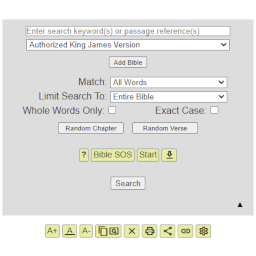
Screenshots


For developers
Is this your plugin? Show off the numbers.
Add a live badge to your site, docs or GitHub README. It updates on its own — no account needed.
Best BibleGet I/O alternatives
All bible plugins →




FAQ
BibleGet I/O: quick answers
Straight answers, pulled from live WordPress.org data.
Live data from WordPress.org · checked Sep 29, 2026
Is BibleGet I/O free?
Yes. BibleGet I/O is free to download and use from the official WordPress.org plugin directory.
Is BibleGet I/O safe to use in 2026?
BibleGet I/O shows warning signs in 2026 — compare the alternatives below before installing. It runs on 30+ sites, is rated 3.7/5 and was last updated 3 years ago, and scores 27/100 on our health check.
How many websites use BibleGet I/O?
BibleGet I/O is active on 30+ WordPress websites and has been downloaded 8,410 times since it launched in August 2014. It was downloaded 67 times in the last 30 days.
Does BibleGet I/O work with WordPress 7.1?
BibleGet I/O is officially tested up to WordPress 6.4.12, while the latest release is 7.1.2. It may still work, but try it on a staging site first.
What PHP version does BibleGet I/O need?
BibleGet I/O requires PHP 7.4 or higher. Most hosts run PHP 8.x today, so it works on any modern WordPress hosting.
When was BibleGet I/O last updated?
The latest version, 8.3, was released on February 26, 2024 (3 years ago).
Who makes BibleGet I/O?
BibleGet I/O is developed and maintained by JohnRDOrazio.
What are the best alternatives to BibleGet I/O?
The most popular alternatives to BibleGet I/O are Logos Reftagger (10K+ installs), Bible Verse of the Day (3K+ installs) and Visual Bible Verse of the D… (1K+ installs).
Powered by PageForge
Want thousands of pages that rank like these? Build them in an afternoon.
This directory runs on the same engine as PageForge. Turn any spreadsheet, CSV or API into thousands of fast, SEO-ready WordPress pages — with schema, internal links and AI-written copy baked in.
- CSV, Google Sheets & API data sources
- AI content, schema & internal links per page
- Works with Elementor, Gutenberg, Yoast & Rank Math
- Free on WordPress.org — no credit card


