


BibleBridge
Bring God's Word to every visitor. A complete, interactive Bible for your WordPress site, with unlimited reading on every plan, on your own domain.

Solid choice
BibleBridge is a solid plugin choice in 2026, with a few things worth checking first. It runs on 10+ sites, is rated 5/5 and was last updated 6 days ago, and scores 77/100 on our health check.
- Actively developed — last update 6 days ago
- Tested with the latest WordPress (7.1)
- Momentum — downloads up 731.5% vs the previous 30 days
- Small user base (10+ active installs)
- Very few reviews so far
How does it stack up?
Side-by-side on installs, updates, ratings & support



Daily downloads
Download spikes usually follow a new release — each site that auto-updates counts as a download.
Rankings
Where BibleBridge stands todayWordPress.org search rankings
Live position in the plugin search, top 100| Keyword | Position |
|---|---|
| bible | #25 |
| bible reader | #6 |
| christian | #26 |
| scripture | #12 |
| Verse | #39 |
Version adoption
Share of active sites per release.
Rating breakdown
★★★★★★★★★★ 5 from 1 reviews
About BibleBridge
From the official readme · v1.0.64Description
BibleBridge integrates a complete, interactive Bible into your WordPress site as a meaningful witness to every visitor. Your domain, your name, your readers. Built for Christian businesses, ministries, churches, and Bible bloggers.
No YouVersion links. No BibleGateway iframes. Just Scripture, fully on your site.
How BibleBridge works
This plugin works together with the BibleBridge server. Auto-Tagging, search, topics, cloud sync, and other API-backed features run on BibleBridge’s own servers, which we build, host, and maintain.
What makes it different
BibleBridge is one consistent Bible, not separate tools bolted together. Everything stays on your domain, under your name and logo – no visitor accounts, no ads, no tracking. Switch translations once and reading and search both follow: nothing to reconfigure.
Free, on every plan
- Unlimited Bible reading: both translations, every chapter, no daily cap
- Auto-Tagging: enable once and BibleBridge automatically finds scripture references in every post, adding hover tooltips with the verse text
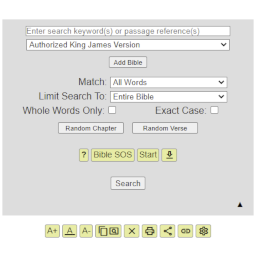
- Shortcodes: embed a search box or the Verse of the Day anywhere on your site – for example:
[biblebridge_search]or[biblebridge_verse_of_the_day] - Includes the Berean Standard Bible (BSB) and King James Version (KJV). See Bible Text Sources below for attribution and licensing information.
- Full-text search with book filtering
- Highlights, notes, and verse sharing, with cloud sync across devices using a simple code – no account required
- Dark mode and a mobile layout
Custom reading plans: build your own, on your own site (Scale)
Sermon series, seasonal devotionals, and small-group studies can live where your congregation already is.
Build a plan in your BibleBridge dashboard, from a single verse a day to several chapters, with schedules up to 400 days. Publish it on your site alongside the standard reading plans, complete with a start date and progress calendar. Readers can track their progress in their browser and sync it across devices when they enable synchronization.
No visitor accounts, app to download, or code required. Free and Growth customers can try the builder and preview their plans before upgrading.
Upgrade to unlock more features
- Offer deeper study: cross-references chosen for how they fit the passage, not just shared words, so visitors can go deeper into Scripture without leaving your site
- Stand out visually: Scripture Atlas’s seven hand-illustrated regions give your site a distinctive way to explore how Bible themes connect – nothing else looks like it. Also includes The Church, an interactive map of church life.
- Bring visitors back: five guided reading plans give people a reason to return to your site day after day
- Build custom reading plans (Scale): Create sermon-series plans, seasonal devotionals, and Bible studies. Choose individual verses, chapters, or multiple readings per day, then publish them on your own site.
- Integrate Scripture anywhere: drop a chapter, verse, or Scripture Atlas embed into any page or post with a shortcode
Plans
Free for personal, ministry, educational, and other non-commercial use. Commercial sites get a 7-day evaluation from first activation – no credit card required to start. Growth is $14/month for personal, ministry, and educational sites; Scale is $29/month and adds commercial use, custom reading plans you build yourself, and higher daily capacity for search and other API-backed features. Both are available billed annually at a discount. View pricing →
How it works
- Install and activate the plugin
- Go to Settings → BibleBridge
- Set your name (for example, “Grace Church Bible”)
- Your Bible is live at yoursite.com/bible
Free tier
The free tier covers everything above under “Free, on every plan” – no ads, no tracking, no visitor accounts. Upgrade anytime from Settings → BibleBridge to unlock the features above under “Upgrade to unlock more features.”
The free tier is for personal, ministry, educational, and other non-commercial use. Commercial sites can evaluate the free plan for 7 days from first activation, after which the Scale plan is required regardless of traffic – see Terms of Service.
External Services
Every file ships as readable source – no obfuscation, no hidden build steps.
The plugin connects to the following services hosted at holybible.dev:
- BibleBridge API (holybible.dev/api) – Powers search, cross-references, topics, reading plans, Scripture Atlas, and Auto-Tagging. When the plugin is activated, it sends your site’s name and URL to set up a free API key. After that, each request includes that key and the requested passage. Auto-Tagging also sends the text of the posts it scans. Searches include an anonymous visitor code, made from the visitor’s IP address, so one heavy user can’t use up your site’s search limit. The code is not the IP address itself and changes every day.
- Reading plan library (holybible.dev/api/plans) – On paid plans, the plugin downloads reading plans maintained by BibleBridge and saves a copy on your site, checking for updates about once an hour. Each request includes your site’s API key. On Scale, custom plans you create in your BibleBridge dashboard are stored on our servers and downloaded the same way. If your site no longer has an active paid plan, the saved copy is removed.
- BibleBridge Sync (holybible.dev/reader/sync.php) – Optional sync that lets visitors keep their highlights, notes, and reading progress across devices. Nothing is sent unless a visitor turns sync on. It uses a random sync code instead of an account. The code and synced data are stored on BibleBridge’s servers. Visitor IP addresses are not sent.
- Verification Ping (holybible.dev/api/verify-beacon) – Helps BibleBridge tell real visitors from bots. When a page with BibleBridge content loads, the visitor’s browser sends a short check directly to BibleBridge. It includes the visitor’s IP address, browser details (user agent), the page being viewed, a random per-visit code, and the result of a built-in open-source bot check (BotD). This information is kept for about a week for security monitoring only, and is not used for advertising or cross-site tracking.
Installation
- In your WordPress admin, go to Plugins → Add New
- Search for “BibleBridge” and click Install Now
- Activate the plugin
- Go to Settings → BibleBridge to set your reader name
- Find your reader URL under Page URL in Settings → BibleBridge and add it as a custom link in your navigation menu
For manual installation: upload the biblebridge folder to /wp-content/plugins/ and activate through the Plugins menu.
Changelog
1.0.64
- Improved: A redesigned reader home page.
- Improved: Redesigned cloud sync. Your changes stay in sync across all your devices.
- New: The Church (Growth and Scale), an interactive map exploring how worship, prayer, baptism, communion and other parts of church life connect in Scripture.
1.0.63
- New: Custom reading plans (Scale). Build your own plans in your BibleBridge dashboard, such as a sermon series or a seasonal plan, using single verses, whole chapters or several readings a day, and publish them on your own site. You can also choose which standard plans appear. Free and Growth accounts can try the builder and preview a plan.
- Improved: Simplified topic verse cards with clearer actions for exploring verse context and cross-references.
- Fix: Corrected quotation mark handling in topic verse displays and copied verse text.
1.0.62
- New: Custom color theme (beta). Choose a top nav color and an accent. Buttons and chips use your exact accent, and text shades are chosen automatically so everything stays easy to read.
- New: The chapter shortcode now shows the full reader formatting. [biblebridge book=”john” chapter=”3″] includes section headings, words of Jesus in red, poetry lines and footnotes. Add footnotes=”no” or xrefs=”no” to turn either off.
- Changed: The verse number is now what you click or tap. It opens the verse actions, and clicking the verse text no longer opens anything. Cross-references are a separate action on that menu, and verses with no cross-references don’t offer it. This applies to the reader, compare view and the shortcode.
- New: Show or hide red letters, paragraph marks and footnotes from the Aa menu.
- Improved: Most KJV footnote markers now sit on the word they explain.
- Improved: Consistent spacing and punctuation in the BSB text.
- Improved: Search handles phrases and long queries more gracefully, and mobile search is cleaner on iPhone.
- Improved: The topics page is a clean list with a filter box.
1.0.61
- Improved: More consistent spacing, buttons and dividers across the reader, search and topics pages.
1.0.60
- Improved: A cleaner, easier-to-tap reader on mobile. Larger buttons, cleaner Prev / Next controls, and more even spacing throughout.
- New: Swipe left or right to change chapters on phones and tablets. Turn it off in the Aa menu.
Screenshots


For developers
Is this your plugin? Show off the numbers.
Add a live badge to your site, docs or GitHub README. It updates on its own — no account needed.
Best BibleBridge alternatives
All bible plugins →




FAQ
BibleBridge: quick answers
Straight answers, pulled from live WordPress.org data.
Source: WordPress.org
Is BibleBridge free?
Yes. BibleBridge is free to download and use from the official WordPress.org plugin directory.
Is BibleBridge safe to use in 2026?
BibleBridge is a solid plugin choice in 2026, with a few things worth checking first. It runs on 10+ sites, is rated 5/5 and was last updated 6 days ago, and scores 77/100 on our health check.
How many websites use BibleBridge?
BibleBridge is active on 10+ WordPress websites and has been downloaded 3,720 times since it launched in April 2026. It was downloaded 898 times in the last 30 days.
Does BibleBridge work with WordPress 7.1?
Yes. The developer has tested BibleBridge up to WordPress 7.1.5, the latest release. It requires WordPress 5.9 or newer.
What PHP version does BibleBridge need?
BibleBridge requires PHP 8.0 or higher. Most hosts run PHP 8.x today, so it works on any modern WordPress hosting.
When was BibleBridge last updated?
The latest version, 1.0.64, was released on November 20, 2026 (6 days ago).
Who makes BibleBridge?
BibleBridge is developed and maintained by Derek Ziemer.
What are the best alternatives to BibleBridge?
The most popular alternatives to BibleBridge are Logos Reftagger (10K+ installs), Bible Verse of the Day (3K+ installs) and Visual Bible Verse of the D… (900+ installs).
Powered by PageForge
One template and a spreadsheet. A real page for every search.
PageForge turns each row of a CSV into a WordPress page with its own title, URL, SEO fields and schema, built on the layout you already designed. Free on WordPress.org.
- CSV and XLSX, plus Google Sheets on Professional and Enterprise
- Its own title, URL, SEO fields and schema for every page
- Works with the block editor, Elementor, Divi and Avada
- Free on WordPress.org, no credit card