


BG Couriers for WooCommerce
Bulgarian courier shipping for WooCommerce: Speedy, Econt, BOX NOW, Pigeon, Sameday, Express One, Evropat - office, address, locker, live rates.

Use with caution
BG Couriers for WooCommerce works, but test it on a staging site before relying on it in 2026. It runs on 40+ sites and was last updated 23 hours ago, and scores 56/100 on our health check.
- Actively developed — last update 23 hours ago
- Tested with the latest WordPress (7.1)
- Momentum — downloads up 80.4% vs the previous 30 days
- Small user base (40+ active installs)
- Very few reviews so far
How does it stack up?
Side-by-side on installs, updates, ratings & supportDaily downloads
Download spikes usually follow a new release — each site that auto-updates counts as a download.
Rankings
Where BG Couriers for WooCommerce stands todayWordPress.org search rankings
Live position in the plugin search, top 100| Keyword | Position |
|---|---|
| BoxNow | #5 |
| econt | #5 |
| sameday | #12 |
| shipping | >100 |
| speedy | #29 |
Version adoption
Share of active sites per release.
About BG Couriers for WooCommerce
From the official readme · v0.4.32Description
BG Couriers is shipping with Bulgaria’s own couriers inside WooCommerce: your customer chooses where the parcel goes and sees what that delivery costs, and you print the label and follow the parcel without leaving WordPress.
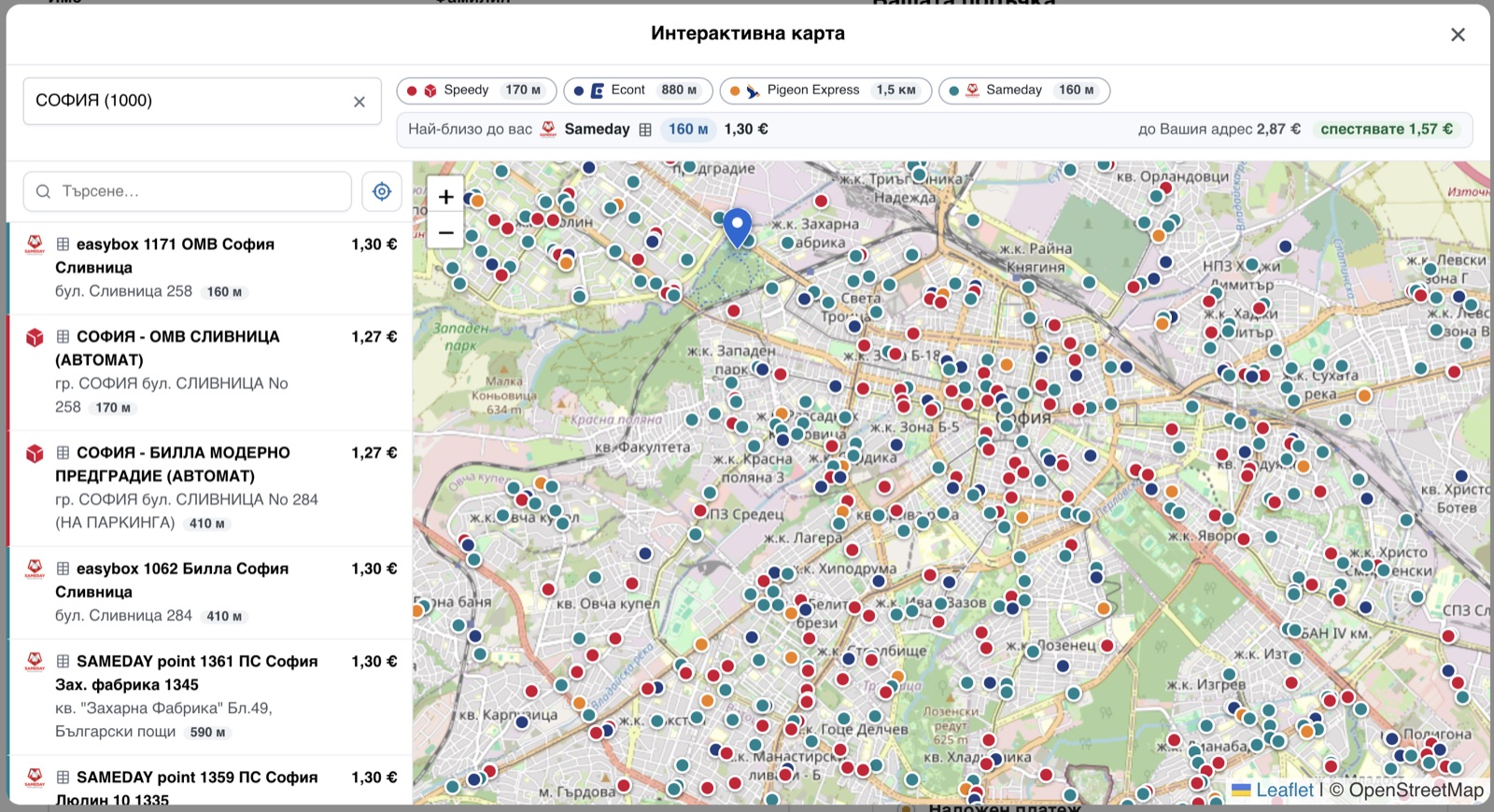
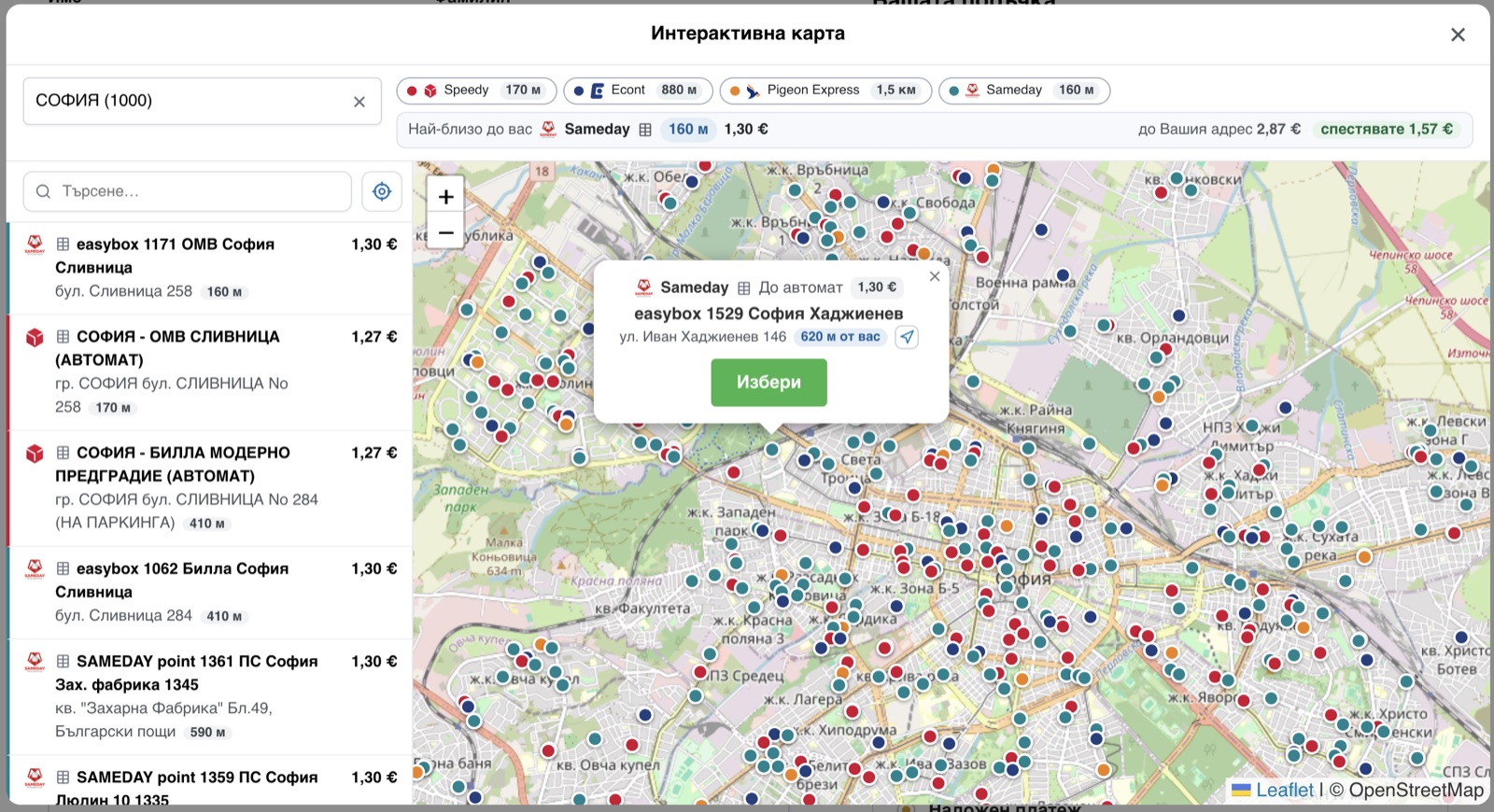
At the checkout every courier you switch on shows its own price for the basket, live from that courier’s API. Your customer picks how the parcel is delivered (to an office, to an address, or to a locker/APS) and finds the office by typing the town, or by pointing at it on one map that carries every courier’s offices and lockers at once, each with its own price. The map can also say which pickup point is closest to them.
In the admin one click issues the waybill and the label: one order, or fifty of them into a single PDF (A6 labels or an A4 sheet). The plugin then keeps each shipment’s status up to date by itself, and your customer sees the waybill and a tracking link on their order and in the e-mails you already send them.
It is free, GPL, and stays that way: every courier, every feature, no paid tier. Deliveries are within Bulgaria.
На български: доставка с куриер за WooCommerce: Спиди, Еконт, BOX NOW, Sameday (easyBox), Pigeon Express, Express One и Европът. Всички куриери в един плъгин: до офис, до адрес или до автомат, наложен платеж, товарителници и етикети с едно кликване, проследяване на пратката. Интерфейсът е изцяло на български.
Couriers
- Speedy (Спиди): office / address / APS. Live rates, labels, tracking.
- Econt (Еконт): office / address / Econtomat. Live rates, labels, tracking, and cash on delivery (наложен платеж) with an itemised packing list.
- Pigeon Express: office / address / locker. Live rates, labels, tracking.
- Sameday: office / address / easyBox. Live rates, labels, tracking.
- BOX NOW (BoxNow): lockers (APM) only, picked by town and locker like every other courier (the towns are read off its lockers). Flat rate.
- Express One: office / address / EXOBOX locker. Live rates, labels, tracking. The address is chosen from Express One’s own street list, which is what its waybills require.
- Европът (Evropat): office / address. Live rates, labels, tracking. The address is chosen from Европът’s own street list, which its waybills require.
Setting it up
You need your own account with each courier you want to offer: the prices your customers see and the labels you print are your own contract’s, and nothing is resold through this plugin. Once you have the API credentials, a courier takes a couple of minutes:
- Paste the credentials on that courier’s tab and switch the courier on; it checks them with the courier there and then, and says so plainly if they are refused.
- Sync its towns and offices: one button.
- Add it to your Bulgaria shipping zone, and to the zone of any other country you deliver to.
Everything else already has a working default: the prices, the map, the checkout fields and the label size all work as they ship.
Also included
- Cash on delivery (наложен платеж), with the choice of who pays the delivery, and the amount to collect follows that choice.
- Free-shipping thresholds, per courier and per delivery type.
- Several parcels in one shipment, and insurance for a value you set (Speedy, Sameday).
- A delivery estimate on the cart page, before the customer reaches the checkout.
- Labels issued automatically when an order reaches a status you choose, or per courier, or not at all.
- Works on both the classic and the block checkout.
- Fully translated to Bulgarian.
External services
The plugin uses the online API of each courier you enable, to price a delivery, to create a label and to track a parcel. Nothing is sent to a courier you have not configured.
What is sent, and when
- Price quote (cart / checkout): the parcel weight, the destination town or office, and the delivery type. When the customer views the shipping options.
- Label (admin): the recipient’s name, phone, e-mail, the chosen address or office/locker, the parcel weight, and, with cash on delivery, the amount to collect and the item list. When you generate the label.
- Tracking: the waybill number. When tracking is opened or refreshed.
Courier APIs
- Speedy: api.speedy.bg. Terms · Privacy
- Econt: ee.econt.com. Terms · Privacy
- Pigeon Express: api.pigeonexpress.com (api-demo.pigeonexpress.com in test mode). Terms · Privacy
- Sameday: api.sameday.bg (sameday-api-bg.demo.zitec.com in test mode). Terms · Privacy
- Express One: system.expressone.bg. Terms · Privacy
- BOX NOW: api-production.boxnow.bg (api-stage.boxnow.bg in test mode). Terms · Privacy
- Европът (Evropat): api.evropat.com. Terms · Privacy
Maps and address lookup
- OpenStreetMap tiles: tile.openstreetmap.org. Map tiles only, loaded when the customer opens a map. Tile policy · Privacy
- OpenStreetMap Nominatim: nominatim.openstreetmap.org. One set of coordinates, turned into an address or a town name. It happens in two cases only: the customer drops a pin on the address map picker (a setting, off by default), or presses “find me” on the map before naming a town, so the town can be filled in for them. Nominatim policy · Privacy
- Google Maps Geocoding: maps.googleapis.com. Takes over those same lookups, and only if you set a Google Maps API key in the settings (optional; OpenStreetMap is used if the key is empty or Google does not answer). It receives the coordinates and nothing else. Terms · Privacy
The map’s “closest to you” (on by default, switchable off) works out the distances in the customer’s own browser. Their position is never stored on the site and is forgotten when the page is closed.
No data is sent to any service you have not configured, and the plugin sends nothing to its author.
Contributing
The plugin is developed in the open. Bugs, ideas and pull requests are welcome on GitHub.
Installation
- Upload the plugin to
/wp-content/plugins/bg-couriers(or install via the Plugins screen) and activate it. WooCommerce must be active. - Go to WooCommerce → Settings → BG Couriers.
- Open a courier’s tab, enter its API credentials, click Validate, then Sync its cities/offices.
- Add the courier’s shipping method to your Bulgaria shipping zone (WooCommerce → Settings → Shipping), and to the zone of any other country you deliver to.
Frequently asked questions
Which countries are supported?
Bulgaria, by seven Bulgarian networks: Speedy, Econt, Pigeon Express, Sameday and Express One deliver to an office, to a street address or to a locker, Европът to an office or a street address, and BOX NOW to its lockers (APM). Delivery outside Bulgaria is not offered.
How can I support the development?
The plugin is free, GPL, and stays that way: every courier, every feature, no paid tier. If it has saved you work and you would like to put something behind it: revolut.me/danq6lus. It is entirely voluntary and changes nothing about the support you get. Reporting a bug in the support forum, or leaving a review, helps just as much.
When is the waybill created, and when should it be?
Either when you choose, or by itself. Auto-generate labels (BG Couriers -> General) issues the waybill the moment an order reaches the status you pick; each courier’s own tab can overrule that for itself. With it off, an order shows a Generate button instead, and the bulk action Print waybills A4/A6 creates any that are missing and hands you one PDF, so you print at the packing table and the waybill is made at that moment. If the order says when it ships (a dispatch day shown at the checkout, the way the Order Delivery Date plugin records one), Wait for the dispatch day (General, on by…
Do I need an account with the couriers?
Yes. Each courier requires its own API credentials, obtained from that courier. Enter them on the courier’s settings tab.
How are prices calculated?
Live from each courier’s API for the parcel weight and destination. If the API is briefly unreachable, a daily reference price (or your configured default) is used. BOX NOW uses a flat rate you set (it has no rate API).
Does it bundle any third-party libraries?
Yes, and all are GPL-compatible and shipped with their source: FPDF (permissive) and FPDI (MIT) to compose label PDFs, and Leaflet (BSD-2-Clause) with OpenStreetMap tiles for the map picker. The courier and courier brand names are used only to identify the services the plugin integrates with; this plugin is not affiliated with or endorsed by any of them.
Changelog
A shop whose BOX NOW webhook was registered had every message refused, so parcel stages never arrived. Ask BOX NOW to send the header the settings now show, with your secret as its value.
0.4.32
- Fixed: a Sameday locker parcel nobody collected now moves the order along. Three of Sameday’s status lines were read as “in transit”: “Заредена в OOH” (the parcel is in the locker, waiting), “Срокът за съхранение на пратката е изтекъл.” (the storage period is over, nobody came) and “Върната на подател” (handed back to you). So the orders list never showed the parcel as waiting or as not collected, the “when not collected” and “when returned” rules never ran, and the order stayed on Shipped for weeks after the box was back on the counter. They now read as waiting, not collected and back with you, and an order already sitting on “coming back” is moved by the next check.
- Fixed: “Отложено взимане от подател” no longer marks a Sameday order as shipped. The driver postponing the collection means the parcel is still with you; it was counted as the parcel moving.
0.4.31
- Changed: the shipment panel on the order screen is compact, and its current stage is a panel that opens. The stage (“Delivered”) is the title; opening it lists the journey so far, newest first, one line per step. What the courier collects at the door is one short line (“At the door ~3,00 €”) instead of a sentence, and on a narrow card the title takes two lines and each step one.
- Changed: a delivered, cancelled or returned parcel is no longer timed or asked about. Its panel shows no “unchanged for” clock and no refresh button, and the background check closes such an order without calling the courier.
- Fixed: choosing a city now fills in the only office at once. In a town with a single office the dropdown stayed empty after the town was picked, and a customer had to open it and click the one row. The office list is now asked for first and the only office is chosen from the same list the dropdown shows.
- Fixed: “Choose” on the map now selects the office at checkout. The map closed but the office was not set, because the checkout recalculation wiped it. The choice is saved first and restored if the recalculation clears it, and the town, delivery type and courier rate follow the pick.
- Fixed: the chosen office is shown in full. A long office name was cut to one line ending in an ellipsis, so two offices of one town could not be told apart. The name now wraps to up to three lines, on a phone too.
- Fixed: the town and office dropdowns are never narrower than the field they open from.
- Changed: the checkout asks for the office list before the delivery recalculation instead of after it, and prefetching the other couriers waits until the recalculation has finished, so the customer’s own town is no longer queued behind it.
0.4.30
- Fixed: a customer who opens “To office” in a town with a single office of that courier no longer has to click it. The checkout showed a dropdown with one row in it, the customer saw the office, did not select it, and the order was refused with “choose an office”, so no order existed at all (reported by a Bulgarian shop: Speedy has one counter and one locker in Белослав). The tab the customer is on now decides: one office on “To office”, or one locker on “To locker”, is chosen for them. Two or more on a tab are still theirs to pick, and the other tab is one click away.
- Changed: the release pipeline no longer fails because Docker Hub has refused an anonymous pull to a shared runner. Nothing in the plugin itself changes.
0.4.29
- New: a parcel nobody came for is no longer shown as one waiting to be collected. Until now both were the same amber “Ready for collection” the order had carried since the day the parcel arrived, so a sale stuck at the counter for ten days looked exactly like one that got there this morning (suggested by a Bulgarian shop, 2026-10-09). “Not collected” is now a stage of its own, with its own red icon in the orders list and its own place on the order’s timeline. Pigeon and Evropat report it themselves (Непотърсена, изтекъл престой/срок на съхранение, Evropat’s status 82) and are flagged the moment they do; for the couriers that keep saying “ready for collection” for as long as the box stands there, a new setting counts the days: 7 by default, 0 turns it off. A second setting can move such an order to a status of your choice (“Failed” is the usual one), while the parcel is still AT the courier, because the existing return rule only fires once the goods are back on your counter, by which time the sale has been lost for a fortnight.
- Changed: the shipment panel on the order says it in one word. It used to print the stage, the courier saying the same thing again (“Непотърсена Непотърсена” on a Bulgarian shop, because the two are the same word) and a sentence about the clock, on a card narrow enough to wrap all three, and with the buttons above it spilling past the card’s own edge. Now: the stage in one word, a clock and the duration beside it on the same line, and the journey’s dates in columns that line up against the right edge of the card: the day under the day, the time under the time. The buttons stay exactly where they have always been; they only rearrange when the panel is too narrow to hold them in one row, and then they spread evenly rather than leaving one hanging. Where the shipment is now looks the same on both screens too: the orders list and the order itself draw one and the same icon, in one and the same colour. Everything that was dropped (the courier’s own wording, the full stage name, the whole “unchanged for …” sentence) is on the hover hints. Checked from a 1600px screen down to a 420px phone: nothing leaves the card, and below the width where two columns fit the dates stack under their stages instead.
- Fixed: when a courier answered with something the plugin could not read, the order was marked with the word “UNKNOWN” and a stage nobody had reported, over the top of the stage it really had. An unreadable answer now changes nothing and the next poll asks again.
- Fixed: a Pigeon parcel that was redirected to a second address read as the uncollected shipment it used to be. Pigeon carries a redirection under a new number and freezes the old one, and the plugin showed the frozen verdict; it now reports the new leg’s own progress under the waybill you booked.
0.4.28
- New: the order now says WHEN each stage happened – label created, on its way, ready for collection, delivered, on its way back, back with you – as one line with dates, instead of being read out of the order notes among the stock movements. The courier’s own event time is used where it gives one.
- New: the parcel is measured from the order, not declared one size for all. The shop ships in a bag, so its size is the size of what went into it: the footprint of the largest item, and the height that makes the parcel hold exactly what was ordered. That is the number a locker compartment is picked by, at the checkout as well as on the waybill, so an order that no longer fits a small box stops being offered one. Two new settings go with it – a packaging allowance (the bag and the air inside it, 1.1 by default) and the packaging’s own weight, added to the goods. On by default; a product with no dimensions counts as the default parcel below it, so filling your products in is what makes this worth having.
0.4.27
- Fixed: the Bulgarian catalogue is back in the package. Installs from WordPress.org have been reading the plugin in English since 0.4.26 – the whole of it, the checkout customers see included – on shops whose WordPress, WooCommerce and theme are all Bulgarian. The catalogue was never missing from the plugin’s code; it was being stripped out of the published package, and the directory has no language pack of its own to put back. The compiled catalogue ships again. If a language pack appears on WordPress.org later, it still wins: WordPress reads wp-content/languages before the plugin’s own folder.
Screenshots




For developers
Is this your plugin? Show off the numbers.
Add a live badge to your site, docs or GitHub README. It updates on its own — no account needed.
Best BG Couriers for WooCommerce alternatives
All BoxNow plugins →| Rank | Plugin | Active installs |
|---|---|---|
| 1 |
 BOX NOW Delivery
BOX NOW the future of parcel delivery.
BOX NOW Delivery
BOX NOW the future of parcel delivery.
|
6K+ |
| 2 |
 BOX NOW Delivery Croatia + Slovenia
BOX NOW the future of parcel delivery.
BOX NOW Delivery Croatia + Slovenia
BOX NOW the future of parcel delivery.
|
900+ |
| 3 |
 AfterSalesPro Plugin
One-Stop Solution for Automated label creation 🏷️, Smart shipment tracking 📍, branded…
AfterSalesPro Plugin
One-Stop Solution for Automated label creation 🏷️, Smart shipment tracking 📍, branded…
|
400+ |
FAQ
BG Couriers for WooCommerce: quick answers
Straight answers, pulled from live WordPress.org data.
Live data from WordPress.org · checked Oct 16, 2026
Is BG Couriers for WooCommerce free?
Yes. BG Couriers for WooCommerce is free to download and use from the official WordPress.org plugin directory.
Is BG Couriers for WooCommerce safe to use in 2026?
BG Couriers for WooCommerce works, but test it on a staging site before relying on it in 2026. It runs on 40+ sites and was last updated 23 hours ago, and scores 56/100 on our health check.
How many websites use BG Couriers for WooCommerce?
BG Couriers for WooCommerce is active on 40+ WordPress websites and has been downloaded 2,004 times since it launched in August 2026. It was downloaded 1,223 times in the last 30 days.
Does BG Couriers for WooCommerce work with WordPress 7.1?
Yes. The developer has tested BG Couriers for WooCommerce up to WordPress 7.1.3, the latest release. It requires WordPress 6.0 or newer.
What PHP version does BG Couriers for WooCommerce need?
BG Couriers for WooCommerce requires PHP 7.4 or higher. Most hosts run PHP 8.x today, so it works on any modern WordPress hosting.
When was BG Couriers for WooCommerce last updated?
The latest version, 0.4.32, was released on October 15, 2026 (23 hours ago).
Who makes BG Couriers for WooCommerce?
BG Couriers for WooCommerce is developed and maintained by Dan.
What are the best alternatives to BG Couriers for WooCommerce?
The most popular alternatives to BG Couriers for WooCommerce are BOX NOW Delivery (6K+ installs), BOX NOW Delivery Croatia +… (900+ installs) and AfterSalesPro Plugin (400+ installs).
Powered by PageForge
Want thousands of pages that rank like these? Build them in an afternoon.
This directory runs on the same engine as PageForge. Turn any spreadsheet, CSV or API into thousands of fast, SEO-ready WordPress pages — with schema, internal links and AI-written copy baked in.
- CSV, Google Sheets & API data sources
- AI content, schema & internal links per page
- Works with Elementor, Gutenberg, Yoast & Rank Math
- Free on WordPress.org — no credit card


