



Benchmark Email Lite
Your Wordpress Site and Email Marketing all in one place!

Solid choice
Benchmark Email Lite is a solid plugin choice in 2026, with a few things worth checking first. It runs on 1K+ sites, is rated 4/5 and was last updated 9 hours ago, and scores 63/100 on our health check.
- Actively developed — last update 9 hours ago
- Tested with the latest WordPress (7.1)
- Momentum — downloads up 269.3% vs the previous 30 days
- Very few reviews so far
- Needs PHP 8.2 or newer
How does it stack up?
Side-by-side on installs, updates, ratings & support



Daily downloads
Download spikes usually follow a new release — each site that auto-updates counts as a download.
Rankings
Where Benchmark Email Lite stands todayWordPress.org search rankings
Live position in the plugin search, top 100| Keyword | Position |
|---|---|
| campaign | >100 |
| Email Marketing | #45 |
| mailing list | #22 |
| newsletter | >100 |
| sign up | #33 |
Version adoption
Share of active sites per release.
Rating breakdown
★★★★★★★★★★ 4 from 3 reviews
About Benchmark Email Lite
From the official readme · v4.4.0Description
What is Benchmark Email Lite?
Benchmark Email Lite is a WordPress plugin that saves you time by giving you access to your email marketing account directly in your WordPress dashboard.
- Easily convert blog posts into email campaigns to increase the reach of your content
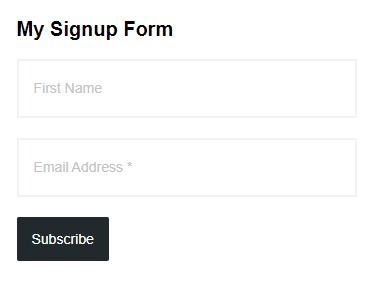
- Turn site visitors into subscribers by creating signup forms and pop-up modals that will automatically adapt to your WordPress theme
- Streamline your workflows by creating and scheduling any email campaign directly from your WordPress dashboard
Send More Targeted Email Campaigns with Website Tracking
When you install Benchmark Email Lite on your WordPress site, it will automatically install the Automation Pro website tracker.
- Follow-up with email campaigns based on the products, services or content that subscribers viewed on your website
- Boost your sales by automating emails that further convince a subscriber of the value of a product or service they showed interest in by visiting a page on your site
- A site visitor viewing a specific page can trigger an email with additional information on a product or service
Access Your Whole Email Marketing Account from Your WordPress Dashboard
Say goodbye to at least one extra tab on your browser.
- Discover the blog content that is most popular with your subscribers by viewing your open and click reports directly in your WordPress dashboard—then create more content just like it!
- Create content and promote it all from the same place
Easily Grow Your Most Valuable Marketing Asset: Your Email List
No coding necessary!
With the Benchmark Email Lite plugin, you can quickly and easily place a signup form anywhere you want on your site. It’s also super simple to customize your forms.
Installation
Installing the plugin
- In your WordPress admin panel, go to Plugins > New Plugin, search for Benchmark Email Lite and click “Install now”.
- Alternatively, download the plugin and upload the contents of benchmark-email-lite.zip to your plugins directory, which usually is /wp-content/plugins/.
- Activate the plugin.
Initial setup
- If you are creating a new Benchmark Email account, get a FREE Benchmark Classic account.
- In your WordPress admin panel, go to Benchmark > Settings.
- Click “Connect to Benchmark”.
- Enter your Benchmark Email username and password then click “OK”.
Frequently asked questions
Q1: Where do I go for help with any issues?
Please call Benchmark Email at (800) 430-4095.
Q2: Is this plugin compatible with the New Generation Benchmark system?
Not yet. In Summer 2026 We began upgrading the plugin to support the New Generation Benchmark system, but we ran into some difficulties and had to pause that work. For now we’re only supporting the Classic Benchmark system. If you need a new account on Classic Benchmark, please use one of the following links by locale: English: English / US Benchmark Classic Japanese: Japanese Benchmark Classic Spanish: Spanish Benchmark Classic Portuguese: Portuguese Benchmark Classic Chinese: Traditional Chinese Benchmark Classic These locales are currently Classic Benchmark only: France: French Benchmark…
Q3: What is an RSS email campaign? How to use?
RSS campaigns send out a digest of blog posts on a schedule using your RSS feed URL. Further details can be found here. Inside your WordPress Admin area, select Benchmark > Interface. Navigate to Emails > Create > RSS Email > Drag/Drop. Enter your WordPress URL, which is your website followed by /feed. You may wish to filter the posts by category or tag, for example: /category/marketing-tips/feed. You may also use category IDs and filter nagatively to exclude a comma-separated list of them, for example: /?cat=-52047&feed=rss2
Q4: Can I use Contact Form 7 (Gravity Forms, etc.) with this plugin?
Yes. The plugin does not directly use any form frameworks other than native Benchmark Email signup forms. As with most WordPress projects, you can bridge the two together with custom code. We’ve assembled an example based on Contact Form 7. Install the Code Snippets plugin, download and import the sample code file, edit the code snippet to change the list ID mappings within the code and tailor the form field names to match your form (or visa-versa), then enable the code snippet and test.
Q5: Can I programmatically filter the HTML email campaigns?
Yes. In v3.3 we’ve added new hooks you can use in your custom functions. The new hooks are: add_filter( 'wpbme_post_title', function( $value, $post ) { return $value; }, 10, 2 ); add_filter( 'wpbme_post_content', function( $value, $post ) { return $value; }, 10, 2 ); add_filter( 'wpbme_email_type', function( $value, $post ) { return $value; }, 10, 2 ); add_filter( 'wpbme_email_html', function( $value, $post ) { return $value; }, 10, 2 ); These filter the blog post title, the content body, the email type and generated HTML body. The email type is DD for the drop-down email editor and can be…
Changelog
4.4.0 on 2026-09-15
- Added: API integration file for the October 2025 Benchmark API.
- Added: New settings fields (currently hidden) for 2025 API connection and signup form IDs.
- Changed: Re-named the previous API library to August 2019.
- Changed: Switched the API keys settings area over to a log in / out mechanism.
- Removed: Legacy admin tracking logic that used expired Google UA.
- Removed: Old function for using the Legacy XML-RPC API.
- Removed: Sister plugin checker and notice.
- Removed: Legacy upgrade code.
4.3.1 on 2025-08-18
- Added: Benchmark partner handshake to the existing UI token renewal process.
4.3 on 2024-06-07
- Added: Benchmark error code on credential authentication failure.
- Updated: Settings page simplification, addresses issue where authentication sometimes required a second attempt.
4.2 on 2024-03-15
- Added: More data sanitization protections.
- Fixed: Admin side CSRF protection, thanks for Joshua Chan for reporting.
- Removed: Expired Universal Analytics usage tracker, might replace someday.
4.1 on 2022-05-30
- Added: Long-term caching of signup forms for sites having trouble with the 4-hour renewals.
- Added: Interface tab Benchmark UI authentication rejection handler.
- Changed: Post-to-campaign from Sample Contact List to all lists except protected.
- Changed: More efficient storage of signup form cache.
4.0 on 2022-05-12
- Added: Gutenberg block for placing sign-up forms within Blocks.
- Changed: Benchmark Email UI from pop-up to a fixed browser tab.
- Changed: Switched the Benchmark Interface page from jQuery to VanillaJS.
- Changed: Added some diagnostics to the front end widget display during error.
- Fixed: Sister product notice to show only when WooCommerce is active.
Screenshots



For developers
Is this your plugin? Show off the numbers.
Add a live badge to your site, docs or GitHub README. It updates on its own — no account needed.
Best Benchmark Email Lite alternatives
All campaign plugins →





FAQ
Benchmark Email Lite: quick answers
Straight answers, pulled from live WordPress.org data.
Live data from WordPress.org · checked Sep 29, 2026
Is Benchmark Email Lite free?
Yes. Benchmark Email Lite is free to download and use from the official WordPress.org plugin directory.
Is Benchmark Email Lite safe to use in 2026?
Benchmark Email Lite is a solid plugin choice in 2026, with a few things worth checking first. It runs on 1K+ sites, is rated 4/5 and was last updated 9 hours ago, and scores 63/100 on our health check.
How many websites use Benchmark Email Lite?
Benchmark Email Lite is active on 1K+ WordPress websites and has been downloaded 134,342 times since it launched in May 2011. It was downloaded 853 times in the last 30 days.
Does Benchmark Email Lite work with WordPress 7.1?
Yes. The developer has tested Benchmark Email Lite up to WordPress 7.1.2, the latest release. It requires WordPress 4.9 or newer.
What PHP version does Benchmark Email Lite need?
Benchmark Email Lite requires PHP 8.2 or higher. Most hosts run PHP 8.x today, so it works on any modern WordPress hosting.
When was Benchmark Email Lite last updated?
The latest version, 4.4.0, was released on September 28, 2026 (9 hours ago).
Who makes Benchmark Email Lite?
Benchmark Email Lite is developed and maintained by beAutomated.
What are the best alternatives to Benchmark Email Lite?
The most popular alternatives to Benchmark Email Lite are Charity Addon for Elementor (1K+ installs), WP Bannerize Pro (800+ installs) and Abandoned cart SMS reminder… (300+ installs).
Powered by PageForge
Want thousands of pages that rank like these? Build them in an afternoon.
This directory runs on the same engine as PageForge. Turn any spreadsheet, CSV or API into thousands of fast, SEO-ready WordPress pages — with schema, internal links and AI-written copy baked in.
- CSV, Google Sheets & API data sources
- AI content, schema & internal links per page
- Works with Elementor, Gutenberg, Yoast & Rank Math
- Free on WordPress.org — no credit card


