


Bell Admin Notice Hub
Blocks every admin notice from cluttering your screens and collects them behind a bell icon in the toolbar with a live counter and a dedicated page.

Use with caution
Bell Admin Notice Hub works, but test it on a staging site before relying on it in 2026. Was last updated 2 months ago, and scores 55/100 on our health check.
- Small user base (<10 active installs)
- Very few reviews so far
How does it stack up?
Side-by-side on installs, updates, ratings & support



Daily downloads
Download spikes usually follow a new release — each site that auto-updates counts as a download.
Rankings
Where Bell Admin Notice Hub stands todayWordPress.org search rankings
Live position in the plugin search, top 100| Keyword | Position |
|---|---|
| admin bar | >100 |
| Admin notices | >100 |
| dashboard | >100 |
| hide notices | >100 |
| Notifications | >100 |
About Bell Admin Notice Hub
From the official readme · v1.2.0Description
Bell Admin Notice Hub cleans up your WordPress admin by suppressing the notices that core, plugins and themes push to the top of every screen. Instead of stacking up and pushing your content down, they are captured and gathered in one place.
Features
- Blocks all admin notices (
admin_notices,all_admin_notices,network_admin_notices,user_admin_notices) from rendering at the top of the screen. - Adds a bell icon to the top toolbar with a live counter of the current notices.
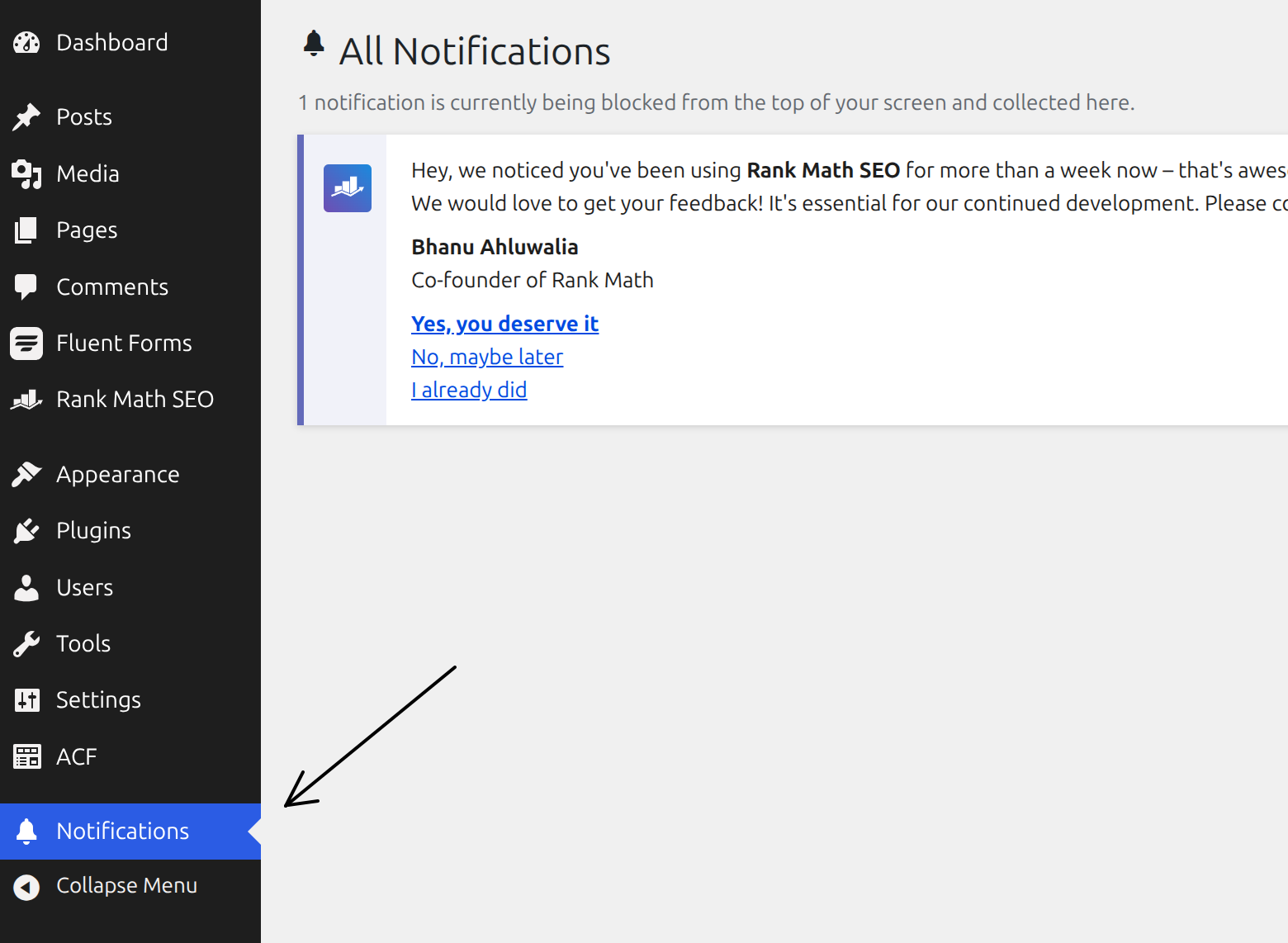
- Provides a dedicated Notifications page where the captured notices are displayed.
- Works in the dashboard and on the front-end toolbar for logged-in users.
- No configuration required — activate and you are done.
Good to know
Because this plugin hides all admin notices, that includes warnings from security and maintenance plugins. Those notices are not lost — they are collected on the Notifications page — but you should check that page regularly so you do not miss important alerts.
Installation
- Upload the
bell-admin-notice-hubfolder to the/wp-content/plugins/directory, or install the plugin through the Plugins screen in WordPress. - Activate the plugin through the Plugins screen.
- Click the bell icon in the top toolbar, or open the Notifications menu item, to view collected notices.
Frequently asked questions
Where did my admin notices go?
They are captured and shown on the dedicated Notifications page. Click the bell icon in the toolbar to get there.
Does the counter update instantly?
The toolbar renders before notices fire, so the counter reflects the notices from your most recent admin page load. It settles to the correct number as you navigate, which is accurate for the persistent notices that make up almost all admin nags.
Will it hide security warnings?
Yes — it hides every admin notice, including those from security plugins. They are still collected on the Notifications page, so review it periodically.
Who can see the notifications?
Only users with the manage_options capability (administrators by default).
Changelog
Access is now limited to administrators and notice output is sanitized. Recommended update.
1.2.0
- Security: restricted access to administrators (
manage_options). - Security: notice output is now filtered through
wp_kses(). - Added an uninstall routine that removes stored transients.
- Completed plugin header metadata for the plugin directory.
1.1.0
- Refactored into a layered, autoloaded architecture.
- Moved styles into enqueued stylesheets.
1.0.0
- Initial release.
Screenshots

For developers
Is this your plugin? Show off the numbers.
Add a live badge to your site, docs or GitHub README. It updates on its own — no account needed.
Best Bell Admin Notice Hub alternatives
All admin bar plugins →



FAQ
Bell Admin Notice Hub: quick answers
Straight answers, pulled from live WordPress.org data.
Live data from WordPress.org · checked Oct 7, 2026
Is Bell Admin Notice Hub free?
Yes. Bell Admin Notice Hub is free to download and use from the official WordPress.org plugin directory.
Is Bell Admin Notice Hub safe to use in 2026?
Bell Admin Notice Hub works, but test it on a staging site before relying on it in 2026. Was last updated 2 months ago, and scores 55/100 on our health check.
How many websites use Bell Admin Notice Hub?
Bell Admin Notice Hub is active on <10 WordPress websites and has been downloaded 162 times since it launched in August 2026. It was downloaded 66 times in the last 30 days.
Does Bell Admin Notice Hub work with WordPress 7.1?
Bell Admin Notice Hub is officially tested up to WordPress 7.0.7, while the latest release is 7.1.3. It may still work, but try it on a staging site first.
What PHP version does Bell Admin Notice Hub need?
Bell Admin Notice Hub requires PHP 7.1 or higher. Most hosts run PHP 8.x today, so it works on any modern WordPress hosting.
When was Bell Admin Notice Hub last updated?
The latest version, 1.2.0, was released on August 17, 2026 (2 months ago).
Who makes Bell Admin Notice Hub?
Bell Admin Notice Hub is developed and maintained by Adrian Sticea.
What are the best alternatives to Bell Admin Notice Hub?
The most popular alternatives to Bell Admin Notice Hub are Hide Admin Bar Based on Use… (20K+ installs), Hide Admin Bar (20K+ installs) and Hide Admin Bar from Non-Adm… (10K+ installs).
Powered by PageForge
Want thousands of pages that rank like these? Build them in an afternoon.
This directory runs on the same engine as PageForge. Turn any spreadsheet, CSV or API into thousands of fast, SEO-ready WordPress pages — with schema, internal links and AI-written copy baked in.
- CSV, Google Sheets & API data sources
- AI content, schema & internal links per page
- Works with Elementor, Gutenberg, Yoast & Rank Math
- Free on WordPress.org — no credit card


