


BackBurner Post Archiver
Automatically move old content out of active circulation after a configurable age - without ever deleting anything or breaking a single URL.

Use with caution
BackBurner Post Archiver works, but test it on a staging site before relying on it in 2026. Was last updated 1 month ago, and scores 60/100 on our health check.
- Tested with the latest WordPress (7.1)
- Small user base (<10 active installs)
- Very few reviews so far
How does it stack up?
Side-by-side on installs, updates, ratings & support



Daily downloads
Download spikes usually follow a new release — each site that auto-updates counts as a download.
Rankings
Where BackBurner Post Archiver stands todayWordPress.org search rankings
Live position in the plugin search, top 100| Keyword | Position |
|---|---|
| archive | >100 |
| cleanup | >100 |
| content management | >100 |
| evergreen content | #68 |
| housekeeping | #17 |
About BackBurner Post Archiver
From the official readme · v1.0.8Description
BackBurner Post Archiver quietly retires old content from the parts of your site where “latest” matters – the homepage, category and tag archives, search results, and your RSS feed – once it passes an age threshold you choose. Nothing is deleted. Anyone with a direct link, a bookmark, or an existing search ranking can still open an archived post exactly as before; it simply stops surfacing in listings of your newest content.
This is useful for sites that accumulate a lot of time-sensitive posts (news, deals, version-specific tutorials, event write-ups) where old items cluttering the homepage and archives hurts the reading experience, without wanting to actually remove any of that content or its SEO value.
Key features:
- Set a single site-wide age threshold (in months) after which content is archived
- Choose exactly which post types are included (Posts, Pages, Media, Products, and any other public custom post type)
- Restrict archiving to specific categories and/or tags, or run it site-wide
- Mark any individual post “Never auto-archive this post” to permanently exempt it, regardless of age
- Archived content is moved to a dedicated “Archived” status – never trashed or deleted
- Archived posts are automatically excluded from the homepage, category/tag archives, internal search, and the RSS feed
- Archived posts keep their original permalink and load normally (no redirects, no 404s) for anyone visiting directly
- Un-archive any post at any time from the normal status dropdown in the post editor
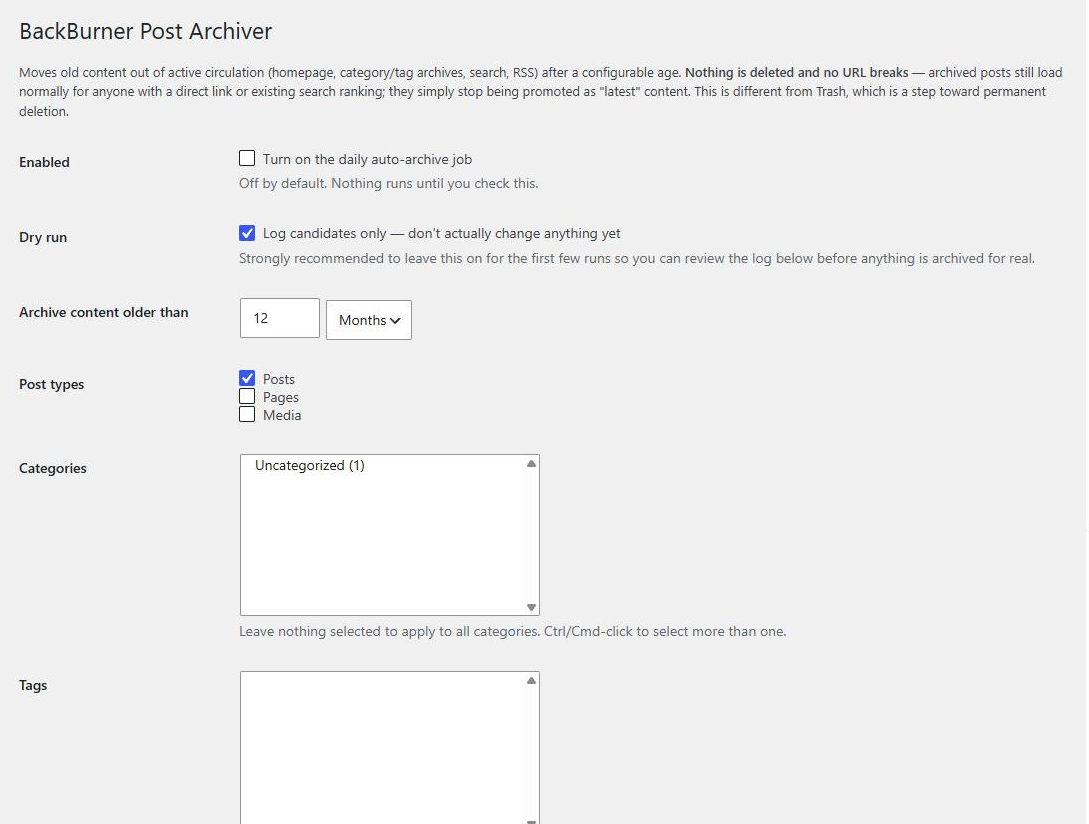
- Built-in Dry Run mode – preview exactly which posts would be archived before changing anything live
- Runs automatically once a day via WP-Cron, or on demand with a “Run now” button
- A master Enabled switch so the whole feature can be turned off instantly without losing your configuration
- Clear “Last run” status shown right on the settings screen
Recommended workflow
- Install and activate the plugin – it does nothing until you turn it on.
- Use Dry Run first, ideally scoped to a single small category, to see exactly what the plugin would archive.
- Review the Dry Run results and mark any posts that should never be archived.
- When you’re confident, turn off Dry Run for a normal, real run.
Installation
- Upload the
backburner-post-archiverfolder to the/wp-content/plugins/directory, or install the plugin directly through the WordPress Plugins screen. - Activate the plugin through the “Plugins” screen in WordPress.
- Go to Settings → BackBurner to configure your age threshold, post types, and category/tag scope.
- Leave “Dry Run” enabled and use “Run now” to preview what would be archived before switching it off.
Frequently asked questions
Does this delete anything?
No. BackBurner never deletes content. It changes a post’s status to “Archived” so it stops appearing in listings of new/latest content. The post itself, its media, and its URL are untouched.
Will archived posts 404 or redirect?
No. An archived post’s permalink continues to load exactly as it did before – full content, no redirect, no 404 – for any visitor who reaches it directly (a bookmark, an external link, or an existing search engine ranking).
Can I stop a specific post from ever being archived?
Yes. Every post has a “Never auto-archive this post” option. Enable it and that post is permanently excluded from BackBurner’s daily run, regardless of its age.
How do I get a post back out of Archived status?
Open it in the editor and change its status back to Published from the normal status dropdown, the same way you would with any other status change.
Does this affect my SEO?
Archived posts keep their canonical URL and continue to be included in your XML sitemap, so search engines can keep indexing them. BackBurner only changes where the post appears within your own site (homepage/archives/search/RSS) – it does not add noindex, does not redirect, and does not remove the post from your sitemap.
What happens if I turn off the “Enabled” switch?
Nothing runs. The daily cron check does nothing at all while Enabled is off, and no previously-archived posts are affected – they stay exactly as they are until you turn BackBurner back on.
Changelog
1.0.7
- Added AuthGeek, ShortGeek and SoundGeek to the TechyGeeksHome panel on the plugin’s settings screen.
1.0.6
- The TechyGeeksHome panel now lists the whole current range of applications rather than four of them, and links to the full list.
- Tidied a few pieces of wording in the admin screens.
1.0.5
- Internationalised the whole admin interface. Every user-facing string now goes through the translation functions with the backburner-post-archiver text domain – around 70 calls, where there were two. The post count in the last-run summary uses _n() so it pluralises properly in any language.
- The TechyGeeksHome hub page now lists BackBurner Post Archiver itself, now that it is live on WordPress.org, alongside AppGeek, PDFGeek, Ultimate Settings Panel and NeoDark Pro, which were all missing.
- Fixed: the DiskGeek link on the hub page pointed at an old announcement post rather than its product page.
1.0.4
- Housekeeping only, no functional change from 1.0.3. Added explanatory comments and tidied formatting so that PHPCS against WordPress-Extra, and PHPCompatibility against PHP 7.4 to 8.4, both report zero errors and zero warnings.
1.0.3
- Fixed: missing wp_unslash() on three array inputs.
- Fixed: replaced a deprecated current_time( ‘timestamp’ ) call.
- Fixed: two unescaped echoes.
- Fixed: private posts were being stripped from archive listings for users entitled to see them.
1.0.2
- Fixed: admin menu was registered at a prominent top-level position; moved to the bottom of the menu near Settings, per Plugins Team review feedback.
- Fixed: renamed all functions, defines and options from the generic “tgh” prefix to unique, plugin-specific prefixes, per Plugins Team review feedback.
Screenshots
For developers
Is this your plugin? Show off the numbers.
Add a live badge to your site, docs or GitHub README. It updates on its own — no account needed.
Best BackBurner Post Archiver alternatives
All archive plugins →




FAQ
BackBurner Post Archiver: quick answers
Straight answers, pulled from live WordPress.org data.
Live data from WordPress.org · checked Oct 18, 2026
Is BackBurner Post Archiver free?
Yes. BackBurner Post Archiver is free to download and use from the official WordPress.org plugin directory.
Is BackBurner Post Archiver safe to use in 2026?
BackBurner Post Archiver works, but test it on a staging site before relying on it in 2026. Was last updated 1 month ago, and scores 60/100 on our health check.
How many websites use BackBurner Post Archiver?
BackBurner Post Archiver is active on <10 WordPress websites and has been downloaded 408 times since it launched in August 2026. It was downloaded 155 times in the last 30 days.
Does BackBurner Post Archiver work with WordPress 7.1?
Yes. The developer has tested BackBurner Post Archiver up to WordPress 7.1.3, the latest release. It requires WordPress 5.8 or newer.
What PHP version does BackBurner Post Archiver need?
BackBurner Post Archiver requires PHP 7.4 or higher. Most hosts run PHP 8.x today, so it works on any modern WordPress hosting.
When was BackBurner Post Archiver last updated?
The latest version, 1.0.8, was released on September 7, 2026 (1 month ago).
Who makes BackBurner Post Archiver?
BackBurner Post Archiver is developed and maintained by techygeekshome.
What are the best alternatives to BackBurner Post Archiver?
The most popular alternatives to BackBurner Post Archiver are Jetpack VaultPress (10K+ installs), Zippy (7K+ installs) and Posts List (7K+ installs).
Powered by PageForge
Want thousands of pages that rank like these? Build them in an afternoon.
This directory runs on the same engine as PageForge. Turn any spreadsheet, CSV or API into thousands of fast, SEO-ready WordPress pages — with schema, internal links and AI-written copy baked in.
- CSV, Google Sheets & API data sources
- AI content, schema & internal links per page
- Works with Elementor, Gutenberg, Yoast & Rank Math
- Free on WordPress.org — no credit card


