


Awin Data Feed
This plugin allows you to import your Awin Datafeed and sell the products from any widget area.

Consider an alternative
Awin Data Feed shows warning signs in 2026 — compare the alternatives below before installing. It runs on 100+ sites, is rated 5/5 and was last updated 1 year ago, and scores 41/100 on our health check.
- Small user base (100+ active installs)
- Very few reviews so far
- No update in over a year
- Only tested up to WordPress 6.8 (latest is 7.1)
How does it stack up?
Side-by-side on installs, updates, ratings & support



Daily downloads
Download spikes usually follow a new release — each site that auto-updates counts as a download.
Rankings
Where Awin Data Feed stands todayWordPress.org search rankings
Live position in the plugin search, top 100| Keyword | Position |
|---|---|
| affiliate | >100 |
| affiliate window | #27 |
| awin | #3 |
| Awin Data Feed | #2 |
| zanox | #3 |
Version adoption
Share of active sites per release.
Rating breakdown
★★★★★★★★★★ 5 from 1 reviews
About Awin Data Feed
From the official readme · v1.8.7Description
If you are an Awin publisher who doesn’t have the resources, time or technical know-how to import our datafeeds in to your site then this is the tool for you. All you need is to import the plugin from the setting page and you will have nice widgets and shortcodes ready for your visitors. This is the easy way to promote affiliate products through great looking widgets.
What is Datafeed ?
Our wiki has a whole host of information regarding our datafeeds http://wiki.awin.com/index.php/Downloading_A_Feed
You will need to be an Awin publisher to download our datafeeds. This is done through our create-a-feed tool which allows you to create a download based on three criteria Category, Advertiser and Brand.
Once you have defined the products the next stage is to determine how you would like to download the datafeed. Certain fields are mandatory and the remainder can be toggled to select. Please note that not all fields may be in use by the advertiser.
How do I use it?
When you have chosen the columns you are downloading and are happy with the order then you can choose your file format, delimiter and compression type. There is also the option to include adult content, if unchecked then certain adult categories will be removed from the feed. To access the feed you can download it directly from the interface or you can use the generated URL to access that feed in that specified structure at any time. You can create as many of these URLs as you like.
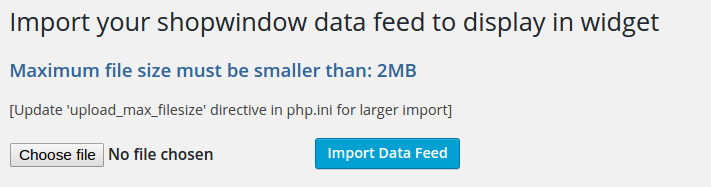
For this plugin you need to download the feed directly as a csv format and then import it.
What pre-requisites are there for using this service?
You have to be registered as a publisher on the Awin platform. Sign up is a simple process which you can do here – https://ui.awin.com/affiliate-signup/account-details
All sign ups are vetted by our compliance team and as such, after signup, there is a small delay before you are accepted as an Awin publisher.
Who are Awin?
Awin exists to provide its clients with the best service and technology available in performance marketing. With offices in the UK and US and over 280 employees, our aim is to exceed expectations in everything we do.
Our technology is developed in-house using the latest methodologies, offering custom proprietary solutions for our partners. Our service has led to us receiving numerous awards including the UK’s coveted Industry Choice of Network Partner award eight times.
Our platform features comprehensive dashboards and a social style partner directory allowing users to discover and connect with a whole host of high quality advertisers and publishers.
We recognise the importance of generating incremental revenue for our clients and pride ourselves on our suite of compliance and protection tools which monitor all the search engines, seek and remove surreptitious adware and spyware and protect against fraud.
For a fresh, innovative and ethical approach to performance marketing, Awin has all the right ingredients.
Further Information
For more information on Datafeed the following may be useful:
1.8.7
- Upgrade for WP 6.8
1.8.6
- Upgrade for WP 6.6
1.8.5
- Upgrade for WP 6.2
1.8.2
- Fix shortcode attributes
1.8.1
- Removed unused files
- fix horizontal display
- tested with latest PHP 8 and WP version 6
1.8
- Sanitizing all inputs and outputs
- Reformatting code
- Security upgrade
1.7
- Fix XSS vulnerability
1.6
- Properly escaped prefix
1.8.7
- Upgrade for up to WP 6.8
1.8.6
- Upgrade for WP 6.5
1.8.5
- Upgrade for WP 6.2
1.8.2
- Fix shortcode attributes
1.8.1
- Removed unused files
- fix horizontal display
- tested with latest PHP 8 and WP version 6
1.8
- Sanitizing all inputs and outputs
- Reformatting code
- Security upgrade
1.7
- Fix XSS vulnerability
1.6
- Properly escaped prefix
Installation
Frequently asked questions
What does this plugin do?
This plugin allows you to import your Awin Datafeed and promote the products from a widget on your site.
What do I need to do to start using this plugin?
First you have to be an Awin publisher, join some advertisers if you like, then download the feed to import in to your WordPress site using this plugin.
Screenshots


For developers
Is this your plugin? Show off the numbers.
Add a live badge to your site, docs or GitHub README. It updates on its own — no account needed.
Best Awin Data Feed alternatives
All affiliate plugins →





FAQ
Awin Data Feed: quick answers
Straight answers, pulled from live WordPress.org data.
Live data from WordPress.org · checked Oct 16, 2026
Is Awin Data Feed free?
Yes. Awin Data Feed is free to download and use from the official WordPress.org plugin directory.
Is Awin Data Feed safe to use in 2026?
Awin Data Feed shows warning signs in 2026 — compare the alternatives below before installing. It runs on 100+ sites, is rated 5/5 and was last updated 1 year ago, and scores 41/100 on our health check.
How many websites use Awin Data Feed?
Awin Data Feed is active on 100+ WordPress websites and has been downloaded 14,987 times since it launched in April 2016. It was downloaded 198 times in the last 30 days.
Does Awin Data Feed work with WordPress 7.1?
Awin Data Feed is officially tested up to WordPress 6.8.11, while the latest release is 7.1.3. It may still work, but try it on a staging site first.
What PHP version does Awin Data Feed need?
Awin Data Feed requires PHP 8.1 or higher. Most hosts run PHP 8.x today, so it works on any modern WordPress hosting.
When was Awin Data Feed last updated?
The latest version, 1.8.7, was released on August 27, 2025 (1 year ago).
Who makes Awin Data Feed?
Awin Data Feed is developed and maintained by Awin.
What are the best alternatives to Awin Data Feed?
The most popular alternatives to Awin Data Feed are Advanced Ads (100K+ installs), Pochipp (30K+ installs) and Meks Easy Ads Widget (10K+ installs).
Powered by PageForge
Want thousands of pages that rank like these? Build them in an afternoon.
This directory runs on the same engine as PageForge. Turn any spreadsheet, CSV or API into thousands of fast, SEO-ready WordPress pages — with schema, internal links and AI-written copy baked in.
- CSV, Google Sheets & API data sources
- AI content, schema & internal links per page
- Works with Elementor, Gutenberg, Yoast & Rank Math
- Free on WordPress.org — no credit card


