



AutoPhotos for WooCommerce – AI Product Photo Editor
Connect WooCommerce to AutoPhotos.ai to edit product photos — background removal, drop shadows, color correction — saved back to the gallery.

Use with caution
AutoPhotos for WooCommerce works, but test it on a staging site before relying on it in 2026. Was last updated 1 month ago, and scores 60/100 on our health check.
- Tested with the latest WordPress (7.1)
- Small user base (<10 active installs)
- Very few reviews so far
How does it stack up?
Side-by-side on installs, updates, ratings & support



Daily downloads
Download spikes usually follow a new release — each site that auto-updates counts as a download.
Rankings
Where AutoPhotos for WooCommerce stands todayWordPress.org search rankings
Live position in the plugin search, top 100| Keyword | Position |
|---|---|
| Background remover | #8 |
| bulk image editing | >100 |
| product image editor | >100 |
| product-photos | >100 |
| remove background | >100 |
About AutoPhotos for WooCommerce
From the official readme · v1.0.3Description
AutoPhotos for WooCommerce connects your store to your
AutoPhotos.ai account so you can edit product
photos — background removal, drop shadow, color correction, AI upscaling,
auto-crop and recoloring — from the AutoPhotos panel, with every result
written straight back to the matching product’s gallery.
The plugin is a lightweight, no-config bridge. It does not process images,
touch your storefront, or contact any server except during the
connect/disconnect action — all editing and billing happen in your
AutoPhotos account, against your own credit balance.
Normally, connecting a store to AutoPhotos means going to WooCommerce ->
Settings -> Advanced -> REST API, generating a key by hand, and pasting it
into the AutoPhotos panel. This plugin does that step for you: generate a
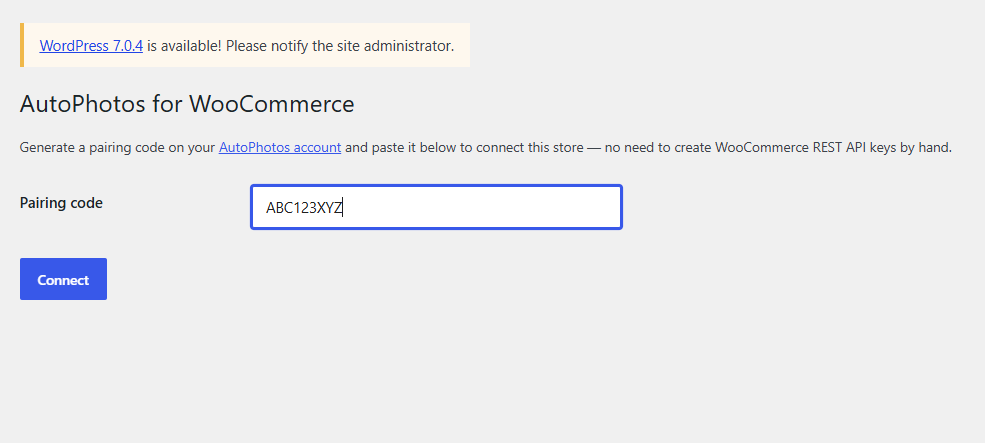
one-time pairing code on your AutoPhotos account, paste it into this
plugin’s settings page, and your store is connected — no manual key
creation.
All photo processing still happens in your AutoPhotos panel at
autophotos.ai/integrations/woocommerce/,
billed against your normal AutoPhotos credit balance. This plugin does not
process any images itself and does not add anything to your storefront —
it only manages the connection.
What this plugin does
- Generates a WooCommerce REST API key (read/write) for your store.
- Sends that key, together with your pairing code, to AutoPhotos.ai so your
account and your store are linked. - Lets you disconnect at any time from the plugin’s settings page, which
revokes the key it created.
What this plugin does NOT do
- It does not upload, store, or process any product images itself.
- It does not modify your products, theme, or storefront.
- It does not communicate with AutoPhotos.ai except during the one-time
connect/disconnect action.
External services
This plugin connects to AutoPhotos.ai, the service that performs the actual
product photo processing (background removal, drop shadow, color
correction, and more) and that this plugin acts as a connection bridge for.
It sends data to AutoPhotos.ai only once, when you click “Connect” on the
plugin’s settings page: your store’s URL and the WooCommerce REST API key
(consumer key and secret) the plugin just generated for your store,
together with the one-time pairing code you pasted in. This links your
store to your AutoPhotos.ai account so the AutoPhotos panel can read your
product photos and write processed results back to your product gallery.
No data is sent automatically or on a schedule — only when you initiate the
connect action.
This service is provided by AutoPhotos.ai: Terms of Service, Privacy Policy.
Installation
- Install and activate WooCommerce if you haven’t already.
- Install and activate this plugin.
- Go to WooCommerce -> AutoPhotos.
- Open autophotos.ai/integrations/woocommerce/
in another tab, sign in, and click “Generate pairing code”. - Paste the code into the plugin’s settings page and click Connect.
- Process your product photos from the AutoPhotos panel.
Frequently asked questions
Do I need an AutoPhotos.ai account?
Yes. Photo processing happens on autophotos.ai using your own AutoPhotos credit balance — this plugin only connects your store to that account.
What permissions does the generated API key have?
Read/write, the same as if you created a key by hand under WooCommerce -> Settings -> Advanced -> REST API. AutoPhotos uses it to read your product photos and write processed results back to the product gallery.
How do I disconnect?
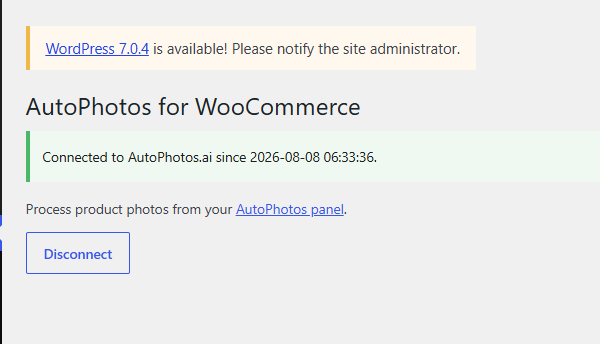
Go to WooCommerce -> AutoPhotos and click Disconnect. This revokes the WooCommerce REST API key the plugin created.
Changelog
1.0.3
- Updated plugin name and readme description. No functional changes.
1.0.2
- Confirmed compatibility with WordPress 7.1.
1.0.1
- Added translations: Dutch, French, German, Italian, Japanese, Polish, Portuguese (Brazil), Spanish.
1.0.0
- Initial release: pairing-code connect flow.
Screenshots
For developers
Is this your plugin? Show off the numbers.
Add a live badge to your site, docs or GitHub README. It updates on its own — no account needed.
Best AutoPhotos for WooCommerce alternatives
All Background remover plugins →FAQ
AutoPhotos for WooCommerce: quick answers
Straight answers, pulled from live WordPress.org data.
Live data from WordPress.org · checked Oct 9, 2026
Is AutoPhotos for WooCommerce free?
Yes. AutoPhotos for WooCommerce is free to download and use from the official WordPress.org plugin directory.
Is AutoPhotos for WooCommerce safe to use in 2026?
AutoPhotos for WooCommerce works, but test it on a staging site before relying on it in 2026. Was last updated 1 month ago, and scores 60/100 on our health check.
How many websites use AutoPhotos for WooCommerce?
AutoPhotos for WooCommerce is active on <10 WordPress websites and has been downloaded 220 times since it launched in August 2026. It was downloaded 66 times in the last 30 days.
Does AutoPhotos for WooCommerce work with WordPress 7.1?
Yes. The developer has tested AutoPhotos for WooCommerce up to WordPress 7.1.3, the latest release. It requires WordPress 6.0 or newer.
What PHP version does AutoPhotos for WooCommerce need?
AutoPhotos for WooCommerce requires PHP 7.4 or higher. Most hosts run PHP 8.x today, so it works on any modern WordPress hosting.
When was AutoPhotos for WooCommerce last updated?
The latest version, 1.0.3, was released on August 27, 2026 (1 month ago).
Who makes AutoPhotos for WooCommerce?
AutoPhotos for WooCommerce is developed and maintained by autophotosai.
What are the best alternatives to AutoPhotos for WooCommerce?
The most popular alternatives to AutoPhotos for WooCommerce are Media Background Remover (20+ installs), LassoCut – Remove Background (<10 installs) and BGMagician (<10 installs).
Powered by PageForge
Want thousands of pages that rank like these? Build them in an afternoon.
This directory runs on the same engine as PageForge. Turn any spreadsheet, CSV or API into thousands of fast, SEO-ready WordPress pages — with schema, internal links and AI-written copy baked in.
- CSV, Google Sheets & API data sources
- AI content, schema & internal links per page
- Works with Elementor, Gutenberg, Yoast & Rank Math
- Free on WordPress.org — no credit card


