



Automarticles Sync
Official integration between your WordPress site and the Automarticles platform: automatically publish, update and sync posts and categories.

Use with caution
Automarticles Sync works, but test it on a staging site before relying on it in 2026. It runs on 10+ sites and was last updated 2 months ago, and scores 57/100 on our health check.
- Small user base (10+ active installs)
- Very few reviews so far
How does it stack up?
Side-by-side on installs, updates, ratings & support



Daily downloads
Download spikes usually follow a new release — each site that auto-updates counts as a download.
Rankings
Where Automarticles Sync stands todayWordPress.org search rankings
Live position in the plugin search, top 100| Keyword | Position |
|---|---|
| blog automation | >100 |
| content automation | >100 |
| publishing | >100 |
| seo | >100 |
| webhook | >100 |
Version adoption
Share of active sites per release.
About Automarticles Sync
From the official readme · v1.6.10Description
Automarticles is a content generation and management platform for blogs. This plugin connects your WordPress site to your Automarticles account, so posts generated and scheduled on the platform are published automatically on your blog, with no manual copy-pasting required.
What the plugin does:
- Receives and creates published/scheduled/draft posts coming from Automarticles, with title, content, description, featured image and category.
- Updates an existing post when it is edited on Automarticles (content, image, status, category).
- Removes a post when it is deleted on Automarticles.
- Creates, updates and organizes categories automatically, avoiding duplicates when the category already exists on your blog.
- Returns the final published post URL back to Automarticles, enabling automatic sharing on social networks.
- Shares your blog’s category list with Automarticles, so you can link existing categories instead of creating new ones.
How it works:
Communication happens through a token-authenticated webhook: Automarticles sends events (post and category creation/update/deletion) directly to your WordPress site, which processes them and responds. No continuous read access to your blog or installation of external services is required — everything happens inside WordPress itself.
External services
This plugin connects your WordPress site to the Automarticles platform (https://automarticles.com), a content generation and management platform for blogs, so posts and categories created there can be published on your blog automatically.
It downloads the featured image of a post from the URL included in the webhook payload your own Automarticles account sends to your site, using wp_remote_get(), so the image can be attached to the WordPress post as its featured image. This only happens when Automarticles sends a POST_CREATED or POST_UPDATED event that includes a featured image; no other browsing or periodic data is sent to or fetched from Automarticles.
This service is provided by Automarticles: Terms of Service and Privacy Policy.
Installation
- Upload the plugin
.zipfile under Plugins > Add New > Upload Plugin, or install it directly from the WordPress plugin search by looking for “Automarticles”. - Activate the plugin under Plugins > Installed Plugins.
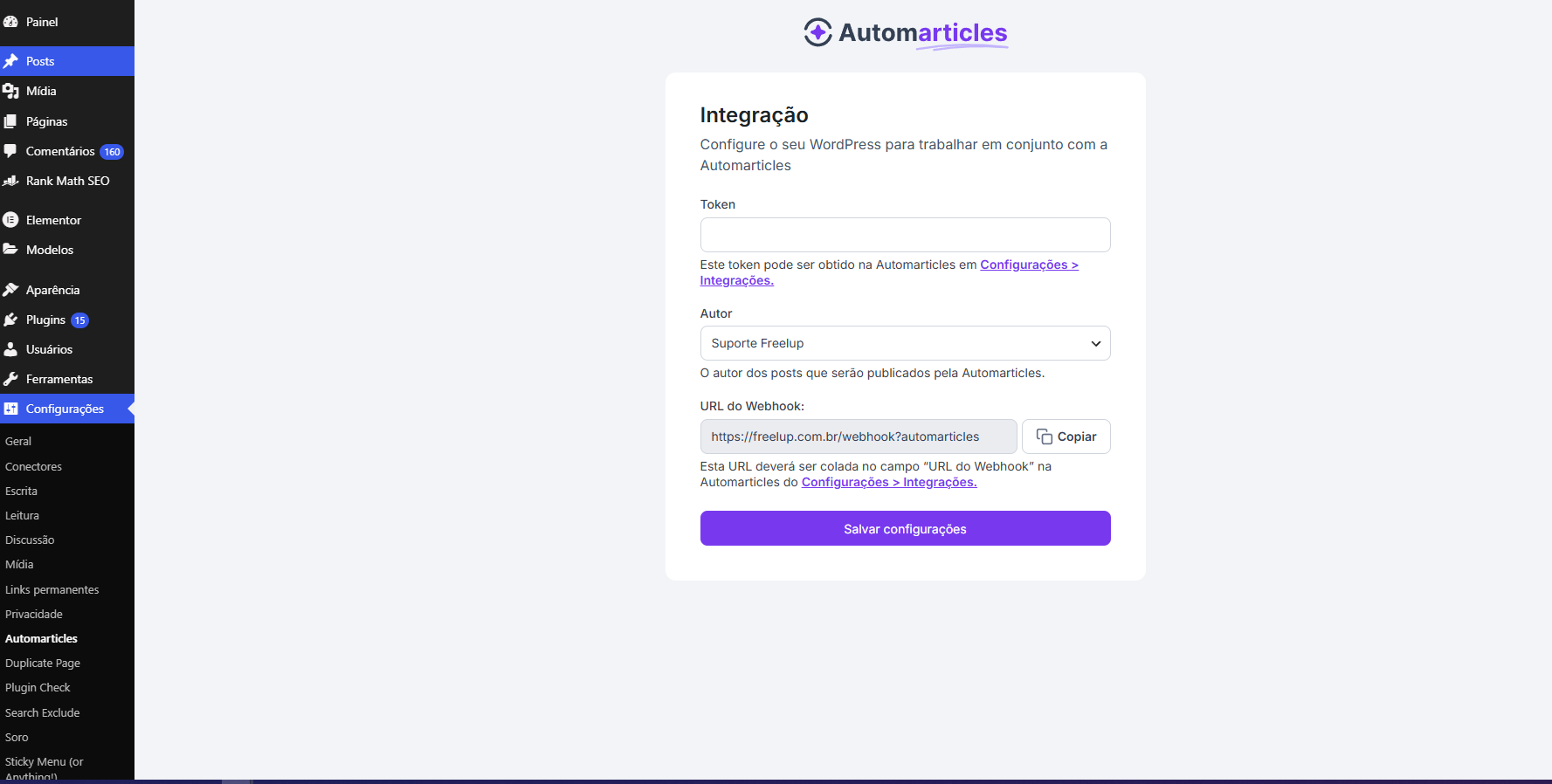
- In the WordPress admin menu, go to Settings > Automarticles.
- Copy the Token generated in your Automarticles account (under Settings > Integrations) and paste it into the “Token” field on this screen.
- Copy the Webhook URL shown on this screen and paste it into the matching field in Automarticles.
- Choose the default Author who will be credited on posts published by the plugin (optional).
- Click Save Settings.
- Go back to Automarticles and click Verify Integration.
That’s it — from then on, posts published/scheduled on Automarticles are automatically sent to your WordPress site.
Frequently asked questions
Do I need to configure any webhook manually?
No. The plugin automatically exposes the required endpoint after activation — just paste the URL shown on the plugin’s settings screen into your Automarticles account.
Does the plugin access my blog continuously?
No. The plugin makes no periodic outbound calls. It only receives and responds to events sent by Automarticles (webhook model), authenticated by a token you control.
What happens if I already have categories created on my blog?
You can sync your existing categories with your Automarticles account before publishing, avoiding duplicate categories. This link is always created manually, with your confirmation.
Does the plugin work with any theme?
Yes. The plugin works at the content layer (native WordPress posts and categories) and does not depend on any specific theme.
Where do I find the Token and integration URL for Automarticles?
Inside your Automarticles account, under Settings > Integrations > WordPress.
Changelog
Important fix: resolves a fatal error that could silently break publishing of posts with a featured image. Recommended update for everyone. No reconfiguration required.
1.6.10
- Fixed: publishing a post with a featured image could crash with a fatal PHP error (“Call to undefined function wp_tempnam()”) on every request, because that WordPress core function wasn’t loaded in the webhook’s execution context. This was the root cause of posts silently failing to publish since image processing was introduced. Found and confirmed via the
GET_LAST_ERRORdiagnostic added in 1.6.8/1.6.9.
1.6.9
- Improved:
GET_LAST_ERRORnow returns the 10 most recent recorded errors (fatal PHP errors or image-processing failures), not just the last one, and each entry identifies which post it came from (Automarticles post id, slug, title). Detection of PHP fatals also now covers the entire event, not only image processing.
1.6.8
- Added: a new
GET_LAST_ERRORwebhook event (authenticated with the same token as everything else) that returns the last recorded fatal PHP error or image-processing failure, so it can be checked remotely without enablingWP_DEBUGor accessing the server. The error is now always recorded (not only whenWP_DEBUGis on).
1.6.7
- Fixed: garbled (mojibake) text in a few error messages (“category information not provided”, “invalid category name or id”) caused by a file encoding issue. Cosmetic only, no functional change.
1.6.6
- Fixed: featured-image processing during publish is now faster and lighter, staying within the plugin-to-Automarticles response window on slower/shared hosts. The image is resized to a smaller max width (1600px, down from 2000px) with a slightly lower JPEG quality, and only the thumbnail/medium sizes are generated synchronously for that attachment (custom theme sizes still generate normally for every other upload on the site).
- Hardened: requests extra memory from WordPress before decoding a large image, avoiding a silent PHP fatal error (out of memory) on hosts with a tight memory limit.
- Added: logs the underlying PHP fatal error (when
WP_DEBUGis on) if publishing a post crashes the request, instead of failing with no diagnostic trail.
1.6.5
- Fixed: large featured images (especially PNG) could make the site time out and return a 503 error when publishing, because generating all registered thumbnail sizes from a big, uncompressed image took longer than the server’s PHP execution limit. Featured images are now resized (max width 2000px) and recompressed to JPEG right after download, before thumbnails are generated, which drastically cuts processing time regardless of the original format/size. Falls back to the original file untouched if the server can’t process images (no GD/Imagick).
- Hardened: raised the featured-image download timeout (15s to 20s) and requests a longer PHP execution time budget for that step, when the host allows it.
Screenshots
For developers
Is this your plugin? Show off the numbers.
Add a live badge to your site, docs or GitHub README. It updates on its own — no account needed.
Best Automarticles Sync alternatives
All blog automation plugins →





FAQ
Automarticles Sync: quick answers
Straight answers, pulled from live WordPress.org data.
Live data from WordPress.org · checked Sep 29, 2026
Is Automarticles Sync free?
Yes. Automarticles Sync is free to download and use from the official WordPress.org plugin directory.
Is Automarticles Sync safe to use in 2026?
Automarticles Sync works, but test it on a staging site before relying on it in 2026. It runs on 10+ sites and was last updated 2 months ago, and scores 57/100 on our health check.
How many websites use Automarticles Sync?
Automarticles Sync is active on 10+ WordPress websites and has been downloaded 275 times since it launched in July 2026. It was downloaded 101 times in the last 30 days.
Does Automarticles Sync work with WordPress 7.1?
Automarticles Sync is officially tested up to WordPress 7.0.6, while the latest release is 7.1.2. It may still work, but try it on a staging site first.
What PHP version does Automarticles Sync need?
Automarticles Sync requires PHP 7.4 or higher. Most hosts run PHP 8.x today, so it works on any modern WordPress hosting.
When was Automarticles Sync last updated?
The latest version, 1.6.10, was released on August 5, 2026 (2 months ago).
Who makes Automarticles Sync?
Automarticles Sync is developed and maintained by Automarticles.
What are the best alternatives to Automarticles Sync?
The most popular alternatives to Automarticles Sync are ContentStudio (600+ installs), AutoPost AI (100+ installs) and OrganicStack Publisher (70+ installs).
Powered by PageForge
Want thousands of pages that rank like these? Build them in an afternoon.
This directory runs on the same engine as PageForge. Turn any spreadsheet, CSV or API into thousands of fast, SEO-ready WordPress pages — with schema, internal links and AI-written copy baked in.
- CSV, Google Sheets & API data sources
- AI content, schema & internal links per page
- Works with Elementor, Gutenberg, Yoast & Rank Math
- Free on WordPress.org — no credit card


