



AutoListicle: Automatically Update Numbered List Articles
Automatically keep your numbered lists in articles displaying the correct number by using this shortcode [auto-list-number].

Safe pick
Yes — AutoListicle: Automatically Upd… is a safe, well-maintained plugin to use in 2026. It runs on 60+ sites, is rated 5/5 and was last updated 4 days ago, and scores 80/100 on our health check.
- Actively developed — last update 4 days ago
- Tested with the latest WordPress (7.1)
- Small user base (60+ active installs)
Daily downloads
Download spikes usually follow a new release — each site that auto-updates counts as a download.
Rankings
Where AutoListicle: Automatically… stands todayWordPress.org search rankings
Live position in the plugin search, top 100| Keyword | Position |
|---|---|
| auto number | #65 |
| listicle | #8 |
| numbered headings | #1 |
| numbered list | #1 |
| shortcode | >100 |
Version adoption
Share of active sites per release.
Rating breakdown
★★★★★★★★★★ 5 from 6 reviews
About AutoListicle: Automatically Update Numb…
From the official readme · v1.5Description
Easily keep your listicles with numbered lists updated correctly by using this plugin’s shortcode [auto-list-number]. This will display the number 1 and increment with every use. Perfect if you write blog posts with steps or “top 10 lists”. This will allow you to easily add items to your lists or move elements around without worrying about updating headings with the correct numbers.
New in 1.5: the item count in post and SEO titles (“17 Best Coffee Grinders” stays correct as you add items), numbering that continues across paginated posts, a block editor panel and toolbar button, ordinal and word formats, and optional ItemList schema.
Count in titles
Put this in the post title and it shows the number of items in the post:
[auto-list-number display="total"] Best Coffee Grinders
It works in the page title, the browser tab, RSS feeds, the REST API, the titles and descriptions of Yoast SEO, Rank Math, All in One SEO, SEOPress and The SEO Framework, and the social tags of Yoast SEO, Rank Math and SEOPress. In SEO title templates you can also use %%autolisticle_total%% (Yoast, SEOPress) or %autolisticle_total% (Rank Math). The count is kept out of the URL WordPress makes from the title. Add name="my-list" to count a named list and format="words" for “Seventeen”.
Block editor
Choose “Insert list number” from the More menu (the arrow) of the text toolbar to add [auto-list-number] at the cursor. The AutoListicle panel in the post sidebar shows how many items the post has, and its “Number headings automatically” switch numbers every heading of the chosen level with no shortcodes at all.
Paginated posts
In posts split into pages with the Page Break block, numbering carries on from page to page, and countdown, position (“4 of 12”) and total displays count every page. To number a page by hand, give its first item a start value.
Number headings automatically
Add this once, above your list, and every H2 that follows gets a number in front of it:
[auto-list-number-headings]
It takes the same options as the item shortcode, plus level to pick the heading tag:
[auto-list-number-headings level="h3" display="countdown" before="#" after=""]
Numbers are wrapped in a span with the class “auto-list-number” so you can style them (set wrapper=”none” to skip the span). Headings above the shortcode are left alone, and a second [auto-list-number-headings] starts a new count from where it sits.
Shortcode Usage examples
Basic usage
[auto-list-number] Item one.
[auto-list-number] Item two.
[auto-list-number] Item three.
Countdown example (for “Top 10” style lists)
[auto-list-number display="countdown"] Best item (displays 3)
[auto-list-number display="countdown"] Second best (displays 2)
[auto-list-number display="countdown"] Third best (displays 1)
Position display example
[auto-list-number display="position"] First item (displays "1 of 3")
[auto-list-number display="position"] Second item (displays "2 of 3")
[auto-list-number display="position"] Third item (displays "3 of 3")
Custom start number (for multi-part articles)
[auto-list-number start="11"] This displays 11
[auto-list-number] This displays 12
[auto-list-number] This displays 13
Number formats
[auto-list-number format="roman"] Displays I, II, III, IV...
[auto-list-number format="alpha"] Displays A, B, C, D...
[auto-list-number format="padded"] Displays 01, 02, 03...
Before and after text
[auto-list-number before="#" after=":"] Displays "#1:"
[auto-list-number before="Step " after=" -"] Displays "Step 2 -"
Spaces inside the quotes are kept. An underscore also works as a space (before=”Step_”), which older versions required.
Extended example using all shortcode functions.
Here is my list of [auto-list-number display="total"] items.

[auto-list-number] Here is the first item in the list.
[auto-list-number] Make long listicles with ease.
[auto-list-number] You can even have multiple lists in one article.
 [auto-list-number name="my-new-list" after=":" wrapper="span"] My new list (this will start at number one).
 [auto-list-number name="my-new-list" after=":" wrapper="span"] This will be a second item.
[auto-list-number] This item will be number 4.
Shortcode Options
- name (Default: “default”) If your article has multiple lists this will keep track of multiple numbers. If a name isn’t set it will just use the list name of “default”. But if you have multiple numbered lists you want to keep track of you can use a unique name for each list in your article.
- wrapper (Default: none) Wrap each number in an HTML tag such as span, div, strong, em, small, sup, li or a heading tag. The wrapper always gets the class “auto-list-number” plus “auto-list-number-3” for the third item, which is helpful if you want to style list numbers separately from your headings. Other tags fall back to span.
- before (Default: “”) Text to display before the number, for prefixes like “#” or “Step “.
- after (Default: “.”) Text to display after the number. Set it to “” to show the bare number.
- start (Default: 1) Set a custom starting number. Perfect for multi-part articles where Part 2 should start at number 11 instead of 1. Only the first item of a list needs it.
- format (Default: none) Change the number format. Options:
- “roman” – Roman numerals (I, II, III, IV, V…)
- “alpha” – Alphabetic letters (A, B, C, D… Z, AA, AB…)
- “padded” – Zero-padded numbers (01, 02, 03…)
- “ordinal” – 1st, 2nd, 3rd…
- “words” – One, Two, Three… (English, up to Nine Hundred Ninety-Nine)
-
display (Default: “increase”) Controls how the number is displayed. Options:
- “increase” – Default behavior, counts up (1, 2, 3…)
- “countdown” – Counts down from total (10, 9, 8…) – perfect for “Top 10” style lists
- “total” – Displays the total count of items
- “position” – Displays “X of Y” format (e.g., “3 of 10”)
-
schema (Default: none) Set to “itemlist” on any item of a list to output ItemList structured data (JSON-LD) for it. See below.
[auto-list-number-headings] accepts wrapper, before, after, start, format, schema and display (increase or countdown), plus level (Default: “h2”) for the heading tag to number.
ItemList schema
Add schema=”itemlist” to one item of a list (or to [auto-list-number-headings]) and the post outputs ItemList structured data for it, with each item’s number, name and a link to its heading when the heading has an HTML anchor. It is off by default: Google currently shows list rich results only for recipes, courses, movies and restaurants, so for most listicles it is descriptive markup rather than a search feature.
Troubleshooting
If you are having trouble with a table of contents plugin you can use the [auto-list-number-force-reset] shortcode to reset your post’s numbers. So ideally if your table of contents was at the top of your post you can put [auto-list-number-force-reset] below it so that all headings are reset to start at 1 again. This way the ToC plugin will loop through 1-4 for example then reset then the headlines can display 1-4 again.
Developers can allow extra wrapper tags with the auto_list_number_wrapper_tags filter, add or translate number formats with auto_list_number_format, and turn ItemList schema on for every list with add_filter( 'auto_list_number_itemlist_schema', '__return_true' );.
Installation
To install this plugin:
- Download the plugin
- Upload the plugin to the wp-content/plugins directory,
- Go to “plugins” in your WordPress admin, then click activate.
- Add the shortcode [auto-list-number] where you want auto incrementing numbers in your articles (recommended use in headings), or add [auto-list-number-headings] once above your headings.
Frequently asked questions
Can I show the number of items in the post title?
Yes. Put [auto-list-number display=”total”] in the title, or %%autolisticle_total%% (Yoast, SEOPress) or %autolisticle_total% (Rank Math) in an SEO title template. Only the total works in titles; numbering individual items is for post content.
Does it work with page builders, widgets and Query Loops?
Yes. Lists in block widgets and visual Text widgets are numbered on their own, page builder widgets inside a post continue the post’s list, and a post shown inside another one (a Query Loop with full content, or a shortcode that embeds a post) is numbered separately from the page around it.
How do I style the numbers?
Use the wrapper option (or the automatic heading numbering, which wraps by default) and target the “auto-list-number” class in your CSS.
Do reusable blocks and synced patterns work?
Yes. Totals for countdown, position and total displays are counted from the rendered content, so shortcodes inside synced patterns are included.
Changelog
Numbering now continues across the pages of a paginated post (put start="1" on a later page's first item to keep numbering it by hand), and display="total" shows the bare number again, without a period.
1.5
- New feature: show the item count in post titles with [auto-list-number display=”total”], in the browser tab, feeds, the REST API and SEO plugin titles (Yoast SEO, Rank Math, All in One SEO, SEOPress and The SEO Framework). New %%autolisticle_total%% (Yoast, SEOPress) and %autolisticle_total% (Rank Math) title variables. The count is kept out of auto-generated URLs.
- New feature: numbering continues across paginated posts (Page Break block), and countdown, position and total displays count every page.
- New feature: block editor helper. “Insert list number” in the text toolbar’s More menu, and an AutoListicle panel in the post sidebar with the item count and a “Number headings automatically” switch.
- New feature: format=”ordinal” (1st, 2nd, 3rd) and format=”words” (One, Two, Three), plus an auto_list_number_format filter for custom formats.
- New feature: optional ItemList structured data with schema=”itemlist”.
- Fixed: a post shown inside another one (a Query Loop with full post content, or a shortcode that embeds a post) broke the outer post’s numbering, totals and heading numbers.
- Fixed: items inside blocks that render shortcodes themselves (such as accordions) were numbered out of order.
- Fixed: display=”total” showed “3.” with a period (since 1.3); it shows the bare number again, as in the “Here is my list of 3 items” example.
- Fixed: lists in widgets counted the post’s items for countdown, position and total displays.
- Fixed: after [auto-list-number-force-reset], countdown and position displays count only the items after the reset.
1.4
- New feature: [auto-list-number-headings] numbers every heading after it automatically, with the same display, format, before/after, start and wrapper options plus a level option for the heading tag.
- Security fix: the wrapper option now only accepts inline and heading tags; other tags fall back to span.
- Totals for countdown, position and total displays are now counted from the rendered content, so shortcodes inside synced patterns and reusable blocks are included and items with an explicit name=”default” are counted.
- Countdown lists with a custom start now count down consistently when only the first item carries the start option.
- Spaces inside before and after values are kept, so before=”Step ” works without the underscore trick (underscores still work).
- The wrapper option now applies to total and position displays too.
- The “X of Y” position text is translatable and the text domain matches the plugin slug.
- Tested up to WordPress 7.1.
1.3
- New feature: Countdown/descending numbers using display=”countdown” – perfect for “Top 10” style lists.
- New feature: Position display using display=”position” – shows “X of Y” format.
- New feature: Custom start number using start=”11″ – great for multi-part articles.
- New feature: Number formats using format=”roman”, format=”alpha”, or format=”padded”.
- New feature: Before text using before=”#” or before=”Step “.
- Fixed PHP warnings and potential errors in total count calculation.
- Improved performance when calculating totals.
- Tested up to WordPress 6.9.
1.2.3
- Tested up to WordPress 6.3.
1.2.2
- Tested up to WordPress 6.0.
- Added support for capitalized shortcode.
- PHP warning bug fix.
1.2.1
- PHP warning bug fix.
Screenshots
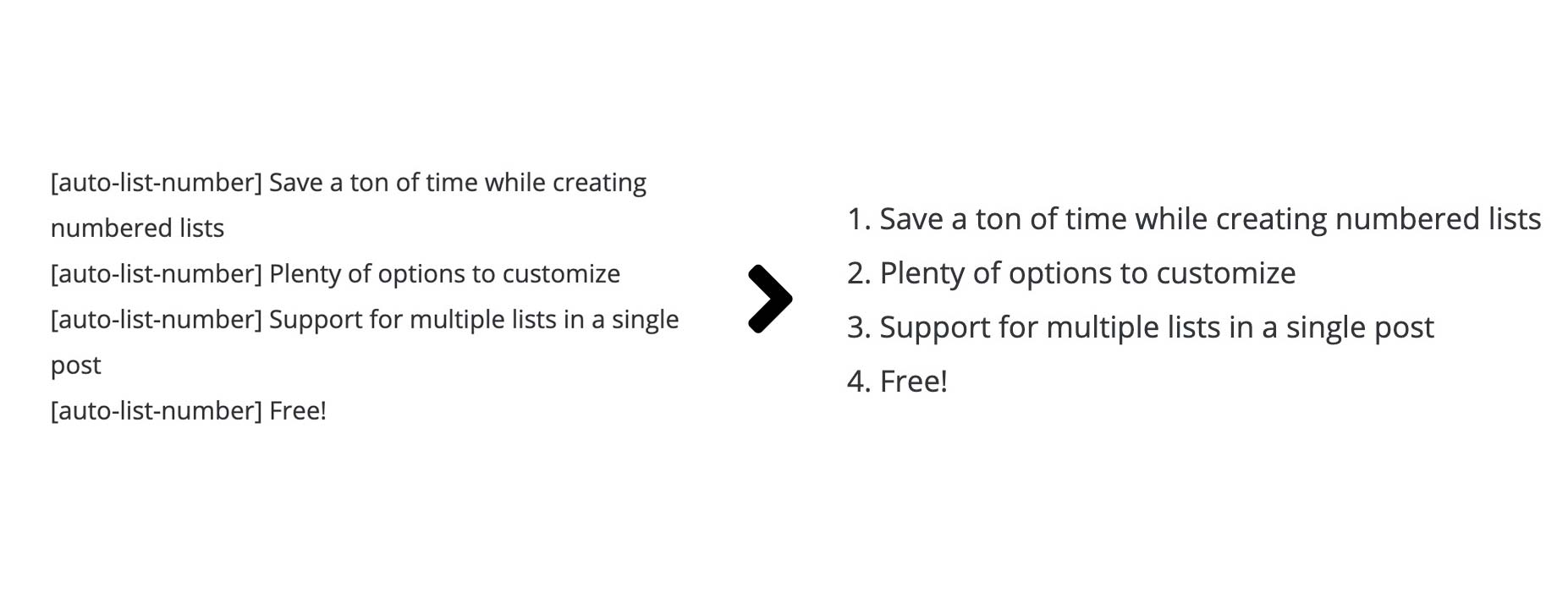
For developers
Is this your plugin? Show off the numbers.
Add a live badge to your site, docs or GitHub README. It updates on its own — no account needed.
FAQ
AutoListicle: Automatically Update…: quick answers
Straight answers, pulled from live WordPress.org data.
Live data from WordPress.org · checked Oct 17, 2026
Is AutoListicle: Automatically Upd… free?
Yes. AutoListicle: Automatically Upd… is free to download and use from the official WordPress.org plugin directory.
Is AutoListicle: Automatically Upd… safe to use in 2026?
Yes — AutoListicle: Automatically Upd… is a safe, well-maintained plugin to use in 2026. It runs on 60+ sites, is rated 5/5 and was last updated 4 days ago, and scores 80/100 on our health check.
How many websites use AutoListicle: Automatically Upd…?
AutoListicle: Automatically Upd… is active on 60+ WordPress websites and has been downloaded 3,932 times since it launched in July 2019. It was downloaded 240 times in the last 30 days.
Does AutoListicle: Automatically Upd… work with WordPress 7.1?
Yes. The developer has tested AutoListicle: Automatically Upd… up to WordPress 7.1.3, the latest release. It requires WordPress 4.4 or newer.
What PHP version does AutoListicle: Automatically Upd… need?
AutoListicle: Automatically Upd… requires PHP 7.0 or higher. Most hosts run PHP 8.x today, so it works on any modern WordPress hosting.
When was AutoListicle: Automatically Upd… last updated?
The latest version, 1.5, was released on October 13, 2026 (4 days ago).
Who makes AutoListicle: Automatically Upd…?
AutoListicle: Automatically Upd… is developed and maintained by Andy Feliciotti.
Powered by PageForge
Want thousands of pages that rank like these? Build them in an afternoon.
This directory runs on the same engine as PageForge. Turn any spreadsheet, CSV or API into thousands of fast, SEO-ready WordPress pages — with schema, internal links and AI-written copy baked in.
- CSV, Google Sheets & API data sources
- AI content, schema & internal links per page
- Works with Elementor, Gutenberg, Yoast & Rank Math
- Free on WordPress.org — no credit card


