


AutoCHMOD
Protect folders and files from unhautorized changes managing filesystem permissions.

Consider an alternative
AutoCHMOD shows warning signs in 2026 — compare the alternatives below before installing. It runs on 10+ sites, is rated 3/5 and was last updated 13 years ago, and scores 24/100 on our health check.
- Small user base (10+ active installs)
- Low rating so far — 3/5 from only 3 reviews
- No update in 12 years
- Only tested up to WordPress 3.9 (latest is 7.1)
How does it stack up?
Side-by-side on installs, updates, ratings & supportDaily downloads
Download spikes usually follow a new release — each site that auto-updates counts as a download.
Rankings
Where AutoCHMOD stands todayWordPress.org search rankings
Live position in the plugin search, top 100| Keyword | Position |
|---|---|
| chmod | #74 |
| filesystem | >100 |
| folders | >100 |
| permissions | >100 |
| security | >100 |
Version adoption
Share of active sites per release.
Rating breakdown
★★★★★★★★★★ 3 from 3 reviews
About AutoCHMOD
From the official readme · v0.5.2Description
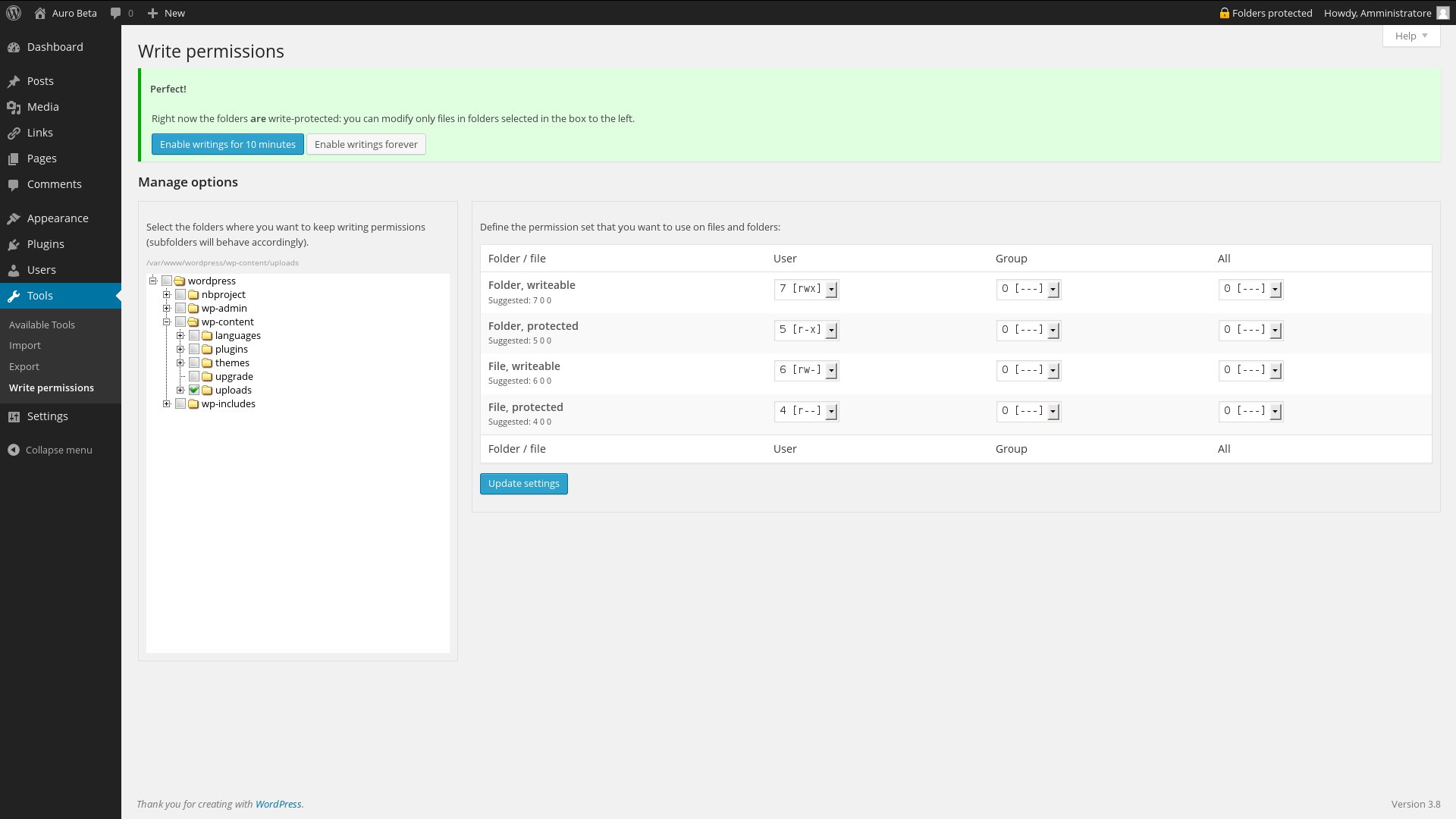
Protect folders and files from unhautorized changes managing filesystem permissions. You can configure the permission mask for file and folders in “protected” and “writeable” status, and with a single click you can switch between them. When you enable writing a cron event is set and the protected status will be applied automatically after 10 minutes.
Please check carefully the configuration before enabling protection! If the default permission mask isn’t correct for your server WordPress will stop working, and you’ll need to restore the correct permission manually.
Pay attention: the suggested configuration is, obviously, only a suggestion: depending on various system configuration the detection could be suboptimal or erroneous.
New in 0.5: automatic updates should work regularly; the protection will disabled and re-enabled, hopefully without pain. But this feature is still experimental and I can’t debug it untill next minor release of WP.
Installation
Just follow any standard plugin installation procedure, as you wish.
Changelog
First public release, because 0.1 was a very buggy alpha version.
0.5
- Let the automatic updates happen!
0.5.1 Fixed the behaviour of the admin bar button on multisite installation: the option are now saved on site_meta
0.5.2 Fixed a bug who didn’t permit saving permission options on some network installations
0.4
- Check suggested configuration with a real case
- Help screen
- Disable protection forever
- Animated countdown when protection is disabled.
0.4.1: Completed italian localization, minor bug fixes
0.4.2: Removed debug information. Sorry, my fault
0.3
- Multisite friendly (config page is in network Settings section)
- Navbar button bring to option page if configuration hasn’t been verified
- Suggest permission comparing a file created in system’s temporary folder and the WordPress root
0.2
- First public release.
- Improved options page.
- Configuration of permissions mask.
- Localization (english, italian)
0.1
- First attempt.
- Single file plugin, no fancy options.
Screenshots


For developers
Is this your plugin? Show off the numbers.
Add a live badge to your site, docs or GitHub README. It updates on its own — no account needed.
Best AutoCHMOD alternatives
All chmod plugins →| Rank | Plugin | Active installs |
|---|---|---|
| 2 |
 SiteCare – File Permissions Manager
Wrong permissions expose your site or quietly break it. Fix them across your whole…
SiteCare – File Permissions Manager
Wrong permissions expose your site or quietly break it. Fix them across your whole…
|
10+ |
FAQ
AutoCHMOD: quick answers
Straight answers, pulled from live WordPress.org data.
Live data from WordPress.org · checked Oct 21, 2026
Is AutoCHMOD free?
Yes. AutoCHMOD is free to download and use from the official WordPress.org plugin directory.
Is AutoCHMOD safe to use in 2026?
AutoCHMOD shows warning signs in 2026 — compare the alternatives below before installing. It runs on 10+ sites, is rated 3/5 and was last updated 13 years ago, and scores 24/100 on our health check.
How many websites use AutoCHMOD?
AutoCHMOD is active on 10+ WordPress websites and has been downloaded 5,010 times since it launched in January 2014. It was downloaded 53 times in the last 30 days.
Does AutoCHMOD work with WordPress 7.1?
AutoCHMOD is officially tested up to WordPress 3.9.40, while the latest release is 7.1.3. It may still work, but try it on a staging site first.
When was AutoCHMOD last updated?
The latest version, 0.5.2, was released on April 17, 2014 (13 years ago).
Who makes AutoCHMOD?
AutoCHMOD is developed and maintained by belinde.
What are the best alternatives to AutoCHMOD?
The most popular alternatives to AutoCHMOD are SiteCare (10+ installs).
Powered by PageForge
Want thousands of pages that rank like these? Build them in an afternoon.
This directory runs on the same engine as PageForge. Turn any spreadsheet, CSV or API into thousands of fast, SEO-ready WordPress pages — with schema, internal links and AI-written copy baked in.
- CSV, Google Sheets & API data sources
- AI content, schema & internal links per page
- Works with Elementor, Gutenberg, Yoast & Rank Math
- Free on WordPress.org — no credit card


