


Attachments
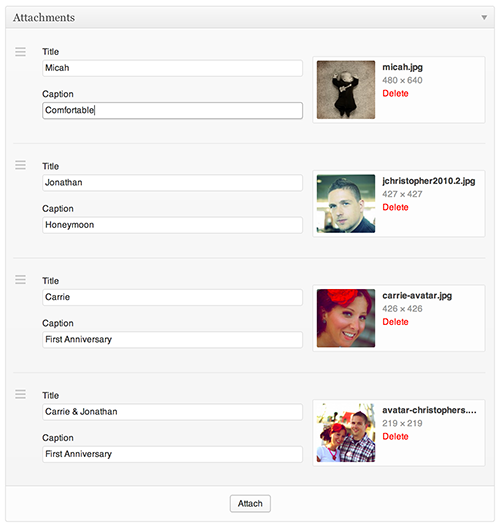
Attachments allows you to simply append any number of items from your WordPress Media Library to Posts, Pages, and Custom Post Types

Solid choice
Attachments is a solid plugin choice in 2026, with a few things worth checking first. It runs on 8K+ sites, is rated 4.8/5 and was last updated 9 months ago, and scores 64/100 on our health check.
- Loved by users — 4.8/5 from 53 reviews
- Only tested up to WordPress 6.9 (latest is 7.1)
How does it stack up?
Side-by-side on installs, updates, ratings & support



Daily downloads
Download spikes usually follow a new release — each site that auto-updates counts as a download.
Rankings
Where Attachments stands todayWordPress.org search rankings
Live position in the plugin search, top 100| Keyword | Position |
|---|---|
| attachment | #5 |
| page | >100 |
| >100 | |
| picture | #30 |
| post | >100 |
Version adoption
Share of active sites per release.
Rating breakdown
★★★★★★★★★★ 4.8 from 53 reviews
About Attachments
From the official readme · v3.5.11Description
Extensive usage instructions are available on GitHub
Attachments allows you to simply append any number of items from your WordPress Media Library to Posts, Pages, and Custom Post Types.
Associate Media items with posts
The idea behind Attachments is to give developers the ability to directly associate Media items with any post. This is accomplished by adding a meta box to post edit screens as determined by the developer. Once Media items have been associated with a post, you’re able to retrieve those Attachments and include them directly within your template files using any specific markup you wish.
Integrate Attachments within your theme with fine grained control
Attachments does not automatically integrate itself with your theme. Since the idea behind Attachments is to allow integration of Media within posts using developer-crafted, unique markup, it’s up to you to integrate with your theme. The most basic integration includes editing the appropriate template file and adding your call(s) to Attachments. For example, if you have set up Attachments to be used with your Posts entries, edit single.php to include the following within The Loop:
<?php $attachments = new Attachments( 'attachments' ); /* pass the instance name */ ?>
<?php if( $attachments->exist() ) : ?>
  <h3>Attachments</h3>
  <p>Total Attachments: <?php echo $attachments->total(); ?></p>
  <ul>
    <?php while( $attachments->get() ) : ?>
      <li>
        ID: <?php echo $attachments->id(); ?><br />
        Type: <?php echo $attachments->type(); ?><br />
        Subtype: <?php echo $attachments->subtype(); ?><br />
        URL: <?php echo $attachments->url(); ?><br />
        Image: <?php echo $attachments->image( 'thumbnail' ); ?><br />
        Source: <?php echo $attachments->src( 'full' ); ?><br />
        Size: <?php echo $attachments->filesize(); ?><br />
        Title Field: <?php echo $attachments->field( 'title' ); ?><br />
        Caption Field: <?php echo $attachments->field( 'caption' ); ?>
      </li>
    <?php endwhile; ?>
  </ul>
<?php endif; ?>
That snippet will request all of the existing Attachments defined for the current Post within The Loop, and retrieve each itemized property for that Attachment. Using the provided details you’re able to integrate the attached Media items in any way you please.
There is a lot more information on Attachments’ GitHub page. Please contribute!
Roadmap
Please see Attachments on GitHub
Usage
Extensive usage instructions are available on GitHub
Installation
- Download the plugin and extract the files
- Upload
attachmentsto your~/wp-content/plugins/directory - Activate the plugin through the ‘Plugins’ menu in WordPress
- Implement Attachments in your theme’s
functions.phpor your own plugin (see Other Notes > Usage) - Update your templates where applicable (see Other Notes > Usage)
Upgrading from version 1.x
You will need to update your theme files that use Attachments 3.0. Version 1.x of Attachments has been fully deprecated but is still available and included with Attachments 3.x. If you would like to continue to use the (no longer supported) 1.x version you may add the following to your wp-config.php:
define( 'ATTACHMENTS_LEGACY', true ); // force the legacy version of Attachments
Version 3 is a major rewrite. While I’ve taken precautions in ensuring you won’t lose any saved data it is important to back up your database prior to upgrading in case something goes wrong. This version is a complete rewrite so all legacy data will be left in place, but a migration must take place to match the new data storage model and workflow.
Frequently asked questions
Frequently Asked Questions
Please see Issues on GitHub
Changelog
Now piggybacking the awesome Media workflow introduced in WordPress 3.5
Please see Attachments’ changelog on GitHub
3.5.11
- Compatibility with WordPress 6.9
- Fixes Fatal Error in some cases when deleting. Props m-hefti
- Fixes field value population for non-English values. Props marcochiesi
- Fixed bug in generated code for migration from Attachments Pro Props marcochiesi
- Fix documentation links on WordPress plugins page. Props crgeary
3.5.9
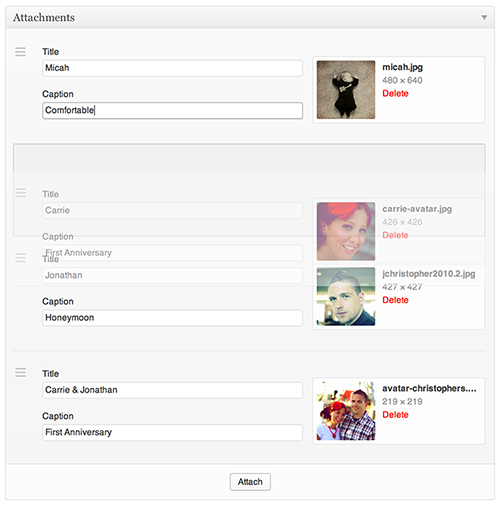
- Added link to collapse Attachments to make sorting easier
- Fixes PHP Notice on installation
- Fixes illegal offset error on PHP7
- Added Dutch translation
3.5.8
- Fixed a potential issue when migrating from Attachments Pro
3.5.7
- Fixed a regression that prevented attaching multiple files at once
3.5.6
- Fixed an issue where changing an Attachment on more than one Attachment would continually update the first Attachment
- Media modal now includes filters (props marcochiesi)
- Added German translation (props bessl)
- Added filter to manipulate Attachments metadata before it’s saved:
attachments_meta_before_save - Underscores are no longer enforced over hyphens
- More entropy for Attachments uid’s to prevent collisions (props sketchpad)
3.5.5
- Fixed an issue where field values were improperly overwritten when the instance was set to prepend in some cases
Screenshots


For developers
Is this your plugin? Show off the numbers.
Add a live badge to your site, docs or GitHub README. It updates on its own — no account needed.
Best Attachments alternatives
All attachment plugins →





FAQ
Attachments: quick answers
Straight answers, pulled from live WordPress.org data.
Live data from WordPress.org · checked Sep 26, 2026
Is Attachments free?
Yes. Attachments is free to download and use from the official WordPress.org plugin directory.
Is Attachments safe to use in 2026?
Attachments is a solid plugin choice in 2026, with a few things worth checking first. It runs on 8K+ sites, is rated 4.8/5 and was last updated 9 months ago, and scores 64/100 on our health check.
How many websites use Attachments?
Attachments is active on 8K+ WordPress websites and has been downloaded 287,450 times since it launched in November 2009. It was downloaded 924 times in the last 30 days.
Does Attachments work with WordPress 7.1?
Attachments is officially tested up to WordPress 6.9.9, while the latest release is 7.1.2. It may still work, but try it on a staging site first.
When was Attachments last updated?
The latest version, 3.5.11, was released on December 30, 2025 (9 months ago).
Who makes Attachments?
Attachments is developed and maintained by Jon Christopher.
What are the best alternatives to Attachments?
The most popular alternatives to Attachments are Fluent PDF Generator (20K+ installs), Attachment Pages Redirect (10K+ installs) and Disable Media Pages (10K+ installs).
Powered by PageForge
Want thousands of pages that rank like these? Build them in an afternoon.
This directory runs on the same engine as PageForge. Turn any spreadsheet, CSV or API into thousands of fast, SEO-ready WordPress pages — with schema, internal links and AI-written copy baked in.
- CSV, Google Sheets & API data sources
- AI content, schema & internal links per page
- Works with Elementor, Gutenberg, Yoast & Rank Math
- Free on WordPress.org — no credit card


