


Animated Live Wall Gallery
Create animated gallery walls with image-switching effects. Display photos from Instagram, Flickr, or media uploads.

Solid choice
Animated Live Wall Gallery is a solid plugin choice in 2026, with a few things worth checking first. It runs on 1K+ sites, is rated 4.4/5 and was last updated 2 months ago, and scores 76/100 on our health check.
- Tested with the latest WordPress (7.1)
- Momentum — downloads up 27.8% vs the previous 30 days
Daily downloads
Download spikes usually follow a new release — each site that auto-updates counts as a download.
Rankings
Where Animated Live Wall Gallery stands todayWordPress.org search rankings
Live position in the plugin search, top 100| Keyword | Position |
|---|---|
| animated gallery | #2 |
| gallery | >100 |
| image gallery | >100 |
| masonry gallery | #44 |
| photo wall | #2 |
Version adoption
Share of active sites per release.
Rating breakdown
★★★★★★★★★★ 4.4 from 14 reviews
About Animated Live Wall Gallery
From the official readme · v1.2.8Description
Animated Live Wall lets you build stunning gallery walls where images switch and animate with smooth CSS effects. Whether you want to showcase your artwork, display an Instagram feed, or create an eye-catching Flickr gallery, this gallery tool makes it simple.
Free Version Demo: Animated Live Wall Gallery
Pro Version Demo: Animated Live Wall Gallery Premium
More About Pro: Check Pro Details
Where To Buy: Buy Animated Live Wall Gallery Premium
The gallery supports both grid and masonry layouts, giving you flexibility in how your photos appear on the page. Each gallery comes with a built-in lightbox for full-size image viewing, and the entire design adapts smoothly to different screen sizes.
Free Features
- Unlimited gallery images and videos
- Grid layout with animated image switching
- Masonry layout for varied image sizes
- Smooth CSS animation effects (fade, scale, hide/show)
- Built-in responsive lightbox
- Instagram feed integration
- Flickr feed integration
- Adjustable column layouts
- Multiple thumbnail size options
- Gap control between images
- Custom image titles
- Link option for images (same or new window)
- Loading icon/preloader
- Custom CSS field for advanced styling
- Shortcode support for easy embedding
Pro Features
- All free features included
- Grid layout with 15+ animation effects
- Mosaic layout option
- Justify layout option
- Animation speed control
- Animation interval settings
- Max step control (animate 1-100 photos at a time)
- Set specific images to never switch
- Gap range from 0 to 15px
- Fixed square cropped images for lightbox
- Instagram caption display on photos
- Instagram icon overlay on photos
- Ajax load more pagination
- Customizable load more button colors
- Enhanced loading performance
Gallery Layouts
Grid Layout
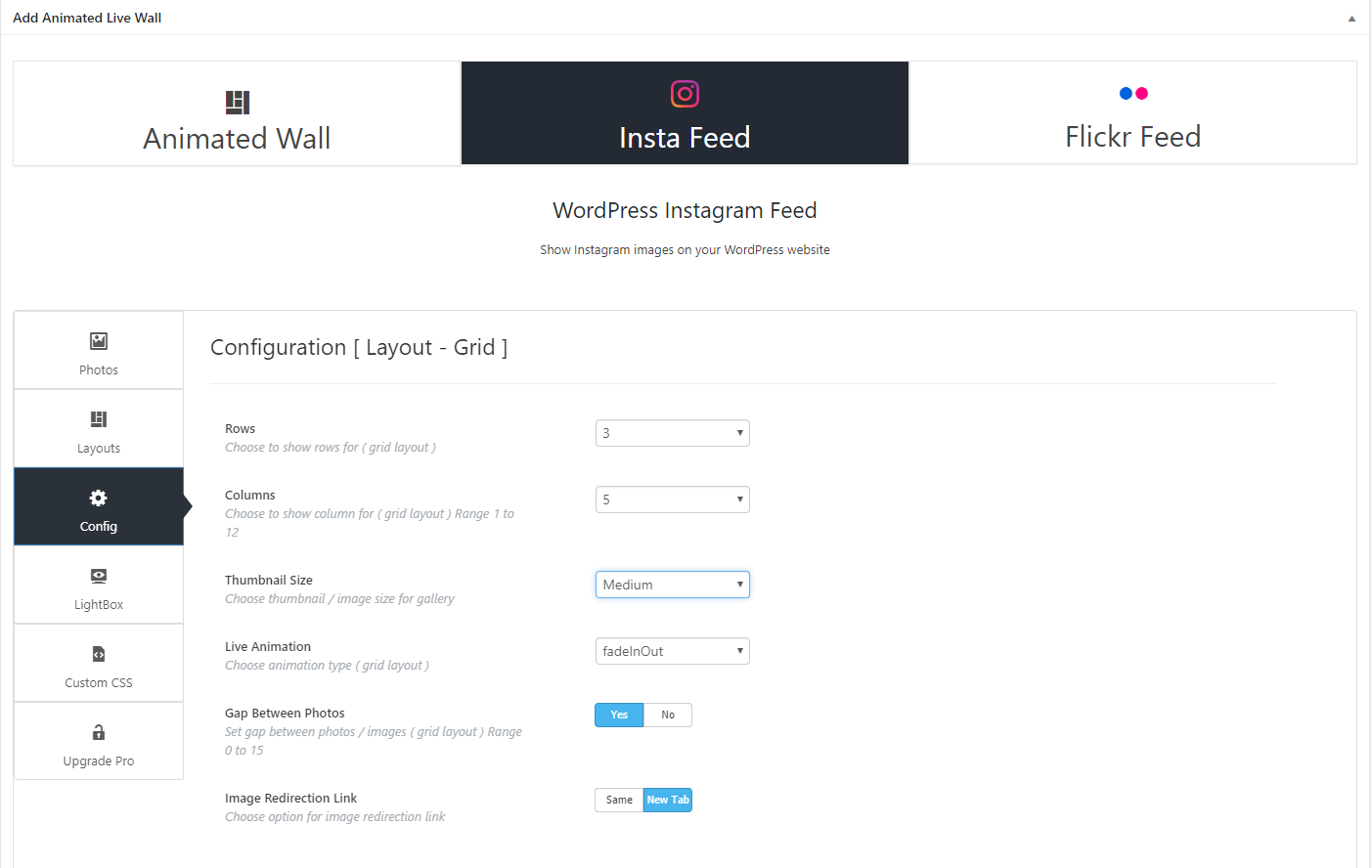
The grid layout arranges images in uniform rows and columns with matching sizes. When your gallery has more images than grid cells, the remaining photos cycle through the grid with animation effects. For example, a 5×4 grid with 50 images will display 20 at a time while the other 30 rotate in randomly.
Masonry Layout
Masonry positions images in a Pinterest-style vertical arrangement. Images flow naturally without fixed row heights, making efficient use of page space. This layout works well for photos with different aspect ratios.
Social Feed Integration
Instagram Feed
Connect your Instagram account and display your feed directly on any page. The gallery fetches your Instagram photos automatically and displays them in your chosen layout style.
Flickr Feed
Pull your Flickr photos into the gallery using your API key and user ID. Display your Flickr albums in grid or masonry format with full lightbox support.
Lightbox
Every gallery includes a responsive lightbox that opens images in a larger popup view. The lightbox supports keyboard navigation, transition effects, and also plays YouTube and Vimeo videos. Navigation arrows let visitors browse through the entire gallery without closing the popup.
Shortcode Usage
After creating your gallery, simply copy the shortcode and paste it into any page, post, or text widget. The gallery appears wherever you place the shortcode.
Installation
From Your Dashboard:
- Go to Plugins > Add New
- Search for “Animated Live Wall”
- Click Install and then Activate
- Find the gallery menu in your dashboard
From WordPress.org:
- Download the zip file from WordPress.org
- Upload to your /wp-content/plugins/ directory
- Activate the plugin from the Plugins page
Need help? Contact us here.
Frequently asked questions
How do I add a gallery to my page?
After creating your gallery, copy the shortcode shown in the gallery settings. Paste this shortcode into any page, post, or text widget where you want the gallery to appear.
How many images can I add?
There is no limit. You can add as many images and videos as you need to each gallery.
Can I rearrange the image order?
Yes. When editing a gallery, you can drag and drop images to change their order.
Is the gallery mobile responsive?
Yes. The gallery automatically adjusts its layout based on screen size and works smoothly on phones, tablets, and desktops.
Can I add links to images?
Yes. Each image has a link field where you can add a URL. You can choose whether links open in the same window or a new tab.
What gallery layouts are available?
The free version includes Grid and Masonry layouts. The Pro version adds Mosaic and Justify layouts.
How do I connect my Instagram account?
In the gallery settings, select Instagram as your source. Generate an access token using Pixel Union, enter it in the settings, and save your gallery.
How do I set up my Flickr feed?
You need your Flickr API key and user ID. Enter both in the gallery Flickr settings section. Our documentation walks you through getting these credentials.
What animation effects are available?
The free version includes fade, scale, and hide/show effects. The Pro version offers 15+ additional animation styles.
Can I control the animation timing?
In the Pro version, you can adjust both animation speed and the interval between image switches.
Does the gallery support video?
Yes. You can add YouTube and Vimeo videos to your gallery. Videos play inside the lightbox popup.
What is the difference between Free and Pro?
The free version covers core functionality: grid/masonry layouts, Instagram/Flickr feeds, lightbox, and basic animations. The Pro version adds more layouts (mosaic, justify), advanced animation controls, load more pagination, and additional styling options. See full comparison
Can I use custom CSS?
Yes. Each gallery has a custom CSS field where you can add your own styling rules.
How do I get support?
For free version support, use the WordPress.org support forum. Pro users can contact us directly through our website.
Changelog
No Major update yet.
1.2.8
- Fixed image stretching in grid and masonry layouts.
- Updated gridrotator JS to handle item margins correctly.
- Enhanced CSS for better image aspect ratio handling using object-fit.
1.2.7
- Tested plugin for WordPress 6.9
1.2.6
- Text domain warning fixed.
- Tested plugin for WordPress 6.8.1
1.2.5
- Bug Fix: Fixed.
1.2.4
- Bug Fix: Fixed.
1.2.3
- Bug Fix: Fixed.
Screenshots



For developers
Is this your plugin? Show off the numbers.
Add a live badge to your site, docs or GitHub README. It updates on its own — no account needed.
FAQ
Animated Live Wall Gallery: quick answers
Straight answers, pulled from live WordPress.org data.
Live data from WordPress.org · checked Oct 12, 2026
Is Animated Live Wall Gallery free?
Yes. Animated Live Wall Gallery is free to download and use from the official WordPress.org plugin directory. The developer also sells premium add-ons or a Pro version with extra features.
Is Animated Live Wall Gallery safe to use in 2026?
Animated Live Wall Gallery is a solid plugin choice in 2026, with a few things worth checking first. It runs on 1K+ sites, is rated 4.4/5 and was last updated 2 months ago, and scores 76/100 on our health check.
How many websites use Animated Live Wall Gallery?
Animated Live Wall Gallery is active on 1K+ WordPress websites and has been downloaded 146,862 times since it launched in February 2019. It was downloaded 607 times in the last 30 days.
Does Animated Live Wall Gallery work with WordPress 7.1?
Yes. The developer has tested Animated Live Wall Gallery up to WordPress 7.1.3, the latest release. It requires WordPress 5.0 or newer.
What PHP version does Animated Live Wall Gallery need?
Animated Live Wall Gallery requires PHP 5.2.4 or higher. Most hosts run PHP 8.x today, so it works on any modern WordPress hosting.
When was Animated Live Wall Gallery last updated?
The latest version, 1.2.8, was released on August 20, 2026 (2 months ago).
Who makes Animated Live Wall Gallery?
Animated Live Wall Gallery is developed and maintained by A WP Life.
Powered by PageForge
Want thousands of pages that rank like these? Build them in an afternoon.
This directory runs on the same engine as PageForge. Turn any spreadsheet, CSV or API into thousands of fast, SEO-ready WordPress pages — with schema, internal links and AI-written copy baked in.
- CSV, Google Sheets & API data sources
- AI content, schema & internal links per page
- Works with Elementor, Gutenberg, Yoast & Rank Math
- Free on WordPress.org — no credit card


