


Androapp – Native Android mobile app for wordpress site
Native mobile app for android platform, create a beautiful mobile app for your wordpress blog in minutes, no programming knowledge required.

Consider an alternative
Androapp shows warning signs in 2026 — compare the alternatives below before installing. It runs on 300+ sites, is rated 4.5/5 and was last updated 4 years ago, and scores 41/100 on our health check.
- Loved by users — 4.5/5 from 65 reviews
- Small user base (300+ active installs)
- No update in 3 years
- Only tested up to WordPress 6.1 (latest is 7.1)
How does it stack up?
Side-by-side on installs, updates, ratings & support


Daily downloads
Download spikes usually follow a new release — each site that auto-updates counts as a download.
Rankings
Where Androapp stands todayWordPress.org search rankings
Live position in the plugin search, top 100| Keyword | Position |
|---|---|
| Android App | >100 |
| app for WordPress | >100 |
| Mobile App | >100 |
| mobile app plugin | >100 |
| Native Mobile App | >100 |
Version adoption
Share of active sites per release.
Rating breakdown
★★★★★★★★★★ 4.5 from 65 reviews
About Androapp
From the official readme · v25.03Description
Native mobile app for android platform, create a beautiful mobile app for your wordpress blog in minutes, no programming knowledge required.
Test your app on your phone in minutes, It will really take minutes, Try it !!
Features
- Unlimited Push Notifications
- Monetize your app using Admob and Appnext ad units
- Deep linking Support
- Inbuilt Sharing channels with image share – Facebook, WhatsApp and more through default android sharing intents.
- WordPress/Facebook comments support
- Offline Save
- Image Zoom, Share and Save
- Parallax Effect for Featured image on post detail page
- Caching – option to use WP Super cache to cache mobile app requests at server side.
- Infinite Scroll
- Multiple themes to suit your website
- Dynamic Settings for Menu, Image Rendering, Preview Text, Share Text, Post Page settings, Ads placements, Notification Style, Theme Colors and more.
- Customize App Colors as per your blog or company website.
- Your own company Logo
- No reference to AndroApp, it is a complete white label app
Demo Mobile Apps
Here are few of the mobile apps built using our plugin
Android App Updates
See what we have been doing on the android app side, see Android App Updates
Pricing
Your mobile app from AndroApp is completely free for the first 1 month, no credit card needed.
Annual Renewal:
$66/year pay here
In case you are not willing or not able to pay, your app will continue to work without any ads from you and instead we reserve to show few of our ads
For any questions, do get in touch with us @ contact@androapp.mobi.
In case you are not able to pay via payumoney, and want to pay via paypal, please drop us an email at contact@androapp.mobi
Visit our site for more information – http://androapp.mobi/
Follow us on Google+, Facebook
AndroApp does not support WooCommerce and BuddyPress plugins
Installation
Follow these instructions for getting your android app apk link
1. Upload the androapp folder to the /wp-content/plugins/ directory or use plugin search – Admin > Plugins > Add new > Search for ‘AndroApp’
1. Activate the Plug-in
1. Follow 5 simple steps in Settings->AndroApp configuration page.
1. You will receive apk link for your android app in your mailbox, open the link from your mobile, install the apk and test.(Don’t worry about the warning, as it is a standard warning for installing any direct apk).
For detailed instructions http://androapp.mobi/#get-started
Frequently asked questions
How to get My Mobile App
Just follow 5 simple steps in Settings->AndroApp configuration page, we will send android app apk link to your e-mail. Click on the link from your mobile and your mobile app will be installed on your phone. test out your new android app for your wordpress site and publish on google play store.
No Post Feeds are visible in the Mobile App
Few clients have faced the issue due to bad timezone settings, try changing your timezone settings and see that there should not be any exception in httpd logs.
Can i monetize my mobile application?
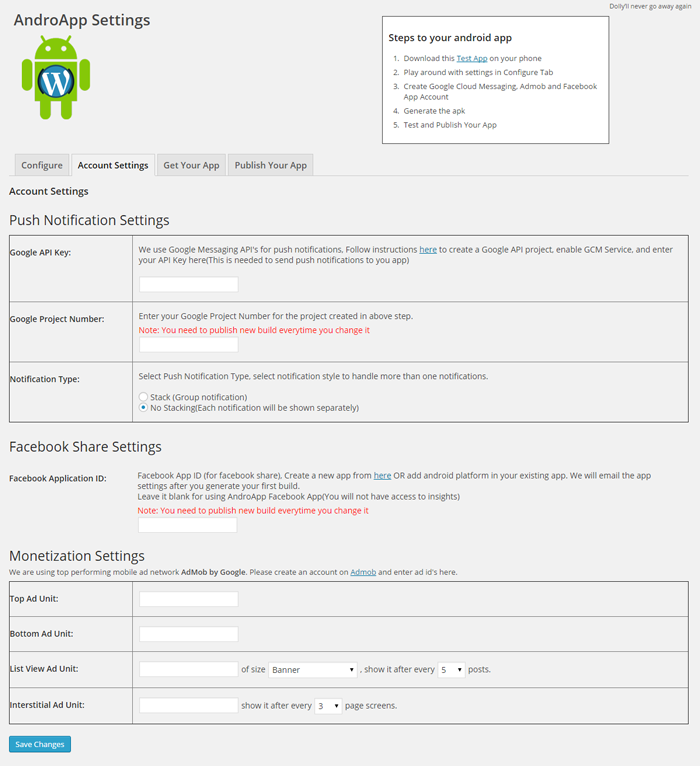
Yes, we have integrated admob sdk, you just need to fill ad unit id’s in account settings page, you have full control over the ad slots and frequency. We also support AppNext and other ad networks via mobsdk, try them out for your mobile app, let us know if you have any issues in using them.
Can i change My Mobile Application Logo
Yes, you can use your own logo, just go to Look & Feel & Build Section and upload a 512×512 size png image.
I don’t like default theme, are there more theme selection options?
Yes, You can change your mobile app theme at runtime(no need to create new build) from AndroApp Settings > Look & Feel & Build Section.
Can i change theme colors
Yes, We give the option to customize theme colors, you can change it to match your blog or company website.
Do you support Push notifications
Yes, we by default send push notification everytime you publish a new post. You need to signup for Firebase Cloud Messaging API’s, See instructions here and fill in Google API key and Project number in Account Settings Page.
Will it send push notification for all the posts?
By Default yes, but you can choose not to send push notification by selecting “Do not send Push Notification” checkbox on edit post page.
Do you provide IOS app for apple store as well?
We used to provide IOS app but stopped now, click here to know why.
Do you support UTF-8? Few of the posts have unicode characters, will they display fine?
We do support utf-8 and they will display perfectly fine.
Do you support multiple languages?
We can provide you the app with all the text in your language, right now it is not automated, so you have to provide us the texts you want to use.
How to pay for the next year subscription fee ?
You can purchase annual subscription from here. Mention your email id and site link in shipping address. We will activate your annual subscription. In case you are not able to pay via payumoney, and want to pay via paypal, please drop us an email at contact@androapp.mobi
Push notification not working for my site, what to do ?
First ensure that you fill the correct project number and api key in account settings tab, create a new build, install it in your mobile. Push notification will be send after around 20-30 minutes. Also enable curl on your server(if not enabled already).
Does AndroApp Support WooCommerce?
We used to support woocommerce earlier, but we stopped supporting it to continue focus on mainstream apps.
Does AndroApp Support BuddyPress?
No, we do not support buddypress plugin
Google play upload fail with following error
You uploaded an APK that is signed with a key that is also used to sign APKs that are delivered to users. Because you are enrolled in App Signing, you should sign your APK with a new key before you upload it. Don’t enable App Signing – follow this
Can i deactivate WP REST API plugin?
WP Rest api comes embedded in wordpress now, you can deactivate the plugin now. Also, when you activate/deactivate WP Rest API plugin, you might need to do this to clear some caches go to Settings->Permalink and Save (without making any changes).
Changelog
Fix for push notification not working for new installs. All backend changes no need to create new apk.
25.03
- Fix for push notification not working for new installs. All backend changes no need to create new apk.
25.02
- Minor fix for category links, to make it compatible for wordpress 6.1.1.
25.01
- Fix for menu icons.
25.00
- Major Update: updated all library versions with the android 12 support, removed Mopub support (since they are shutting down), In next version, will remove AppNext support as well, do let us know the good Ads SDK to add instead. email us 2 contact[at]androapp.mobi
24.01
- Fixed multiple notification issue with empty title. (introduced in 24.00).
- Added option to send custom notification through push notification tab. You need to create new apk for this to work.
24.00
- Auto Push Notification fix, fixed issue in push notification on a new post.
Screenshots


For developers
Is this your plugin? Show off the numbers.
Add a live badge to your site, docs or GitHub README. It updates on its own — no account needed.
Best Androapp alternatives
All Android App plugins →


FAQ
Androapp: quick answers
Straight answers, pulled from live WordPress.org data.
Live data from WordPress.org · checked Oct 7, 2026
Is Androapp free?
Yes. Androapp is free to download and use from the official WordPress.org plugin directory.
Is Androapp safe to use in 2026?
Androapp shows warning signs in 2026 — compare the alternatives below before installing. It runs on 300+ sites, is rated 4.5/5 and was last updated 4 years ago, and scores 41/100 on our health check.
How many websites use Androapp?
Androapp is active on 300+ WordPress websites and has been downloaded 169,469 times since it launched in January 2015. It was downloaded 172 times in the last 30 days.
Does Androapp work with WordPress 7.1?
Androapp is officially tested up to WordPress 6.1.15, while the latest release is 7.1.3. It may still work, but try it on a staging site first.
When was Androapp last updated?
The latest version, 25.03, was released on December 15, 2022 (4 years ago).
Who makes Androapp?
Androapp is developed and maintained by singhalavi.
What are the best alternatives to Androapp?
The most popular alternatives to Androapp are Super Progressive Web Apps (40K+ installs), WPMobile.App (3K+ installs) and AppPresser (1K+ installs).
Powered by PageForge
Want thousands of pages that rank like these? Build them in an afternoon.
This directory runs on the same engine as PageForge. Turn any spreadsheet, CSV or API into thousands of fast, SEO-ready WordPress pages — with schema, internal links and AI-written copy baked in.
- CSV, Google Sheets & API data sources
- AI content, schema & internal links per page
- Works with Elementor, Gutenberg, Yoast & Rank Math
- Free on WordPress.org — no credit card


