


Amortexa Mortgage Calculator
An interactive mortgage calculator block with live payment results, down payment, recurring costs, charts, and an amortization schedule.

Solid choice
Amortexa Mortgage Calculator is a solid plugin choice in 2026, with a few things worth checking first. Was last updated 6 days ago, and scores 64/100 on our health check.
- Actively developed — last update 6 days ago
- Tested with the latest WordPress (7.1)
- Small user base (<10 active installs)
- Very few reviews so far
How does it stack up?
Side-by-side on installs, updates, ratings & support


Daily downloads
Download spikes usually follow a new release — each site that auto-updates counts as a download.
Rankings
Where Amortexa Mortgage Calculator stands todayWordPress.org search rankings
Live position in the plugin search, top 100| Keyword | Position |
|---|---|
| amortization | #14 |
| block | >100 |
| calculator | >100 |
| mortgage | #45 |
| real-estate | >100 |
About Amortexa Mortgage Calculator
From the official readme · v1.0.0Description
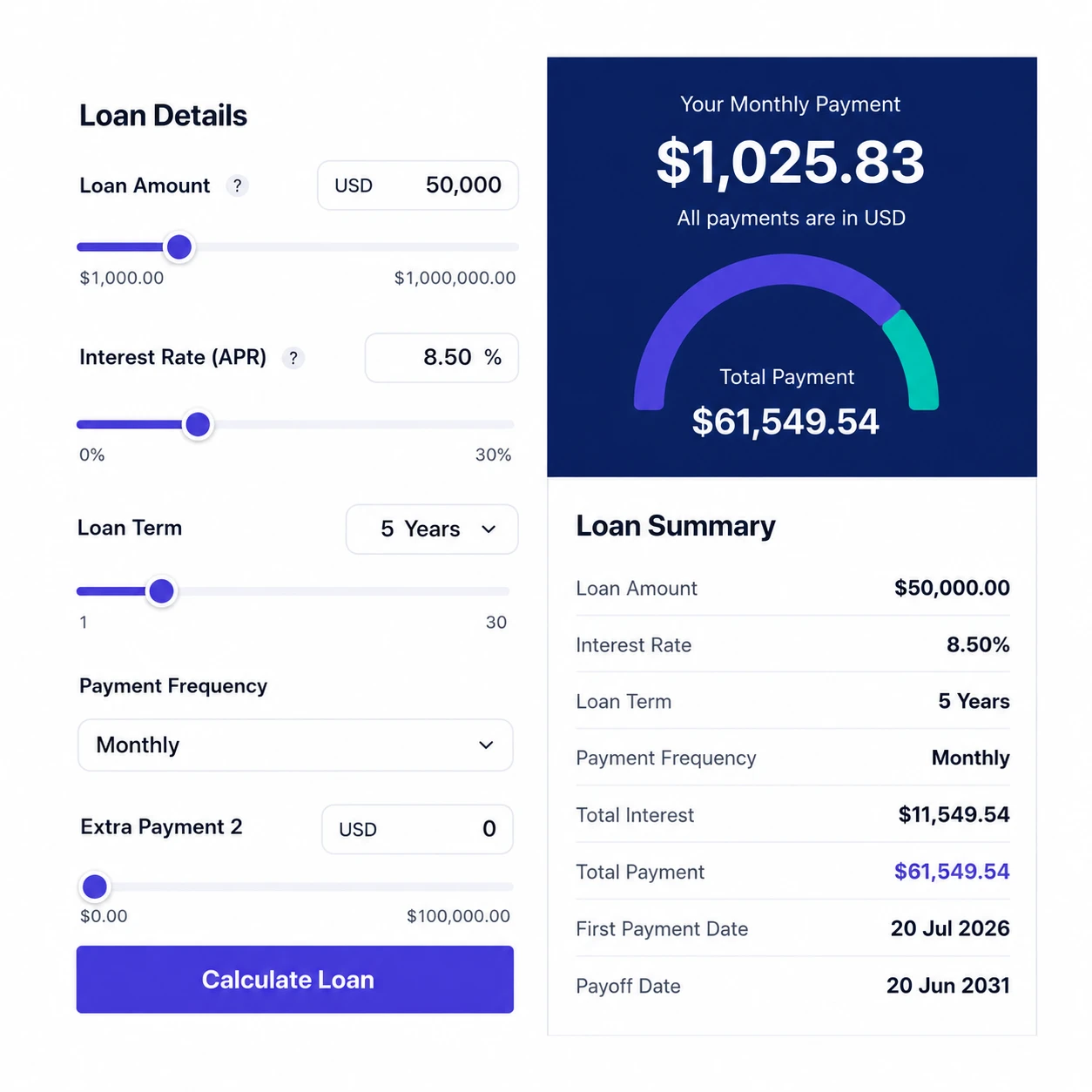
Amortexa adds a Mortgage Calculator block to the block editor. Drop it on any page and visitors get a working, self-contained mortgage calculator with live results, charts, and a full amortization schedule.
Key features
- Live calculation. Monthly payment, financed principal, total interest, and total paid update instantly as visitors type or drag a slider.
- Down payment support. Interest is correctly charged on the financed principal only, not the full purchase price.
- Real monthly cost, not just principal and interest. Turn on recurring costs to add property tax, home insurance, HOA fees, PMI, and any other monthly costs, and the calculator reports a genuine total monthly payment. Each component is a cash amount or a percentage of the purchase price, and the results and the composition chart both include it.
- PMI that cancels itself. When PMI is set, the balance is walked forward month by month and PMI stops the first month the loan reaches 80% of the purchase price, the later of automatic cancellation and the point you could request it yourself. Charge it to term end and it overstates what you would actually pay.
- Twenty-four built-in skins. Twelve light and twelve dark: Classic Light, Elegant Dark, Ocean Blue, Sunset Warm, Forest Green, Midnight Violet, Rose Quartz, Minimal Slate, Royal Grape, Aqua Fresh, Mocha Cream, Cyber Neon, Emerald Nights, Crimson Dusk, Graphite, Copper Forge, Royal Sapphire, Amber Gold, Cobalt Blue, Fuchsia Bloom, Mint Fresh, Sandstone, Lemon Zest, and Steel Blue — chosen per block.
- Colour and typography controls. Override the accent, secondary accent, label, and field text/background/border colours, and pick a font family — all per block, without writing CSS.
- Dependency-free SVG charts. A payment-composition donut and a balance-over-time line chart with cumulative interest, drawn in plain SVG. No charting library, no external requests.
- Amortization schedule. Annual rows showing principal paid, interest paid, and remaining balance, collapsible on the front end.
- Works without JavaScript. The block is fully server-rendered, so results and the schedule are correct even with scripting disabled. JavaScript is progressive enhancement that adds live recalculation and the charts.
- Responsive by container. The layout adapts to the block’s own width rather than the viewport, so columns stack, sliders wrap, and the schedule scrolls neatly inside narrow columns.
- Customisable currency. Set the symbol per block or site-wide, and place it before ($99) or after (99 €) the amount.
- No tracking, no external services. The plugin makes no network requests, loads no third-party fonts, and stores no personal data.
Site-wide defaults
Under the Amortexa menu you can set the defaults every new calculator block starts from: currency symbol, interest rate, decimal precision, loan amount, down payment, term, default skin, default chart type, and whether the amortization table is shown by default. Individual blocks can still override any of these in the editor.
Developer friendly
All mortgage math lives in pure, reusable PHP functions, mirrored by an equivalent JavaScript implementation for instant client-side feedback. A parity test in the repository asserts the two agree exactly.
The plugin also exposes a REST endpoint and a set of documented actions and filters for extending skins, defaults, results, currency, and rate limiting.
Privacy
Amortexa does not collect, store, or transmit any personal data.
The calculator runs entirely in the browser and on your own server. Visitor input is never saved to the database, never sent to the plugin author, and never used for analytics. The only data the plugin persists is your own site-wide settings (currency symbol, defaults, and so on), stored in a single amortexa_settings option in your site’s database. That option is deleted automatically when you uninstall the plugin.
Installation
- Upload the
amortexa-mortgage-calculatorfolder to the/wp-content/plugins/directory, or install the plugin through the WordPress admin Plugins screen. - Activate the plugin. Go to Plugins → Installed Plugins and click Activate under Amortexa.
- Optionally set your site-wide defaults under the Amortexa menu.
- Edit any post or page, open the block inserter, search for “Mortgage Calculator”, and drag the block into the content area. It appears in the custom Amortexa category.
Frequently asked questions
Does the calculator work without JavaScript?
Yes. The block is server-rendered: the initial results and amortization table are computed in PHP from the block’s attributes, so the calculator is usable with scripting disabled. JavaScript only adds live recalculation while typing and draws the charts.
Why does the amortization table show years instead of months?
A 30-year loan produces 360 monthly rows, which would bloat every page load. Rows are aggregated annually to keep pages fast; the underlying schedule is still calculated month by month, so the per-year figures are accurate.
How do I work out my real monthly payment?
Turn on Show costs and fill in the recurring costs you actually pay: property tax, home insurance, HOA fees, PMI, and any other monthly costs. The results then show a Total monthly cost alongside principal and interest, plus what you would pay out of pocket in total over the life of the loan. The payment composition chart gains a slice per cost, and the amortization schedule carries them through year by year. Every cost that can reasonably be quoted as a rate has a unit switch, so you can enter, for example, property tax as 1.25% or as a cash amount such as $1850 a year. Percentage costs are…
When does PMI stop?
As soon as the loan balance reaches 80% of the original purchase price, unless that happens later in the schedule. Federal rules require a lender to cancel PMI automatically at 78% and allow you to request cancellation from 80%, so Amortexa uses 80%: it never charges PMI past what you would actually be entitled to stop, and it stops as early as the rules permit. If your loan starts at 80% LTV or below, PMI is not charged at all.
Can I change the currency symbol?
Yes. Set it per block using the block’s “Currency symbol” setting, site-wide under the Amortexa menu, or programmatically with the amortexa_currency_symbol filter. Each block can also place the symbol before the amount ($99) or after it (99 €) using the “Currency position” setting. Amounts are formatted with your locale’s number separators.
Is there a REST API?
Yes. Send a POST request to /wp-json/amortexa-mortgage-calculator/v1/calculate with a JSON body such as { "amount": 300000, "down_payment": 60000, "interest_rate": 6.5, "term_years": 30 }. Pass "with_schedule": true to include the amortization schedule in the response. The endpoint is a stateless calculator that returns only public arithmetic and no private data, so it is open to unauthenticated requests by design. If you need to require authentication, return false from the amortexa_rest_calculate_allowed filter. Calls are rate limited per client address: 30 requests per minute by default…
Can I insert the calculator with a shortcode?
The [amortexa-mortgage-calculator] shortcode is supported alongside the block and accepts every loan, cost, layout, panel, skin, chart and schedule attribute. The per-element appearance settings from the Design tab are block-only, because they are styled by your site-wide defaults and a shortcode cannot sensibly reproduce a design token map. On the Amortexa > Shortcode tab each exposed attribute has an input, and a sample shortcode rebuilds and copies as you change them: [amortexa-mortgage-calculator loanamount="350000" interestrate="4.75" loanterm="30" charttype="bar" showcosts="true"…
Can I add the calculator to a sidebar or widget area?
Yes. Under Appearance → Widgets you will find a Mortgage Calculator widget. Drag it into a sidebar, footer, or any other widget area and set a title. It is a small wrapper around the [amortexa-mortgage-calculator] shortcode, so it renders the same calculator as the block and inherits your site-wide defaults. Only the loan amount, interest rate, loan term, layout, and skin can be overridden per widget, and any field left blank keeps the site default. The widget also appears in the block based widget editor, where you add it with the Legacy Widget block.
Which actions and filters are available?
Filters amortexa_skins — add or replace the available visual skins. amortexa_default_attributes — override the default loan amount, rate, term, and other block attributes. amortexa_default_settings — override the default admin settings. amortexa_calculation_result — modify the computed result before output, for example to convert currency. amortexa_currency_symbol — replace the resolved currency symbol. amortexa_cost_units — change whether a recurring cost is treated as a percentage or a cash amount. amortexa_shortcode_block — change the block attributes built from the shortcode’s own…
Does the plugin collect or transmit any data?
No. See the Privacy section below.
Requirements
WordPress 6.8 or higher. PHP 7.4 or higher. A block theme or a classic theme with the block editor enabled.
Where is the source code?
The complete, human-readable source for this plugin is public and maintained on GitHub: https://github.com/tariqsmd/amortexa-mortgage-calculator The compiled files under build/ (index.js, view.js, and render.php) are generated from the unminified sources in src/ by @wordpress/scripts, which is why they are not readable line by line. The matching sources are: build/index.js is built from src/index.js, src/edit.js, src/save.js, and the modules under src/components/ and src/utils/. build/view.js is built from src/view.js. build/render.php is compiled from src/render.php. build/style-index.css…
Third-party libraries
Amortexa bundles no third-party code. Every file it loads is original to this plugin, including the charts, which are drawn in plain SVG rather than by a charting library. There is no jQuery, no Bootstrap, and no charting or animation dependency at runtime. The packages below are used at build time only, to compile the files in build/ and assemble the release archive. None is included in the plugin and none runs on a visitor’s browser: @wordpress/scripts (MIT) – https://github.com/WordPress/gutenberg/tree/trunk/packages/scripts – Babel, webpack, and SCSS compilation sass (MIT) –…
Changelog
First release. Amortexa has its own entry in the admin menu, where site-wide defaults for loan amount, down payment, loan term, skin, and chart type live, and recurring costs (property tax, insurance, HOA, PMI, other) are opt-in behind the Show costs switch.
1.0.0
- New: recurring costs — property tax, home insurance, HOA fees, PMI, and other costs — behind an opt-in Show costs switch, so a calculator only carries the cost fields you ask for.
- New: every cost that can be quoted as a rate carries a unit switch, so it can be entered as a percentage of the purchase price or as a cash amount. Property tax defaults to a rate, the rest to a cash amount.
- New: a Total monthly cost result and a lifetime out-of-pocket figure alongside the existing principal and interest, total interest, and total paid.
- New: the payment composition chart gains a slice per active cost, and the amortization schedule carries recurring costs through each year.
- New: PMI ends the first month the balance reaches 80% of the purchase price, instead of being charged to term end.
- Improved: cost components each pick up a distinct, automatically chosen colour, with a legend, so the breakdown stays readable across light and dark skins.
- Improved: cost figures are clamped by the unit the author chose, so an amount-based premium is no longer truncated by a percentage bound.
- New: four layouts — Stacked, Two columns, Inputs beside details (inputs in one column, results and charts in the other), and Chart beside inputs (inputs and results stacked in one column, charts in the other). The amortization table stays full width underneath every one of them, because a four column table is unreadable in a half width column.
- New:
amortexa_skins,amortexa_cost_units, andamortexa_shortcode_blockfilters are documented. - New: a Mortgage Calculator widget for sidebars and any other widget area, with optional overrides for amount, rate, term, layout, and skin.
- New: a shortcode builder on the Shortcode tab of the Amortexa screen. Every attribute gets an input and the sample shortcode rebuilds and copies as you change them.
- New: site-wide defaults for loan amount, down payment, loan term, skin, and chart type on the Amortexa screen, which has its own entry in the admin menu rather than sitting under Settings.
- New: per-block toggles to show/hide the results summary and the range sliders.
- New: currency symbol position option globally and per block — before the amount ($99) or after (99 €).
- New: shortcode attributes for form layout (
formcolumns) and panel order (panelorder). - New: the shortcode carries every recurring cost attribute —
showcosts,propertytax,homeinsurance,hoafee,pmi,othercostsand their*unitcounterparts — matching what the block and the editor expose. - New: twenty-four visual skins across light, dark, and accent colourways.
- New: per-element appearance controls in a dedicated Design tab, covering seventy-six design tokens grouped by calculator region.
- New: font family selector for the calculator (theme default, modern sans, classic serif, monospace).
- New: SVG charts — payment composition donut, balance over time line, annual bar, and dot comparison (no external libraries).
- New: range sliders paired with every number input for quick value adjustments.
- Improved: the front-end bundle is registered through the block metadata, so assets load in templates and block widgets where
has_block()cannot detect the block. - Improved: layout adapts to the block’s container width — columns stack, sliders wrap, charts reflow, and the amortization table scrolls inside narrow columns with a sticky first column.
- Improved: the shortcode reference moved to its own tab on the Amortexa screen, and the monthly payment announces changes to screen readers.
- Improved: the Amortexa screen’s tabs follow the ARIA tabs pattern, so they can be reached with the arrow keys, Home, and End, and only the active tab is a tab stop.
- Improved: fields are now labelled once instead of twice, and the first tab is still shown and submittable if the admin script fails to load.
- Fixed: the generated sample shortcode’s copy button now copies the sample instead of the plain example above it.
- Fixed: the amortization schedule toggle no longer hides its own button, so the table can be collapsed and expanded again.
- Fixed: the schedule toggle is revealed once the collapse behavior is active, instead of staying permanently hidden.
- Fixed: the down payment can no longer exceed the loan amount, whether the amount is typed or dragged.
- Fixed: editor script dependencies are now read from the generated asset manifest, preventing load-order issues in the block editor.
- Fixed: the compiled block metadata is regenerated on every build so the registered block name, editor handles, and CSS class names can no longer drift from the source.
- Fixed: font weight labels in the editor are now translatable.
- Removed: an unused empty bootstrap method, and the duplicated calculation helpers are no longer loaded twice at runtime.
- Removed: development-only files (tests, build tooling and the duplicated helper source) from the distributed plugin.
For developers
Is this your plugin? Show off the numbers.
Add a live badge to your site, docs or GitHub README. It updates on its own — no account needed.
Best Amortexa Mortgage Calculator alternatives
All amortization plugins →



FAQ
Amortexa Mortgage Calculator: quick answers
Straight answers, pulled from live WordPress.org data.
Live data from WordPress.org · checked Oct 14, 2026
Is Amortexa Mortgage Calculator free?
Yes. Amortexa Mortgage Calculator is free to download and use from the official WordPress.org plugin directory.
Is Amortexa Mortgage Calculator safe to use in 2026?
Amortexa Mortgage Calculator is a solid plugin choice in 2026, with a few things worth checking first. Was last updated 6 days ago, and scores 64/100 on our health check.
How many websites use Amortexa Mortgage Calculator?
Amortexa Mortgage Calculator is active on <10 WordPress websites and has been downloaded 108 times since it launched in October 2026. It was downloaded 121 times in the last 30 days.
Does Amortexa Mortgage Calculator work with WordPress 7.1?
Yes. The developer has tested Amortexa Mortgage Calculator up to WordPress 7.1.3, the latest release. It requires WordPress 6.8 or newer.
What PHP version does Amortexa Mortgage Calculator need?
Amortexa Mortgage Calculator requires PHP 7.4 or higher. Most hosts run PHP 8.x today, so it works on any modern WordPress hosting.
When was Amortexa Mortgage Calculator last updated?
The latest version, 1.0.0, was released on October 8, 2026 (6 days ago).
Who makes Amortexa Mortgage Calculator?
Amortexa Mortgage Calculator is developed and maintained by Muhammad Tariq.
What are the best alternatives to Amortexa Mortgage Calculator?
The most popular alternatives to Amortexa Mortgage Calculator are AC's Loan Calculator (400+ installs), Ultimate Loan & Mortgage Ca… (100+ installs) and Smart Loan Calculator (100+ installs).
Powered by PageForge
Want thousands of pages that rank like these? Build them in an afternoon.
This directory runs on the same engine as PageForge. Turn any spreadsheet, CSV or API into thousands of fast, SEO-ready WordPress pages — with schema, internal links and AI-written copy baked in.
- CSV, Google Sheets & API data sources
- AI content, schema & internal links per page
- Works with Elementor, Gutenberg, Yoast & Rank Math
- Free on WordPress.org — no credit card


