


AlphaListing
Provides an A to Z index page and widget.

Safe pick
Yes — AlphaListing is a safe, well-maintained plugin to use in 2026. It runs on 500+ sites, is rated 5/5 and was last updated 1 week ago, and scores 86/100 on our health check.
- Actively developed — last update 1 week ago
- Tested with the latest WordPress (7.1)
- Momentum — downloads up 24.9% vs the previous 30 days
- Small user base (500+ active installs)
How does it stack up?
Side-by-side on installs, updates, ratings & support

Daily downloads
Download spikes usually follow a new release — each site that auto-updates counts as a download.
Rankings
Where AlphaListing stands todayWordPress.org search rankings
Live position in the plugin search, top 100| Keyword | Position |
|---|---|
| a to z | #2 |
| a-z | #4 |
| index | #15 |
| listing | #80 |
| widget | >100 |
Version adoption
Share of active sites per release.
Rating breakdown
★★★★★★★★★★ 5 from 6 reviews
About AlphaListing
From the official readme · v4.6.0Description
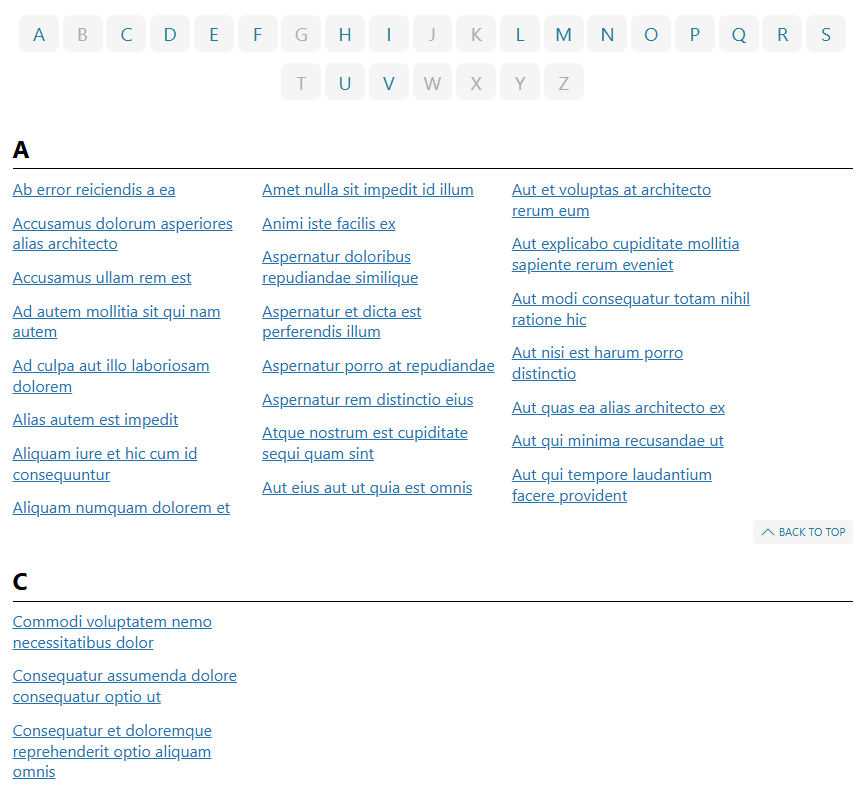
Display posts, pages, and terms alphabetically in a Rolodex-, catalog-, or directory-style list with the AlphaListing plugin!
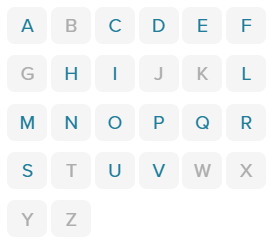
This plugin includes a block and shortcode for the list, along with a widget for linking to the list from any location on a site. If a letter has no associated pages, the widget will display the letter unlinked, while the list page will omit the letter entirely.
Show posts from any single or multiple post types, including built-in posts and pages. Post types from plugins like WooCommerce products are also supported. Alternatively, display terms such as categories or tags.
This plugin is based on the original A-Z Listing by Lucy (formerly Dani) Llewellyn, which is no longer maintained. Custom templates built for the original plugin may not work reliably with this version. For the most up-to-date example template, see the example template.
Documentation
Comprehensive documentation is now available:
Installation
This section describes how to install the plugin and get it working.
Requirements
- PHP 8.0 or higher is required.
- The plugin requires mbstring to be enabled in the PHP installation. Without this feature, the plugin may behave unexpectedly or fail.
Instructions
- Upload the
alphalistingfolder to the/wp-content/plugins/directory. - Activate the plugin through the “Plugins” menu in WordPress.
- Use the AlphaListing block in the (Gutenberg) block editor or the
[alphalisting]shortcode on the desired page or post. - (Optional) Add the A-Z Site Map widget to a sidebar.
Changelog
4.6.0
- New: Post listings can ignore a leading article when choosing a title’s letter and when sorting, so “The Great Gatsby” is listed under G. Choose a language under “Ignore leading articles” in the block settings, or add
ignore-articles="en"to the shortcode. English, French, Spanish, and Italian are supported, one language per listing, and elided forms such as “L’Étranger” and “Un’Altra Vita” are recognised. The full title is still displayed.
4.5.1
- Bugfix: Items under a grouped letter heading (such as
A-C, from the “Group letters” setting orgrouping="3") are listed in alphabetical order again. They were previously ordered by the second character of the title, so “Banana” could appear before “Apple”. - Bugfix: Items under the grouped
0-9heading are now ordered the same way as when the numbers are listed individually. - New: The block’s “Include all descendants” toggle is now available when a parent post is selected, matching the shortcode’s
get-all-childrenattribute. It was previously only offered for taxonomy term listings. - Change: The block’s column settings move into their own “Layout” panel, leaving the rest under “Display options”. Every setting and its shortcode attribute is unchanged.
- Change: The block’s “CSS class names” field is removed in favour of WordPress’ built-in “Additional CSS class(es)” field under Advanced, which edits the same value. Existing class names are preserved.
- Change: The block’s “Listing ID” setting now explains that it sets the listing’s HTML id attribute, not a post or term ID.
- Change: Every shortcode attribute is now declared by its own query-part extension, so there is a single list of settings behind both the block and the shortcode. Attribute names, defaults, and filters are unchanged.
4.5.0
- New: Post listings can be grouped and sorted by the last word of each post title. Enable “Group by last word” in the block settings, or add
group-by="last-word"to the shortcode. - Bugfix: The widget’s “Terms to exclude” setting is now saved. It was previously discarded every time the widget was saved.
- Bugfix: The widget’s “Hide empty terms” checkbox now takes effect. It previously had no effect on the listing.
- Bugfix: Listings no longer produce a fatal error when given an unregistered taxonomy, a
parent-termin an unregistered taxonomy, or atargetpointing at a deleted post. - Bugfix: The template-tag functions (
have_a_z_letters(),the_a_z_letter(),have_a_z_items(), and friends) now work in theme templates. They previously looped forever because each call rebuilt the listing from scratch. - Bugfix: CSS class names passed to the letter list are split on commas and spaces again.
- Bugfix: The widget’s post-title autocomplete no longer shows stray backslashes in titles containing apostrophes.
- Security: Widget settings are no longer interpolated into a shortcode string, so a value containing a quote or bracket can no longer alter the rendered shortcode.
- Change: The
instance-idattribute is sanitized for use in an HTML id and URL fragment. - Change: The plugin now declares
Requires PHP: 8.0andRequires at least: 6.0, so WordPress will block activation on unsupported versions instead of fataling.
4.4.0
- New: add a block setting option and
back-to-topshortcode attribute to show/hide the “Back to Top” link. - Change: the post type select control now allows multiple selections, enabling listings across multiple post types simultaneously.
- Bugfix: fix shortcode attribute not properly carried over to the block setting during shortcode to block conversion.
- Bugfix: prevent PHP 8 TypeError in callbacks.
- Change: remove jQuery-UI Tabs script. It was never used or fully implemented and appeared to be abandoned by the previous developer.
4.3.7
- Bugfix: harden column layout attribute sanitization.
- Bugfix: fix parent selector attribute wiring in block editor.
- Bugfix: harden widget update sanitization.
- Bugfix: fix get_item_meta to handle plural item prefixes.
- New: add exclude post and term IDs fields to the block settings.
4.3.6
[alphalisting exclude-terms]now accepts explicit term listings and consistently filters by numeric term IDs for reliable exclusions.- Fixed
alphalisting_cache()so template tags instantiate the namespaced query class without fatal errors. - Improved pagination to keep multi-page queries from skipping items and restored the unknown “#” bucket in edge cases.
- Added an ASCII fallback when
mbstringis unavailable so basic listings still render correctly. - Code improvements covering additional internal cleanups.
Screenshots
For developers
Is this your plugin? Show off the numbers.
Add a live badge to your site, docs or GitHub README. It updates on its own — no account needed.
Best AlphaListing alternatives
All a to z plugins →FAQ
AlphaListing: quick answers
Straight answers, pulled from live WordPress.org data.
Live data from WordPress.org · checked Oct 2, 2026
Is AlphaListing free?
Yes. AlphaListing is free to download and use from the official WordPress.org plugin directory.
Is AlphaListing safe to use in 2026?
Yes — AlphaListing is a safe, well-maintained plugin to use in 2026. It runs on 500+ sites, is rated 5/5 and was last updated 1 week ago, and scores 86/100 on our health check.
How many websites use AlphaListing?
AlphaListing is active on 500+ WordPress websites and has been downloaded 4,487 times since it launched in March 2025. It was downloaded 777 times in the last 30 days.
Does AlphaListing work with WordPress 7.1?
Yes. The developer has tested AlphaListing up to WordPress 7.1.2, the latest release. It requires WordPress 6.0 or newer.
What PHP version does AlphaListing need?
AlphaListing requires PHP 8.0 or higher. Most hosts run PHP 8.x today, so it works on any modern WordPress hosting.
When was AlphaListing last updated?
The latest version, 4.6.0, was released on September 21, 2026 (1 week ago).
Who makes AlphaListing?
AlphaListing is developed and maintained by Ethan Lin.
What are the best alternatives to AlphaListing?
The most popular alternatives to AlphaListing are AtoZ Sorting (20+ installs) and A to Z Category Navigation… (10+ installs).
Powered by PageForge
Want thousands of pages that rank like these? Build them in an afternoon.
This directory runs on the same engine as PageForge. Turn any spreadsheet, CSV or API into thousands of fast, SEO-ready WordPress pages — with schema, internal links and AI-written copy baked in.
- CSV, Google Sheets & API data sources
- AI content, schema & internal links per page
- Works with Elementor, Gutenberg, Yoast & Rank Math
- Free on WordPress.org — no credit card


