



All in one WP Content Protector
All in One WP Content Protector is the ultimate solution to safeguard your WordPress content from unauthorized copying and misuse. With its comprehensive features, you can effortlessly protect your valuable content and…

Use with caution
All in one WP Content Protector works, but test it on a staging site before relying on it in 2026. It runs on 100+ sites, is rated 5/5 and was last updated 4 months ago, and scores 60/100 on our health check.
- Small user base (100+ active installs)
- Very few reviews so far
How does it stack up?
Side-by-side on installs, updates, ratings & support



Daily downloads
Download spikes usually follow a new release — each site that auto-updates counts as a download.
Rankings
Where All in one WP Content Prote… stands todayWordPress.org search rankings
Live position in the plugin search, top 100| Keyword | Position |
|---|---|
| content-protection | #48 |
| copy protection | #61 |
| element selection protection | #7 |
| image protection | >100 |
| right-click protection | #48 |
Version adoption
Share of active sites per release.
Rating breakdown
★★★★★★★★★★ 5 from 1 reviews
About All in one WP Content Protector
From the official readme · v2.0Description
All in One WP Content Protector is the ultimate solution to safeguard your WordPress content from unauthorized copying and misuse. With its comprehensive features, you can effortlessly protect your valuable content and maintain its integrity.
Features:
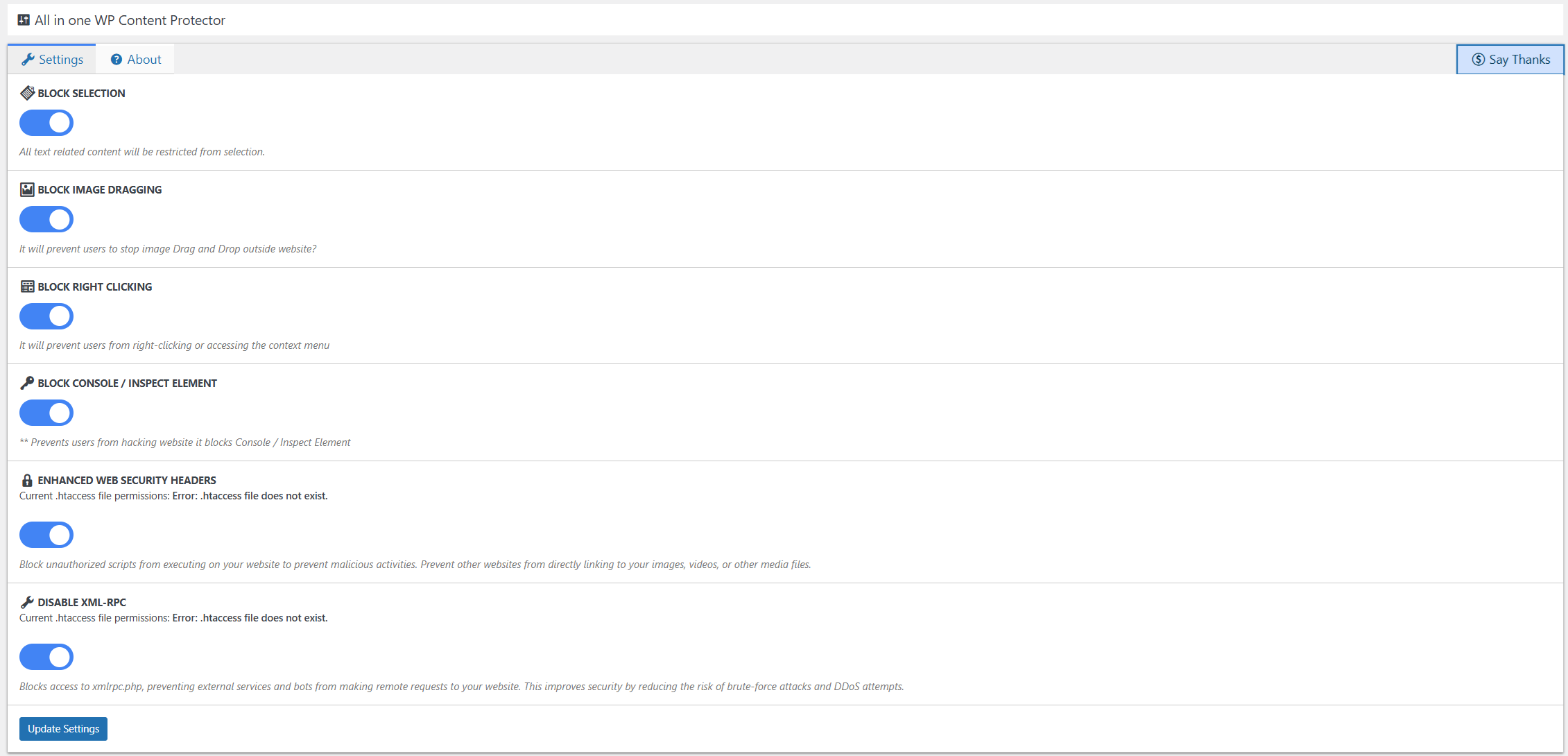
- Block Elements Selection: Prevent users from selecting and copying text and other elements on your website.
- Block Image Drag Drop: Disable image dragging and dropping to prevent image theft.
- Block Right Click / Copy Paste: Restrict right-click actions and copying/pasting content to deter unauthorized use.
- Block Console / Inspect Element: Prevent users from accessing browser developer tools to view or modify your website’s code.
- Enhanced Web Security Headers: Block unauthorized scripts from executing on your website to prevent malicious activities. Prevent other websites from directly linking to your images, videos, or other media files.
- Disable XML-RPC: Blocks access to xmlrpc.php, preventing external services and bots from making remote requests to your website. This improves security by reducing the risk of brute-force attacks and DDoS attempts.
With All in One WP Content Protector, you can rest assured that your content remains secure and protected against plagiarism and misuse.
Installation
Using plugins page
- Go to Plugins -> Add New and search for All in one WP Content Protector.
- Activate the plugin through the ˜Plugins™ screen in WordPress.
- Click the
All in one WP Content Protectorlink located in main menu section to configure the plugin options
Using Manual File System
- Upload
all-in-one-wp-content-security.zipto the/wp-content/plugins/directory - Activate the plugin through the ‘Plugins’ menu in WordPress
- Click the
All in one WP Content Protectorlink located in main menu section to configure the plugin options
Changelog
2.0
- New Enhanced Web Security Headers
- New Disable XML-RPC
1.1
- Security Update
1.0
- Tested with WordPress 6.4.3
- Minor Fixes
0.2
- Tested with WordPress 6.0.2
- Tested with various themes and plugins.
0.1
- Initial Public Release
Screenshots

For developers
Is this your plugin? Show off the numbers.
Add a live badge to your site, docs or GitHub README. It updates on its own — no account needed.
Best All in one WP Content Protect… alternatives
All content-protection plugins →





FAQ
All in one WP Content Protector: quick answers
Straight answers, pulled from live WordPress.org data.
Live data from WordPress.org · checked Oct 20, 2026
Is All in one WP Content Protector free?
Yes. All in one WP Content Protector is free to download and use from the official WordPress.org plugin directory.
Is All in one WP Content Protector safe to use in 2026?
All in one WP Content Protector works, but test it on a staging site before relying on it in 2026. It runs on 100+ sites, is rated 5/5 and was last updated 4 months ago, and scores 60/100 on our health check.
How many websites use All in one WP Content Protector?
All in one WP Content Protector is active on 100+ WordPress websites and has been downloaded 3,210 times since it launched in April 2022. It was downloaded 117 times in the last 30 days.
Does All in one WP Content Protector work with WordPress 7.1?
All in one WP Content Protector is officially tested up to WordPress 7.0.7, while the latest release is 7.1.3. It may still work, but try it on a staging site first.
What PHP version does All in one WP Content Protector need?
All in one WP Content Protector requires PHP 5.6 or higher. Most hosts run PHP 8.x today, so it works on any modern WordPress hosting.
When was All in one WP Content Protector last updated?
The latest version, 2.0, was released on June 18, 2026 (4 months ago).
Who makes All in one WP Content Protector?
All in one WP Content Protector is developed and maintained by Mahesh Thorat.
What are the best alternatives to All in one WP Content Protector?
The most popular alternatives to All in one WP Content Protector are WP Content Copy Protection… (100K+ installs), Secure Copy Content Protect… (20K+ installs) and Disabled Source, Disabled R… (10K+ installs).
Powered by PageForge
Want thousands of pages that rank like these? Build them in an afternoon.
This directory runs on the same engine as PageForge. Turn any spreadsheet, CSV or API into thousands of fast, SEO-ready WordPress pages — with schema, internal links and AI-written copy baked in.
- CSV, Google Sheets & API data sources
- AI content, schema & internal links per page
- Works with Elementor, Gutenberg, Yoast & Rank Math
- Free on WordPress.org — no credit card


