



Order Tracking Notification for WooCommerce
A lightweight WooCommerce shipment tracking plugin for Canada. Add a tracking number and carrier to WooCommerce orders.

Solid choice
Order Tracking Notification for… is a solid plugin choice in 2026, with a few things worth checking first. Was last updated 3 weeks ago, and scores 64/100 on our health check.
- Actively developed — last update 3 weeks ago
- Tested with the latest WordPress (7.1)
- Small user base (<10 active installs)
- Very few reviews so far
How does it stack up?
Side-by-side on installs, updates, ratings & support



Daily downloads
Download spikes usually follow a new release — each site that auto-updates counts as a download.
Rankings
Where Order Tracking Notification… stands todayWordPress.org search rankings
Live position in the plugin search, top 100| Keyword | Position |
|---|---|
| Email Tracking | >100 |
| order tracking | >100 |
| tracking | >100 |
| tracking notification | >100 |
| WooCommerce Tracking | >100 |
About Order Tracking Notification for WooComm…
From the official readme · v2.0.0Description
Order Tracking Notification is a super lightweight WooCommerce plugin designed to let store owners quickly add a tracking number and carrier directly to a WooCommerce order.
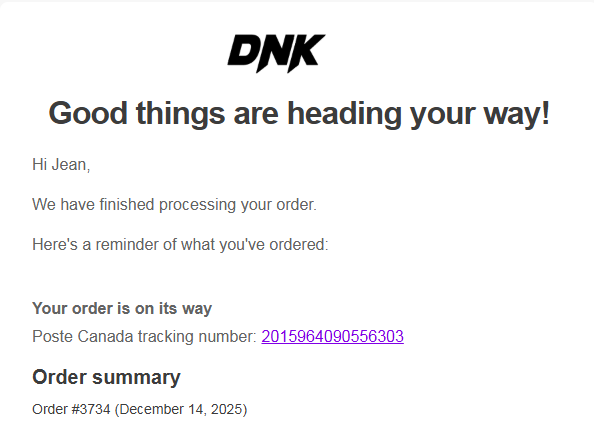
The tracking information is then automatically added to all customer emails (including “Order Completed”) with a clickable tracking link.
No complex setup.
No APIs required.
No heavy UI.
Just simple, fast, clean shipment tracking built for Canadian stores.
Key Features
- Add tracking number + carrier to any WooCommerce order
- Supported carriers: Canada Post, UPS, Purolator, GLS, Canpar, Delivro, Nationex, Loomis, Uni Uni, LivRapide
- Tracking automatically appears in customer emails
- Clickable tracking link to the carrier website
- Compatible with both HPOS and legacy WooCommerce order storage
- Lightweight — no external services, no scripts, no performance impact
- Complete integration with Machool and Ogalo: tracking number and carrier are added to orders automatically
Ultra-light plugin
This plugin adds zero bloat to your store.
One clean UI in the WooCommerce order edit page, and automatic email integration.
Perfect for stores that need quick, reliable tracking without subscribing to complex or expensive shipment tracking solutions.
Installation
- Upload the plugin folder to
/wp-content/plugins/aisp-simple-tracking/ - Activate the plugin through the Plugins menu in WordPress
- Edit any WooCommerce order
- Find the Order Tracking Notification meta box
- Choose your carrier and enter your tracking number
- Save the order — tracking info will automatically appear in the customer emails
Frequently asked questions
Does this plugin support HPOS?
Yes! The plugin is compatible with both WooCommerce HPOS and Legacy order storage.
Where do I enter the tracking number?
Go to WooCommerce → Orders → Edit Order. You will see the meta box Order Tracking Notification with a carrier selector and tracking field.
Will customers see the tracking number?
Yes. The plugin automatically inserts tracking information in all customer-facing WooCommerce emails.
Which carriers are supported?
Canada Post Purolator GLS Canpar UPS Loomis Nationex Delivro Uni Uni LivRapide
Changelog
This update introduces multi-tracking support — you can now add multiple tracking numbers per order. All tracking numbers appear as clickable links in customer emails.
2.0.0
- Add: Support for multiple tracking numbers per order — same carrier, multiple packages.
- Add: Dynamic add/remove tracking number rows in the order admin panel.
- Add: All tracking numbers are displayed as clickable links in customer emails.
- Add: Orders list now shows the first tracking number with a (+N more) indicator when multiple are present.
- Add: Internal order notes are automatically added when tracking is saved manually or received via API.
- Add: Webhook now accepts tracking_numbers (array) in addition to tracking_number (string) for multi-tracking support.
- Improve: Tracking numbers are now stored as a JSON array — existing single tracking numbers are automatically migrated on read, no manual action required.
1.7.1
- Add: When a shipping label is cancelled, the order is automatically returned to processing to allow a new label to be created and a new tracking email to be sent to the customer.
1.7.0
- Add: Support for Ogalo shipping integration — tracking number and carrier are added to orders automatically.
- Add: Support for the label-created order status sent by external integrations, automatically mapped to completed.
- Improve: External tracking data now reads from both carrier and shipping_provider meta keys for broader compatibility.
- Improve: Internal variable naming refactored from Machool-specific to generic external integration naming.
1.6.1
- Update: Tested up to WordPress 7.0.
1.6.0
- Add: Support for Uni Uni and LivRapide shipping carriers.
- Improve: Shipping carriers are now sorted alphabetically for easier navigation.
1.5.0
- Improve: Centralized all meta keys (carrier, tracking, boxes) as constants in the Helpers class to avoid duplication across files.
- Fix: Moved Settings and Webhook init() calls inside the plugins_loaded hook to ensure WooCommerce is fully loaded before initialization.
- Fix: Removed duplicate init() call at the bottom of the Settings and Webhook class files.
- Fix: Applied wp_kses_post() on the final output string in the email class instead of on the translation string before variable substitution.
- Improve: Added REST API args validation and sanitization (absint on order_id, sanitize_text_field on tracking_number and carrier).
- Improve: Removed unused meta key properties from the Email and Orders Column classes.
- Improve: Refactored the orders column output using a cleaner PHP/HTML structure.
- Improve: Code formatting and consistency in the Settings class.
- Improve: Added admin notice feedback after saving settings and after generating or regenerating the API key.
- Improve: Added inline documentation for backward compatibility with existing filters.
Screenshots




For developers
Is this your plugin? Show off the numbers.
Add a live badge to your site, docs or GitHub README. It updates on its own — no account needed.
Best Order Tracking Notification f… alternatives
All Email Tracking plugins →




FAQ
Order Tracking Notification for Woo…: quick answers
Straight answers, pulled from live WordPress.org data.
Live data from WordPress.org · checked Oct 5, 2026
Is Order Tracking Notification for… free?
Yes. Order Tracking Notification for… is free to download and use from the official WordPress.org plugin directory.
Is Order Tracking Notification for… safe to use in 2026?
Order Tracking Notification for… is a solid plugin choice in 2026, with a few things worth checking first. Was last updated 3 weeks ago, and scores 64/100 on our health check.
How many websites use Order Tracking Notification for…?
Order Tracking Notification for… is active on <10 WordPress websites and has been downloaded 1,191 times since it launched in December 2025. It was downloaded 116 times in the last 30 days.
Does Order Tracking Notification for… work with WordPress 7.1?
Yes. The developer has tested Order Tracking Notification for… up to WordPress 7.1.2, the latest release. It requires WordPress 6.0 or newer.
What PHP version does Order Tracking Notification for… need?
Order Tracking Notification for… requires PHP 7.2 or higher. Most hosts run PHP 8.x today, so it works on any modern WordPress hosting.
When was Order Tracking Notification for… last updated?
The latest version, 2.0.0, was released on September 16, 2026 (3 weeks ago).
Who makes Order Tracking Notification for…?
Order Tracking Notification for… is developed and maintained by Marco Gagnon.
What are the best alternatives to Order Tracking Notification for…?
The most popular alternatives to Order Tracking Notification for… are LocaliQ – Tracking Code (2K+ installs), Email Tracker (800+ installs) and LeadBoxer (100+ installs).
Powered by PageForge
Want thousands of pages that rank like these? Build them in an afternoon.
This directory runs on the same engine as PageForge. Turn any spreadsheet, CSV or API into thousands of fast, SEO-ready WordPress pages — with schema, internal links and AI-written copy baked in.
- CSV, Google Sheets & API data sources
- AI content, schema & internal links per page
- Works with Elementor, Gutenberg, Yoast & Rank Math
- Free on WordPress.org — no credit card


