


AI Content Generate – Content generator for the editor
The AI Content Generator plugin brings ChatGPT to WordPress, enabling quick and easy content creation within the Gutenberg editor.

Consider an alternative
AI Content Generate shows warning signs in 2026 — compare the alternatives below before installing. Was last updated 2 years ago, and scores 24/100 on our health check.
- Small user base (<10 active installs)
- Very few reviews so far
- No update in over a year
- Only tested up to WordPress 6.6 (latest is 7.1)
How does it stack up?
Side-by-side on installs, updates, ratings & support



Daily downloads
Download spikes usually follow a new release — each site that auto-updates counts as a download.
Rankings
Where AI Content Generate stands todayWordPress.org search rankings
Live position in the plugin search, top 100| Keyword | Position |
|---|---|
| ai content | >100 |
| AI content generator | >100 |
| ChatGPT | >100 |
| openai | >100 |
About AI Content Generate
From the official readme · v1.0.0Description
The AI Content Generator plugin brings ChatGPT to WordPress, enabling quick and easy content creation within the Gutenberg editor.
Description:
The AI Content Generate plugin is designed to seamlessly integrate the power of ChatGPT into your WordPress website, specifically tailored for the Gutenberg editor. With this plugin, you can effortlessly generate rich, AI-generated content directly within your WordPress environment.
👉 Features:
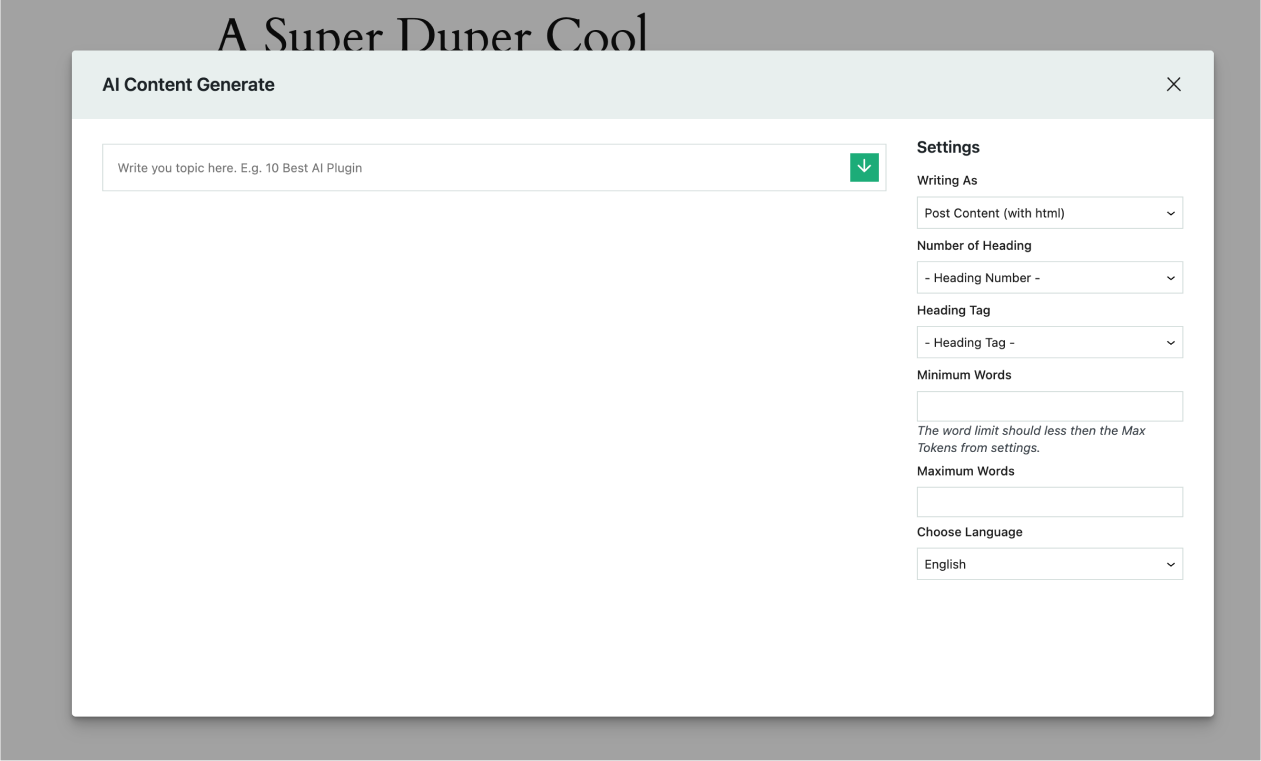
- Content Generation Options: Write content as post content or normal plain text.
- Heading Number: Choose heading numbers from 1 to 10 for structured content.
- Heading Tags: Select heading tags from h1 to h6 to optimize your content’s SEO.
- Word Limit Control: Set minimum and maximum word limits to tailor the length of your generated content.
- Language Selection: Choose from a variety of supported languages to generate content in your preferred language.
👉 Additional Features:
If the generated content doesn’t meet your requirements, the plugin offers additional features to enhance or modify the text:
- Rewrite: Rewrite the generated content for better clarity or relevance.
- Improve: Enhance the quality of the generated text for better readability and engagement.
- Make Shorter/Make Longer: Adjust the length of the content as per your needs.
- Summarize: Generate a concise summary of the content.
- Introduction/Conclusion: Add introductory or concluding paragraphs to the generated content.
- Voice Transformation: Transform the voice of the content between active and passive voices, or make it more assertive.
- And more features to fine-tune and customize the generated content to your liking.
👉 Installation:
Using The WordPress Dashboard
- Navigate to the ‘Add New’ in the plugins dashboard
- Search for ‘AI Content Generate’
- Click ‘Install Now’
- Activate the plugin on the Plugin dashboard
👉 Uploading in WordPress Dashboard
- First, download the zip file from – https://wordpress.org/plugins/ai-content-generate
- Navigate to the ‘Add New’ in the plugins dashboard
- Navigate to the ‘Upload’ area
- Select
ai-content-generate.zipfrom your computer - Click ‘Install Now’
- Activate the plugin in the Plugin dashboard
👉 Using FTP:
- Download
ai-content-generate.zip - Extract the
ai-content-generatedirectory to your computer - Upload the
ai-content-generatedirectory to the/wp-content/plugins/directory - Activate the plugin in the Plugin dashboard
👉 Usage:
- Once activated, navigate to the AI Content Generate Settings
- Generate OpenAI API Secret Key from here here and enter the key in the settings.
- Navigate to the Gutenberg or classic editor.
- Click the ChatGPT button in the main toolbar.
- Configure your desired settings for content generation.
- Click on the Green button (Bottom Arrow) to generate AI-powered content.
- Review and edit the generated content as needed.
- Copy text or direct insert the content in the editor
👉 Privacy and Data Usage Notice:
This plugin relies on a third-party service, the OpenAI API, to provide text generation for automated responses. When using this feature, user-provided text is sent to OpenAI’s API for processing and to generate a relevant response. This interaction allows the plugin to offer enhanced functionalities based on AI-driven text completion.
Data Transmission
The data sent to OpenAI may include:
* Text input required for generating responses.
External Service Details
For more information on how OpenAI handles data and privacy, please review their policies:
- Privacy Policy: https://openai.com/policies/privacy-policy
- Terms of Service: https://openai.com/policies/terms-of-service
By using this plugin, you acknowledge that certain features rely on OpenAI’s services and agree to the terms and conditions of their use.
👉 Credits:
The AI Content Generate plugin is powered by the ChatGPT model, developed by OpenAI. This integration allows the plugin to leverage advanced AI-driven text generation for enhanced content creation capabilities.
Frequently asked questions
Need Any Help?
Please mail us at devofwp@gmail.com
Changelog
1.0.0
- New: Added Settings page
- New: Added AI Content Generate Modal
- New: Content Copy and Insert option
Thank you for choosing the AI Content Generate plugin! We hope it enhances your content creation experience on WordPress.
Screenshots

For developers
Is this your plugin? Show off the numbers.
Add a live badge to your site, docs or GitHub README. It updates on its own — no account needed.
Best AI Content Generate alternatives
All ai content plugins →




FAQ
AI Content Generate: quick answers
Straight answers, pulled from live WordPress.org data.
Live data from WordPress.org · checked Oct 1, 2026
Is AI Content Generate free?
Yes. AI Content Generate is free to download and use from the official WordPress.org plugin directory.
Is AI Content Generate safe to use in 2026?
AI Content Generate shows warning signs in 2026 — compare the alternatives below before installing. Was last updated 2 years ago, and scores 24/100 on our health check.
How many websites use AI Content Generate?
AI Content Generate is active on <10 WordPress websites and has been downloaded 1,018 times since it launched in November 2024. It was downloaded 38 times in the last 30 days.
Does AI Content Generate work with WordPress 7.1?
AI Content Generate is officially tested up to WordPress 6.6.9, while the latest release is 7.1.2. It may still work, but try it on a staging site first.
When was AI Content Generate last updated?
The latest version, 1.0.0, was released on November 1, 2024 (2 years ago).
Who makes AI Content Generate?
AI Content Generate is developed and maintained by DevofWP.
What are the best alternatives to AI Content Generate?
The most popular alternatives to AI Content Generate are GetGenie (80K+ installs), TextBuilder (4K+ installs) and ContentBot AI Writer (AI Co… (400+ installs).
Powered by PageForge
Want thousands of pages that rank like these? Build them in an afternoon.
This directory runs on the same engine as PageForge. Turn any spreadsheet, CSV or API into thousands of fast, SEO-ready WordPress pages — with schema, internal links and AI-written copy baked in.
- CSV, Google Sheets & API data sources
- AI content, schema & internal links per page
- Works with Elementor, Gutenberg, Yoast & Rank Math
- Free on WordPress.org — no credit card


