


AI Content Creator – Easy ChatGPT powered article generator
This plugin easily creates articles for new posts for your site using the same AI that powers ChatGPT.

Solid choice
AI Content Creator is a solid plugin choice in 2026, with a few things worth checking first. It runs on 400+ sites, is rated 5/5 and was last updated 4 months ago, and scores 62/100 on our health check.
- Momentum — downloads up 59.4% vs the previous 30 days
- Small user base (400+ active installs)
- Very few reviews so far
How does it stack up?
Side-by-side on installs, updates, ratings & support



Daily downloads
Download spikes usually follow a new release — each site that auto-updates counts as a download.
Rankings
Where AI Content Creator stands todayWordPress.org search rankings
Live position in the plugin search, top 100| Keyword | Position |
|---|---|
| ChatGPT | #25 |
| gpt | #38 |
| ia | #5 |
| inteligência artificial | #1 |
| openai | #60 |
Version adoption
Share of active sites per release.
Rating breakdown
★★★★★★★★★★ 5 from 2 reviews
About AI Content Creator
From the official readme · v1.3.0Description
Are you tired of spending hours creating content for your website? Do you want to take your website’s content to the next level? Look no further than the AI Content Creator plugin for WordPress!
Looking for an easy and efficient way to create posts for your website? Look no further than AI Content Creator!
With this powerful WordPress plugin, you can quickly generate high-quality content using an AI text generation provider. On WordPress versions that support it, the plugin can use any text generation provider and model made available through WordPress AI Client by compatible provider plugins, so the plugin is no longer limited to a fixed list of OpenAI models. A legacy OpenAI API key can still be used as a fallback. Simply enter a title for your article, click “Create article” and let the plugin do the rest.
Please note that you’ll need access to an AI text generation provider to use the plugin. Where WordPress AI Client is available, install the provider connector you want to use and configure it from Settings > Connectors. For example, Ollama can be used through a connector such as the AI Provider for Ollama plugin. You can also configure the legacy OpenAI API key fallback. If you use OpenAI directly, we provide instructions on how to get a key in the plugin’s help section.
If you want AI article generation without API keys or per-request provider costs, you can use a local or remote Ollama server through a compatible connector. This can be especially attractive for users who want to run their own models and keep generation under their own infrastructure.
While AI-generated content is not always perfect, the plugin includes preliminary error checks to help you catch any issues before publishing. Plus, you can preview the content and edit it as needed before creating a post draft and hitting “publish.”
After article has been created, you may use the featured image selector included. It offers you a bunch of royalty free suggestions from Pixabay related to the article topic and includes a image search engine to make it as easy as possible.
SEO capabilities include automatic tags for the article, as well as meta keywords and description if the AI creates them and Yoast SEO, All in One SEO or Rank Math SEO are installed and active on your site.
We’re constantly working to improve the plugin’s capabilities and stay up-to-date with the latest AI technologies. The plugin includes conditional integration with WordPress AI Client and WordPress Abilities when those APIs are available, while preserving the existing legacy generation flow for older installations.
The plugin supports multiple languages. And if there’s a language you need that’s not yet supported, just let us know; we’re always open to feedback and suggestions.
You can configure the plugin to write articles in these languages:
– English (English)
– Spanish (Español)
– Portuguese (Português)
– French (Français)
– German (Deutsch)
– Russian (русский)
– Japanese (日本語)
– Italian (Italiano)
– Chinese (中文)
– Dutch (Nederlands)
– Korean (한국어)
– Arabic (العربية)
– Turkish (Türkçe)
– Polish (Polski)
– Ukrainian (українська)
– Persian (فارسی)
– Swedish (Svenska)
– Czech (čeština)
– Danish (Dansk)
– Finnish (Suomi)
– Hungarian (Magyar)
– Catalan (Català)
– Basque (Euskara)
– Galician (Galego)
– Asturian (Asturianu)
Performance and quality may be affected when writing in languages used by a low population.
To ensure your API key stays safe and secure, we’ve implemented various measures to protect it from unauthorized access. For example, the plugin erases your key from queries prior to saving, and access to the plugin’s settings is restricted to administrators.
Need help getting started? Check out the plugin’s help section for detailed instructions on how to use AI Content Creator to its full potential.
Requirements
- Access to an AI text generation provider, through a compatible WordPress AI provider plugin configured in Settings > Connectors, or the legacy OpenAI API key fallback.
- To use Ollama without API keys or per-request provider costs, run a local or remote Ollama server and configure it through a compatible connector, such as the AI Provider for Ollama plugin.
Installation
- Upload files to the /wp-content/plugins/ai-content-creator/ directory or install plugin directlly through the Plugins menu of your WordPress.
- Activate the plugin through the Plugins menu of your WordPress.
- Go to AI Content Creator settings from the WordPress admin menu to configure the plugin.
- Adjust settings to fit your needs and press at Save changes.
Frequently asked questions
Is an OpenAI or ChatGPT account required?
No. When WordPress AI Client is available, AI Content Creator can use any provider exposed by a compatible WordPress AI provider connector. OpenAI or ChatGPT is only required if you choose the legacy OpenAI API key fallback or a connector that specifically requires OpenAI credentials.
How can I sign for the OpenAI account?
Follow the plugin Help section for instructions if you want to use the legacy OpenAI API key fallback. This is optional when you use a WordPress AI Client provider connector instead.
How do I install and configure AI provider connectors?
Install a compatible WordPress AI provider plugin from the Plugins screen. That connector adds providers and models to WordPress AI Client. Then go to Settings > Connectors to configure the provider credentials, endpoint, and available models. After the connector is configured, AI Content Creator can use it through WordPress AI Client where available.
How can I use Ollama?
Ollama is used through the same WordPress AI Client connector system as other providers. Install and run Ollama on a local machine or remote server, then install a compatible WordPress connector such as the AI Provider for Ollama plugin. Configure the Ollama connector from Settings > Connectors with the Ollama server URL and the models you want to use. Once the connector is ready, select or prioritize that provider in AI Content Creator settings. This lets you generate articles without third-party API keys or per-request provider costs, while your Ollama server and computing resources remain…
The result is not HTML
As humans, AI are not exact nor predictable, is a typical fail, try it again. Also keep in mind that too much instructions may cause to forget to follow some others. Think as you are explaining Homer Simpson what to do. Try to be concise and don’t bother it with an exccess of instructions.
Changelog
Adds WordPress AI Client provider support, WordPress Abilities integration, and improved admin action protection.
1.3.0
May 13 2026.
* Added conditional WordPress AI Client support before the legacy OpenAI fallback.
* Added configurable WordPress AI Client provider and model priorities.
* Added conditional WordPress Abilities API integration for generating articles and creating drafts from stored generations.
* Added a conditional WordPress Abilities API action for reprocessing stored generations.
* Added nonces to article admin actions that modify stored generations or selected images.
* WordPress 7.0 compatibility checked.
1.2.6
Mar 22 2025.
* New models support: GPT-4o mini, GPT-4.5, o1, o1 pro, o1 mini, and o3 mini.
* Support for the text-davinci-003 model has been removed.
* Default model on instal gpt-4o-mini.
* Updated usage model pricing, non-binding.
* Added Slovak language support, per ady66’s request.
* CSRF protection in create draft function. Thanks to Nguyen Xuan Chien at Patchstack.
* Minor code improvements.
1.2.5
Nov 08 2024.
* Improved API longer key formats with support for new characters, including additional dashes and underscores.
* Context and additional guidelines are not longer mandatory.
* WordPress 6.7 basic compatibility checked.
1.2.4
Sep 15 2024.
* Longer API keys format supported.
1.2.3
May 24 2024.
* Solved bug on uninstall.
* WordPress 6.6 basic compatibility checked.
1.2.2
May 22 2024.
* New sk-proj-… API keys format supported.
Screenshots
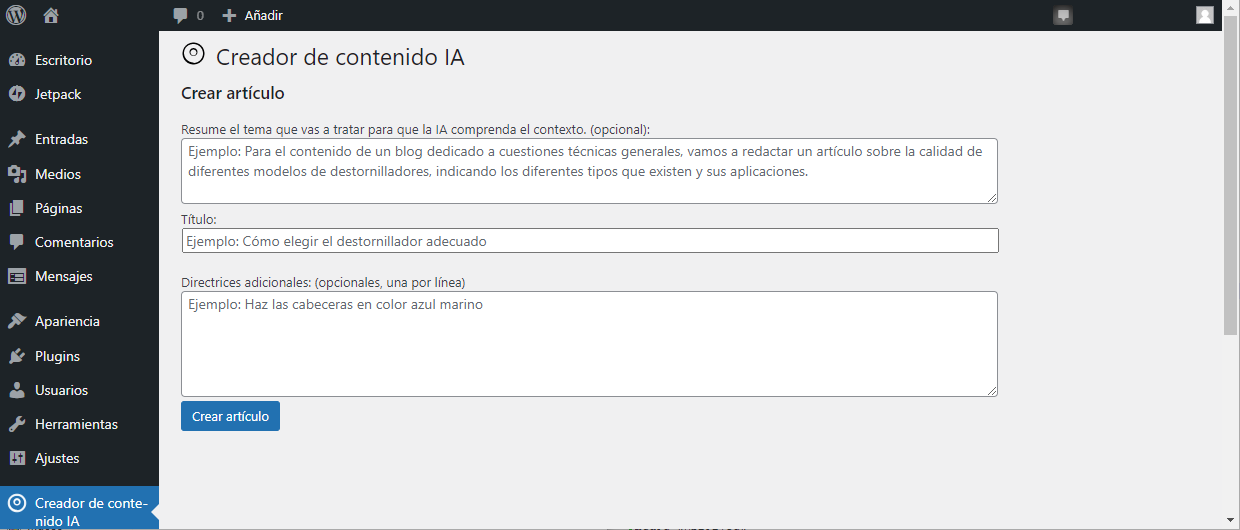


For developers
Is this your plugin? Show off the numbers.
Add a live badge to your site, docs or GitHub README. It updates on its own — no account needed.
Best AI Content Creator alternatives
All ChatGPT plugins →





FAQ
AI Content Creator: quick answers
Straight answers, pulled from live WordPress.org data.
Live data from WordPress.org · checked Sep 28, 2026
Is AI Content Creator free?
Yes. AI Content Creator is free to download and use from the official WordPress.org plugin directory.
Is AI Content Creator safe to use in 2026?
AI Content Creator is a solid plugin choice in 2026, with a few things worth checking first. It runs on 400+ sites, is rated 5/5 and was last updated 4 months ago, and scores 62/100 on our health check.
How many websites use AI Content Creator?
AI Content Creator is active on 400+ WordPress websites and has been downloaded 20,320 times since it launched in March 2023. It was downloaded 958 times in the last 30 days.
Does AI Content Creator work with WordPress 7.1?
AI Content Creator is officially tested up to WordPress 7.0.6, while the latest release is 7.1.2. It may still work, but try it on a staging site first.
What PHP version does AI Content Creator need?
AI Content Creator requires PHP 5.5 or higher. Most hosts run PHP 8.x today, so it works on any modern WordPress hosting.
When was AI Content Creator last updated?
The latest version, 1.3.0, was released on May 18, 2026 (4 months ago).
Who makes AI Content Creator?
AI Content Creator is developed and maintained by ABCdatos.
What are the best alternatives to AI Content Creator?
The most popular alternatives to AI Content Creator are Social Sharing Plugin (100K+ installs), LocoAI (70K+ installs) and WPVibe (40K+ installs).
Powered by PageForge
Want thousands of pages that rank like these? Build them in an afternoon.
This directory runs on the same engine as PageForge. Turn any spreadsheet, CSV or API into thousands of fast, SEO-ready WordPress pages — with schema, internal links and AI-written copy baked in.
- CSV, Google Sheets & API data sources
- AI content, schema & internal links per page
- Works with Elementor, Gutenberg, Yoast & Rank Math
- Free on WordPress.org — no credit card


