



Affiliate Reviews
Build affiliate review sites with blocks: comparison tables, product grids, ratings, pros & cons, CTA buttons and cloaked links with click stats.

Solid choice
Affiliate Reviews is a solid plugin choice in 2026, with a few things worth checking first. It runs on 300+ sites, is rated 3.3/5 and was last updated 4 days ago, and scores 71/100 on our health check.
- Actively developed — last update 4 days ago
- Tested with the latest WordPress (7.1)
- Small user base (300+ active installs)
- Low rating so far — 3.3/5 from only 3 reviews
How does it stack up?
Side-by-side on installs, updates, ratings & support



Daily downloads
Download spikes usually follow a new release — each site that auto-updates counts as a download.
Rankings
Where Affiliate Reviews stands todayWordPress.org search rankings
Live position in the plugin search, top 100| Keyword | Position |
|---|---|
| affiliate | #28 |
| affiliate marketing | #24 |
| comparison table | #74 |
| product review | >100 |
| reviews | #51 |
Version adoption
Share of active sites per release.
Rating breakdown
★★★★★★★★★★ 3.3 from 3 reviews
About Affiliate Reviews
From the official readme · v2.0.0Description
Affiliate Reviews turns the block editor into an affiliate site builder. Add your products, casinos, brokers or services once, then show them anywhere as comparison tables, “top picks” grids, review boxes, pros & cons lists and CTA buttons. Every design is made of blocks you can rearrange and restyle, and none of it needs a page builder.
Version 2.0 rebuilds the plugin around native WordPress blocks. Each piece of a review (logo, rating, bonus, pros & cons, specifications, CTA button) is now its own block. Start from a ready-made pattern or build your own layout, and style it with the same color, typography and spacing controls as core blocks.
Why affiliate marketers use it
- Enter data once, reuse it everywhere. Each review stores its affiliate link, rating, bonus, pros & cons, specifications and terms. Change a link or a rating once and every table, grid and box on your site updates.
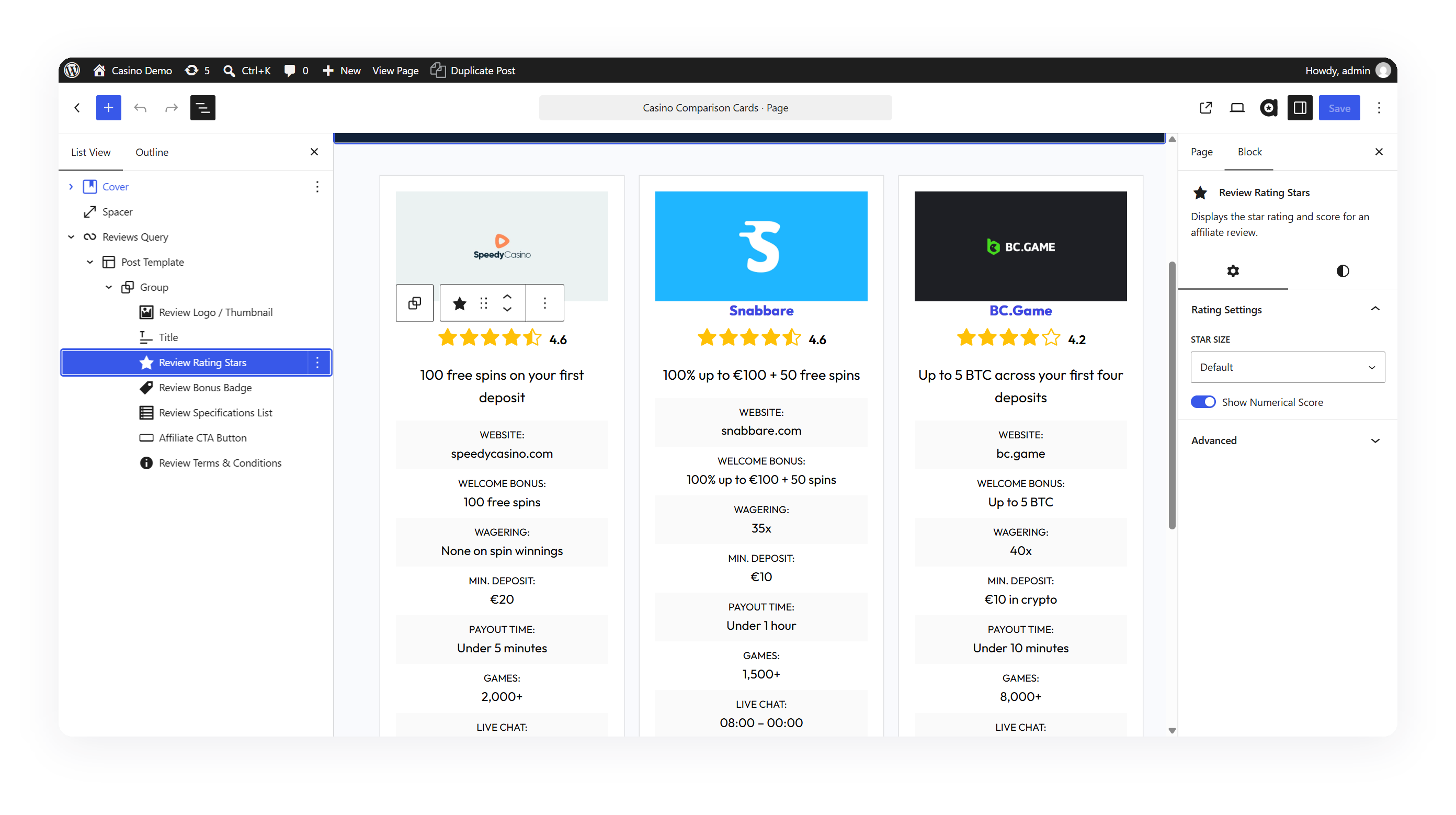
- Comparison tables and grids in one click. Insert a pattern, choose how to sort (by rating, date or title) and filter by category. Tables are built on the core Query Loop, so they update themselves as you add reviews.
- Your layout, not ours. Rearrange blocks, drop any core block (headings, images, columns) in between, and save your design as your own pattern.
- Fast pages. No page builder, and CSS loads only on pages that use it. Check our demos: with a good block theme you can reach perfect Google PageSpeed scores.
- Built for any niche. Physical products, software, casinos and sportsbooks, forex brokers, hosting and VPNs all work.
Live demos
All three demos use the free UniBlock block theme.
Review blocks
Mix these blocks into any layout. Inside a pattern or a Query Loop they pick up the current review automatically.
- Affiliate CTA Button: links to the review’s affiliate URL, with full color, gradient, typography, border and spacing controls
- Review Rating Stars: star rating with an optional numeric score, in two star sizes
- Review Logo / Thumbnail: brand logo or product image in default, box, circle or frameless styles
- Review Bonus Badge: highlights the offer, e.g. “100% up to $500” or “20% off”
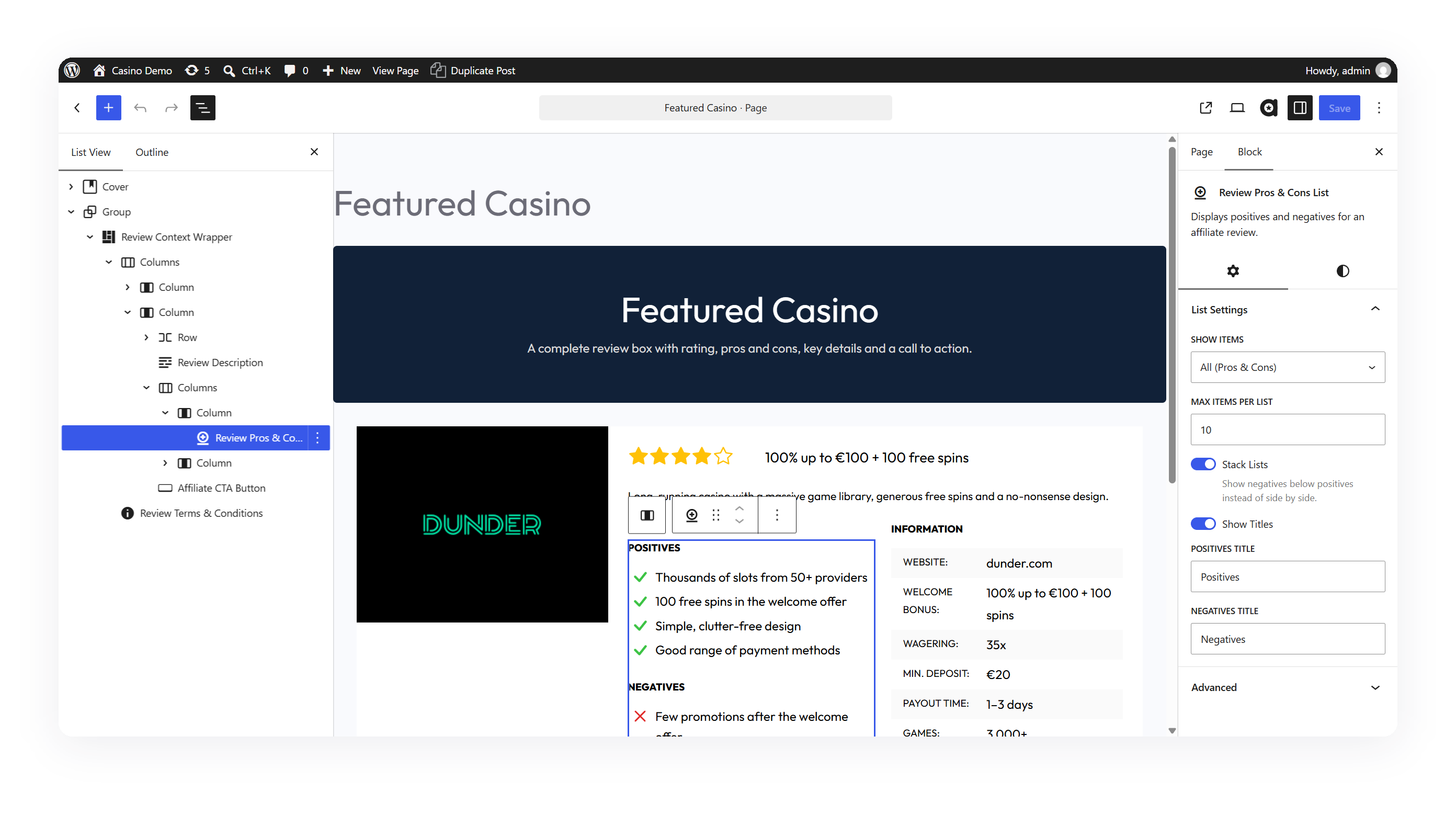
- Review Pros & Cons List
- Review Specifications List: key/value details such as price, license or payout speed
- Review Tag: a ribbon such as “Best Choice” or “Editor’s Pick”, inline or overlaid on the image
- Review Description
- Review Terms & Conditions: the small print, e.g. “18+ | T&Cs apply”
- Review Link: a “Read Review” link to the full review
- Review Context Wrapper: shows any single review in any post or page
Ready-made patterns
Insert a finished layout and adjust it to fit your site:
- Review table and large review table (ranked, sorted by rating)
- Review grid
- Review loop, small and large
- Compact review list for sidebars and narrow columns
- Review comparison: side-by-side cards for “X vs Y” sections
- Review summary: an “at a glance” box for the top of a review
- Single review box, compact and large
Affiliate link management
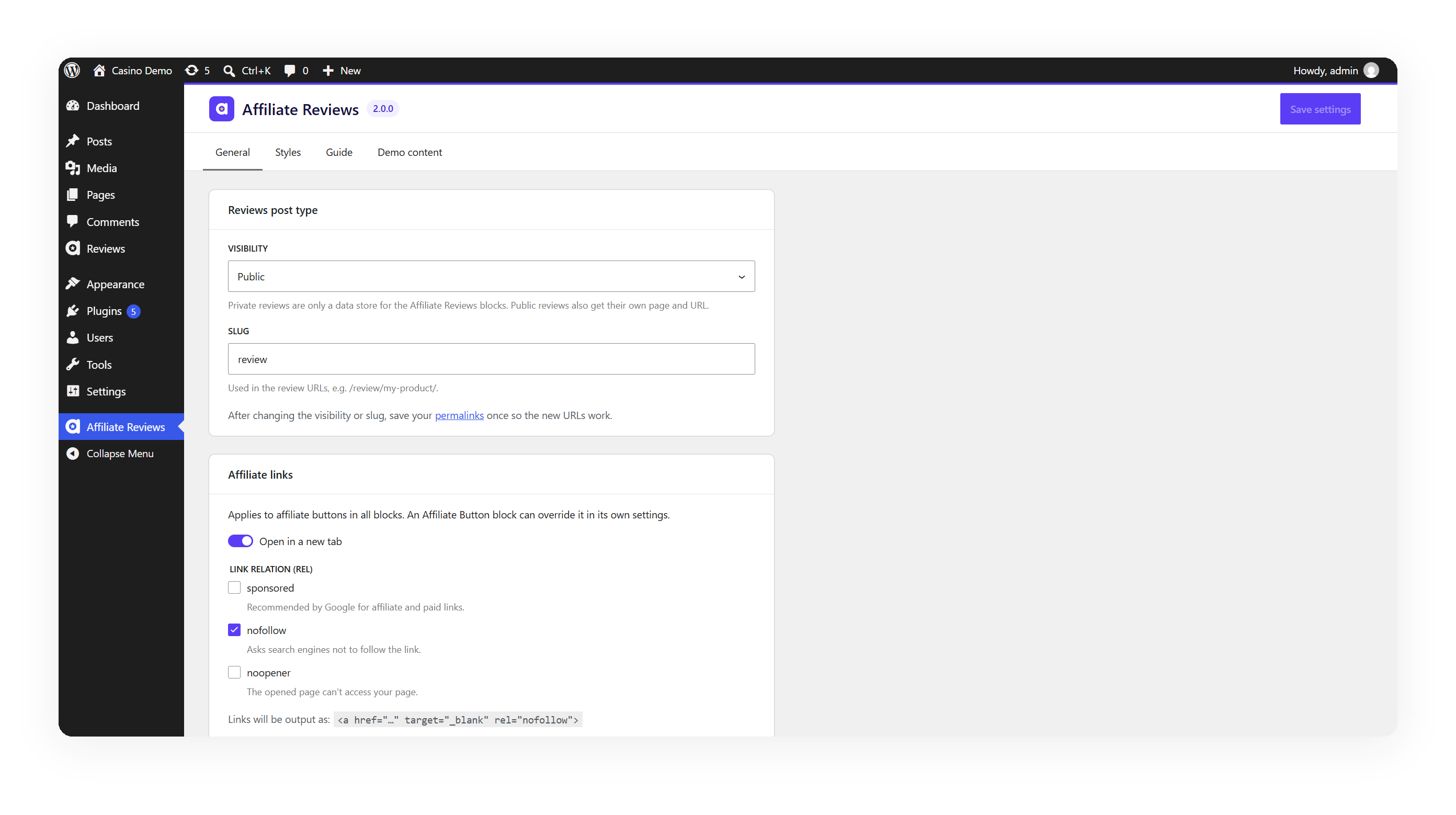
- Site-wide link settings: choose once whether affiliate links open in a new tab and which
relvalues they get (sponsored,nofollow,noopener) to follow Google’s guidelines for paid links. - Link cloaking (optional): turn
https://partner.com/?ref=a8f3xintoyoursite.com/go/brand/. You choose the prefix, and each review gets its own slug. - Click stats: the Reviews list shows clicks for the last 30 days and all time for every cloaked link. Stats are counted per review per day, with no IP addresses, cookies or visitor data stored, and known bots are ignored.
Link cloaking is off by default. Turning it on changes nothing until you give a review a link slug.
Easy to work with
- Edit review fields in the editor sidebar. Rating, links, bonus, pros & cons and specifications sit in a panel next to your content.
- Try it with demo reviews. Import three sample reviews, with logos and a category, in one click, and remove them just as easily when you add your own.
- Live previews in the editor. Blocks and patterns preview your latest review, or sample data before you have any.
- Public or private reviews: publish reviews as their own pages with a custom URL slug, or keep them private and use them only as a data source for tables on your pages.
- Styles settings with a live preview to match colors, buttons and thumbnails to your brand.
- A built-in guide on the settings page that lists every block and pattern and shows where the 1.x blocks are still used.
- Responsive by design: blocks adapt to the width of the column they’re placed in, so layouts hold up in sidebars and narrow columns as well as full-width pages.
Upgrading from 1.x? Nothing breaks.
Your existing Grid, Table, Table Large, Single, Single Large, Pros & Cons and Info List blocks keep working and look exactly the same. When you’re ready, convert any of them to the new block-based layout from the block toolbar, one block at a time, whenever you choose.
Installation
- Go to Plugins → Add New, search for “Affiliate Reviews”, then click Install and Activate.
- Go to Reviews → Add New and create your first review: add the affiliate link, rating, pros & cons and other details in the sidebar panel. Or, to try the plugin first, import the demo reviews from the notice shown after activation or from Affiliate Reviews → Demo content.
- Open any page, click +, and insert one of the Affiliate Reviews patterns or blocks.
- Optional: open Affiliate Reviews in the admin menu to set link behavior, enable link cloaking and adjust styles.
Frequently asked questions
Will updating to 2.0 change my existing pages?
No. Every block from 1.x keeps its markup, styles and settings. The new blocks and settings are opt-in, and link defaults (rel="nofollow", new tab) match 1.x.
Which themes does it work with?
The new blocks and patterns are designed for block themes (such as Twenty Twenty-Five or UniBlock) and use the colors and fonts from your theme’s global styles. The 1.x blocks work with classic themes too.
Can I use it for casino, forex or other niches?
Yes. Nothing in the plugin is specific to one niche. Reviews have generic fields (rating, bonus/offer, pros & cons, specifications, terms), so you can adapt them to products, services, casinos, brokers and more.
How do I build a comparison table?
Insert the “Review table” pattern. It’s a Query Loop of your reviews, so you can sort it by rating, filter it by category, and restyle or rearrange any block inside it.
Does link cloaking slow down my site or store personal data?
No. The redirect happens before WordPress runs its main query, and clicks are stored as one counter per review per day. No IP addresses, cookies or user agents are saved. The raw affiliate link isn’t exposed through the REST API either.
Can I show my reviews without publishing them as pages?
Yes. Set the Reviews post type to Private in the settings. Reviews then only feed your tables, grids and boxes. They have no public URLs, and visitors can’t read them through the REST API.
What happens to my data if I delete the plugin?
Deleting the plugin removes its settings and click stats. Your reviews, their fields and categories stay in the database, so nothing is lost if you install it again.
Changelog
New review blocks, patterns, link settings and optional link cloaking, plus security fixes. 1.x blocks keep working. Needs WP 6.5+ and PHP 7.4+. Private reviews leave the REST API, and 1.x single-review blocks hide unpublished reviews.
2.0.0
- New: 11 composable review blocks: Affiliate CTA Button, Rating Stars, Logo / Thumbnail, Bonus Badge, Pros & Cons List, Specifications List, Review Tag, Description, Terms & Conditions, Review Link and Review Context Wrapper
- New: 10 ready-made patterns for tables, grids, loops, comparisons, summaries and single review boxes, built on a “Reviews Query” Query Loop variation
- New: Edit review fields in a block editor sidebar panel
- New: Site-wide affiliate link settings (new tab,
relsponsored / nofollow / noopener) - New: Optional link cloaking (
/go/slug/) with privacy-friendly click stats - New: Color, typography and spacing controls on the new blocks
- New: Convert legacy blocks to the new layout, one block at a time; legacy grids and tables become the matching loop pattern
- New: One-click demo reviews import, and removal
- New: Block previews show your latest review, or sample data on a new site
- New: Guide tab on the settings page, with every block and pattern and where 1.x blocks are still used
- Improved: Reworked settings page with General, Styles, Guide and Demo content tabs
- Improved: Container-query based responsive layouts
- Improved: Layout CSS loads only on pages that use it
- Improved: All blocks use block API version 3, ready for the iframed editor of WordPress 7
- Improved: Deleting the plugin removes its settings and click stats (reviews are kept)
- Improved: The text domain is now
affiliate-reviews, so translations from translate.wordpress.org load - Security: Raw affiliate links are no longer readable through the REST API by visitors, and private reviews are kept out of it
- Security: Settings and review fields are sanitized on every save, and a review’s /go/ link can’t be taken over by another review
- Security: 1.x single-review blocks no longer show unpublished reviews to visitors
- Security: Bundled CMB2 updated to 2.13.2
- Fix: Empty review Query Loops when reviews are not public
- Note: Requires WordPress 6.5 and PHP 7.4 or later. All 1.x blocks remain supported and unchanged.
1.0.7
- Vulnerability fix: unescaped data
- Bug fix: Table style large description not working
1.0.6
- Small fixes about ratings and translations
1.0.5
- New options for affiliate buttons for padding, font weight and font size
- Small CSS improvements
- New tags functionality for tables and grid
1.0.4
- Improved experience when no reviews available and block previews not working
- Bump @wordpress/scripts to the latest version
1.0.3
- New option in Affiliate Grid Block to hide pros list
- Thumbnails now have review link if available
- Bug fix: Affiliate Grid Block missing background color
Screenshots
For developers
Is this your plugin? Show off the numbers.
Add a live badge to your site, docs or GitHub README. It updates on its own — no account needed.
Best Affiliate Reviews alternatives
All affiliate plugins →





FAQ
Affiliate Reviews: quick answers
Straight answers, pulled from live WordPress.org data.
Live data from WordPress.org · checked Oct 9, 2026
Is Affiliate Reviews free?
Yes. Affiliate Reviews is free to download and use from the official WordPress.org plugin directory.
Is Affiliate Reviews safe to use in 2026?
Affiliate Reviews is a solid plugin choice in 2026, with a few things worth checking first. It runs on 300+ sites, is rated 3.3/5 and was last updated 4 days ago, and scores 71/100 on our health check.
How many websites use Affiliate Reviews?
Affiliate Reviews is active on 300+ WordPress websites and has been downloaded 3,195 times since it launched in March 2023. It was downloaded 382 times in the last 30 days.
Does Affiliate Reviews work with WordPress 7.1?
Yes. The developer has tested Affiliate Reviews up to WordPress 7.1.3, the latest release. It requires WordPress 6.5 or newer.
What PHP version does Affiliate Reviews need?
Affiliate Reviews requires PHP 7.4 or higher. Most hosts run PHP 8.x today, so it works on any modern WordPress hosting.
When was Affiliate Reviews last updated?
The latest version, 2.0.0, was released on October 5, 2026 (4 days ago).
Who makes Affiliate Reviews?
Affiliate Reviews is developed and maintained by wpchop.
What are the best alternatives to Affiliate Reviews?
The most popular alternatives to Affiliate Reviews are Advanced Ads (100K+ installs), Pochipp (30K+ installs) and Meks Easy Ads Widget (10K+ installs).
Powered by PageForge
Want thousands of pages that rank like these? Build them in an afternoon.
This directory runs on the same engine as PageForge. Turn any spreadsheet, CSV or API into thousands of fast, SEO-ready WordPress pages — with schema, internal links and AI-written copy baked in.
- CSV, Google Sheets & API data sources
- AI content, schema & internal links per page
- Works with Elementor, Gutenberg, Yoast & Rank Math
- Free on WordPress.org — no credit card


